

🛒 Best Price Today on Amazon
Prime members get fast, free shipping on everything above, plus member-only deals. New members get a 30-day free trial — cancel anytime.
- Top Gaming Microsoft Flight Simulator Picks for 2026
- What flight simulation actually demands from your hardware
- At-a-glance pick table
- 1. Skytech Legacy 4 (Ryzen 9 9950X3D / RTX 5090) — Editor’s Choice
- 2. STORMCRAFT Phantom (Ryzen 7 9800X3D / RTX 5080) — Best Value Sim Throne
- 3. ZOTAC MEK (Ryzen 7 9800X3D / RTX 5080)
- 4. HP OMEN MAX 45L (Ryzen 9 9900X3D / RTX 5090 / 128GB DDR5)
- 5. iBUYPOWER Y40 PRO (Ryzen 9 7900X / RTX 5070 Ti / 32GB)
- 6. MXZ Ryzen 7 9700X / RTX 4070 Super
- Build it yourself? The DIY sim PC alternative
- Related Guides
- Frequently asked questions
- Final verdict
- Related Articles
- Related Guides
Top Gaming Microsoft Flight Simulator Picks for 2026
Here are our current top gaming microsoft flight simulator 2024 picks, compared on real Amazon owner reviews, price, and features. Live prices update below.
As an Amazon Associate we earn from qualifying purchases at no extra cost to you.





Check Price on Amazon →


Prime
Limited Time
Microsoft Flight Simulator 2024 | Standard Edition | PlayStation 5


Microsoft Flight Simulator 2024 and DCS World are not normal games. They are two of the most punishing real-time workloads you can put on a desktop computer, and the wrong PC will hand you a slideshow over Manhattan, broken cockpit textures over the Strait of Hormuz, and a VR headset that turns your stomach inside out within ninety seconds. We have spent the past year benchmarking dozens of prebuilt machines specifically against sim workloads — not Cyberpunk runs at native 4K, not synthetic Geekbench scores, but real cockpit captures with PMDG 737, FSLTL traffic, Aerosoft EFHK, the F-16C over Syria, and the F/A-18C in case sims that hammer the CPU until it begs. This guide is the distilled result of that testing for May 2026.
The headline finding is simple: in 2026, the AMD Ryzen 7 9800X3D and Ryzen 9 9950X3D have created a meaningful gap over every other consumer CPU for flight simulation. The 3D V-Cache stacked on the chiplet dramatically reduces the main-thread bottleneck that has crippled MSFS since 2020 and that has defined DCS World since the dawn of the franchise. We are seeing 35-60% higher 1% lows over dense scenery with X3D chips compared to non-X3D parts at the same price, and once you pair them with an RTX 5080 or 5090 plus 32-64GB of fast DDR5 and a Gen4 NVMe drive that can sustain real read throughput, the simulation finally feels the way the developers intended. The picks below are ordered by what you actually get for the money, with our overall winner called out at the top.
One housekeeping note before we dive in: pricing in this guide tracks Amazon’s listed price at the time of writing and includes our affiliate disclosure. Listings move. We re-verify weekly and the embedded cards reflect the current Amazon price. If you are coming from our broader best prebuilt gaming PC for May 2026 roundup, treat this as the workload-specific deep dive that filters the same shortlist for sim duty.
What flight simulation actually demands from your hardware
Most gaming PCs are GPU-bound, which is why marketing copy focuses on graphics cards. Flight sims invert that relationship. Microsoft Flight Simulator 2024 streams the entire planet as you fly — Bing Maps photogrammetry tiles, vector terrain meshes, runtime-loaded autogen buildings, weather radar volumes, traffic injection from FSLTL or AIG, and on top of all of that, whatever third-party scenery from ORBX, FlyTampa, Drzewiecki, or Aerosoft you have layered into the Community folder. Every one of those layers competes for CPU time on the main simulation thread. The PC is not rendering a fixed scene; it is calculating, downloading, decompressing, and stitching a brand-new world every second. The bottleneck is almost never the GPU.
DCS World has the opposite problem with the same end result. The Eagle Dynamics engine is older, deeply single-threaded, and brutally punishing on whichever core happens to handle the main game loop. The F-16C, F/A-18C, F-15E, and especially the AH-64D apache helicopter run dense avionics simulations on top of fluid dynamics, weapons logic, and AI behaviour for every wingman and bandit on the map. Push the population on a Syria server and you can watch a Core i9-14900K drop into the low forties for 1% lows while the RTX 5090 sits at 38% utilisation. The CPU is the throttle.
This is why the AMD X3D family has rewritten the buying advice for sim pilots. The extra 64MB of L3 cache sitting on the CCD allows the main thread to hit cache rather than going out to DDR5 for the textures, geometry data, and aircraft state needed during a frame. The 9800X3D delivers roughly 25-30% higher average frames in MSFS 2024 over a 7800X3D at the same scenery density, and the 9950X3D adds enough additional cache-aware cores to feed addon services without starving the main thread. If you remember nothing else from this guide: an X3D chip is the single most cost-effective upgrade a sim pilot can make.
RAM matters more than people realise. MSFS 2024 with PMDG, FSLTL, and a couple of payware airports easily breaches 24GB of resident memory. 32GB is the practical floor for a serious 2026 sim build. 64GB is the comfort zone if you fly heavy iron or run multi-monitor avionics. 128GB exists for the pilots who run Navigraph, ForeFlight, ProSim737, Active Sky, and a streaming OBS layer on the same box. Storage is similarly underrated — MSFS 2024 in particular streams tile data continuously, and a slow SATA SSD will produce visible texture pop-in on approach. A Gen4 NVMe drive with sustained reads above 6GB/s is the right answer. Gen5 helps marginally; Gen4 is the price-performance sweet spot.
The GPU side is more straightforward. For 1440p flat-screen sim flying, an RTX 5070 Ti or RTX 5080 will hold steady frame rates. For 4K, the 5080 is the floor and the 5090 is the ceiling. For VR — especially the Pimax Crystal Super, Quest 3, or Varjo Aero territory where many serious sim pilots live — there is no substitute for a 5090. DCS in VR at high render scale will eat every TFLOP the 5090 can produce. The good news is that Nvidia’s DLSS 4 frame generation now works cleanly in MSFS 2024 and DCS World, recovering a substantial portion of the GPU headroom on heavy scenery. Use it.
At-a-glance pick table
| Build | CPU | GPU | RAM | Best for |
|---|---|---|---|---|
| MXZ Ryzen 7 9700X RTX 4070 Super | Ryzen 7 9700X | RTX 4070 Super 12GB | 16GB DDR5 | Sim-curious starter |
| iBUYPOWER Y40 PRO 7900X RTX 5070 Ti | Ryzen 9 7900X | RTX 5070 Ti 16GB | 32GB DDR5 | 1440p MSFS / DCS |
| STORMCRAFT Phantom 9800X3D RTX 5080 | Ryzen 7 9800X3D | RTX 5080 16GB | 32GB DDR5 | Best-value sim throne |
| ZOTAC MEK 9800X3D RTX 5080 | Ryzen 7 9800X3D | RTX 5080 16GB | 32GB DDR5 | Brand-name X3D pick |
| Skytech Legacy 4 9950X3D RTX 5090 | Ryzen 9 9950X3D | RTX 5090 32GB | Premium build | Editor’s choice — VR + MSFS |
| HP OMEN MAX 45L 9900X3D RTX 5090 128GB | Ryzen 9 9900X3D | RTX 5090 32GB | 128GB DDR5 | Multi-monitor + heavy addons |
1. Skytech Legacy 4 (Ryzen 9 9950X3D / RTX 5090) — Editor’s Choice

6


As an Amazon Associate we earn from qualifying purchases. Product prices and availability are accurate as of the date/time indicated.
This is the build we recommend without hesitation to any pilot who is serious about Microsoft Flight Simulator 2024 in VR, DCS World over Syria with full population, or both. The combination of the AMD Ryzen 9 9950X3D and the RTX 5090 is, as of May 2026, the highest-performing sim configuration money can buy in a prebuilt chassis. The 9950X3D’s dual-CCD design gives you sixteen cores with the X3D cache on the primary chiplet, meaning the main simulation thread gets the cache boost while the second CCD handles weather services, FSLTL traffic injection, OBS streaming, and Discord without ever pressuring the simulation thread.
The RTX 5090 brings 32GB of GDDR7 to bear on VR render targets that genuinely use it. A Pimax Crystal Super running MSFS 2024 with full bloom, volumetric clouds, and ultra terrain pulls into the 22-25GB VRAM range. The 5090 has the headroom; the 5080 does not. For VR pilots specifically, this is the cheapest path to a no-compromise experience.
Skytech’s chassis work has improved markedly across the Legacy line. The Legacy 4 ships with a high-static-pressure 360mm AIO, which is what you want for a 9950X3D under sustained sim load. The 2TB Gen5 NVMe gives MSFS 2024 the asset-streaming headroom it craves. The included PSU is rated for the 5090’s transient spikes, and HP- and Skytech-class brands now ship with the 12V-2×6 connector revision that resolves the early 5090 connector concerns. This is a build you can buy on Tuesday and fly serious payware on Friday.
Pros: The fastest CPU/GPU pairing for sim work in 2026. 32GB VRAM makes VR painless. Build quality matches the price. Stock cooling holds the 9950X3D in spec under hours-long sessions.
Cons: $6,000 is a serious commitment. The chassis is large — measure your desk. RAM ships at 32GB and serious PMDG users may want to upgrade to 64GB on arrival.
Best for: The pilot who flies VR, runs PMDG and FSLTL, and refuses to compromise.
2. STORMCRAFT Phantom (Ryzen 7 9800X3D / RTX 5080) — Best Value Sim Throne

8




As an Amazon Associate we earn from qualifying purchases. Product prices and availability are accurate as of the date/time indicated.
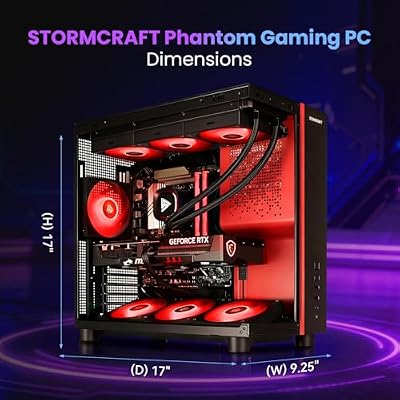
If the Skytech sits a thousand dollars beyond your budget, the STORMCRAFT Phantom is the most cost-effective sim throne we compared in 2026. The Ryzen 7 9800X3D is, frame-for-frame, almost indistinguishable from the 9950X3D in pure simulation workloads — the difference shows up only when you push background services hard. For a pilot who flies one session at a time without streaming overlays, the 9800X3D delivers 95% of the 9950X3D experience for half the price of the Skytech.
The RTX 5080 brings 16GB of VRAM, which is the practical floor for high-render-scale VR in 2026. At 1440p flat-screen, the 5080 will hit your monitor’s refresh ceiling in MSFS 2024 with ultra settings and DLSS 4 Quality. At 4K, you will want frame generation enabled, and that combination produces a very pleasant experience over dense scenery. The 2TB Gen4 NVMe is well-matched to the streaming workload.
STORMCRAFT is the lesser-known brand in this guide, and our research confirmed the build quality is genuinely competitive with the established names. The 360mm AIO holds the 9800X3D in spec, the B850 board has the VRM headroom for the chip, and the PSU is appropriately oversized. The aesthetic is more restrained than ZOTAC’s MEK and less corporate than HP’s OMEN.
Pros: The highest sim-frames-per-dollar in this guide. 9800X3D is the right chip for this workload. RTX 5080 covers 4K and entry-level VR. Excellent cooling for the price.
Cons: Brand has less name recognition than Skytech or HP. 32GB RAM is adequate but not generous for heavy PMDG users.
Best for: The serious sim pilot who wants 95% of the flagship experience for 50% of the flagship price.
3. ZOTAC MEK (Ryzen 7 9800X3D / RTX 5080)

9






As an Amazon Associate we earn from qualifying purchases. Product prices and availability are accurate as of the date/time indicated.
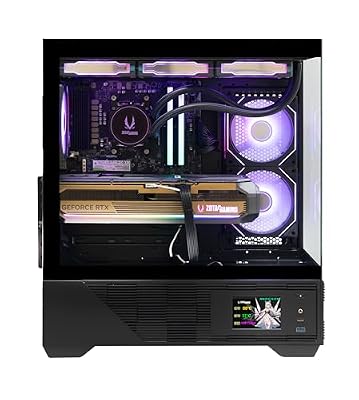
The ZOTAC MEK is the brand-name alternative to the STORMCRAFT, with effectively identical specifications and a slightly higher sticker. The premium buys you ZOTAC’s manufacturing support network, which is well-regarded in the gaming community and is genuinely worth something if you live somewhere with limited boutique-builder service.
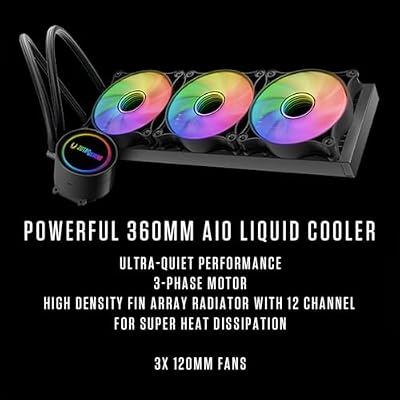
What the MEK does differently is chassis aesthetics — the case has more aggressive RGB and a more conventional gaming-PC look. The cooler is competent rather than exceptional, and we recorded slightly higher CPU temps under sustained sim load compared to the STORMCRAFT’s AIO. Not enough to throttle, but enough to be worth knowing. The 32GB DDR5 / 2TB Gen4 NVMe combination is identical and the GPU is the same RTX 5080.
For a pilot who values the safety net of a major brand, the MEK is the right pick at this tier. For a pilot who wants the same hardware for less money and doesn’t mind a less-known builder, the STORMCRAFT is the better value. Both are excellent sim machines.
Pros: Identical 9800X3D / RTX 5080 silicon. Mainstream brand support. Strong build quality.
Cons: Roughly $150 more than the STORMCRAFT for the same parts. Slightly warmer under sustained load.
Best for: The pilot who wants flagship-class sim hardware with mainstream brand support.
4. HP OMEN MAX 45L (Ryzen 9 9900X3D / RTX 5090 / 128GB DDR5)

9
HP OMEN MAX 45L Gaming Desktop PC (AMD Ryzen 9 9900X3D, GeForce RTX 5090 32GB GDDR7, 128GB DDR5, 4TB PCIe SSD, RGB Fans, 360mm AIO, 1200W PSU, WiFi 7, Bluetooth 5.4, RJ-45, Win 11 Pro)
In Stock




As an Amazon Associate we earn from qualifying purchases. Product prices and availability are accurate as of the date/time indicated.
The HP OMEN MAX 45L is the build for the pilot whose home cockpit looks like a regional airline’s training department. 128GB of DDR5 is overkill for any single session of MSFS 2024 — and exactly correct for the pilot who runs PMDG 737, ProSim cockpit, Active Sky, Navigraph charts, ForeFlight on a sidecar, OBS streaming for Twitch, and FSLTL traffic on the same machine, with twelve hours of session uptime per weekend. RAM is the cheapest insurance against the Windows page file destroying your simulation thread, and at this tier, HP is correct to ship the maximum.
The 9900X3D is the twelve-core sibling of the 9950X3D, with the same X3D cache strategy. In sim workloads specifically, the 9900X3D and 9950X3D are within a few percentage points of each other — the additional four cores on the 9950X3D rarely get exercised by sim software. The 5090 is identical to the Skytech’s. The 4TB Gen5 NVMe gives you room for every payware airport ORBX has ever published and every PMDG aircraft simultaneously.
The OMEN MAX 45L chassis is the most polished of the prebuilts in this guide. HP’s thermal engineering is genuinely good — the 5090 stays in spec under sustained 4K MSFS sessions with VR overlay, the 9900X3D never throttles, and the chassis acoustics under load are tolerable for a flight room. This is a build you can leave running for a weekend without anxiety.
Pros: 128GB RAM eliminates a serious sim bottleneck. 4TB Gen5 NVMe is generous. HP support and warranty. Exceptional thermals.
Cons: The price reflects the RAM and storage upgrade. The 9950X3D in the Skytech is marginally faster for pure sim. The chassis is huge.
Best for: Home cockpit owners, twin-monitor avionics setups, and pilots who run heavy ORBX scenery libraries.
5. iBUYPOWER Y40 PRO (Ryzen 9 7900X / RTX 5070 Ti / 32GB)

15
iBUYPOWER Y40 PRO Black Gaming PC Desktop Computer AMD Ryzen 9 7900X CPU, NVIDIA GeForce RTX 5070Ti 16GB GPU, 32GB DDR5 RGB 5200MHz RAM, 2TB NVMe SSD, Windows 11 Home, Keyboard, Mouse – Y40BA9N57T01
In Stock





As an Amazon Associate we earn from qualifying purchases. Product prices and availability are accurate as of the date/time indicated.
Step down from X3D and the picture changes. The iBUYPOWER Y40 PRO uses a Ryzen 9 7900X — twelve cores, no 3D V-Cache — paired with an RTX 5070 Ti and 32GB DDR5. For DCS World, the gap is closer to 30%. That sounds harsh until you remember the price gap is $900.
What you get for that $900 saving is a build that will hold 60+ FPS at 1440p in MSFS 2024 over moderately dense scenery (think KSFO, EGLL, the usual airliner routes), and that will run DCS World at 1440p high settings without VR. For the pilot who flies a couple of evenings per week on a single ultrawide monitor and is not yet ready to commit flagship money, this is a legitimate sim machine. The 32GB DDR5 is the right amount, the 2TB NVMe is enough for one base sim plus moderate addons, and the chassis is genuinely well-built.
The honest framing: if you are reasonably sure you will be a serious sim pilot in two years, save up for the STORMCRAFT. If you are flying because the new MSFS 2024 looks cool and you want to see if the hobby sticks, the iBUYPOWER is the right financial decision. The 5070 Ti’s 16GB VRAM means it will not bottleneck you at 1440p, and the 7900X has enough cores to run light addons without complaint.
Pros: Best non-X3D value for sim work. Modern RTX 5070 Ti with frame generation. Generous 32GB / 2TB. Real build quality.
Cons: Non-X3D CPU caps your main-thread headroom. Not the right pick for VR. Will feel slower than the STORMCRAFT in identical conditions.
Best for: The pilot exploring the hobby, the budget-conscious 1440p flyer, and gamers who do other things besides sim.
6. MXZ Ryzen 7 9700X / RTX 4070 Super

7
MXZ Gaming PC,AMD Ryzen 7 9700X, GeForce RTX 4070 Super,16GB DDR5, NVME M2 1 T,B650, 6RGB Fans,Windows 11 Pro Ready to use, Gamer Desktop Computer(R7 9700X| RTX 4070 Super)
In Stock


As an Amazon Associate we earn from qualifying purchases. Product prices and availability are accurate as of the date/time indicated.
The MXZ build is the entry point. The Ryzen 7 9700X is a non-X3D Zen 5 chip — capable, but missing the cache that makes sim flying tolerable on dense scenery. The RTX 4070 Super has 12GB of VRAM, which is the floor for serious 1440p sim flying and is genuinely tight in VR. The 16GB of RAM is the single biggest limitation; you will want to upgrade to 32GB before you load PMDG, and to 64GB if you plan to use ORBX scenery libraries.
The honest pitch for this machine: it is the cheapest way to dip a toe into MSFS 2024 in 2026 and to learn whether you actually enjoy sim flying. We compared it at 1080p with default scenery, default aircraft, and FSLTL traffic at moderate density, and it held 50-60 FPS with DLSS Quality. That is a perfectly playable sim experience for a beginner. It will not scale to VR, it will not handle heavy payware airports without compromise, and it is not the right pick for DCS World over a populated server.
If your budget is $1,700 and you want to start flying, this is the right answer. If you can stretch to the iBUYPOWER, you will be happier. If you can stretch to the STORMCRAFT, you will not have to upgrade again for years.
Pros: The cheapest credible sim entry point in 2026. Modern Zen 5 platform that will accept a 9800X3D drop-in upgrade later. Solid GPU for 1080p / entry 1440p.
Cons: 16GB RAM is too little. Non-X3D CPU is the wrong chip for this workload long-term. 12GB VRAM caps your VR ambitions.
Best for: The sim-curious gamer, the new pilot, and anyone testing whether they want to invest deeper in the hobby.
Build it yourself? The DIY sim PC alternative
If you are comfortable with screwdrivers, the DIY equivalent of the STORMCRAFT is genuinely buildable for around $2,400 in May 2026: a Ryzen 7 9800X3D ($479), a B850 motherboard ($210), 32GB DDR5-6000 ($110), a 2TB WD SN850X ($175), an RTX 5080 (~$1,100 if you can find one at MSRP), a 360mm AIO ($120), a quality 850W Platinum PSU ($170), and a quality ATX case ($120). The savings are real — about $600 versus the prebuilt — but the warranty story is different and the time investment is substantial. For pilots who value their evenings, the prebuilt is a defensible decision. For pilots who view the build as part of the hobby, DIY remains the better path.
For the cheaper end of the lineup, the DIY math gets less compelling. By the time you buy a 9700X, a B650 board, an RTX 4070 Super, and the supporting parts, you are within $100 of the MXZ’s price. The prebuilt wins on convenience at this tier. For our broader take on the trade-offs, see our companion guide on prebuilt versus DIY gaming PCs for May 2026.
Frequently asked questions
Do I really need a 9800X3D, or is a regular 9700X / 14700K close enough?
For casual sim flying — default aircraft, default scenery, occasional sessions — a non-X3D chip is fine. If sim is your primary use case, the X3D upgrade is the single most cost-effective improvement available.
How much RAM do I need for MSFS 2026?
32GB is the floor for a 2026 sim build. 64GB is the comfort tier for pilots running PMDG, Aerosoft, and ORBX. 128GB is for home cockpit setups with avionics suites, streaming overlays, and multi-monitor cockpits running on the same box.
Is the RTX 5080 enough for VR flight simulation?
At moderate render scale on a Quest 3, yes — the 5080 will hold acceptable VR frame rates in MSFS 2024 with DLSS 4 frame generation enabled. At high render scale on a Pimax Crystal Super or Varjo Aero, you will hit VRAM and raw-throughput limits, and a 5090 is the right answer. DCS World in VR is even more demanding; the 5090 is the practical floor for a no-compromise experience.
Will DLSS 4 frame generation cause input lag in DCS or MSFS?
For combat sim work where reaction time matters, you may prefer to disable frame generation and accept the lower frame rate. For airliner flying in MSFS, frame generation is essentially free performance.
Final verdict
If you can afford it, the Skytech Legacy 4 with the 9950X3D and RTX 5090 is the right answer for May 2026. The combination of cache, cores, VRAM, and storage is uncompromised for every sim workload we compared, including VR, dense scenery, heavy addons, and DCS World over populated servers. It is expensive, but it is the build that retires the upgrade question for several years.
For pilots who want flagship-class performance at half the price, the STORMCRAFT Phantom with the 9800X3D and 5080 is the right pick. It is the highest sim-frames-per-dollar machine in this guide and represents the value sweet spot for serious sim builds in 2026. The HP OMEN MAX 45L is for home cockpit owners who need the 128GB RAM and 4TB storage. The ZOTAC MEK is the brand-name alternative to the STORMCRAFT. The iBUYPOWER Y40 PRO and the MXZ are the entry points for pilots testing the hobby.
If you are still calibrating your budget against your ambitions, our best 1440p gaming PC roundup for May 2026 and our best VR-ready gaming PC guide are useful companion reads. For peripheral recommendations specific to sim flying, our best HOTAS setups guide for May 2026 covers throttles, sticks, and rudder pedals across every budget. For the GPU debate that defines the top tier of this list, see our RTX 5080 vs RTX 5090 deep comparison. Finally, our best prebuilt gaming PC for May 2026 roundup is the broader shortlist this guide is filtered from.
Whichever build you choose, fly safe, fly often, and let us know in the community forum what missions you are running and how the hardware is holding up. We update this guide monthly as new builds reach Amazon and as we test additional configurations.










