

- Top Pick: NVIDIA DGX Spark™ – Personal AI Desktop Supercomputer – Desktop GB10 Grace Blackwell Chip
- Best Value: HPE NVIDIA Tesla V100 32GB HBM2 PCIe 3.0 x16 Passive GPU Computational Accelerator for AI Machine Learning HPC Deep Learning 699-2G500-0216-400 (Renewed)
- Premium Choice: Apple 2026 MacBook Pro Laptop with Apple M5 Pro chip with 18-core CPU and 20-core GPU: Built for AI, 16.2-inch Liquid Retina XDR Display, 48GB Unified Memory, 1TB SSD, Wi-Fi 7; Space Black
For AI work, the GPU is the engine — and the single spec that decides what you can run is VRAM. Training and fine-tuning models, running large local language models, and generating images all live or die by how much memory the card has to hold weights, activations and batches; once you run out of VRAM the job simply will not fit. Alongside memory, the CUDA and Tensor core throughput determines how fast that work goes. This guide rounds up the best AI GPUs in 2026, and it splits honestly into two groups: true professional workstation cards built for this job, and high-VRAM GeForce RTX 5090 gaming cards that many people press into AI service.
- Best AI GPUs at a Glance
- 1. PNY Technology NVIDIA RTX PRO 6000 Blackwell Max-Q Workstation GPU
- 2. PNY NVIDIA RTX PRO 5000 Blackwell 48GB GDDR7 Workstation GPU
- 3. CyberGeek GeForce RTX 5090 Overclocked Triple Fan, 32GB GDDR7, 28 Gbps
- 4. GIGABYTE AORUS GeForce RTX 5090 AI Box – 32GB GDDR7, 512-Bit, PCI-E 5.0
- 5. ASUS ROG Astral GeForce RTX 5090 White OC Edition, 32GB GDDR7, 3352 AI TOPS
- 6. ASUS TUF Gaming GeForce RTX 5090 Triple Fan, 32GB GDDR7, 3352 AI TOPS, 28 Gbps
- How to Choose an AI GPU
- Frequently Asked Questions
- Related Guides
- Related Articles
We will be straight about the distinction throughout, because it matters. The NVIDIA RTX PRO Blackwell workstation cards here carry far larger memory pools and ECC (error-correcting) memory, professional drivers and a design intended for sustained compute — the right tools if your budget and workload demand it. The RTX 5090 cards, by contrast, are outstanding gaming GPUs with a generous 32GB of GDDR7; they are genuinely capable for a great deal of local AI, but they do not offer ECC and are not validated as professional accelerators. Our picks span prices from around $4,150 up to around $12,700, ordered to lead with the cards that fit serious model work first. Below is an at-a-glance comparison, then a closer look at each and an honest buyer’s guide to VRAM, ECC and fitting gaming GPUs to AI.
As an Amazon Associate we earn from qualifying purchases.



🛒 Best Price Today on Amazon
Prime members get fast, free shipping on everything above, plus member-only deals. New members get a 30-day free trial — cancel anytime.
Best AI GPUs at a Glance
| GPU | Best For | Standout Spec | Approx Price |
|---|---|---|---|
| PNY NVIDIA RTX PRO 6000 Blackwell Max-Q | Largest-model pro workloads | Workstation Blackwell, huge VRAM + ECC | around $12,696 |
| PNY NVIDIA RTX PRO 5000 Blackwell 48GB | Pro AI on a tighter budget | 48GB GDDR7 + ECC, pro drivers | around $4,820 |
| CyberGeek GeForce RTX 5090 OC 32GB | High-VRAM gaming card for AI | 32GB GDDR7, 28 Gbps | around $4,500 |
| GIGABYTE AORUS RTX 5090 AI Box 32GB | External / flexible 5090 | 32GB GDDR7, 512-bit | around $4,424 |
| ASUS ROG Astral RTX 5090 White OC 32GB | Premium-cooled 5090 | 32GB GDDR7, 3352 AI TOPS | around $4,400 |
| ASUS TUF Gaming RTX 5090 32GB | Best-value 5090 for AI tinkering | 32GB GDDR7, 28 Gbps | around $4,150 |
1. PNY Technology NVIDIA RTX PRO 6000 Blackwell Max-Q Workstation GPU

PNY Technology VCNRTXPRO6000BQ-PB NVIDIA RTX PRO 6000 Blackwell Max-Q Workstation Graphics Card
As an Amazon Associate we earn from qualifying purchases. Product prices and availability are accurate as of the date/time indicated.
The PNY NVIDIA RTX PRO 6000 Blackwell Max-Q is the genuine flagship of this list and the right tool when AI is your profession. It is a true workstation card built on NVIDIA’s Blackwell architecture, carrying an enormous VRAM pool with ECC (error-correcting) memory and professional-grade drivers — exactly what you want for fine-tuning sizeable models, running large local LLMs, or any workload where capacity and stability outrank everything else. At around $12,696 it is by far the most expensive option, and that price reflects professional engineering rather than gaming value.
This is the card to choose when you are constrained by VRAM today and need to fit models that simply will not load on a 32GB gaming GPU. The huge memory pool lets you hold far larger models and batches in a single card, ECC memory guards against the silent bit-errors that can corrupt long training runs, and the Max-Q design targets sustained compute in a workstation. If your work — and budget — justify a dedicated professional accelerator, the RTX PRO 6000 is the standout, no-compromise pick here.
Pros: True workstation Blackwell card, largest VRAM here with ECC memory, professional drivers, built for sustained AI compute.
Cons: By far the most expensive; overkill (and poor value) for gaming or light AI tinkering.
2. PNY NVIDIA RTX PRO 5000 Blackwell 48GB GDDR7 Workstation GPU
PNY Technology VCNRTXPRO6000BQ-PB NVIDIA RTX PRO 6000 Blackwell Max-Q Workstation Graphics Card
As an Amazon Associate we earn from qualifying purchases. Product prices and availability are accurate as of the date/time indicated.
The PNY NVIDIA RTX PRO 5000 Blackwell is the professional pick for those who need workstation-class capability without the flagship price. It is a true Blackwell workstation card with 48GB of GDDR7 and ECC memory, plus professional drivers — a serious amount of error-corrected VRAM for fine-tuning, large-model inference and other demanding AI work. At around $4,820 it sits close in price to the gaming RTX 5090s below, but it offers something they cannot: 48GB of ECC memory and professional validation.
This is the card to choose when you want more VRAM than a 32GB gaming GPU and the reliability of error-correcting memory, but cannot justify the RTX PRO 6000. The 48GB pool fits notably larger models and batches than a 5090, ECC protects long-running jobs from silent memory errors, and the professional drivers suit production and creator workflows. For a buyer whose work genuinely needs pro-grade VRAM and stability at the most accessible professional price here, the RTX PRO 5000 is the smart choice.
Pros: True workstation card with 48GB GDDR7 and ECC, more VRAM than any 5090 here, professional drivers, sensible pro pricing.
Cons: Pure compute focus rather than gaming; pricier than a 5090 with less raw gaming performance.
3. CyberGeek GeForce RTX 5090 Overclocked Triple Fan, 32GB GDDR7, 28 Gbps
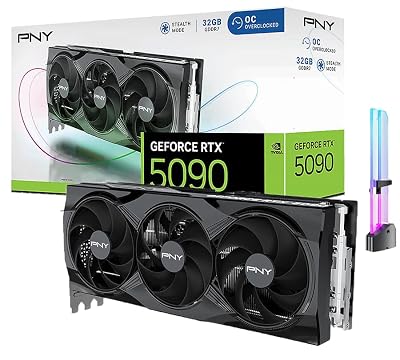
CyberGeek GeForce RTX 5090 Overclocked Triple Fan Graphics Card, 32GB GDDR7, 28 Gbps, 512-bit, 3352 AI Tops, DLSS 4, AI Content Creation, Local LLM Inference, DP 2.1b x3, HDMI 2.1b, with GPU Holder




As an Amazon Associate we earn from qualifying purchases. Product prices and availability are accurate as of the date/time indicated.
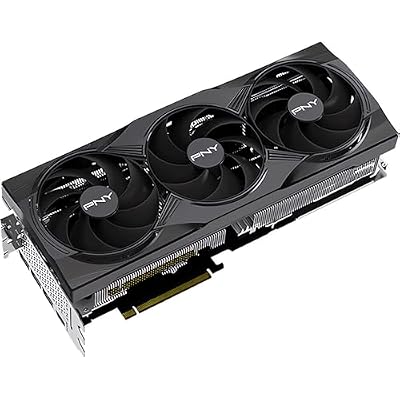
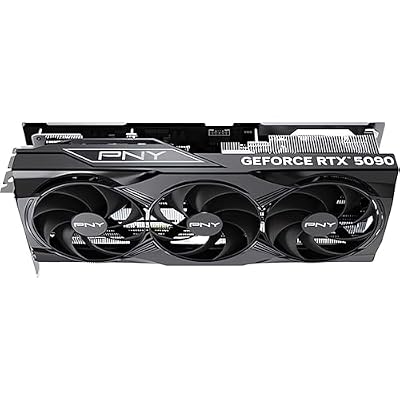
The CyberGeek GeForce RTX 5090 is the first of the high-VRAM gaming cards on this list, and an honest framing matters: it is a superb gaming GPU pressed into AI service, not a workstation accelerator. It carries 32GB of fast GDDR7 at 28 Gbps on a triple-fan, overclocked design — a genuinely generous memory pool for a consumer card, and enough to run a great deal of local AI. At around $4,500 it competes on price with the RTX PRO 5000, but without ECC or pro validation.
This is the card to choose when you want strong local-AI capability and flagship gaming in one box, and you understand the trade-offs. The 32GB of GDDR7 comfortably handles many local LLMs, image-generation models and fine-tuning experiments, and the high-bandwidth memory keeps throughput quick. What you give up versus the pro cards is ECC memory — so it is less suited to very long, error-sensitive training runs — and professional driver validation. As a high-VRAM gaming GPU that doubles capably for AI tinkering and inference, the CyberGeek 5090 is a strong, honest pick.
Pros: Generous 32GB GDDR7 for a consumer card, fast 28 Gbps memory, overclocked triple-fan cooling, flagship gaming plus capable local AI.
Cons: Gaming GPU, not a pro accelerator: no ECC memory and less VRAM than the workstation cards.
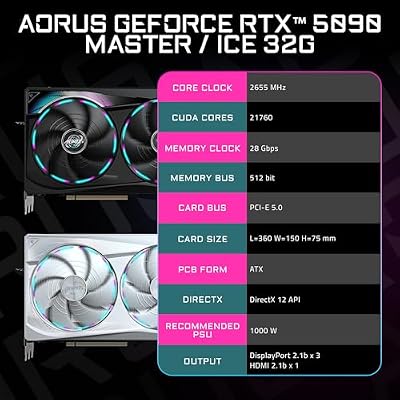
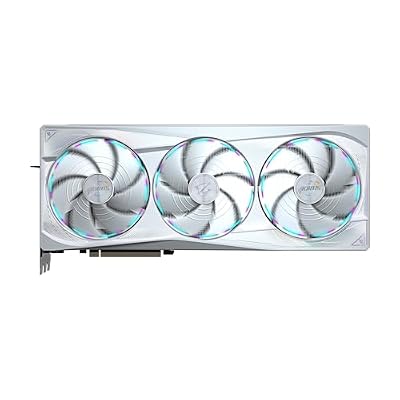
4. GIGABYTE AORUS GeForce RTX 5090 AI Box – 32GB GDDR7, 512-Bit, PCI-E 5.0

GIGABYTE AORUS GeForce RTX 5090 Master ICE 32G Graphics Card, WINDFORCE Cooling System, 32GB 512-bit GDDR7, GV-N5090AORUSM ICE-32GD Video Card




As an Amazon Associate we earn from qualifying purchases. Product prices and availability are accurate as of the date/time indicated.
The GIGABYTE AORUS RTX 5090 AI Box is the flexible-deployment 5090 on this list. Like its siblings it is a gaming-class GPU with 32GB of GDDR7 on a wide 512-bit memory bus over PCI-E 5.0, but the ‘AI Box’ form factor is aimed at external or more flexible setups, letting you attach serious GPU power to a system that could not otherwise house it. At around $4,424 it offers 5090-class capability with deployment flexibility — and, to be clear, the same gaming-card caveats.
This is the option to consider when you want the 32GB GDDR7 muscle of an RTX 5090 for local AI but need flexibility in how it connects — for instance to a compact machine or a laptop-style workflow. The wide 512-bit bus and GDDR7 deliver high memory bandwidth for inference and fine-tuning, and the 32GB pool runs many local models well. As with every 5090 here, there is no ECC and no professional driver validation, so treat it as a high-VRAM gaming GPU adapted to AI rather than a workstation accelerator. For flexible 5090 power, the AORUS AI Box stands out.
Pros: 32GB GDDR7 with a wide 512-bit bus, PCI-E 5.0, flexible external-friendly form factor, capable local AI and gaming.
Cons: Still a gaming GPU: no ECC, not pro-validated; form-factor flexibility can add cost or complexity.
5. ASUS ROG Astral GeForce RTX 5090 White OC Edition, 32GB GDDR7, 3352 AI TOPS

The ASUS ROG Astral RTX 5090 White OC is the premium-cooled gaming 5090 on the list. It brings the same 32GB of GDDR7 and the headline 3352 AI TOPS of the 5090 class, wrapped in ASUS’s flagship ROG Astral cooling and a striking white OC design built to sustain high clocks quietly. At around $4,400 it is the showpiece 5090 here, and once again it is an elite gaming card adapted to AI rather than a workstation part.
This is the card to choose when you want top-tier 5090 capability with the best cooling and build quality, and aesthetics matter for your build. The robust ROG Astral cooler helps the GPU hold high clocks under the sustained load that AI inference and fine-tuning impose, the 32GB GDDR7 runs many local models well, and the high AI TOPS figure reflects strong Tensor throughput for a consumer card. The honest caveats are unchanged: no ECC memory and no professional driver validation. For a premium, well-cooled high-VRAM gaming GPU that doubles for serious AI tinkering, the ROG Astral is a standout.
Pros: 32GB GDDR7, high AI TOPS, flagship ROG Astral cooling for sustained clocks, premium white build.
Cons: Premium pricing for cooling and looks; gaming card with no ECC and no pro validation.
6. ASUS TUF Gaming GeForce RTX 5090 Triple Fan, 32GB GDDR7, 3352 AI TOPS, 28 Gbps

ASUS TUF Gaming GeForce RTX 5090 Triple Fan GPU, 32GB GDDR7, 3352 AI Tops, 28 Gbps, 512-bit, DLSS 4, AI Content Creation, Local LLM Inference, DP 2.1b x3, HDMI 2.1b x2, with GPU Holder


As an Amazon Associate we earn from qualifying purchases. Product prices and availability are accurate as of the date/time indicated.
Rounding out the list is the ASUS TUF Gaming RTX 5090, the best-value path to 5090-class AI capability here. It delivers the same 32GB of GDDR7 at 28 Gbps and 3352 AI TOPS as the pricier 5090s, on ASUS’s durable, no-nonsense TUF triple-fan cooler that focuses budget on cooling and reliability rather than premium flourishes. At around $4,150 it is the cheapest 5090 on the list, and the most sensible if you simply want the capability.
This is the card to choose when you want a high-VRAM gaming GPU for local AI and gaming at the lowest 5090 price here, without paying for showpiece cooling or RGB. The 32GB GDDR7 handles many local LLMs, image models and fine-tuning runs, the high memory bandwidth keeps throughput quick, and the TUF cooler is built to last under sustained load. The familiar honest caveats apply — no ECC and no professional driver validation, so it is a gaming card adapted to AI rather than a workstation accelerator. For pragmatic, best-value 5090 power, the TUF Gaming model is the pick.
Pros: Lowest-priced 5090 here, full 32GB GDDR7 at 28 Gbps, durable TUF triple-fan cooling, capable for local AI and gaming.
Cons: Gaming GPU, not a pro card: no ECC memory; plainer build than premium 5090s.
How to Choose an AI GPU
For AI work, start with VRAM, because it is the hard limit on what you can run. The amount of memory on the card decides whether a model, its activations and your batch size will fit at all — run out and the job fails, no matter how fast the GPU is. This is the single biggest reason the workstation cards here, with their far larger memory pools and 48GB on the RTX PRO 5000, can tackle models that a 32GB gaming card cannot. Estimate the memory your target models and workflows need, then choose a card with enough VRAM to hold them comfortably.
Understand the honest divide between professional and gaming GPUs, because it shapes everything else. The NVIDIA RTX PRO Blackwell cards are true workstation accelerators: they offer ECC (error-correcting) memory that guards long training runs against silent bit-errors, professional drivers validated for production and creator software, and a design intended for sustained compute. The GeForce RTX 5090 cards are elite gaming GPUs with a generous 32GB of GDDR7 that are very capable for local LLMs, image generation and fine-tuning — but they have no ECC and are not professionally validated. Neither is ‘better’ in the abstract; the right one depends on your workload’s tolerance for error and your need for capacity.
Then weigh compute throughput and memory bandwidth. CUDA and Tensor core performance — reflected in figures like the 5090 class’s AI TOPS — determines how quickly the work runs once it fits in memory, and fast GDDR7 with a wide memory bus (the 512-bit bus on the AORUS card, for instance) feeds those cores quickly. For inference and fine-tuning, high memory bandwidth genuinely helps. Still, capability you cannot fit into VRAM is wasted, so treat throughput as the second priority after you have secured enough memory for your models.
Finally, match the card to your real budget and use case honestly. If AI is your profession and you need the largest models or error-corrected reliability, the RTX PRO 6000 or RTX PRO 5000 are the correct tools and worth their price. If you are doing serious-but-not-mission-critical local AI alongside gaming, a 32GB RTX 5090 — the value TUF model, the premium ROG Astral, the flexible AORUS AI Box or the CyberGeek OC — gives you a lot of capability for considerably less, provided you accept the lack of ECC and pro validation. Decide how much VRAM your work demands, be clear-eyed about whether you need professional features, and pick the GPU on this list that fits both your models and your budget.
Frequently Asked Questions
How much VRAM do I need for AI work?
As much as your models require to fit — VRAM is the hard limit on AI GPUs. Larger language models, bigger batch sizes and fine-tuning all consume more memory, and if a job exceeds your VRAM it simply will not run. A 32GB RTX 5090 handles a great deal of local AI, while the workstation cards here — including 48GB on the RTX PRO 5000 — fit notably larger models. Estimate your workload’s memory needs first, then buy enough headroom.
Can I use a gaming GPU like the RTX 5090 for AI?
Yes, and honestly it works well for a lot of local AI. The RTX 5090 cards here carry 32GB of fast GDDR7, enough to run many local LLMs, image-generation models and fine-tuning experiments capably. The trade-offs are real, though: they lack ECC memory and professional driver validation, so for very long, error-sensitive training or production workloads a workstation card is the safer tool. For tinkering, inference and most enthusiast AI, a 5090 is a strong, cost-effective choice.
What is ECC memory and do I need it for AI?
ECC (error-correcting code) memory detects and corrects the occasional silent bit-errors that can occur in memory, and the workstation RTX PRO cards here include it while the gaming RTX 5090s do not. For long training runs or production workloads where a corrupted value could ruin results, ECC adds valuable reliability. For shorter local inference and experimentation, its absence on a 5090 is usually an acceptable trade-off for the lower price.
Is a workstation GPU worth it over an RTX 5090 for AI?
It depends on your workload. The RTX PRO Blackwell cards justify their cost when you need more VRAM than 32GB, ECC reliability for long jobs, or validated professional drivers — the RTX PRO 5000’s 48GB and ECC, for example, fit larger models more safely. If your AI is serious but not mission-critical and 32GB is enough, a gaming RTX 5090 delivers most of the practical capability for considerably less money.
Related Guides
- Best GPUs for Your Build
- Best Workstation GPUs
- Best GPUs for Machine Learning
- Best CPUs for AI Workloads
- Best Power Supplies
- Best Gaming PCs
Affiliate Disclosure: As an Amazon Associate, we earn from qualifying purchases. If you click a link and make a purchase, we may earn a small commission at no extra cost to you. Prices and availability are accurate as of publication and may change.
Ready to decide? Our #1 pick for 2026 is the PNY NVIDIA RTX PRO 6000 Blackwell Max-Q.
Live price & availability on Amazon.


