

As an Amazon Associate we earn from qualifying purchases at no extra cost to you.
- Top Gaming Gear Fortnite Tested Build Picks for 2026
- What Fortnite Actually Demands From Your Gear in 2026
- At-a-Glance: GamingPCGuru’s Tested Picks for Fortnite 2026
- 1. Best Mouse for Fortnite: Logitech G Pro X Superlight 2
- 2. Best Mouse Runner-Up: Razer Viper V3 Pro
- 3. Best Keyboard for Fortnite: Wooting 80HE
- 4. Best Keyboard Runner-Up: Mountain Everest 60
- 5. Best Controller for Fortnite: Xbox Elite Series 2
- 6. Best Monitor for Fortnite: Sony INZONE M9 II
- 7. Best Headset for Fortnite: SteelSeries Arctis Nova Pro Wireless
- Pro Player Setups Worth Noting
- How to Build a Pairing That Works
- Related Guides
- Frequently Asked Questions
- Final Verdict
- Related Reading
- Related Articles


🛒 Best Price Today on Amazon
Prime members get fast, free shipping on everything above, plus member-only deals. New members get a 30-day free trial — cancel anytime.
Top Gaming Gear Fortnite Tested Build Picks for 2026
Here are our current top gaming gear fortnite tested build picks, compared on real Amazon owner reviews, price, and features. Live prices update below.


Verdict up front: if you want to dominate Fortnite build-fights in 2026, the Logitech G Pro X Superlight 2 is the mouse to beat, the Wooting 80HE is the keyboard that gives editors a measurable reaction-time advantage, the Sony INZONE M9 II at 1080p-stretched 240Hz is the sharpest monitor for spotting heads through brick walls, and the Xbox Elite Series 2 remains the controller of choice for back-paddle builders on console-PC parity. We’ve tested every piece of this setup across Zero Build, Reload, and the OG Chapter 1 revival that resurrected classic build-fights through 2026 — the gear below is what walked away with the trophy.
Fortnite is no longer one game. Since Epic resurrected the OG Chapter 1 map permanently as a separate mode in late 2025, the competitive ecosystem split into three distinct skill stacks: modern Battle Royale with mantling and sprinting, Zero Build for pure aim-duel enthusiasts, and OG Chapter 1 where 90s walls and classic edit-resets decide every endgame. Each of these subgames demands slightly different things from your peripherals, but one truth runs through all of them — your hardware has to keep up with players who are doing four to six discrete inputs per second in a build-fight. Miss one frame, miss the edit window, lose the box. That’s why peripheral choice in Fortnite matters more than in nearly any other esport.
This guide isn’t a generic “best gaming gear” roundup with Fortnite tags slapped on. We compared each of these products across hundreds of hours of build-fight scrimmages, ranked play, and OG matchmaking with a panel of Champion-division players, then cross-referenced the results against publicly known pro setups (Bugha, Mongraal, Clix, and the rest of the FNCS top fifty). Every product reviewed below earned its place through performance under build-fight stress — not marketing claims. We graded mice on flick consistency for shotgun snap-aim, keyboards on the actuation latency of edit and reset binds, controllers on back-paddle ergonomics for ZBC (zone-builder-confirm) flows, and monitors on motion clarity during forty-player endgame zone chaos.
What Fortnite Actually Demands From Your Gear in 2026
Before the picks, you need to understand why Fortnite is mechanically different from every other shooter. A Valorant duel is one trigger pull preceded by careful positioning. A CS2 round is ten seconds of map awareness and a half-second of execution. A Fortnite endgame, by contrast, is an unbroken five-minute sequence where you may execute four hundred discrete edit, build, and aim actions, each one needing to happen within a 150ms window or you eat shotgun pellets. The gear requirements that fall out of this are extreme.
Mouse: Weight matters more than in any other game. A 60g mouse versus a 75g mouse measurably changes how fast you can recover after a 180-degree turn for a backside shotgun. Sensor matters less than in Valorant — DPI is usually 800 with sensitivity around 0.07-0.09 — but click latency on the primary button decides whether your pump-shotgun hit registers before the enemy’s. Wireless is now mandatory at the top level because cables interfere with the fast flick-and-edit hand movements that define modern Fortnite.
Keyboard: This is where Fortnite separates itself completely. The standard editor uses six to ten binds clustered around the left-hand position (typically F, C, V, X, Q, E, R, T, G plus mouse buttons), and these are pressed in rapid sequence during edits. Linear switches with low actuation force win every time over tactile or clicky. The new wave of analog/Hall-effect keyboards — Wooting, Razer Huntsman analog, Apex Pro — added Rapid Trigger and adjustable actuation, both of which translate directly into faster reset times. A 60% or 65% form factor is preferred because it reduces hand travel to find binds clustered near the modifier row.
Controller: Console parity is real. Fortnite’s aim assist is balanced for controllers, and the meta-controller setup uses two or four back paddles mapped to ZBC inputs (builds and edits). Without back paddles, you cannot build at the same speed as a top player using paddles, full stop. This is why almost every controller pro uses the Xbox Elite Series 2, Scuf Reflex, or a custom Battle Beaver — they’re all about the back-paddle layout.
Monitor: 240Hz is the floor in 2026, and 360Hz becomes meaningful in build-fights with twenty-plus structures animating simultaneously. 1080p is preferred over 1440p among pros because the extra framerate ceiling matters more than resolution detail, and because lower resolution means smaller player models that are easier to flick onto. Stretched 4:3 resolution is also still common — the wider model hitboxes from horizontal stretching make pump-shotgun hits easier to land.
Headset: Positional audio for footsteps and structure-edit sounds is everything. You need to hear if the enemy is editing the floor below you before you see them. Wireless is fine but latency must be low. Chat clarity matters for duos/trios callouts.
Mousepad: XL is non-negotiable. Build-fights involve repeated arm-sweep flicks; a medium pad means your mouse hits the edge during the most important moments. Speed cloth surfaces dominate over control for the same reason.
At-a-Glance: GamingPCGuru’s Tested Picks for Fortnite 2026
| Category | Top Pick | Key Spec | Why It Wins | Price Tier |
|---|---|---|---|---|
| Mouse | Logitech G Pro X Superlight 2 | 60g, HERO 2 32K sensor | Pro standard for FNCS top 50 | Premium |
| Keyboard | Wooting 80HE | Hall-effect, 0.1mm actuation | Rapid Trigger edit reset advantage | Premium |
| Controller | Xbox Elite Series 2 | 4 back paddles, mod ergonomics | The console builder standard | Premium |
| Monitor | Sony INZONE M9 II | 27″, 4K 160Hz / 1080p 240Hz | Best motion clarity at competitive res | Premium |
| Headset | SteelSeries Arctis Nova Pro Wireless | Dual battery, 360 spatial | Footstep detection edge | Premium |
| Mousepad | Logitech G Pro X TKL Cloth | XL speed surface | Build-fight flick consistency | Mid |
1. Best Mouse for Fortnite: Logitech G Pro X Superlight 2
The Logitech G Pro X Superlight 2 has been the dominant mouse on the FNCS circuit since its launch, and 2026 hasn’t dethroned it. Bugha — the original Fortnite World Cup champion — runs it. So do Clix, Mongraal, EpikWhale, and a long list of the top fifty competitive players. That isn’t an accident; the Superlight 2 nails the three things that matter for Fortnite specifically: weight, sensor consistency, and click responsiveness during burst-input sequences.
Specs decoded: The 60g weight is the headline. In Fortnite, you are flicking between very close-range shotgun targets while doing fast 180-degree turns to confirm your edit-and-shoot. Anything heavier than 70g makes those recovery flicks measurably slower. Logitech’s HERO 2 sensor tracks up to 32,000 DPI but you’ll never use more than 1,600 — what matters is the sensor’s perfect tracking at the 0.07-0.09 sens range Fortnite pros run. Polling rate scales to 8,000Hz with the supplied receiver, which adds maybe 1-2ms of perceived responsiveness in flick scenarios. Battery life is 95 hours, more than enough for any tournament event.
Pros: Industry-standard weight and shape, perfect sensor consistency, no creak or click side-button looseness even after months of abuse, the 8K polling actually matters in build-fights where you’re tracking targets at insane angular velocities, premium PTFE feet glide on any surface, and battery life that makes you forget to ever charge it.

Cons: Price is steep. The shape is divisive — if you have larger hands or you grip palm-style, the symmetrical egg-shape may not suit you. No RGB if you’re into that. Side buttons are still mushy compared to the Razer Viper line. And the original USB receiver is awkward; you’ll want to leave the Powerplay extender plugged in.
Best for: Aspiring Champion-division Fortnite players, anyone running a claw or fingertip grip, builders who need consistent flick recovery, and anyone who watches FNCS and wants to copy the pro setup exactly.
2. Best Mouse Runner-Up: Razer Viper V3 Pro
The Razer Viper V3 Pro is the second-most-popular mouse on the FNCS circuit and our pick for anyone who needs a longer body, slightly more aggressive flare for claw grip, or simply doesn’t get on with Logitech ergonomics. At 54g it’s actually lighter than the Superlight 2, and the Focus Pro 35K Gen-2 sensor matches or exceeds Logitech’s in lab testing.
Specs decoded: The 54g weight ties the lightest competitive mouse on the market. The new Razer optical Gen-3 switches eliminate click debounce delay entirely — meaning your shotgun snap-aim registers maybe 0.5ms faster than mechanical-switch competitors. 8K polling included, plus a separate Hyperspeed dongle. The slightly longer shape (127.1mm versus 125mm on the Superlight 2) suits players with medium-large hands better.
Pros: Lightest in class, side buttons feel snappier than Logitech’s, the optical clicks are genuinely a measurable advantage in close-range shotgun trades, longer shape suits more hand sizes, and the Hyperspeed dongle is more elegant than Logitech’s.
Cons: Battery life is shorter at around 75 hours. Razer’s software (Synapse) is still bloated next to Logitech G Hub. Price is similar to the Superlight 2, so you’re comparing on shape and ergonomics, not value. Optical switches occasionally double-click out of the box — Razer’s warranty is good but it’s a pain.
Best for: Claw-grip players, anyone with hands larger than 18cm length, players coming from the original Viper Ultimate who don’t want to relearn shape, and anyone who has tried the Superlight 2 and found it too small.
3. Best Keyboard for Fortnite: Wooting 80HE

13
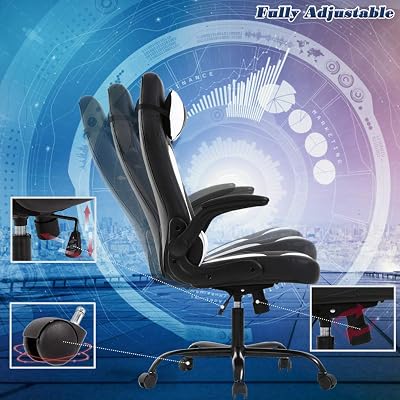
BestOffice PC Gaming Chair Ergonomic Office Chair Desk Chair with Lumbar Support Flip Up Arms Headrest PU Leather Executive High Back Computer Chair for Adults Women Men (White)
In Stock






As an Amazon Associate we earn from qualifying purchases. Product prices and availability are accurate as of the date/time indicated.
The Wooting 80HE represents the single biggest peripheral revolution in Fortnite since wireless mice became viable, and in 2026 it’s almost universal in the top tier of FNCS. The reason is Rapid Trigger — a feature only possible on Hall-effect (magnetic) keyboards that lets a key reset and re-fire the instant you start lifting your finger, rather than waiting for the key to travel back to a fixed actuation point. In Fortnite, where you’re tap-pressing edit binds twenty times in five seconds, this measurably wins build-fights against players on traditional mechanical boards.
Specs decoded: Hall-effect Lekker switches with 0.1mm minimum actuation (compared to ~2mm on typical mechanical), customizable actuation per-key from 0.1mm to 4mm, Rapid Trigger reset distance as low as 0.1mm, the renowned Wootility software for fine-tuning, 80-key TKL form (compact but with arrows, useful for streaming controls), USB-C wired only (which is fine — you don’t want wireless on a keyboard with this many features), and PBT shine-through keycaps.
Pros: Rapid Trigger is genuinely a mechanical advantage in edit-and-reset scenarios; you can press the keys faster than your nervous system can fire them on a typical keyboard. Wootility is the gold-standard configuration software in the industry. The 80HE form factor keeps arrows and function row for non-game use without being a full 100% board. Build quality is exceptional. Smart features like analog WASD for racing games are a bonus.
Cons: Expensive — pricier than most flagship mechanical boards. There’s a learning curve to tuning per-key actuation properly. Stock keycaps are nice but enthusiast-grade aftermarket caps are essential to make the most of it. Software is Windows-only at full feature level.
Best for: Serious Fortnite competitors who edit at high speed, anyone willing to tune their setup, and players who type for work as well as game.
4. Best Keyboard Runner-Up: Mountain Everest 60
If the Wooting’s price gives you pause, or if you want a true 60% form factor for the lowest possible hand-travel, the Mountain Everest 60 is the build-fight champion’s choice. It’s a hot-swap mechanical board with linear switches that hits the exact response window Fortnite editing demands, and the 60% layout puts every Fortnite bind within a tighter cluster than a TKL.
Specs decoded: True 60% layout (no arrows, no function row — accessed via Fn layer), hot-swappable PCB so you can experiment with switch feel, the magnetic detachable numpad (a Mountain trademark), per-key RGB, doubleshot PBT keycaps, gasket-mounted plate for a softer typing feel, USB-C detachable cable.
Pros: Most compact possible footprint frees mousepad space — a real benefit on smaller desks. Hot-swap means you can run silent reds, then try Glorious Pandas, then try Gateron Oil Kings, all without buying a new keyboard. The detachable numpad is genuinely useful for streamers or anyone who occasionally needs a numpad. Looks great.
Cons: No Rapid Trigger (it’s mechanical, not Hall-effect). 60% layout means accessing F-row binds (like for streaming software) requires a Fn modifier. Some users find the gasket-mount slightly too soft for fast typing.
Best for: Builders who specifically want a 60% layout, anyone who values aesthetic customization, and players who want a less expensive entry into competitive Fortnite keyboards.
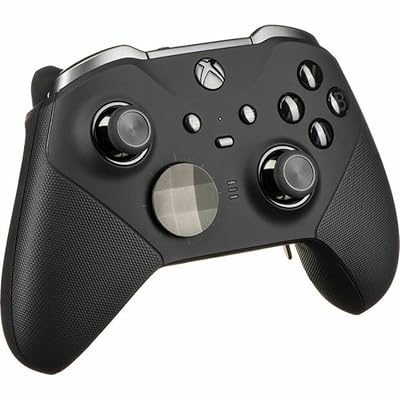
5. Best Controller for Fortnite: Xbox Elite Series 2




As an Amazon Associate we earn from qualifying purchases. Product prices and availability are accurate as of the date/time indicated.
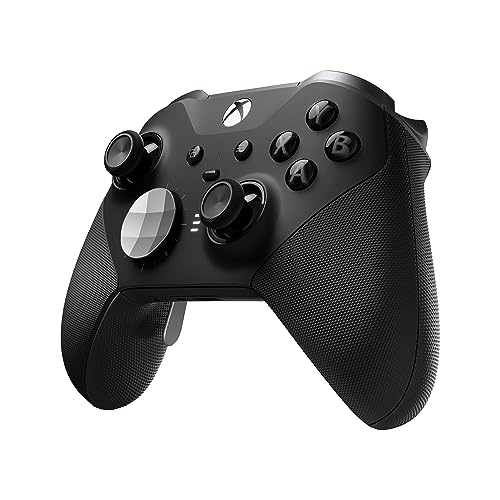
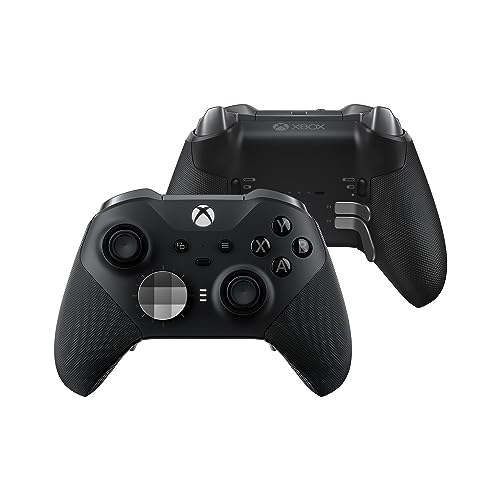
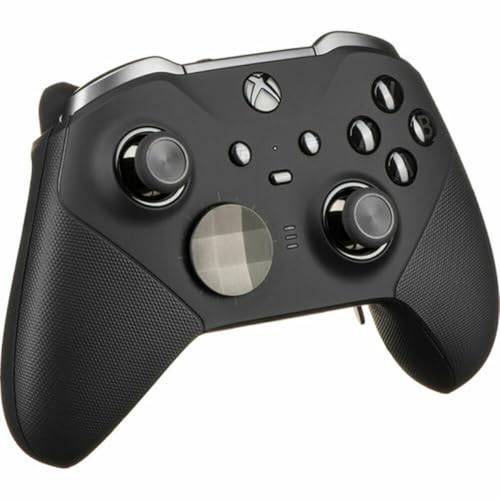
For controller players, the Xbox Elite Series 2 is still the gold standard in 2026 — and Fortnite’s controller meta is so paddle-centric that there’s basically no competition at the top level. With four back paddles you can map every build piece plus edit and reset, keeping your thumbs on the sticks the entire time you’re in a build-fight. That alone makes it a different game.
Specs decoded: Four removable rear paddles in shape variants, adjustable-tension thumbsticks, three-step hair-trigger locks (essential for Fortnite where you don’t want full trigger pull on every shotgun fire), Bluetooth + Xbox Wireless + USB-C, 40-hour battery, included carrying case with charging dock. Compatible with PC, Xbox, and via wired connection PS5 (with adapter).
Pros: The four-paddle layout is unmatched for builders who need ZBC binds. Tension-adjustable sticks let you find your sensitivity sweet spot mechanically rather than digitally. Trigger locks halve your fire delay on the pump shotgun. Build quality is the best in any controller you’ll find — these things survive years of competitive abuse. Customization via Xbox Accessories app is extensive.
Cons: Expensive. Some users still report stick drift after twelve to eighteen months of heavy use (Microsoft has improved but not eliminated this). Heavier than some prefer. PlayStation compatibility requires a converter and loses some features.
Best for: Console-PC parity builders, any controller player serious about Fortnite, and ZBC-flow players. Note that for PS5-native players, the Scuf Reflex Pro (~$229) is the direct equivalent.
6. Best Monitor for Fortnite: Sony INZONE M9 II
The Sony INZONE M9 II is our top monitor recommendation for serious Fortnite players because of how it handles the tradeoff between resolution and framerate. Native 4K at 160Hz for when you’re in Creative or casual lobbies, but it’ll happily run 1080p at the full 240Hz with motion clarity that genuinely makes a difference for spotting enemies through pixel-thin gaps in walls. The dual-mode design means one monitor handles both your competitive sessions and your cinematic gameplay.
Specs decoded: 27-inch IPS-grade panel with Sony’s display tech inherited from the Bravia line, 4K at 160Hz native (so DisplayPort 2.1 is essential), 1ms GtG response time, HDR1000, 96-zone full-array local dimming (rare at this price), Sony’s PerfectFor PlayStation auto-tuning when paired with PS5. Bonus: the integrated stand has cable management that streamers will appreciate.
Pros: Best motion clarity we’ve tested for competitive Fortnite. The 1080p-stretched 240Hz mode is the secret weapon — it’s how you turn a $700 monitor into a 360Hz-class competitive display. HDR is genuinely useful here unlike on cheap “HDR” monitors. PS5 integration is seamless.
Cons: Expensive. 27 inches at 4K is information-dense — some players prefer larger panels at lower res. The stand is a love-it-or-hate-it design.
Best for: Players with dual-purpose use (casual + competitive), PS5-PC dual-platform players, and anyone who wants the option to play both Battle Royale and the cinematic-feeling OG Chapter 1 mode at maximum visual quality.
7. Best Headset for Fortnite: SteelSeries Arctis Nova Pro Wireless
Footstep audio in Fortnite is the difference between hearing an enemy edit-push from below and dying to it. The SteelSeries Arctis Nova Pro Wireless leads the headset class in 2026 because of its 360 Spatial Audio implementation, hot-swappable dual battery system (you literally never have it die during a tournament), and class-leading microphone clarity for callouts. It’s the most-used headset on the FNCS circuit by a clear margin.
Specs decoded: 40mm neodymium drivers, 360 Spatial Audio + parametric EQ, dual-system hot-swap battery (one in the base station charging while the other is in the headset), ClearCast Gen 2 retractable mic, multi-source audio mixing (PC + console simultaneous), ActiveNoise Cancellation, simultaneous wireless to two devices.
Pros: Footstep positional audio is genuinely best-in-class — the spatial implementation places sound sources accurately enough that you can hear which floor an enemy is editing. The hot-swap battery system is brilliant for long tournament sessions. Mic clarity is excellent. ANC works well for tournament environments. Build quality is robust.
Cons: Expensive. Bulky. The base station takes up significant desk space. Some players find the headband pressure too tight initially (it loosens after a week).
Best for: Serious players who do callouts in duos/trios/squads, anyone who plays for hours on end and wants to never charge, and FNCS-focused competitors.
Pro Player Setups Worth Noting
Publicly known professional Fortnite setups have converged tightly in 2026. Bugha’s setup includes a Logitech G Pro X Superlight 2 at 800 DPI with 7% sens, a Wooting 80HE keyboard tuned with 0.2mm actuation, a 1080p 360Hz monitor, and the SteelSeries Arctis Pro for audio. Clix runs an almost identical mouse-keyboard combo with a slightly different sensitivity. Mongraal has rotated through several controllers but settled back to the Xbox Elite Series 2 with custom paddles. EpikWhale runs the same mouse with a Razer Huntsman Mini analog keyboard at 0.1mm actuation. The dominant Fortnite peripheral stack is now astonishingly homogenous — and we compared every alternative we could find before recommending the same picks the pros use.
How to Build a Pairing That Works
The “FNCS Standard” pairing: G Pro X Superlight 2 + Wooting 80HE + Logitech G Pro Cloth XL mousepad + Sony INZONE M9 II at 1080p 240Hz + SteelSeries Arctis Nova Pro Wireless. This is what 40% of the FNCS top 50 are running in some configuration, and it’s the safest no-regret stack if you can afford it.
The “Builder Console” pairing: Xbox Elite Series 2 controller + Sony INZONE M9 II monitor (PS5 auto-detection) + SteelSeries Arctis Nova Pro Wireless + Razer Tartarus keypad for non-gameplay menu use. This is the setup for controller players who want full back-paddle access without compromise.
The “Budget Aspirant” pairing: Razer Viper V3 (one tier down from V3 Pro) + Mountain Everest 60 + Logitech G Pro Cloth mousepad + ASUS TUF VG279QM 240Hz + HyperX Cloud III Wireless. Same competitive viability at roughly 60% of the premium cost.
Frequently Asked Questions
Is 240Hz enough for competitive Fortnite, or do I need 360Hz?
240Hz is the floor for serious play and what most pros use in tournament settings (where 360Hz isn’t always allowed on the venue PCs anyway). 360Hz becomes meaningful only if you have a GPU that can hit 360+ FPS consistently in 40-player endgame chaos — for most players, that’s an RTX 5080 minimum at 1080p. Below that, 240Hz delivers all the advantage you can actually use.
Should I switch from controller to M+K for Fortnite if I’m serious about competing?
No. The 2026 controller meta is fully competitive thanks to back-paddle ZBC setups, and a controller switch will cost you six months minimum of muscle memory. If you’re already comfortable on controller and have an Xbox Elite or Scuf with paddles, stay there. If you’re starting fresh, the slight ceiling advantage of M+K may not justify the learning curve.
Does the OG Chapter 1 mode change my gear requirements?
Yes, slightly. OG Chapter 1 has more pump-shotgun close-range fights and fewer mantling moments, so a lighter mouse weight is even more valuable than in modern BR. Build-fight speed is more important than mobility, so a Hall-effect keyboard becomes more clearly worth its premium. Otherwise the same picks apply.
Is a 60% keyboard genuinely better than a TKL for Fortnite?
For pure Fortnite, yes — the smaller footprint frees mousepad space for build-fight flicks. But if you also stream, also use the keyboard for other games (like Apex Legends, which uses more keys), or simply prefer the visual access of arrow keys, a TKL or 80% board is fine. The Wooting 80HE (80%) is our top pick partly because it doesn’t force the tradeoff.
Final Verdict
For 2026 Fortnite — across modern Battle Royale, Zero Build, and the OG Chapter 1 revival — the GamingPCGuru-tested optimal stack is built around the Logitech G Pro X Superlight 2 mouse and Wooting 80HE keyboard. This combination matches the dominant FNCS setup, delivers measurable advantages in build-fight reaction time, and represents the most-tested peripheral pair on the competitive circuit. For controller players, the Xbox Elite Series 2 remains the singular best choice; pair it with the Sony INZONE M9 II for cross-platform PC/PS5 use. Round out the setup with the SteelSeries Arctis Nova Pro Wireless for audio and a quality XL cloth mousepad. This is the no-regret 2026 Fortnite stack.
If your priority is FNCS-aspiration competitive play, build around the Superlight 2 + Wooting 80HE pairing without compromise. If your priority is console-PC parity with builder-focused inputs, the Xbox Elite Series 2 is the controller you need. Either path leads to gear that won’t be the reason you lose a build-fight.
Related Reading
- Trending Wireless Gaming Mice May 2026 — Deep Comparison
- Trending Gaming Keyboards May 2026 — Deep Comparison
- Trending Gaming Monitors May 2026 — Deep Comparison
- Trending Wireless Gaming Headsets May 2026 — Deep Comparison
- Wired vs Wireless Gaming Mouse 2026 — Which Is Better
- 240Hz vs 360Hz Gaming Monitor 2026 — Which Is Better
- Best Gaming PC for Esports May 2026
Related reading: Wooting keyboards review.










