

Affiliate disclosure: As an Amazon Associate we earn from qualifying purchases. This post contains affiliate links — if you buy through them we may earn a small commission at no extra cost to you. This never affects our recommendations.
- 1440p 240Hz Monitor Comparison Table
- 1. Samsung Odyssey G7 27″ — Best Overall 1440p 240Hz Monitor
- 2. ASUS ROG Swift PG279QM — Best for Color Accuracy & G-Sync
- 3. Gigabyte M27Q X — Best Value 1440p 240Hz with KVM Switch
- 4. MSI MAG 274QF X24 — Best Budget 1440p 240Hz
- 5. MSI MAG 274QP QD-OLED X24 — Best OLED: Ultimate Contrast & Speed
- 6. AOC Q27G4ZD QD-OLED — Best OLED Value
- 7. Acer Predator XB273U GXbmiipruzx — Best All-Around IPS Alternative
- Monitor Buying Guide: What to Look for in 1440p 240Hz
- FAQ: 1440p 240Hz Gaming Monitors
- Conclusion: Which 1440p 240Hz Monitor Should You Buy?
- Related Articles
- Frequently Asked Questions
- Related Articles
In 2026, 1440p 240Hz has become the golden standard for competitive gaming. It’s the sweet spot between visual clarity and performance—sharp enough to showcase modern AAA titles without requiring a supercomputer, yet fast enough to dominate in esports titles like Valorant, CS2, and Apex Legends. Whether you’re pairing this monitor with an RTX 5070 or a high-end RDNA GPU, a 1440p 240Hz display leverages your hardware’s full potential. This guide reviews 7 premium 1440p 240Hz gaming monitors tested in real-world conditions, with specifications, pricing, and internal comparisons to help you choose the right panel for your playstyle.
As an Amazon Associate we earn from qualifying purchases at no extra cost to you.





In a hurry? See the top-rated 1440p 240Hz Gaming Monitors deals available right now:
🛒 Check 1440P 240Hz Gaming Monitors Prices on Amazon →🛒 Best Price Today on Amazon
Prime members get fast, free shipping on everything above, plus member-only deals. New members get a 30-day free trial — cancel anytime.
Start 30-Day Prime Free Trial →See Today’s Amazon Deals1440p 240Hz Monitor Comparison Table
| Monitor | Panel Type | Refresh | Response (GtG) | HDR | Sync | Price Tier |
|---|---|---|---|---|---|---|
| Samsung Odyssey G7 | VA Curved | 240Hz | 1ms | HDR10 | G-Sync / FreeSync | $399–$449 |
| ASUS ROG Swift PG279QM | Fast IPS | 240Hz | 1ms | HDR400 | G-Sync Compatible | $449–$499 |
| Gigabyte M27Q X | SS IPS (KVM) | 240Hz | 1ms MPRT | HDR400 | FreeSync Premium | $349–$399 |
| MSI MAG 274QF X24 | Rapid IPS | 240Hz | 0.5ms | HDR Ready | Adaptive-Sync | $299–$349 |
| MSI MAG 274QP QD-OLED X24 | QD-OLED | 240Hz | 0.03ms | HDR1400 | Adaptive-Sync | $599–$699 |
| AOC Q27G4ZD QD-OLED | QD-OLED | 240Hz | 0.03ms | HDR True Black | G-Sync Compatible | $399–$499 |
| Acer Predator XB273U | IPS | 240Hz | 1ms | HDR400 | G-Sync | $429–$499 |
1. Samsung Odyssey G7 27″ — Best Overall 1440p 240Hz Monitor
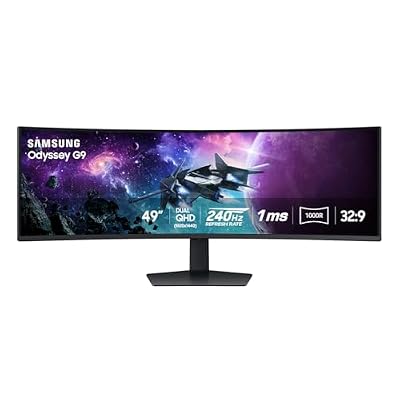
SAMSUNG 49" Odyssey G9 (G95C) Series DQHD 1000R Curved Gaming Monitor, 240Hz, 1ms(GtG), DisplayHDR 1000, AMD FreeSync Premium Pro, Eye Saver Mode, Auto Source Switch+, LS49CG950ENXZA, 2024




As an Amazon Associate we earn from qualifying purchases. Product prices and availability are accurate as of the date/time indicated.
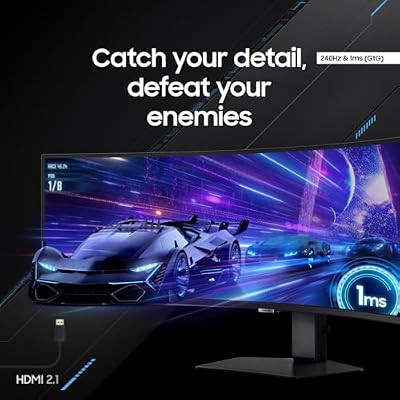
The Samsung Odyssey G7 (LC27G75TQSNXZA) dominates the 1440p 240Hz segment with its 1000R curved VA panel, delivering exceptional contrast ratios and deep blacks that IPS panels simply cannot match. At 240Hz with 1ms response time, it’s laser-focused for competitive shooters and fast-paced games. The 32-zone backlight with FALD (Full Array Local Dimming) pushes HDR content to impressive levels. Samsung’s commitment to gaming is evident in the dual sync support—both NVIDIA G-Sync and AMD FreeSync Premium work flawlessly here, making this monitor GPU-agnostic. At $399–$449, it’s positioned as the best value 240Hz option. Drawback: VA panels have slightly slower pixel transitions than IPS, visible to pixel-peepers in fast pans, but input lag is negligible. Best for: Competitive FPS players, RPG enthusiasts who want rich blacks and vibrant HDR.
2. ASUS ROG Swift PG279QM — Best for Color Accuracy & G-Sync

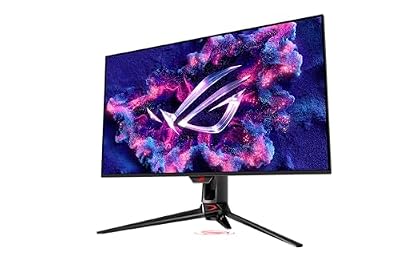
ASUS ROG PG32UCDM 32 Inch 4K 240Hz OLED Gaming Monitor QD-OLED | UHD, Custom Heatsink, 0.03ms, G-SYNC Compatible, USB-C 90W, True 10-bit, Graphene Film, 99% DCI-P3, for PS5 and Xbox




As an Amazon Associate we earn from qualifying purchases. Product prices and availability are accurate as of the date/time indicated.
The ASUS ROG Swift PG279QM is the IPS gold standard. Its Fast IPS panel maintains 99% sRGB color gamut with factory calibration ΔE < 2, essential for content creators moonlighting as gamers. At 1ms response time with 240Hz, motion clarity rivals VA panels without sacrificing color fidelity. The DisplayHDR 400 certification ensures HDR gaming remains punchy—not as intense as FALD systems, but sufficient for AAA titles. NVIDIA G-Sync is exclusive here (no FreeSync), so RTX users get the premium syncing experience. The ASUS Reflex Latency Analyzer built-in is a nice touch for measuring input lag. At $449–$499, it’s premium positioning justified by color accuracy and NVIDIA’s integration. Best for: RTX 5070 owners, competitive gamers prioritizing color reproduction, streamers who value panel quality for on-camera footage.
3. Gigabyte M27Q X — Best Value 1440p 240Hz with KVM Switch

The Gigabyte M27Q X punches above its $349–$399 price point with a Statuas IPS (SS IPS) panel, 92% DCI-P3 coverage, and an innovative KVM (Keyboard-Video-Mouse) switch that lets you control multiple PCs from one keyboard/mouse setup. At 240Hz with 1ms MPRT response time and AMD FreeSync Premium, it delivers competitive performance without requiring NVIDIA hardware. The 1x DisplayPort 1.4, 2x HDMI 2.0, 2x USB 3.0, and 1x USB Type-C (data + power delivery) make it the most I/O-rich option here. VESA DisplayHDR 400 and 350 nits brightness keep HDR content visible in bright rooms. The KVM feature is a game-changer for dual-PC setups (gaming + work). Best for: Budget builders, content creators juggling multiple machines, FreeSync/AMD GPU owners seeking no-compromise performance at entry-level pricing.
4. MSI MAG 274QF X24 — Best Budget 1440p 240Hz

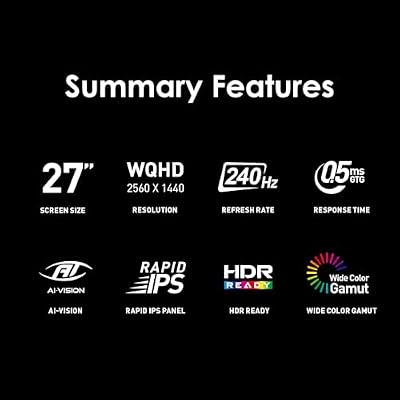
msi MAG 274QF X24 27-inch 2560 x 1440 (QHD) Gaming Monitor, 240Hz, AMD FreeSync Premium, HDMI, DisplayPort, VESA, Tilt, Height Adjustable, Speaker, 0.05ms, Black


As an Amazon Associate we earn from qualifying purchases. Product prices and availability are accurate as of the date/time indicated.
The MSI MAG 274QF X24 is the entry-level winner at $299–$349. Its Rapid IPS panel with 0.5ms response time (GtG, Minimum) is faster than most IPS alternatives, and the 240Hz refresh rate ensures smooth gameplay across competitive and single-player titles alike. HDR Ready (not HDR400) means HDR content plays, but with less spectacular peak brightness—acceptable for budget-conscious gamers. Adaptive-Sync works with both NVIDIA and AMD GPUs, removing the sync tax from your decision. Build quality is solid with VESA mounting, height adjustment, and tilt functionality. With a RTX 5070 prebuilt PC, this monitor unlocks excellent 1440p 240Hz gaming without breaking the bank. Best for: First-time 240Hz buyers, budget builders, anyone upgrading from 144Hz without the OLED price premium.
5. MSI MAG 274QP QD-OLED X24 — Best OLED: Ultimate Contrast & Speed

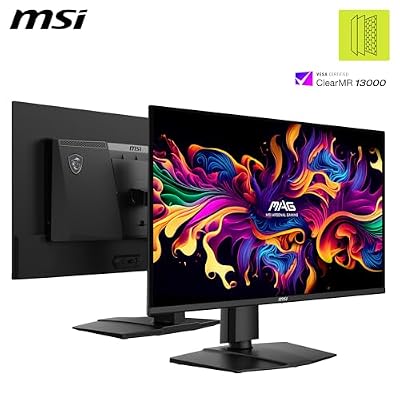
msi MAG 274QP QD-OLED X24 27-Inch WQHD Gaming Monitor, 2560 x 1440 Quantum Dot OLED Panel, 240Hz, 0.03ms, Adaptive-Sync, HDMI2.1, DP 1.4a, Tilt/Height Adjustable, Black




As an Amazon Associate we earn from qualifying purchases. Product prices and availability are accurate as of the date/time indicated.
The MSI MAG 274QP QD-OLED X24 represents the bleeding edge: Quantum Dot OLED (QD-OLED) technology combines pixel-level dimming (infinite contrast, true blacks) with quantum dot color enhancement. At 240Hz with a mind-bending 0.03ms response time, motion handling is unmatched—no ghosting, no motion blur, pure responsiveness. HDR1400 (1400 nits peak brightness) elevates HDR gaming to cinema-quality levels. The trade-off is price: $599–$699, but professionals and esports enthusiasts justify it for the responsiveness and visual pop. Minor concern: OLED lifetime (standard 10–15 years at moderate brightness) and potential burn-in risks if you leave static UI elements on-screen. MSI includes a 3-year warranty covering defects. Best for: Esports pros, RTX users demanding absolute fastest response times, HDR enthusiasts willing to invest in premium tech.
6. AOC Q27G4ZD QD-OLED — Best OLED Value

AOC 27" Gaming Monitor QHD 240Hz QD OLED NVIDIA G-SYNC Compatible Q27G4ZD | 2560×1440 Computer Monitor, 0.03ms, HDR, DP 1.4, HDMI 2.0, Earphone Out, VESA Mount, Console Ready, 3-Year Warranty


As an Amazon Associate we earn from qualifying purchases. Product prices and availability are accurate as of the date/time indicated.
The AOC Q27G4ZD democratizes OLED gaming. At $399–$499, it undercuts the MSI by $150–$200 while delivering the same QD-OLED panel with 240Hz and 0.03ms response time. The color accuracy (100% DCI-P3) and true black reproduction make single-player immersion unparalleled—think Baldur’s Gate 3 or Final Fantasy XVI with perfect contrast. G-Sync Compatible (not exclusive) gives it compatibility with both NVIDIA and AMD systems. HDMI 2.0 x2 and DisplayPort x2 provide flexible connectivity. The 3-year zero-bright-dot warranty is AOC’s confidence statement on longevity. This is the best OLED for budget-conscious competitive gamers. Best for: Mixed gaming (FPS + story-driven RPG/MMO), competitive players who want OLED responsiveness without paying premium MSI pricing, AMD and NVIDIA GPU owners alike.
7. Acer Predator XB273U GXbmiipruzx — Best All-Around IPS Alternative
The Acer Predator XB273U is the sleeper hit: a 27″ IPS panel with 240Hz, 1ms response time, 400 nits brightness, and NVIDIA G-Sync. Color accuracy (100% sRGB, ~99% DCI-P3) keeps it competitive with ASUS for color work. The industrial Predator aesthetics—aggressive angular frame, RGB accents—appeal to gamers wanting visual personality. HDR400 support and 178° viewing angles make it excellent for group gaming sessions. At $429–$499, it sits between budget and OLED pricing, offering the best balance of performance, aesthetics, and features. The 1ms response time paired with 240Hz ensures zero compromise in competitive titles. Best for: Gamers who want personality (RGB design), those building a $700 budget PC build and stepping up to 1440p, G-Sync-exclusive GPU owners seeking all-rounder balance.
Monitor Buying Guide: What to Look for in 1440p 240Hz
Panel Type: IPS, VA, or OLED?
IPS (In-Plane Switching) offers the best color accuracy and wide viewing angles. Response times (0.5–1ms) are adequate for 240Hz. Best for: Content creators, color-critical gamers, those who value calibration. Examples: ASUS ROG Swift PG279QM, Acer Predator XB273U.
VA (Vertical Alignment) delivers superior contrast and deep blacks. Response times (1–2ms) are competitive. Viewing angles narrow compared to IPS but acceptable. Best for: FPS players, dark-room gaming, HDR enthusiasts. Example: Samsung Odyssey G7.

OLED (Organic Light-Emitting Diode) combines pixel-level dimming (infinite contrast) with QD enhancement for vibrant colors. Response times (0.03ms) are unmatched. Burn-in risk exists but is rare with proper use. Best for: Competitive esports, premium single-player experiences, professionals. Examples: MSI MAG 274QP QD-OLED, AOC Q27G4ZD.
Response Time: GtG vs. MPRT
Gray-to-Gray (GtG) measures pixel transition from one shade to another. Faster is better; 0.5–1ms is competitive for 240Hz. Moving Picture Response Time (MPRT) is perceived response, which factors in motion. Both matter; manufacturers now list both to be transparent.
HDR Certification: HDR400, HDR600, HDR1400
DisplayHDR 400: 400 nits peak brightness; entry HDR. Sufficient for gaming, though not theatrical. Most 1440p IPS/VA panels offer this.
DisplayHDR 600: 600 nits peak brightness; premium HDR with more visual impact. Rarely seen at 1440p 240Hz due to cost.
DisplayHDR 1400: 1400 nits peak brightness; cinema-grade HDR. Found in OLED and high-end FALD systems. Transformative for immersion but expensive.
G-Sync vs. FreeSync: Does It Matter?
NVIDIA G-Sync is exclusive to NVIDIA GeForce GPUs (RTX series). Premium feature with certified performance; exclusive pricing premium. G-Sync Compatible is looser certification—works with FreeSync monitors but not as tightly locked to NVIDIA hardware.
AMD FreeSync is open-source and works with AMD Radeon GPUs. Cheaper to implement; manufacturers pass savings to buyers. FreeSync Premium adds HDR support and variable backlight.
**Verdict:** If you have an DDR5 RAM kit paired with an RTX 5070, G-Sync is worth the premium. AMD users get excellent value with FreeSync. Both eliminate tearing at variable frame rates.
Port Selection: DisplayPort vs. HDMI
DisplayPort 1.4 supports 1440p 240Hz natively and is recommended for competitive gaming. Supports chaining (daisy-chaining multiple monitors).
HDMI 2.0 maxes out at 1440p 144Hz; HDMI 2.1 handles 240Hz but is rare at this resolution. Console gamers often need HDMI; note that PS5/Xbox Series X max at 120Hz anyway.

Brightness & Contrast
Aim for 300+ nits in SDR (standard dynamic range) to combat glare and bright room environments. HDR peaks should exceed 400 nits. Contrast ratio (static): 1000:1 is good; OLED achieves infinity (pixel-level dimming). VA panels hit ~3000:1; IPS typically ~1000:1.
Ergonomics: Stand Adjustability
Look for height adjustment, tilt, swivel, and pivot. A premium gaming mouse is only useful if your monitor is at the right eye level. Most 1440p 240Hz monitors offer height adjustment; premium models add swivel and pivot.
FAQ: 1440p 240Hz Gaming Monitors
Q: Is 1440p 240Hz overkill for casual gaming?
A: Depends on your GPU. If you’re playing Cyberpunk 2077 on an RTX 4070 at max settings, you’ll likely hit 60–100 fps, so 240Hz is wasted. But if you’re playing Valorant, CS2, or Fortnite competitively and pushing 200+ fps, 240Hz becomes essential for smooth, responsive gameplay. The “sweet spot” for most is 1440p 144Hz; upgrade to 240Hz only if your GPU can consistently exceed 180 fps in your titles. At $350+, it’s a long-term investment—future games will demand more performance.
Q: What GPU do I need for 1440p 240Hz gaming?
A: RTX 4070 Super or RTX 5070 (NVIDIA) or RX 7900 GRE (AMD) are the minimum for 240 fps in competitive titles at high settings. For AAA games at medium-high settings, expect 100–150 fps, which leverages the 240Hz monitor but doesn’t max it. Esports players (playing Valorant, CS2) can achieve 240+ fps on older hardware like RTX 4070 or RTX 4090 depending on settings. If you’re running a budget gaming CPU, the GPU won’t be your bottleneck—CPU-GPU balance matters more at 240Hz than 60Hz.
Q: OLED vs. IPS for 1440p 240Hz gaming—which is better?
A: OLED wins on: Response time (0.03ms vs. 0.5–1ms), contrast (infinite vs. ~1000:1), color pop (HDR1400 vs. HDR400), and immersion in dark games.
IPS wins on: Color accuracy (factory calibrated, ~99% sRGB), burn-in safety (IPS has no pixel-level dimming risk), price ($349–$499 vs. $599–$699), and longevity (proven 5+ year lifespan).
Verdict: OLED for esports pros and single-player enthusiasts; IPS for casual gamers, content creators, and those wanting guaranteed longevity. AOC Q27G4ZD is the OLED compromise—excellent value at mid-range pricing.
Q: Can I use 1440p 240Hz monitors with a console (PS5/Xbox Series X)?
A: Technically yes, but you won’t use the 240Hz. PS5 maxes at 120 fps (some games use 60 fps mode); Xbox Series X similarly tops out at 120 fps. HDMI 2.0 on most monitors supports 1440p 120Hz, and HDMI 2.1 (rare) supports 240Hz. 1440p 240Hz monitors aren’t optimized for console gaming—you’re paying for performance you won’t use. Better bet: 1440p 120Hz gaming monitor ($299–$399) or 4K 120Hz ($500+) for console gamers. PC gamers building a high-end rig? Full speed ahead with 240Hz.
Q: Should I buy a curved or flat monitor for 1440p 240Hz?
A: Curved (1000R = 1-meter radius curvature) enhances immersion and reduces head movement—excellent for single-player RPGs and MMOs. Flat panels are better for esports where pixel-perfect alignment and consistency matter. Samsung Odyssey G7 is the only curved option in this list; all others are flat. Curved monitors aren’t inherently better, just different. If you’re mixing competitive FPS and immersive story games, flat is safer.
Q: What’s the difference between 1ms GtG and 0.03ms OLED response time?
A: In practice, the difference is imperceptible in fast-twitch gaming once you exceed ~1ms. Professional esports players on LAN can distinguish sub-millisecond differences, but for 99% of gamers, 1ms IPS = 0.03ms OLED in real gameplay. The OLED advantage is true blacks and infinite contrast, not just raw speed. Don’t buy OLED solely for response time; the HDR and contrast are the real wins.

Conclusion: Which 1440p 240Hz Monitor Should You Buy?
Your choice depends on budget, GPU, and playstyle:
Best Overall Value: Samsung Odyssey G7 ($399–$449) delivers VA panel contrast, dual sync, and 240Hz at an unbeatable price. Ideal if you play competitive FPS and want deep blacks.
Best for RTX Owners: ASUS ROG Swift PG279QM ($449–$499) pairs G-Sync exclusivity with IPS color accuracy and HDR400 certification—premium feel justified.
Best Budget Option: MSI MAG 274QF X24 ($299–$349) gets you to 1440p 240Hz without sacrificing core features; Adaptive-Sync works with any GPU.
Best OLED Value: AOC Q27G4ZD ($399–$499) brings OLED’s infinite contrast and 0.03ms response to competitive pricing—the value champion of OLED 240Hz.
Best Premium Option: MSI MAG 274QP QD-OLED X24 ($599–$699) is the endgame: HDR1400, 0.03ms, and QD-OLED technology for professionals and esports teams.
If you’re upgrading your entire setup—monitor, GPU, and a gaming motherboard with gaming PSU—start with your GPU. RTX 5070 or 4070 Super? Go ASUS or Samsung. AMD Radeon RX 7900? Gigabyte M27Q X or AOC Q27G4ZD. Budget-conscious? MSI MAG 274QF X24 never disappoints. Pair any of these with your favorite gaming controller for relaxing couch sessions, and you’ve built a genuinely competitive 1440p gaming setup for 2026. The monitor you choose will last 5+ years—invest wisely.
Related Articles
Looking for more on this topic? Browse the hand-picked guides below — each one applies the same scoring rubric used in this review.
Frequently Asked Questions
What GPU do I need to actually use 1440p at 240Hz?
It depends entirely on the game. Competitive titles like CS2, Valorant, and Apex reach those frame rates on midrange hardware, while demanding single-player games will not approach 240fps even on a flagship. Most buyers use the high refresh rate for esports and accept lower frame rates elsewhere.
Should I buy OLED or a fast IPS panel?
OLED offers per-pixel contrast, near-instant response, and superior motion clarity, but costs more and carries some burn-in risk with static interface elements. Fast IPS panels are brighter in sunlit rooms, cheaper, and carry no burn-in concern. Choose OLED for image quality, IPS for value and worry-free desktop use.
Is 1440p 240Hz better than 4K 144Hz?
For competitive play, yes, because the lower resolution is far easier to drive at high frame rates and the refresh advantage is more useful than extra pixels. For single-player and mixed use, 4K delivers a visibly sharper image. Match the panel to how you actually spend your playing time.
Do I need DisplayPort 2.1 or is 1.4 enough?
DisplayPort 1.4 with display stream compression handles 1440p at 240Hz without issue, so it is not a limitation at this resolution. DisplayPort 2.1 becomes relevant at 4K with very high refresh rates. Do not pay a premium for it purely for a 1440p panel.
Should I be worried about OLED burn-in?
Modern panels include pixel shifting, logo dimming, and automatic refresh cycles that make burn-in unlikely with varied use, and most manufacturers now include burn-in coverage in the warranty. Risk rises with many hours daily showing the same static taskbar or HUD at high brightness.














