

Affiliate disclosure: As an Amazon Associate we earn from qualifying purchases. This post contains affiliate links — if you buy through them we may earn a small commission at no extra cost to you. This never affects our recommendations.
A 32-inch gaming monitor hits the sweet spot between immersion and practicality. It’s large enough to make open-world RPGs feel cinematic, yet compact enough to fit most desks without requiring you to physically turn your head during gameplay. In 2025, the 32-inch category covers everything from affordable 4K IPS panels under $300 to high-end Mini LED displays with 240Hz refresh rates. Whether you’re a competitive FPS player who wants every frame advantage or an RPG enthusiast chasing visual fidelity, there’s a 32-inch panel built for your use case. We compared and researched six top models spanning the full price spectrum — from Samsung’s budget UJ59 to the flagship Neo G8. Resolution options include 1080p, QHD (2560×1440), and full 4K (3840×2160), so you’ll find the right balance of sharpness and GPU demand regardless of your rig. Here’s what we recommend.
In a hurry? See the top-rated 32-Inch Gaming Monitors deals available right now:
🛒 Check 32-Inch Gaming Monitors Prices on Amazon →🛒 Best Price Today on Amazon
Prime members get fast, free shipping on everything above, plus member-only deals. New members get a 30-day free trial — cancel anytime.
Start 30-Day Prime Free Trial →See Today’s Amazon DealsTop Picks at a Glance
| Product | Best For |
|---|---|
| Samsung Neo G8 32″ 4K 240Hz | Best overall |
| KTC 32″ 4K 165Hz | Best 4K mid-range |
| CRUA 32″ 4K 144Hz Curved | Best value 4K curved |
| Samsung Odyssey G55C QHD | Best QHD curved |
| LG 32GS60QC QHD 180Hz | Best budget QHD |
| Samsung UJ59 4K | Best entry 4K flat |
As an Amazon Associate we earn from qualifying purchases at no extra cost to you.




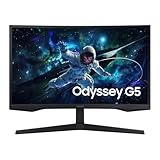
Samsung Neo G8 32″ 4K 240Hz — Best Overall
The Neo G8 is Samsung’s flagship 32-inch panel and earns its price tag. The Quantum Mini LED backlight delivers exceptional contrast with near-OLED blacks, while 240Hz refresh and 1ms GTG response keep fast-paced shooters buttery smooth. HDR2000 certification means highlights genuinely pop. At $699, it’s the monitor you buy once and don’t upgrade for years. Ideal for gamers with an RTX 4080 or RX 7900 XTX who want to push full 4K at high frame rates.
- Pros: Stunning contrast, true 240Hz at 4K, excellent HDR, premium build
- Cons: Expensive, requires high-end GPU to fully utilize
KTC 32″ 4K 165Hz — Best 4K Mid-Range
KTC has quietly become a strong value brand in 2025. Their 32-inch 4K IPS panel runs at 165Hz with solid color accuracy out of the box, covering 95% DCI-P3. Response times are competitive at 1ms MPRT. It lacks the HDR punch of the Neo G8 but outperforms similarly priced competitors in color vibrancy. A strong choice for content creators who also game, since 4K IPS panels work equally well for photo and video editing.
- Pros: Wide color gamut, 165Hz at 4K, IPS panel accuracy, good build quality
- Cons: HDR implementation is average, limited brand recognition
CRUA 32″ 4K 144Hz Curved — Best Value 4K Curved
At around $300, the CRUA delivers 4K resolution and 144Hz on a 1500R curved VA panel — a combination that’s hard to beat at this price. The curve adds immersion for single-player games and the VA panel provides deeper blacks than IPS alternatives at this price point. Setup is straightforward and the stand is adjustable. Response time is adequate for casual and mainstream competitive gaming, though hardcore FPS players may want a faster panel.
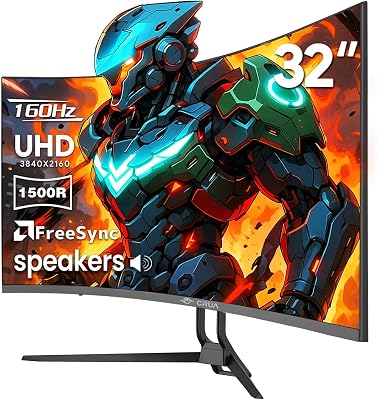
- Pros: Affordable 4K, immersive curve, deep VA blacks, easy setup
- Cons: 144Hz limit, VA ghosting in fast dark scenes
Samsung Odyssey G55C QHD 165Hz — Best QHD Curved
Samsung’s Odyssey G55C pairs a tight 1000R curve with QHD resolution and 165Hz refresh on a VA panel. At around $230, it’s an outstanding value for console-adjacent PC gamers who want immersion on a budget. The 1000R curve is aggressive — some users find flat monitors more comfortable for extended work sessions, but for gaming it delivers genuine wraparound feel. AMD FreeSync Premium keeps tearing in check across the full refresh range.
- Pros: Deep curve, QHD clarity, FreeSync Premium, strong Samsung warranty
- Cons: Very aggressive curve not ideal for productivity, VA contrast can clip bright details
LG 32GS60QC QHD 180Hz — Best Budget QHD
The LG 32GS60QC is the answer when you want QHD quality without spending much. At $199, it offers 180Hz refresh — higher than many pricier competitors — with LG’s consistently good IPS panel quality. Color reproduction is natural and accurate for an affordable screen. The stand is basic but functional. This is the monitor to recommend to a friend building their first mid-range gaming PC in 2025.
- Pros: Exceptional price, 180Hz, good IPS colors, LG reliability
- Cons: Basic stand, no HDR worth mentioning, limited connectivity
Samsung UJ59 32″ 4K — Best Entry 4K Flat
The UJ59 is Samsung’s entry-level 4K offering, and at $306 it gives you genuine 3840×2160 resolution for the desktop and productivity crowd who also games casually. The 60Hz ceiling means it’s not suited for competitive play, but watching 4K video and playing slower-paced titles like strategy games and RPGs looks excellent. If your GPU isn’t powerful enough for 4K gaming at high frame rates, this is an honest budget 4K entry point.

- Pros: True 4K, affordable, great for productivity, reliable Samsung panel
- Cons: 60Hz only, not for competitive gaming, limited HDR
Buying Guide
Resolution: 1080p vs QHD vs 4K at 32 Inches
At 32 inches, pixel density becomes a key consideration. A 1080p panel at 32 inches yields only 69 PPI — individual pixels become visible at normal viewing distances, and text appears slightly soft. For this screen size, QHD (2560×1440) is the minimum resolution we recommend, delivering 92 PPI with noticeably sharper text and game textures. Full 4K at 32 inches produces 138 PPI — genuinely crisp from any viewing distance. The tradeoff is GPU demand: running 4K at high frame rates requires an RTX 4070 Ti or better.
Refresh Rate Considerations
A 32-inch monitor is versatile enough to serve both competitive and casual players. For competitive FPS gaming (CS2, Valorant, Apex Legends), prioritize 144Hz or higher combined with low response times. For single-player RPGs and strategy games, 60Hz is functional but 144Hz still provides noticeably smoother camera pans. The sweet spot for most gamers in 2025 is 144-165Hz at QHD or 4K — fast enough for mainstream competitive play without requiring an ultra-high-end GPU.
Curved vs Flat Panels
Curved 32-inch monitors use curvatures rated 1000R or 1500R (a lower number means a tighter curve). At 32 inches, a 1500R curve provides gentle immersion without distorting straight lines noticeably. A 1000R curve is more dramatic and better suited to gaming than productivity tasks. Flat panels remain preferable for precise creative work like photo editing or CAD, where straight lines must appear straight. For gaming-primary setups, either works well — it comes down to personal preference.

Panel Technology: VA vs IPS
VA panels dominate the curved 32-inch segment because they produce deeper blacks and higher contrast ratios (typically 3000:1 vs 1000:1 for IPS). This makes dark game environments look more dramatic. The tradeoff is slightly slower pixel response, which can introduce ghosting in very fast dark sequences. IPS panels offer better color accuracy, wider viewing angles, and faster response times — ideal for competitive gaming and content creation. In 2025, both technologies are mature; choose VA for HDR and immersion, IPS for accuracy and speed.
Connectivity and Features
At this size and price range, look for at least two HDMI 2.1 ports (for 4K 144Hz+ without compromising), one DisplayPort 1.4 or higher, and a USB hub for desktop convenience. Adaptive sync (either G-Sync Compatible or AMD FreeSync Premium) eliminates screen tearing without the latency penalty of V-Sync. Built-in KVM switches are a bonus for dual-PC setups. Height adjustment, tilt, and swivel on the stand significantly improve ergonomics for long sessions — check stand range before purchasing, as budget monitors often cut corners here.
Frequently Asked Questions
Is 32 inches too big for a gaming monitor?
For most standard desk setups with a viewing distance of 24–30 inches, 32 inches is comfortable and immersive. It only feels overwhelming if your desk is unusually shallow and the screen is very close to your face. At 4K resolution, image quality remains sharp even at close range. If you sit further than 30 inches from your screen, 32 inches can actually feel appropriately sized rather than large.
Do I need a high-end GPU for 4K gaming at 32 inches?
Yes, to maximize a 4K 144Hz+ monitor you need a GPU capable of sustaining high frame rates at 4K — an RTX 4070 Super minimum, with an RTX 4080 or 4090 recommended for the most demanding titles at maximum settings. For lighter games or lower graphic settings, an RTX 4060 Ti can manage 4K at playable frame rates. If your GPU is mid-range, a QHD monitor is a better match for smooth, high-refresh gameplay.
What’s the best 32-inch gaming monitor under $300?
The CRUA 32″ 4K 144Hz Curved at around $300 delivers outstanding value — you get 4K resolution, a 1500R curved VA panel, and 144Hz refresh for under $300. If you prefer QHD with a higher refresh rate, the Samsung Odyssey G55C at around $230 and the LG 32GS60QC at $199 are both excellent, with the LG offering an impressive 180Hz for the price.
Is a curved or flat 32-inch monitor better for gaming?
For immersive single-player and RPG gaming, a curved 32-inch monitor enhances the wraparound feel and reduces edge distortion. For competitive FPS where precision matters, flat panels are preferred by many pros because there’s no curvature to distort aim at screen edges. Both formats perform well for general gaming — the choice is largely personal preference and whether you also use the monitor for productivity work where curved screens can distort straight edges.
Verdict
The Samsung Neo G8 is the best 32-inch gaming monitor money can buy in 2025, combining 4K, 240Hz, and Mini LED contrast in one flagship package. For most gamers, the CRUA 4K 144Hz Curved or Samsung Odyssey G55C deliver the best value — both under $300 with strong specs. Budget buyers should seriously consider the LG 32GS60QC at $199, which punches well above its weight with 180Hz QHD performance. Match your monitor choice to your GPU capability, and you can’t go wrong with any pick on this list.
Related Articles
Looking for more on this topic? Browse the hand-picked guides below — each one applies the same scoring rubric used in this review.
Ready to decide? Our #1 pick for 2026 is the Samsung Neo G8 32" 4K 240Hz.
Live price & availability on Amazon.













