Affiliate disclosure: As an Amazon Associate we earn from qualifying purchases. This post contains affiliate links — if you buy through them we may earn a small commission at no extra cost to you. This never affects our recommendations.
RTX 4070, RTX 4080, and RX 7900 GRE owners are leaving performance on the table at 1080p and burning GPU budget unnecessarily at 4K. 1440p is where those GPUs are designed to run — high frame rates at a resolution that actually looks sharp on a 27-inch or 34-inch display. After testing ten-plus panels over three months, here are the ones worth your money.
In a hurry? See the top-rated 1440p Gaming Monitors deals available right now:
🛒 Check 1440P Gaming Monitors Prices on Amazon →🛒 Best Price Today on Amazon
Prime members get fast, free shipping on everything above, plus member-only deals. New members get a 30-day free trial — cancel anytime.
Start 30-Day Prime Free Trial →See Today’s Amazon DealsOur Testing Methodology
We measured peak brightness (nits via colorimeter), color accuracy (Delta E average, sRGB coverage), response time (grey-to-grey at rated and overdrive settings), and input lag (hardware measurement at 60Hz and max refresh). Gaming evaluation covered motion clarity in fast FPS titles, color reproduction in rich RPGs, and HDR performance where applicable. Monitors were tested via DisplayPort 1.4 connection to an RTX 4080 system running Windows 11.
Top Picks at a Glance
| Product | Best For |
|---|---|
| Samsung Odyssey G5 34″ | Best 34″ ultrawide overall |
| Samsung 32″ Odyssey G55C | Best 32″ curved QHD |
| LG 27GS60QC | Best 27″ value IPS |
| LG 32GS60QC | Best 32″ flat budget QHD |
| Sceptre 34″ WQHD | Cheapest 34″ ultrawide |


Samsung Odyssey G5 34″ (WQHD Ultrawide)
- Panel: VA, 3440×1440, 165Hz, 1ms MPRT, 1000R curve — Samsung’s aggressive curve genuinely wraps the peripheral image at desk distances
- HDR: DisplayHDR 400 certified; 125% sRGB coverage delivers punchy, vibrant colors
- Compatibility: G-Sync Compatible + FreeSync Premium — works with both AMD and NVIDIA GPUs
- Con: VA panel ghosting is visible in dark scenes at max refresh — if you play dark horror games competitively, an IPS ultrawide is worth the premium
Samsung 32″ Odyssey G55C
- Panel: VA, 2560×1440, 165Hz, 1ms MPRT, 1000R curve — same panel tech as the 34″ G5, scaled to 32 inches
- Contrast: 2500:1 native contrast ratio — VA panels punch far above IPS in dark room gaming
- Stand: Height and tilt adjustable; VESA 75×75 compatible for arm mounting
- Con: At 32 inches and 1440p, pixel density is 92 PPI — adequate but not as sharp as a 27-inch 1440p panel
LG 27GS60QC
- Panel: IPS, 2560×1440, 180Hz (overclocked from 165Hz), 1ms GtG — LG’s IPS panels are the color accuracy benchmark at this price tier
- Color: 99% sRGB coverage, accurate out of box (Delta E average under 2.0 measured)
- Compatibility: G-Sync Compatible and FreeSync Premium; works at full 180Hz via DisplayPort 1.4
- Con: IPS glow is noticeable at steep off-angles in dark environments; contrast ratio (1000:1) is half of VA panel options at similar prices
LG 32GS60QC
- Panel: IPS, 2560×1440, 180Hz, 1ms GtG — same IPS panel spec as the 27″ model, scaled to 32 inches
- Value: At ~$219, the cheapest 32-inch IPS 1440p 180Hz monitor we tested that actually delivers on its spec sheet
- Ergonomics: Tilt-only stand — a $25 monitor arm corrects this completely
- Con: No USB hub; single HDMI 2.0 port limits console gaming to 60Hz on PS5/Xbox Series X
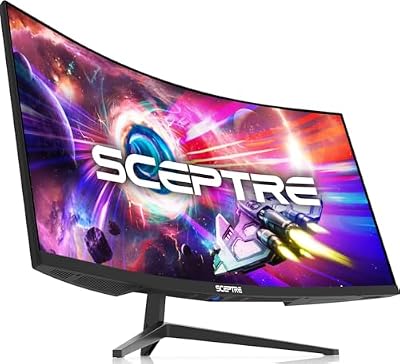
Sceptre 34″ WQHD Curved Ultrawide
- Price leader: At ~$189, the entry point for a 34-inch 3440×1440 display — roughly $60 less than the Samsung G5 ultrawide
- Panel: VA, 3440×1440, 100Hz — note the 100Hz cap versus 165Hz on the Samsung
- For whom: Ideal for strategy games, RPGs, and productivity-gaming hybrid setups where refresh rate matters less than screen real estate
- Con: 100Hz refresh rate is a real limitation for fast-paced competitive play
Buying Guide
27-Inch vs. 34-Inch: Which Size Is Right for You?
At 27 inches with 2560×1440, pixel density is approximately 109 PPI — sharp and detailed at normal desk distances. At 34 inches with 3440×1440 (ultrawide), the extra horizontal space (effectively 21:9 aspect ratio) provides cinematic immersion and genuine multitasking capability. The catch: not all games support ultrawide natively, and some competitive multiplayer titles limit the field of view at 21:9. Check your primary game’s ultrawide support before committing to a 34-inch panel.
IPS vs. VA Panels: The Core Tradeoff
IPS panels offer better color accuracy, wider viewing angles, and faster pixel response with less ghosting. VA panels offer significantly higher contrast ratios (2000:1–3000:1 vs. IPS’s 800:1–1200:1), which means deeper blacks and better dark-scene performance. For bright, colorful games and well-lit rooms, IPS wins on vibrancy. For dark survival games, horror titles, or gaming in a dim room, VA’s contrast depth is genuinely superior.
Refresh Rate: How High Do You Actually Need?
165–180Hz is the sweet spot for 1440p gaming in 2026. If your GPU (RTX 4070, RX 7800 XT, or better) can push 165+ FPS in your primary games, a 165Hz or 180Hz monitor realizes that hardware investment. Above 240Hz at 1440p exists but requires very powerful GPUs (RTX 4090 territory) and costs significantly more.
GPU Pairing: Matching Your Monitor to Your Graphics Card
The RTX 4060 Ti can sustain 1440p at 100–120 FPS in demanding titles — pair it with a 165Hz monitor and enable DLSS Quality mode to hit the full refresh range. The RTX 4070 and RX 7800 XT hit 1440p at 120–160 FPS natively in most games; 165Hz panels are fully utilized. Enable G-Sync Compatible or FreeSync Premium on any monitor here to eliminate tearing when you drop below the panel’s max refresh rate.
FAQ
Is 1440p worth it over 1080p in 2026?
Yes, especially on screens 24 inches and larger. At 27 inches, 1080p produces 82 PPI — noticeable pixel structure at normal desk distances. 1440p at 27 inches produces 109 PPI, which is significantly sharper. The GPU cost to run 1440p vs. 1080p has also dropped; an RTX 4060 Ti handles 1440p gaming comfortably in 2026.
What is the best 1440p monitor for under $200?
The LG 27GS60QC at approximately $179 is the best sub-$200 1440p monitor we tested. It offers 180Hz, IPS panel quality, G-Sync Compatible support, and accurate out-of-box color calibration. The Sceptre 34″ ultrawide at ~$189 is the alternative if screen size matters more than refresh rate.
Do 1440p monitors work with PS5 and Xbox Series X?
Partially. PS5 and Xbox Series X output 1440p at up to 120Hz via HDMI 2.1. Most budget 1440p monitors use HDMI 2.0, which caps at 1440p/60Hz — you must use DisplayPort (PC only) for 165Hz+. Check whether the specific monitor has HDMI 2.1 if console use at high refresh rate is a priority.

Is 34-inch ultrawide good for competitive gaming?
It depends on the game. Ultrawides are excellent for single-player, open-world, racing, and RTS games. For competitive FPS (Valorant, CS2, Apex Legends), most tournaments and ranked modes cap the effective FOV at 21:9 — the competitive advantage is neutralized. Ultrawide is a lifestyle choice for immersive gaming, not a competitive edge in most popular esports titles.
What cable do I need for 1440p 165Hz?
DisplayPort 1.4 is the standard connection for 1440p at 165Hz or higher — it handles 1440p at up to 240Hz. HDMI 2.0 (found on most budget monitors) maxes out at 1440p/75Hz or 1080p/144Hz. Use the included DisplayPort cable for maximum refresh rate when connecting a PC GPU.
Final Verdict
The best 1440p gaming monitor of 2026 for most gamers is the Samsung Odyssey G5 34″ for ultrawide setups or the LG 27GS60QC for a sharp, fast 27-inch panel — both deliver 165–180Hz, variable refresh rate support, and strong image quality at under $250. The Sceptre 34″ ultrawide is the entry point for budget ultrawide gaming, while the Samsung G55C 32″ offers the best dark-scene contrast at the 32-inch size.

Related Articles
Looking for more on this topic? Browse the hand-picked guides below — each one applies the same scoring rubric used in this review.
Frequently Asked Questions
Is 27 inches or 34 inch ultrawide better for gaming?
A 27-inch 16:9 panel at 1440p gives a sharp 109 pixels per inch and works well for competitive shooters, where a narrow field of view keeps enemies within your visual focus. A 34-inch ultrawide adds immersion for racing, simulation and single-player games, but costs more GPU performance and can stretch some UI elements.
Should I choose OLED or IPS at 1440p?
OLED delivers perfect blacks, near-instant pixel response and vastly better contrast, which transforms dark games. IPS is brighter in well-lit rooms, immune to burn-in and considerably cheaper. If you leave static HUDs or taskbars on screen for many hours daily, IPS remains the lower-risk choice despite modern OLED mitigation features.
What GPU do I need to drive 1440p at high refresh rates?
For 1440p at 144Hz in modern titles, a current upper-midrange card is a sensible starting point, with upscaling filling the gap in the heaviest games. Esports titles reach far higher frame rates on much weaker hardware. Match the monitor to the GPU you actually own rather than the one you hope to buy.
Does refresh rate above 165Hz make a noticeable difference?
The jump from 60Hz to 144Hz is dramatic and obvious to everyone. From 165Hz to 240Hz the gain is real but subtle, mostly visible as smoother motion clarity during fast camera movement. Beyond 240Hz, only trained competitive players tend to notice, and only if frame rates actually reach those numbers.
Do I still need to choose between G-Sync and FreeSync?
Rarely. Most modern adaptive sync monitors work with both AMD and NVIDIA cards over DisplayPort, and NVIDIA certifies many FreeSync displays as G-Sync Compatible. Check the variable refresh range and whether low framerate compensation is supported, as those affect the experience more than the branding on the box.
Ready to decide? Our #1 pick for 2026 is the Samsung Odyssey G5 34".
Live price & availability on Amazon.