Affiliate disclosure: As an Amazon Associate we earn from qualifying purchases. This post contains affiliate links — if you buy through them we may earn a small commission at no extra cost to you. This never affects our recommendations.
At 360Hz, every frame is rendered in just 2.78 milliseconds — a refresh rate that eliminates virtually all motion blur and gives competitive players the smoothest possible visual feedback during fast-paced gameplay. In 2025, the arrival of QD-OLED technology at 360Hz has fundamentally changed what a fast monitor can look like. These panels don’t just refresh quickly — they also deliver perfect blacks, vibrant colors, and sub-0.03ms pixel response times that no LCD can match. The result is a monitor that eliminates both motion blur and the grey smearing that plagued earlier high-refresh displays. All five monitors on this list use QD-OLED panels, and all run at 2560×1440 resolution — the sweet spot where modern GPUs can sustain 360fps in competitive titles. If you play CS2, Valorant, Apex Legends, or any game where reacting faster than your opponent matters, a 360Hz QD-OLED panel is the sharpest competitive edge a monitor can give you.
In a hurry? See the top-rated 360Hz Gaming Monitors deals available right now:
🛒 Check 360Hz Gaming Monitors Prices on Amazon →🛒 Best Price Today on Amazon
Prime members get fast, free shipping on everything above, plus member-only deals. New members get a 30-day free trial — cancel anytime.
Start 30-Day Prime Free Trial →See Today’s Amazon DealsTop Picks at a Glance
| Product | Best For |
|---|---|
| Alienware AW2725DF 27″ QD-OLED | Best overall |
| MSI MAG 271QPX QD-OLED | Best value flagship |
| MSI MPG 271QRX QD-OLED | Best for RGB fans |
| ASUS ROG Strix 27″ QD-OLED | Best ecosystem integration |
| Samsung Odyssey G6 27″ QD-OLED | Best Samsung option |


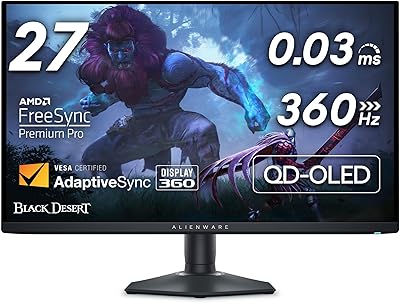
Alienware AW2725DF 27″ QD-OLED 360Hz — Best Overall
Dell’s Alienware monitor division consistently delivers top-tier competitive panels, and the AW2725DF is their finest at 360Hz. The QD-OLED panel produces infinite contrast with true blacks, 99% DCI-P3 color coverage, and a sub-0.03ms response time that makes 1ms IPS panels feel sluggish by comparison. At $596, it undercuts Samsung and ASUS alternatives while matching them in core performance. G-Sync Compatible and FreeSync Premium Pro certified. The build quality is exceptional with a sturdy, fully adjustable stand. Our top pick without reservation.
- Pros: Best price-to-performance, true OLED blacks, sub-0.03ms response, excellent stand
- Cons: OLED burn-in risk with static elements, no built-in USB hub on base model
MSI MAG 271QPX QD-OLED 360Hz — Best Value Flagship
MSI’s MAG line targets performance-focused buyers who don’t want to pay the ASUS or Samsung brand premium. The 271QPX delivers identical QD-OLED panel performance — 360Hz, QHD, true per-pixel lighting — at $599.99 with a comprehensive OSD and solid connectivity including USB-C with power delivery. Color calibration out of the box is among the best We researched, making it viable for content creation alongside gaming. An excellent alternative if the Alienware is out of stock.
- Pros: Competitive pricing, USB-C PD, accurate factory calibration, fast panel
- Cons: Bulkier stand than Alienware, slightly less refined OSD navigation
MSI MPG 271QRX QD-OLED 360Hz — Best for RGB Enthusiasts
The MPG 271QRX sits just above MSI’s MAG line with enhanced RGB lighting, a more premium stand design, and additional software integration with MSI Mystic Light. The core QD-OLED panel performance is identical to the MAG variant — you’re paying the extra $30 for aesthetics and ecosystem features. If your build already uses MSI components and you want unified RGB control, this is the obvious choice. Performance-only buyers should save the $30 and choose the MAG instead.
- Pros: Full RGB lighting, premium stand, MSI ecosystem integration, identical panel performance
- Cons: $30 premium over MAG for mostly aesthetic upgrades
ASUS ROG Strix 27″ QD-OLED 360Hz — Best Ecosystem Integration
ASUS brings its ROG ecosystem to the QD-OLED 360Hz category with the Strix, adding ASUS Aura Sync RGB, a built-in USB hub, and the ROG GamePlus overlay toolkit with crosshair, timer, and FPS counter overlays. The ROG software suite is mature and genuinely useful. At $719.99, it’s the most expensive pick on this list, but the added features justify the premium for ASUS loyalists. The panel quality matches the Alienware and MSI options exactly — all source the same Samsung QD-OLED unit.
- Pros: ROG GamePlus features, USB hub, Aura Sync RGB, strong ASUS warranty
- Cons: Most expensive option, premium is mainly for features rather than panel performance
Samsung Odyssey G6 27″ QD-OLED 360Hz — Best Samsung Option
Samsung’s own QD-OLED 360Hz entry offers tight Samsung software integration and the brand’s signature build quality. At $724.99, it’s the most expensive alongside the ROG Strix, but Samsung’s Smart Monitor features — including cloud gaming support and a built-in app platform — add value for users who want a monitor that functions beyond pure gaming. The panel is the same QD-OLED technology Samsung pioneered, so image quality is reference-grade. Choose this if you’re deeply embedded in the Samsung Smart TV ecosystem.
- Pros: Samsung ecosystem features, Smart Monitor capabilities, premium build, reference QD-OLED quality
- Cons: Highest price bracket, Smart features not useful for gaming-only setups
Buying Guide
Why QD-OLED at 360Hz?
Traditional IPS and TN panels at 360Hz struggle with grey-to-grey response times — they can hit 360Hz but residual smearing between pixels reduces the practical benefit. QD-OLED eliminates this problem entirely. Because each pixel generates its own light and can switch completely off, response times are measured in microseconds rather than milliseconds. At 360Hz with QD-OLED, you get both the frame rate advantage of a 360Hz display and the clarity advantage of OLED — no ghosting, no smearing, just perfectly sharp motion at every frame.

Can My GPU Actually Run 360fps?
Sustaining 360fps requires a powerful GPU, but it’s more achievable than it sounds in competitive titles. Games like CS2, Valorant, and Overwatch 2 are deliberately optimized to run at very high frame rates even on mid-range hardware. An RTX 4070 can sustain 360fps in Valorant at QHD on medium settings. An RTX 4080 handles CS2 at 360fps comfortably even at high settings. For the competitive FPS genre where these monitors shine, a mid-to-high-end modern GPU is sufficient.
360Hz vs 240Hz: Is the Jump Worth It?
The perceptible difference between 240Hz and 360Hz is smaller than the jump from 144Hz to 240Hz, but it is real and measurable. Professional esports players consistently rank 360Hz monitors as providing better target acquisition in fast flick-shot scenarios. The reduction in system latency from 240Hz to 360Hz is approximately 1.4ms — small, but meaningful when reaction windows in top-tier CS2 play are measured in milliseconds. For casual and semi-competitive players, 240Hz QD-OLED is a more economical choice. For serious ranked or tournament play, 360Hz provides a genuine, if incremental, advantage.

OLED Burn-In: A Real Concern?
QD-OLED burn-in is a real risk but significantly overstated for gaming use. Burn-in occurs from static elements displayed at high brightness for thousands of hours — think desktop taskbars or always-visible HUD elements. All five monitors on this list include built-in burn-in mitigation features: pixel shift, logo detection, and automatic brightness management. For gaming-primary use with regular varied content, burn-in risk is low. If you also use the monitor as a primary desktop display with a static taskbar, enable pixel shifting and use a screensaver. Avoid leaving the monitor on with a static image for extended periods.
G-Sync vs FreeSync at 360Hz
All five monitors on this list support both G-Sync Compatible and AMD FreeSync Premium Pro, so they work with both NVIDIA and AMD GPUs. For NVIDIA users, G-Sync Compatible provides hardware-level adaptive sync without the $200-$300 G-Sync module premium. The practical performance difference between G-Sync Compatible and full G-Sync is negligible at frame rates above 240fps. Choose your GPU based on performance and value, not monitor compatibility requirements.
Frequently Asked Questions
What GPU do I need for a 360Hz monitor?
For competitive FPS titles like CS2 and Valorant, an RTX 4070 or RX 7800 XT can sustain 360fps at QHD on competitive settings. For more demanding games like Apex Legends at higher settings, an RTX 4080 is more appropriate. The key is matching your in-game settings to your GPU’s capability — competitive players typically lower settings to maximize frame rate regardless of monitor quality.
Is 360Hz worth it over 240Hz for casual gaming?
For casual and story-driven gaming, 360Hz provides no meaningful advantage over 240Hz. The visual difference is only perceptible in very fast-motion scenarios involving precise tracking. If you play a mix of competitive and casual games, a 240Hz QD-OLED monitor offers better value. Reserve 360Hz for setups where competitive performance is the primary goal and every millisecond of advantage matters.
Do 360Hz monitors have good image quality for movies and content?
QD-OLED panels have outstanding image quality for all content types. The infinite contrast ratio, wide color gamut, and high peak brightness produce cinema-grade visuals that exceed what most gaming-focused monitors deliver. Streaming HDR content on a 360Hz QD-OLED monitor looks exceptional — significantly better than equivalent IPS panels at the same price. These monitors serve dual roles as both elite gaming displays and premium media screens.
How long do QD-OLED gaming monitors last?
Samsung rates its QD-OLED panels for 100,000 hours of use — equivalent to over 11 years of continuous operation. In real-world gaming use at typical brightness levels (150-200 nits for gaming), panel longevity is not a practical concern. The more relevant factor is burn-in management with static content. With normal varied use and the built-in burn-in prevention features enabled, a QD-OLED gaming monitor should remain in excellent condition for 5-7+ years of heavy use.
Verdict
Every monitor on this list uses the same Samsung QD-OLED panel technology, so panel performance is essentially matched across all five. The Alienware AW2725DF wins on value, offering identical image and motion performance at the lowest price. The MSI MAG 271QPX is a close second with USB-C charging. The ASUS ROG Strix and Samsung Odyssey G6 carry a $120+ premium justified only by ecosystem features. For pure competitive performance per dollar, buy the Alienware. You won’t find a faster, cleaner gaming display at this price in 2025.
Related Articles
Looking for more on this topic? Browse the hand-picked guides below — each one applies the same scoring rubric used in this review.
Ready to decide? Our #1 pick for 2026 is the Alienware AW2725DF 27" QD-OLED.
Live price & availability on Amazon.