Affiliate disclosure: As an Amazon Associate we earn from qualifying purchases. This post contains affiliate links — if you buy through them we may earn a small commission at no extra cost to you. This never affects our recommendations.
The sub-$300 bracket is where gaming monitors get genuinely exciting. This price range unlocks 1440p (QHD) resolution — a meaningful upgrade from 1080p that makes games look sharper and more detailed, particularly on 27-inch and 32-inch displays. You also gain access to 240Hz panels, large 32-inch screens, and high-quality curved VA displays from household names like Samsung, LG, and Dell. We researched and reviewed six monitors across the $100 to $299 range to identify the best options for different gaming styles and budgets. From the value-oriented SANSUI 27-inch at $104 to the 32-inch 1440p Samsung Odyssey at $229, these monitors represent the best performance-per-dollar in 2025 for gamers ready to invest in a display that will serve them for years to come.
In a hurry? See the top-rated Gaming Monitors Under $300 deals available right now:
🛒 Check Gaming Monitors Under $300 Prices on Amazon →🛒 Best Price Today on Amazon
Prime members get fast, free shipping on everything above, plus member-only deals. New members get a 30-day free trial — cancel anytime.
Start 30-Day Prime Free Trial →See Today’s Amazon DealsTop Picks at a Glance
| Product | Best For |
|---|---|
| LG 32GS60QC 32″ QHD 180Hz | Best 32-inch 1440p value |
| Samsung Odyssey G55C 32″ QHD | Best curved 1440p |
| Dell 27″ 240Hz | Best 1080p performance |
| Amzfast 27″ 240Hz Curved | Best curved 240Hz |
| SANSUI 27″ 160Hz Curved | Best budget pick |
| Amazon Basics 27″ 75Hz IPS | Best productivity monitor |




LG 32GS60QC 32″ QHD 180Hz — Best 32-Inch 1440p Value
The LG 32GS60QC delivers a 32-inch QHD (2560×1440) curved VA panel with a 180Hz refresh rate at just $199 — making it one of the most competitively priced 1440p monitors available. The large display surface at 1440p resolution provides a pixel density that makes games look noticeably sharper than 1080p on a 27-inch screen. VA panel contrast adds depth to dark gaming environments, and LG’s DisplayHDR 400 support brings improved highlight detail. At $199, this monitor is exceptional value for anyone ready to move to QHD gaming.
- Pros: 32-inch 1440p, 180Hz, VA contrast, HDR support, strong brand
- Cons: VA pixel response can lag IPS in dark-to-dark transitions
Samsung Odyssey G55C 32″ QHD — Best Curved 1440p Monitor
Samsung’s Odyssey G55C combines a 32-inch 1000R curved VA panel with 2560×1440 resolution and a 165Hz refresh rate at $229.99. The aggressive 1000R curve creates a deeply immersive experience for open-world, simulation, and RPG titles. Samsung’s VA panel technology delivers excellent contrast ratios and deep blacks that genuinely enhance dark gaming environments. FreeSync Premium adaptive sync prevents tearing throughout the refresh range. This monitor represents the sweet spot between screen size, resolution, and refresh rate for immersive gaming.
- Pros: 1000R curve, 1440p, 165Hz, Samsung panel quality, FreeSync Premium
- Cons: 1000R curve may not suit multi-monitor setups, VA ghosting in some dark scenes
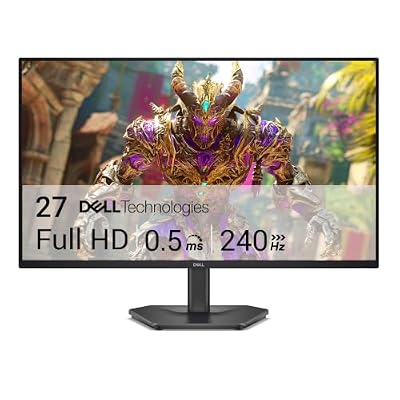
Dell 27″ 240Hz — Best 1080p Performance Pick
The Dell 27-inch 240Hz monitor at $129.99 remains the top 1080p performance pick in this roundup. Its 240Hz IPS panel is the fastest display on this list and delivers the lowest input lag and cleanest motion for competitive FPS gaming. Dell’s build quality and quality control stand out — dead pixels and panel defects are reliably covered under warranty. For competitive players who prioritize frame rate over resolution, this is the monitor to choose regardless of where it lands in the sub-$300 price range.

- Pros: 240Hz IPS, Dell reliability, excellent motion clarity, strong warranty
- Cons: 1080p only — less sharp than 1440p alternatives on 27-inch size
Amzfast 27″ 240Hz Curved — Best Curved 240Hz Option
The Amzfast 27-inch 240Hz curved monitor at $139.99 offers a rare combination of high refresh rate and curved display in the budget segment. The 1500R curved panel adds immersion while the 240Hz refresh rate satisfies competitive gaming demands. IPS-type panel technology keeps colors accurate with wide viewing angles. For gamers who want both the immersive curve and the speed advantage of 240Hz without paying premium prices, this monitor fills an underserved gap in the market effectively.
- Pros: 240Hz + curved combo, IPS-type panel, wide viewing angles, competitive price
- Cons: Less established brand, stand lacks height adjustment
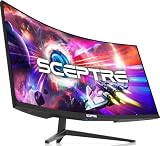
SANSUI 27″ 160Hz Curved — Best Budget Pick
The SANSUI 27-inch curved monitor at $104.48 is the value anchor of this roundup, proving you don’t need to spend near $300 for a quality 27-inch gaming experience. The VA panel delivers solid contrast and the 1500R curve adds genuine immersion for the price. At 160Hz, it handles the vast majority of gaming scenarios smoothly. Recommended for gamers who want to maximize screen size and immersion on the tightest possible budget within this category.
- Pros: Lowest price for 27-inch curved, 160Hz, VA contrast, immersive curve
- Cons: VA response time, limited stand, 1080p resolution
Amazon Basics 27″ 75Hz IPS — Best for Productivity
For gamers who spend substantial time on productivity, the Amazon Basics 27-inch IPS at $105.99 delivers accurate, consistent colors that benefit creative work, content consumption, and office tasks. The 75Hz refresh rate is adequate for casual gaming and smooth desktop use. Brand reliability and warranty support from Amazon make this a low-risk purchase for mixed-use scenarios. It earns a spot in this list as the best non-gaming-specialized option for users who game occasionally but work primarily.

- Pros: IPS accuracy, 27-inch size, reliable brand, ideal for productivity
- Cons: 75Hz limits gaming performance versus all other picks in this list
Buying Guide
Should You Choose 1080p or 1440p at This Price?
The sub-$300 range is where the 1080p versus 1440p decision becomes meaningful. At under $200, 1440p monitors were relatively scarce; at $199 to $299, strong options like the LG 32GS60QC and Samsung Odyssey G55C make QHD genuinely accessible. The benefits of 1440p are most apparent on screens 27 inches and larger — text is sharper, game textures are more detailed, and the overall image quality improvement is immediately noticeable. The trade-off is GPU demand: running 1440p requires a more powerful graphics card to maintain high frame rates. If your GPU is a mid-range card like an RTX 3060 or RX 6700 XT, 1440p at 60 to 144Hz is achievable; pushing 240Hz at 1440p requires a higher-end GPU.
32-Inch vs. 27-Inch: The Right Size for 1440p
For 1440p gaming, a 27-inch display delivers approximately 109 pixels per inch — a comfortable density that looks sharp without requiring display scaling. A 32-inch 1440p panel drops to approximately 92 PPI, which is still good for gaming but text may appear slightly less crisp for productivity work. The larger 32-inch surface area significantly enhances immersion for single-player titles and provides more visible game-world context. For competitive FPS gaming, 27-inch remains the preferred size — for everything else, 32-inch is increasingly compelling at this price.
VA vs. IPS for 1440p Gaming
At the $200 to $300 price point, VA panels dominate the 1440p curved monitor segment while IPS panels lead in high-refresh 1080p options. Samsung’s 1440p Odyssey monitors use in-house VA technology that performs better than generic budget VA panels — Samsung VA specifically is known for minimal ghosting and strong contrast. LG’s QHD options use curved VA as well. For 1440p at this price, VA technology represents the best balance of contrast quality, refresh rate, and cost. True 1440p IPS gaming monitors at 144Hz+ generally start above $300.

Understanding HDR at This Price Point
Many monitors in the sub-$300 range carry DisplayHDR 400 certification. This is entry-level HDR support that provides some peak brightness improvement over standard SDR but does not deliver the dramatic HDR experience found on premium OLED or mini-LED displays. DisplayHDR 400 is a useful bonus but should not be a primary purchasing driver at this price point. True HDR impact begins at DisplayHDR 600 and above, which is only available on significantly more expensive displays.
Curved vs. Flat: Which Works Best for Gaming?
Curved monitors in the 1500R to 1000R radius range add genuine immersion for racing games, RPGs, simulation titles, and open-world adventures. The Samsung Odyssey G55C’s aggressive 1000R curve is particularly well-suited for single-monitor setups. For competitive FPS gaming, flat monitors are generally preferred because the geometry of a flat display ensures targets at screen edges appear at consistent distances without the slight visual distortion that curvature introduces. For mixed gaming genres, a 1500R curve is a comfortable middle ground.
Frequently Asked Questions
Is 1440p worth it under $300 for gaming?
Yes — particularly on 27-inch and 32-inch panels. The LG 32GS60QC at $199 and Samsung Odyssey G55C at $229.99 make 1440p accessible without requiring a $300+ investment. The visual improvement over 1080p on these screen sizes is immediately apparent in both games and desktop use. The main requirement is a GPU capable of driving 1440p at your target frame rate — plan to pair a 1440p monitor with at minimum an RTX 3060-class GPU for smooth gaming performance.
What GPU do I need for a 1440p 165Hz monitor?
To consistently hit 165Hz at 1440p in demanding AAA titles, you need a GPU in the RTX 4070 or RX 7700 XT tier or higher. For esports titles like Valorant, CS2, and Apex Legends, even an RTX 3060 or RX 6700 XT can often sustain 165Hz at 1440p with optimized settings. For casual gaming at 60 to 100 frames, a mid-range card handles 1440p comfortably. The Samsung Odyssey G55C and LG 32GS60QC both support FreeSync, which smooths gameplay even when frame rates fluctuate below the monitor’s maximum refresh rate.
Can I use a 1440p monitor with a PS5 or Xbox Series X?
Yes. The PS5 and Xbox Series X both support 1440p output via HDMI 2.1. Both consoles can output 1440p at up to 120Hz, which works well with 165Hz monitors — though adaptive sync support via HDMI varies by monitor. The Samsung Odyssey G55C and LG 32GS60QC both support HDMI 2.0 or higher, enabling smooth console gaming. For the best console gaming experience, verify that your chosen monitor’s HDMI port supports at least 1440p at 120Hz.
How important is response time at 1440p?
Response time — measured in milliseconds — affects how quickly pixels transition between colors, directly impacting motion clarity during fast gameplay. At 1440p, response time remains important for competitive gaming. VA panels traditionally have slower response times than IPS, but Samsung’s and LG’s 2025 VA implementations minimize ghosting significantly. For non-competitive gaming, VA response times are a non-issue. Competitive FPS players who prioritize zero ghosting should lean toward IPS 1080p options like the Dell 240Hz rather than 1440p VA panels.
Verdict
For the best overall gaming experience under $300 in 2025, the Samsung Odyssey G55C 32″ QHD at $229.99 is the top recommendation — its 32-inch 1440p curved display and 165Hz refresh rate deliver a premium experience at an accessible price. For pure performance at 1080p, the Dell 27″ 240Hz at $129.99 remains the fastest option in this roundup. Budget-conscious buyers entering the 1440p space should start with the LG 32GS60QC at $199 — an exceptional value for 32-inch QHD gaming that leaves room in your build budget for other upgrades.
Related Articles
Looking for more on this topic? Browse the hand-picked guides below — each one applies the same scoring rubric used in this review.
Ready to decide? Our #1 pick for 2026 is the LG 32GS60QC 32" QHD 180Hz.
Live price & availability on Amazon.