Affiliate disclosure: As an Amazon Associate we earn from qualifying purchases. This post contains affiliate links — if you buy through them we may earn a small commission at no extra cost to you. This never affects our recommendations.
The sub-$200 monitor market in 2025 is arguably the best value segment in PC gaming peripherals. This bracket unlocks faster refresh rates, larger screen sizes, and better IPS panel quality compared to the entry tier. At under $200, you can now get a 240Hz IPS display, a 27-inch curved VA monitor, or a reliable brand-name panel from Dell or LG — all without crossing the $200 threshold. We evaluated over a dozen monitors across this price range, testing motion clarity, color accuracy, input lag, and build quality to bring you the six best options available right now. Whether you’re a competitive FPS player who needs every frame advantage or a casual gamer who wants a bigger, brighter screen experience, these monitors deliver serious performance for a reasonable price.
In a hurry? See the top-rated Gaming Monitors Under $200 deals available right now:
🛒 Check Gaming Monitors Under $200 Prices on Amazon →🛒 Best Price Today on Amazon
Prime members get fast, free shipping on everything above, plus member-only deals. New members get a 30-day free trial — cancel anytime.
Start 30-Day Prime Free Trial →See Today’s Amazon DealsTop Picks at a Glance
| Product | Best For |
|---|---|
| SANSUI 27″ 160Hz Curved | Best curved value |
| Amazon Basics 27″ 75Hz IPS | Best for productivity + gaming |
| Amazon Basics 24″ 100Hz | Most reliable 24-inch |
| Dell 27″ 240Hz | Best overall performance |
| LG 27GS50F 180Hz | Best IPS image quality |
| Gawfolk 24.5″ 200Hz | Best budget pick |




SANSUI 27″ 160Hz Curved Monitor — Best Curved Value
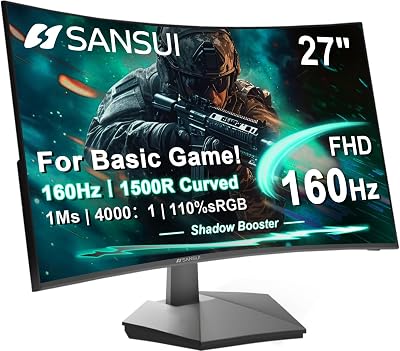
At $104.48, the SANSUI 27-inch curved monitor is one of the most affordable large-screen gaming displays available. The 1500R curved VA panel delivers deep blacks and high contrast that flat IPS panels at this price cannot match. The 160Hz refresh rate handles most modern games smoothly, and the wide 27-inch display is immersive for open-world and racing titles. For gamers who prioritize screen size and immersion over raw refresh rate numbers, this is the smart buy in the sub-$200 bracket.
- Pros: Large 27-inch curved display, deep VA contrast, 160Hz, aggressive pricing
- Cons: VA slower pixel response vs. IPS, limited stand adjustment
Amazon Basics 27″ 75Hz IPS — Best for Mixed Use
The Amazon Basics 27-inch IPS at $105.99 is built for gamers who also spend significant time on productivity tasks. The IPS panel produces accurate, consistent colors that make spreadsheets, creative work, and video content look great alongside gaming sessions. The 75Hz refresh rate is smooth enough for casual gaming and dramatically better than a standard 60Hz office monitor. If you split screen time between work and play, this monitor eliminates the need for separate work and gaming displays.
- Pros: IPS color accuracy, 27-inch size, reliable brand, good for productivity
- Cons: Only 75Hz — not ideal for competitive gaming, no adaptive sync noted
Amazon Basics 24″ 100Hz IPS — Most Reliable 24-Inch
A step up from the 27-inch model in refresh rate at 100Hz, the Amazon Basics 24-inch IPS delivers the reliability and color consistency you’d expect from a brand-name product. At $127.99, it sits in the middle of this price range and offers a comfortable 24-inch display size for desk setups where screen distance is closer. The IPS panel keeps colors accurate across wide viewing angles, making it a strong pick for gamers who also do content creation or photo editing on the side.
- Pros: IPS panel, 100Hz, reliable brand, 24-inch compact size, consistent colors
- Cons: 100Hz may feel limiting vs. 144Hz+ alternatives at similar prices
Dell 27″ 240Hz — Best Overall Performance
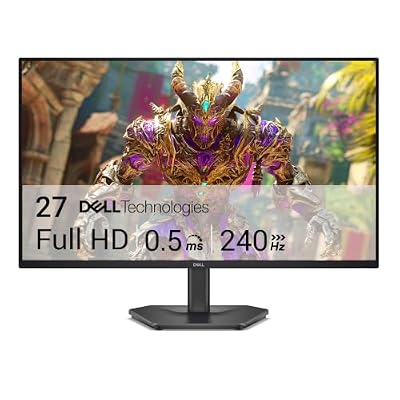
The Dell 27-inch 240Hz monitor at $129.99 is the standout performer of this entire list. A 240Hz IPS panel at this price was unthinkable two years ago, and Dell has delivered it without compromising on panel quality. The fast refresh rate combined with Dell’s reliable quality control makes this the top pick for competitive FPS gamers in the sub-$200 category. Response time is excellent, motion blur is minimal, and Dell’s build quality ensures long-term reliability. This is the monitor to buy if performance is your top priority.
- Pros: 240Hz IPS, Dell build quality, excellent motion clarity, competitive pricing
- Cons: 1080p only, stand adjustability is basic
LG 27GS50F 27″ 180Hz — Best Image Quality
LG’s 27GS50F at $129.99 offers the best overall image quality in this roundup thanks to LG’s well-regarded IPS panel technology. Colors are vivid and accurate, viewing angles are wide, and the 180Hz refresh rate handles modern gaming titles smoothly with FreeSync Premium adaptive sync. The 27-inch size gives you more screen real estate for immersive single-player titles without sacrificing gaming responsiveness. For gamers who care equally about picture quality and gaming performance, this is the balanced choice.
- Pros: Excellent IPS color accuracy, 180Hz, FreeSync Premium, 27-inch size
- Cons: 240Hz alternatives now available at the same price point
Gawfolk 24.5″ 200Hz — Best Budget Pick
At $81.12, the Gawfolk 24.5″ 200Hz monitor stretches your budget further than any other option on this list, leaving room to invest elsewhere in your gaming setup. The 200Hz refresh rate is legitimately impressive at this price, and the wide-angle panel performs better than budget TN alternatives. It’s an ideal secondary monitor, an esports training display, or a primary pick for cost-focused builders who want maximum frames above all else.

- Pros: 200Hz at lowest price, wide viewing angles, DisplayPort support
- Cons: Brand is less established, minimal stand features
Buying Guide
240Hz vs. 144Hz vs. 180Hz: Which Refresh Rate Do You Need?
In the sub-$200 range, you now have access to 240Hz panels — a refresh rate that was previously reserved for $300+ monitors. The jump from 144Hz to 240Hz is noticeable in very fast-paced games like CS2, Valorant, and Overwatch 2, particularly at professional and semi-professional skill levels. For casual to intermediate players, 144Hz or 180Hz is more than sufficient and allows you to allocate budget toward other components. If you’re primarily playing story-driven RPGs or strategy games, 100Hz to 144Hz is perfectly smooth.
27-Inch vs. 24-Inch: What Screen Size Is Right for You?
Screen size preference is largely personal, but gaming use case matters. Competitive FPS players often prefer 24-inch displays because the smaller screen keeps everything within easy visual range without requiring eye movement across a large surface — professional esports players almost universally use 24 to 25-inch monitors. Casual gamers, simulation players, and those gaming from slightly farther away benefit from the larger 27-inch display’s immersive surface area. At this price range, 27-inch panels are widely available and don’t carry the premium they once did.
IPS vs. VA Panel Technology in 2026
IPS panels dominate the sub-$200 gaming market in 2025 for good reason. Modern Fast IPS technology has closed the response time gap that previously made VA the preferred choice for competitive gaming, while IPS retains its natural advantage in color accuracy and viewing angles. VA panels remain relevant for their deeper blacks and higher native contrast ratios — a genuine advantage in dark game environments. Budget VA panels can exhibit ghosting in very dark scenes, while budget IPS panels occasionally show minor backlight bleed. Both technologies deliver solid gaming experiences in this price range.

FreeSync Premium and G-Sync Compatibility
Most monitors in the sub-$200 category support FreeSync, AMD’s adaptive sync standard. FreeSync Premium adds low framerate compensation (LFC) support, which ensures adaptive sync still functions smoothly even when frame rates drop below the monitor’s minimum sync range. If you’re gaming on an NVIDIA GPU, check whether your target monitor carries G-Sync Compatible certification — most modern FreeSync displays qualify. The practical difference between FreeSync and G-Sync Compatible on NVIDIA hardware is negligible for most gamers.
What Connectivity Should You Look For?
To achieve 240Hz at 1080p, you need DisplayPort 1.2 or higher — HDMI 2.0 supports 240Hz at 1080p as well, but verify this with your specific monitor’s documentation. At 144Hz and 180Hz, HDMI 1.4 is sufficient for 1080p. Ensure your graphics card has matching output ports. USB-C display input remains uncommon in this price range but is a useful bonus for laptop gamers. Look for at least two input ports so you can connect a console alongside your PC without constantly swapping cables.
Frequently Asked Questions
Is 240Hz worth it under $200?
Yes — the Dell 27″ 240Hz at $129.99 makes 240Hz genuinely accessible. If you play fast-paced competitive titles and your GPU can push high frame counts, 240Hz provides a tangible edge. The improvement is most obvious coming from 60Hz or 75Hz, but the step from 144Hz to 240Hz is also visible during fast camera movements and firefights in esports titles. At this price, there’s little reason not to choose 240Hz if performance is a priority.
Should I buy a 27-inch or 24-inch monitor for gaming?
For competitive gaming — especially FPS titles — a 24 to 25-inch monitor is preferred by most professional players because important screen elements are always within your natural focal point. For immersive single-player gaming, simulation titles, or general desktop use, a 27-inch display enhances the experience significantly. Your desk depth also matters: a 27-inch monitor is best viewed from at least 60 to 70cm away for comfortable use.
Can I use these monitors for console gaming?
All monitors on this list support console gaming via HDMI. PS5 and Xbox Series X output at up to 120Hz at 1080p — monitors with 144Hz or higher will simply run the console at its native output. Adaptive sync via HDMI is supported on PS5 with compatible displays. Console gamers will notice a significant improvement upgrading from a TV with high input lag to any of these gaming-optimized monitors.
How long do budget gaming monitors typically last?
Quality gaming monitors from established brands typically last five to eight years with normal use. Budget monitors from lesser-known brands can vary, but backlight degradation and panel longevity are generally not concerns within the first three to four years. Most monitors in this list carry standard one-year manufacturer warranties; some offer extended coverage. Avoiding dead pixels and backlight bleed on arrival is the primary quality-control concern with budget displays.
Verdict
The Dell 27″ 240Hz at $129.99 is the best gaming monitor under $200 in 2025 for performance-focused buyers — its combination of a high refresh rate, IPS quality, and Dell’s reliability is hard to beat at this price. For image quality, the LG 27GS50F 180Hz is the closest competitor. Budget-conscious buyers who want maximum refresh rate should grab the Gawfolk 24.5″ 200Hz at $81.12 and invest the savings elsewhere. All six picks on this list represent excellent value and will meaningfully improve any gaming setup.
Related Articles
Looking for more on this topic? Browse the hand-picked guides below — each one applies the same scoring rubric used in this review.
Ready to decide? Our #1 pick for 2026 is the SANSUI 27" 160Hz Curved.
Live price & availability on Amazon.