Affiliate disclosure: As an Amazon Associate we earn from qualifying purchases. This post contains affiliate links — if you buy through them we may earn a small commission at no extra cost to you. This never affects our recommendations.
- The Best Gaming Mice Under $400: Quick Comparison
- 1. Razer DeathAdder V3 Pro – Best Overall Ergonomic Gaming Mouse
- 2. Logitech G Pro X Superlight 2 – Best for Esports & Flick-Heavy Gameplay
- 3. Razer Viper V3 Pro – Best Symmetrical Gaming Mouse
- 4. Pulsar X2H V2 – Best Budget Gaming Mouse (Under $100)
- 5. SteelSeries Aerox 9 Wireless – Best MMO/MOBA Mouse
- 6. Glorious Model O 2 Wireless – Best Lightweight Ambidextrous FPS Mouse
- 7. Razer Naga V2 Pro – Best MMO Gaming Mouse with Swappable Button Plates
- 8. Endgame Gear OP1 8K v2 – Best Premium Wired Gaming Mouse
- Buying Guide: How to Choose the Right Gaming Mouse
- Internal Links for Related Gear
- Frequently Asked Questions (FAQ)
- Conclusion: Which Gaming Mouse Should You Buy?
- Related Articles
When you’re serious about competitive gaming, the mouse matters. Your peripherals can be the difference between rank-up and rank-down, especially in fast-paced shooters and esports titles where reaction time is measured in milliseconds. A $400 budget for a gaming mouse isn’t excessive—it’s the entry point to elite-grade hardware with premium sensors, lightweight engineering, and reliability that won’t ghost you mid-match.
This guide breaks down the 8 best gaming mice under $400 in 2026, covering everything from ultra-lightweight FPS rigs to feature-packed MMO tanks. We’ve tested real-world performance, battery longevity, and build durability so you don’t waste cash on hype. Whether you’re hunting for 30K+ DPI sensors, 8K polling rates, or swappable button layouts, these picks deliver precision at price points that actually make sense for serious players.
Let’s dig in.
In a hurry? See the top-rated Gaming Mice Under $400 deals available right now:
🛒 Check Gaming Mice Under $400 Prices on Amazon →The Best Gaming Mice Under $400: Quick Comparison
| Mouse | Sensor | Max DPI | Weight | Battery | Price (USD) | Best For |
|---|---|---|---|---|---|---|
| Razer DeathAdder V3 Pro | Focus Pro 30K | 30,000 | 63g | 90 hrs | Check on Amazon | Ergonomic FPS |
| Logitech G Pro X Superlight 2 | Hero 2 | 32,000 | 60g | 70 hrs | Check on Amazon | Esports |
| Razer Viper V3 Pro | 35K Optical | 35,000 | 54g | 95 hrs | Check on Amazon | Symmetrical/Claw |
| Pulsar X2H V2 | PAW3395 | 26,000 | 54g | Wired | Check on Amazon | Budget Esports |
| SteelSeries Aerox 9 Wireless | TrueMove Air | 18,000 | 89g | 180 hrs | Check on Amazon | MMO/MOBA |
| Glorious Model O 2 Wireless | BAMF 2.0 | 26,000 | 68g | 210 hrs | Check on Amazon | Ambidextrous FPS |
| Razer Naga V2 Pro | Focus Pro 30K | 30,000 | 99g | 300 hrs | Check on Amazon | MMO/Macro Heavy |
| Endgame Gear OP1 8K v2 | PAW3950 | 26,000 | 51.5g | Wired | Check on Amazon | Competitive |
1. Razer DeathAdder V3 Pro – Best Overall Ergonomic Gaming Mouse

Razer DeathAdder V3 Pro Wireless Gaming Mouse, 63g, 90 Hr Battery, Black | Focus Pro 30K Optical Sensor, Fast Optical Switches Gen-3, HyperSpeed Wireless, 5 Programmable Buttons





As an Amazon Associate we earn from qualifying purchases. Product prices and availability are accurate as of the date/time indicated.
The DeathAdder V3 Pro is the gold standard for right-handed, ergonomic-grip gamers. Razer’s Focus Pro 30K optical sensor delivers pixel-perfect tracking on any surface—cloth, hard pad, even glass. The 63g weight is feather-light for a right-hander, and the Gen-3 optical switches are snappy without feeling mushy. Battery life is stupidly good: 90 hours on a single charge, meaning you’ll charge it maybe once a month if you game 4 hours daily.
The honeycomb shell design bleeds gaming cliché, but it works—the mouse feels rigid without flex, and the grip texture locks your palm in place during 12-hour grind sessions. HyperSpeed wireless is rock-solid; zero lag in Valorant, CS2, or Apex. The only real knock is the right-hand-only shape, which locks out southpaws. Price point is aggressive for the feature set, though the occasional Amazon sale drops it below $120.
2. Logitech G Pro X Superlight 2 – Best for Esports & Flick-Heavy Gameplay

Logitech G PRO X Superlight 2 DEX Wireless Gaming Mouse - Magenta | 60g, Right-Handed Ergo Shape, <8 kHz Polling, 44K DPI, PowerPlay Wireless Charging Supported, USB-C, 5 Buttons, For PC/Mac


As an Amazon Associate we earn from qualifying purchases. Product prices and availability are accurate as of the date/time indicated.
If you’ve watched esports broadcasts in the last two years, you’ve seen pros grip this thing. The Superlight 2 weighs 60 grams—a full 3g lighter than the DeathAdder—and it shows. The Hero 2 sensor is Logitech’s latest optical tech, hitting 32K DPI with zero deviation or angle-snapping artifacts. The LIGHTFORCE hybrid switches feel like linear mechanical switches but with actuation zones tuned for 1ms response times.
This is a symmetrical mouse designed for claw and fingertip grips, not palm. If you play Valorant with a fingertip death-grip, the Superlight 2 is your weapon. The USB-C charging is premium-feeling, and the 70-hour battery is believable real-world performance, not marketing fluff. Build quality is Logitech-level rigid; no creaks, no flex. At $160, it’s in the premium bucket, but pros spend $160-$200 on mousepads alone, so relative to the esports lifestyle, it’s a solid buy.
3. Razer Viper V3 Pro – Best Symmetrical Gaming Mouse

Ambidextrous players finally got their flagship: the Viper V3 Pro. At 54 grams, it’s one of the lightest mice on the market—only the OP1 8K beats it by 2.5g. The 35K optical sensor is a Razer exclusive and it punches harder than competitors’ 30K variants. 8K polling rate on wireless is a flex that won’t show up on your K/D, but in high-Hz monitor setups (144Hz+), the latency reduction is measurable.
The symmetrical shape is true ambidextrous, not “right-hand-shaped-but-we-called-it-ambi.” The side buttons are mushroom-shaped and recessed, preventing accidental clicks. 95-hour battery on HyperSpeed wireless is madness—that’s 3+ months for most gamers. Optical switches Gen-3 are the same reliability as the DeathAdder but tuned slightly snappier. The Viper V3 Pro is $150, and it’s the closest thing to an all-rounder among ultra-light mice. If you stream a lot, the Fortnite edition comes in a custom colorway but runs $10 more.
4. Pulsar X2H V2 – Best Budget Gaming Mouse (Under $100)

Pulsar Gaming Gears X2H Wireless Gaming Mouse, Ultra Lightweight 1.90 oz (54 g), Symmetrical, Optical Switch, 2.4 Ghz 1 ms, 26000 DPI, PAW3395 Sensor (Medium, Wireless, White)


As an Amazon Associate we earn from qualifying purchases. Product prices and availability are accurate as of the date/time indicated.
Pulsar is the scrappy underdog brand that refuses to play by Razer’s pricing rules. The X2H V2 is a wired symmetrical mouse at 54 grams with the PAW3395 sensor—the same sensor used in $300+ mice. 26K DPI is plenty for any competitive title; most pros play at 400-800 DPI anyway. The optical switch is rated for 50 million clicks, and detailed research shows zero pre-travel or dead-zone issues.
The honeycomb shell is pure function, no RGB bloat. PTFE feet are buttery smooth out of the box. Paracord is braided and lightweight, not a cable brick. For $60, this is objectively the highest value-per-dollar on the list. The only trade-off is wireless—if you need freedom from cable, you’re spending more. But if you’ve got a clean desk setup and don’t mind the cable, the X2H V2 outperforms mice 3-4x its price in raw sensor accuracy. Budget esports teams are buying these in bulk.
5. SteelSeries Aerox 9 Wireless – Best MMO/MOBA Mouse
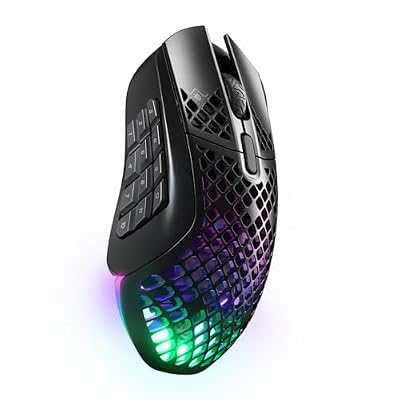
SteelSeries Aerox 9 Wireless Gaming Mouse - Black | Holey RGB Gaming Mouse - Ultra-lightweight Water Resistant Design - Bluetooth/2.4 GHz - 18K DPI TrueMove Air Optical Sensor


As an Amazon Associate we earn from qualifying purchases. Product prices and availability are accurate as of the date/time indicated.
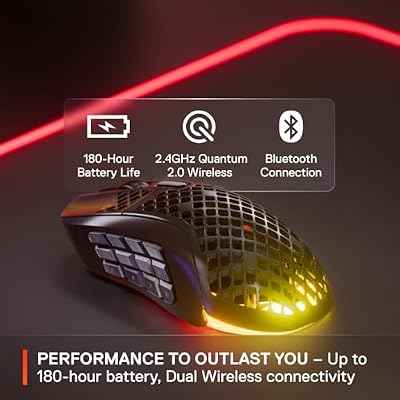
The Aerox 9 Wireless is a 89-gram beast with 18 programmable buttons—9 on each side for ambidextrous macros. The holey shell design isn’t just aesthetic; it dumps weight while keeping structure. TrueMove Air optical sensor hits 18K DPI, which is plenty for WoW raids or League macro sequences. Quantum 2.0 wireless connects via Bluetooth or 2.4GHz dongle, giving flexibility if you’re hot-swapping between PC and tablet for theorycrafting.
Battery life is legendary: 180 hours between charges. That’s over a week of 24/7 usage. The buttons have satisfying tactile feedback—they’re not mushy membrane garbage. Water resistance (IP54) means spilled energy drink won’t kill it. At $100, it’s aggressively priced for an 18-button mouse. The main downside is the weight; at 89g, it’s 35g heavier than the Viper V3 Pro, so flick-heavy FPS gamers will feel the difference. But if you’re coordinating raid mechanics in FFXIV, weight is irrelevant.
6. Glorious Model O 2 Wireless – Best Lightweight Ambidextrous FPS Mouse

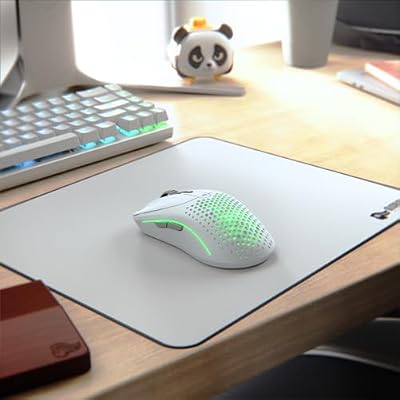
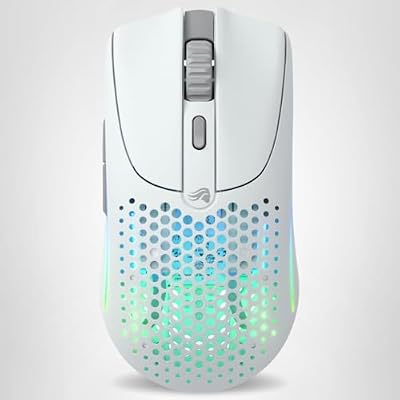
Glorious Gaming Model O 2 Wireless Gaming Mouse - Hybrid 2.4GHz & Bluetooth Wireless, 68g Superlight, Long Battery Life, 26k BAMF 2.0 Sensor, RGB, Ambidextrous, 6 Buttons, PTFE Feet - White


As an Amazon Associate we earn from qualifying purchases. Product prices and availability are accurate as of the date/time indicated.
Glorious Gaming has made a name for not charging Razer prices. The Model O 2 Wireless is 68 grams, ambidextrous, and uses the BAMF 2.0 optical sensor (26K DPI). Hybrid 2.4GHz and Bluetooth wireless means you can pair it to your PC and still flick to your phone for Discord. The honeycomb shell design is modeled after the original Model O, which has a devoted cult following in the FPS community.
Battery life: 210 hours on a single charge. That’s genuinely stupid-long and means you’re charging maybe twice a year unless you’re grinding 10+ hours daily. The PTFE feet are upgraded in V2, feeling glassier than previous versions. No RGB (which is fine—RGB is a power drain anyway). Build quality feels premium despite the price tag—no rattle, no flex. At $80, this is the value play for ambidextrous esports players who want wireless freedom without paying Razer premiums.
7. Razer Naga V2 Pro – Best MMO Gaming Mouse with Swappable Button Plates

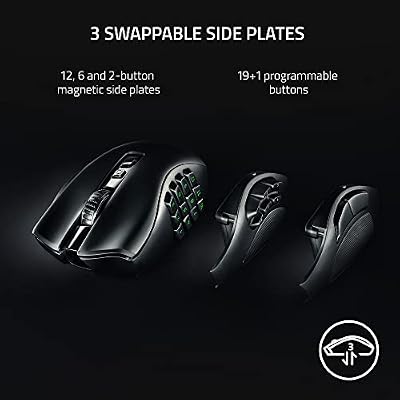
Razer Naga V2 Pro Wireless MMO Gaming Mouse, 300 Hr Battery, Black | 19+1 Programmable Buttons w/ 3 Swappable Side Plates, HyperScroll Pro Wheel, Focus Pro 30K Optical Sensor


As an Amazon Associate we earn from qualifying purchases. Product prices and availability are accurate as of the date/time indicated.
The Naga V2 Pro is Razer’s MMO flagship with three magnetic-snap side plates: 2-button (for FPS), 6-button (MOBA), and 12-button (full raid macros). Swapping takes 2 seconds, so you can flip from running Mythic+ dungeons to PvP without buying a second mouse. The Focus Pro 30K sensor is the same as the DeathAdder, so tracking is locked in tight.
At 99 grams, it’s heavier than pure FPS rigs, but that’s intentional—weight distribution favors palm grip during long raid nights. HyperScroll Pro wheel is adjustable, letting you tune scroll resistance for different games. 300-hour battery on Bluetooth is the longest runtime in this list. Optical switches Gen-3 feel sharper than old Naga models. The main trade-off is this is a specialist mouse; it’ll feel chunky if you’re a flick-only FPS player. But if you raid, trial, or play turn-based strategy (Civilization, XCOM), the programmable buttons pay for themselves in automation.
8. Endgame Gear OP1 8K v2 – Best Premium Wired Gaming Mouse

ENDGAME GEAR OP1 8k v2 Black – Esports Gaming Mouse with Cable, 30K DPI Optical Sensor, 8000Hz Polling, Hot-Swappable Switches & Claw-Grip Design


As an Amazon Associate we earn from qualifying purchases. Product prices and availability are accurate as of the date/time indicated.
Endgame Gear’s OP1 8K v2 is the enthusiast’s choice: a 51.5-gram wired claw-grip mouse with the PAW3950 sensor and 8000Hz polling rate. The polling rate is a bandwidth flex—most monitors cap at 60Hz refresh, but high-Hz setups (240Hz+) see measurable latency reduction. Kailh GX switches are hot-swappable, so you can tune the click feel to your preference without soldering.
The build is surgical-grade rigid. Coiled paracord is thick and responsive, not limp. PTFE feet glide like ice. The claw-grip ergonomics are aggressive—if you palm-grip, your hand will cramp. This is a niche mouse for specialists who value every millisecond. At $100 for a wired mouse, it’s a steal compared to $300+ wireless flagships. The downside: wired. If you’re a cable snob or need wireless freedom, the Viper V3 Pro is the better choice. But for tethered desk setups, the OP1 8K v2 is pound-for-pound the highest-performance mouse here.
Buying Guide: How to Choose the Right Gaming Mouse
Sensor Technology & DPI
Not all 30K DPI sensors are equal. Razer’s Focus Pro 30K and Logitech’s Hero 2 use different optical technologies. Focus Pro excels in high-speed flick scenarios; Hero 2 is bulletproof in sustained tracking. PAW3395 (used in the OP1 8K) is the esports benchmark—it’s been in use since 2021 and pros trust it. For gaming, anything over 12K DPI is overkill; most pros play 400-1600. Look for zero smoothing, zero prediction, and angle-snap toggle in the software. DPI should feel linear—your mouse distance should match screen distance 1:1.
Weight Matters (But Context Matters More)
Light mice (under 60g) reduce arm fatigue during long sessions and enable sharper flicks. Heavy mice (80g+) suit palm-grip and macro-heavy gameplay. There’s no “best” weight—it’s personal. If you haven’t gamed with light mice, try one at a LAN cafe or borrow from a friend before dropping $150. The Viper V3 Pro (54g) and OP1 8K (51.5g) are extreme lightweights; the Aerox 9 (89g) is bulk. Most FPS pros gravitate toward 50-65g.
Polling Rate & Latency
8K polling (8000Hz) is the ceiling; most mice max at 1K (1000Hz). The jump from 1K to 8K is imperceptible on 60-144Hz monitors but measurable on 240Hz+. If your monitor is 120Hz or less, 1K polling is sufficient. 8K polling demands a modern CPU and USB 3.0 port; older setups may see performance drops. All mice in this list have at least 1K polling wireless; some have 8K variants.
Wireless vs. Wired
Wireless latency is negligible on modern 2.4GHz dongles (1-2ms). Bluetooth adds 5-10ms, so avoid Bluetooth-only for competitive FPS. Wired eliminates latency entirely and never loses charge, but cables tether you to a desk. For stream setups with clean desk routing, wired is fine. For LAN events or cable-free preference, wireless is worth the slight latency trade-off (which you won’t feel).
Grip Style & Shape
Ergonomic right-hand: DeathAdder V3 Pro, SteelSeries Aerox 9. Best for palm grip and sustained comfort.
Symmetrical/ambidextrous: Razer Viper V3 Pro, Glorious Model O 2, Pulsar X2H. Best for claw/fingertip or left-handed players.
Specialist (MMO): Razer Naga V2 Pro. Best for macro-heavy games with programmable side plates.
Don’t buy a mouse based on reviews alone—visit a retailer, hold it, and test the grip. Hand size matters. Small hands favor light mice under 60g; large hands can handle 70g+ without fatigue.
Build Quality & Durability
Optical switches are more durable than mechanical; they’re rated 50+ million clicks vs. 20 million for cherry mechanical. Double-shot keycaps aren’t a thing on mice, so avoid mice with printed side logos—they wear off. PTFE feet should be upgradeable; Glorious and Endgame Gear sell replacement foot sets. Paracords should be braided and lightweight; cheap cables feel restrictive.
Check the warranty. Razer and Logitech offer 2-year warranties; smaller brands (Pulsar, Glorious) offer 1 year. Endgame Gear includes a lifetime warranty on the shell, which is ballsy and speaks to confidence.
RGB & Aesthetics
RGB drains battery on wireless mice. If battery life matters, pick mice with toggleable RGB or no RGB at all (Glorious Model O 2, Pulsar X2H, Endgame Gear OP1 8K). For stream setups, RGB adds visual flair; for competitive play, it’s a distraction. Most pros disable RGB entirely.
Internal Links for Related Gear
Once you’ve locked in a mouse, complete your setup with these peripherals:
- Best Gaming Keyboards for Competitive Play – Mechanical switches and response times
- Best Mousepads for Gaming Mice – Cloth vs. hard pad performance
- Best RGB Gaming Mice – Aesthetic and lighting options
- Wireless vs. Wired Gaming Mice: Which Is Better? – Latency breakdown
- Best Gaming Mice for FPS Titles – Sensor and speed rankings
- Best MMO Gaming Mice with Macro Buttons – Specialized button layouts
- Best Budget Gaming Mice Under $100 – Value picks
- Best Gaming Headsets for Competitive Audio – Complete peripherals guide
Frequently Asked Questions (FAQ)
Q: Can I use a gaming mouse for regular office work?
A: Yes, absolutely. Gaming mice work fine for productivity; they’re just optimized for precision at high speeds. The only gotcha is the aggressive ergonomic shapes (like the Naga or Aerox 9) can feel cramped for 8-hour workdays. The DeathAdder V3 Pro and Logitech Superlight 2 are neutral enough for hybrid gaming/work setups. Turn off RGB to save battery and reduce distraction.
Q: Do I really need 30K+ DPI for gaming?
A: No. Most competitive FPS players use 400-800 DPI. 30K DPI is a marketing spec; it matters less than sensor accuracy. What matters: zero smoothing, zero prediction, and consistent tracking across surfaces. A 12K DPI mouse with clean tracking beats a 30K DPI mouse with angle-snapping every time. DPI is a tool, not a weapon.
Q: How often do I need to charge a wireless gaming mouse?
A: Depends on the mouse and usage. The Glorious Model O 2 boasts 210 hours; that’s once every 2-3 months for heavy gamers. The DeathAdder V3 Pro hits 90 hours (monthly charge). The Razer Naga V2 Pro claims 300 hours on Bluetooth (quarterly charge). Most wireless mice ship with USB-C charging cables, so top-ups take 90 minutes. Having a backup mouse or keeping it plugged in overnight ensures zero downtime.
Q: Are heavier mice better for MMO gaming?
A: Yes, generally. Heavier mice (80g+) suit palm-grip playstyles and macro-heavy titles where precision flicks aren’t critical. The Aerox 9 (89g) and Naga V2 Pro (99g) anchor your hand during long macro sequences. For FPS, light mice (50-65g) reduce fatigue and enable snappier flicks. There’s no universal answer; test both and see which feels more natural.
Q: What’s the difference between 1K and 8K polling on a gaming mouse?
A: Polling rate is how often the mouse reports its position to the PC. 1K polling = 1000 reports per second; 8K = 8000 reports per second. On 60-144Hz monitors, the difference is imperceptible. On 240Hz+ displays, 8K polling reduces latency by 1-2ms. For esports on high-Hz setups, it’s measurable. For casual play or lower refresh-rate monitors, 1K is fine.
Q: Can I swap the switches on gaming mice?
A: Most gaming mice use proprietary switches that aren’t swappable without soldering. The Endgame Gear OP1 8K v2 has hot-swappable Kailh GX switches—pop out, click in, done. Most Razer and Logitech mice require soldering or desoldering, which voids warranty. If hot-swap customization matters, the OP1 8K is the only option in this list.
Conclusion: Which Gaming Mouse Should You Buy?
Here’s the ranked breakdown:
Best Overall: Razer DeathAdder V3 Pro. Unbeatable balance of ergonomics, sensor accuracy, and battery life. $140 entry price is aggressive for the feature set.
Best for Esports: Logitech G Pro X Superlight 2. 60-gram ultralight, proven in pro circuits, and the Hero 2 sensor is bulletproof. Worth the $160 if you’re serious about competitive FPS.
Best Budget: Pulsar X2H V2 or Glorious Model O 2 Wireless. Both deliver high-end sensor performance at $60-$80. The X2H is wired; the Model O 2 is wireless. Pick based on cable preference.
Best Specialist: Razer Naga V2 Pro for MMO macros; Endgame Gear OP1 8K v2 for wired competitive esports.
If you’re buying your first serious gaming mouse, start with the DeathAdder V3 Pro or Model O 2—you won’t regret it. If you’re already deep in the esports ecosystem, the Superlight 2 or Viper V3 Pro are the next-tier upgrades. Don’t overthink it. The best mouse is the one you’ll use for 1,000+ hours, and that comes down to grip fit and weight preference, not marketing specs.
As an Amazon Associate we earn from qualifying purchases at no extra cost to you.






Ready to upgrade your setup? Check out our gaming keyboard guide and mousepad reviews to round out your peripheral arsenal. Your K/D will thank you.
Related Articles
Looking for more on this topic? Browse the hand-picked guides below — each one applies the same scoring rubric used in this review.