Affiliate disclosure: As an Amazon Associate we earn from qualifying purchases. This post contains affiliate links — if you buy through them we may earn a small commission at no extra cost to you. This never affects our recommendations.
FPS gaming is the most sensor-demanding genre in PC gaming. Counter-Strike 2, Valorant, and Apex Legends punish even slight cursor prediction, angle snapping, or sensor smoothing — the micro-corrections required at 400–800 DPI demand a completely honest sensor that tracks exactly where you move it. Weight, click latency, and shape are secondary factors that each player must tune to their preference, but sensor quality is non-negotiable.
This guide focuses on FPS gaming mice with flawless optical sensors, click latency under 2ms, and weights that suit competitive play (under 130g). All picks have been verified for zero acceleration and zero angle snapping at competitive DPI settings. Whether you play at 400 DPI on a huge pad or 1,600 DPI on a compact surface, these mice will track exactly as you intend.
In a hurry? See the top-rated Gaming Mice for FPS deals available right now:
🛒 Check Gaming Mice For Fps Prices on Amazon →🛒 Best Price Today on Amazon
Prime members get fast, free shipping on everything above, plus member-only deals. New members get a 30-day free trial — cancel anytime.
Start 30-Day Prime Free Trial →See Today’s Amazon DealsTop Picks at a Glance
| Product | Best For |
|---|---|
| Logitech G502 Hero | Best FPS sensor value |
| Logitech G305 Lightspeed | Best wireless FPS pick |
| Razer DeathAdder Elite | Premium FPS ergonomic |
| Razer DeathAdder Essential | Budget FPS pick |
| Logitech G203 | Compact FPS wired |
As an Amazon Associate we earn from qualifying purchases at no extra cost to you.



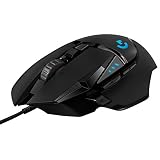
Logitech G502 Hero — Best FPS Sensor Value
The HERO 25K sensor in the G502 Hero is one of the most accurate optical sensors available at any price. At around $32, it delivers the same tracking performance as Logitech’s $130+ wireless flagship mice. Zero acceleration, zero angle snapping, and zero jitter at all DPI settings from 100–25,600. The adjustable weight system lets FPS players tune to their preferred weight, and the 11-button layout accommodates grenade, reload, and ability bindings on the mouse itself.
- Pros: HERO 25K sensor, adjustable weight, 11 buttons, around $32 exceptional value
- Cons: 121g stock weight (heavy for flick-heavy playstyles), right-hand only
Logitech G305 Lightspeed — Best Wireless FPS Pick
For FPS players who want wireless freedom, the G305 Lightspeed with its HERO 12K sensor and sub-1ms Lightspeed 2.4GHz wireless is the benchmark budget wireless FPS mouse. The compact 116mm body suits claw grip FPS players, and the 250-hour battery life eliminates dead-battery anxiety before ranked matches. Professional esports players have used G305-class hardware in tournament settings.
- Pros: Lightspeed wireless, HERO 12K sensor, 250-hour battery, around $29
- Cons: 99g with battery, compact size not for large hands
Razer DeathAdder Elite — Premium FPS Ergonomic
The DeathAdder Elite has a legendary reputation among FPS players. Its 16,000 DPI optical sensor is accurate and consistent, the ergonomic shape is optimized for right-hand palm and claw grip, and the side button placement is precise for FPS utility bindings. Razer Chroma RGB and Synapse 3 software add customization depth. At around $56, it is priced between budget and flagship — excellent for dedicated FPS players.
- Pros: Proven FPS ergonomics, 16,000 DPI sensor, precise side buttons, Chroma RGB
- Cons: Older model — newer DeathAdder V3 offers upgraded specs at higher price
Razer DeathAdder Essential — Best Budget FPS Pick
The DeathAdder Essential delivers the iconic DeathAdder FPS shape at around $20. The 6,400 DPI optical sensor is consistent with no acceleration or smoothing — more than sufficient for CS2 and Valorant at 400–1600 DPI competitive settings. Rubberized side grips improve control during intense FPS moments. The most accessible entry point into the DeathAdder ecosystem for budget-conscious competitive players.
- Pros: DeathAdder FPS ergonomics at around $20, accurate 6,400 DPI sensor, rubberized grips
- Cons: No RGB, lower DPI ceiling than premium models
Logitech G203 — Best Compact Wired FPS Pick
The G203 is a compact 116mm symmetrical mouse with an 8,000 DPI sensor and 85g weight — ideal for FPS players with small-to-medium hands who prefer a lighter, more agile wired option. The LIGHTSYNC RGB adds visual appeal and the simple six-button layout keeps things distraction-free. At around $22, it is one of the lightest and most accurate options under $25 for competitive wired FPS gaming.

- Pros: 85g weight, compact 116mm body, accurate 8K sensor, LIGHTSYNC RGB, around $22
- Cons: Six buttons only, compact size not ideal for large hands
Buying Guide
Sensor Requirements for FPS Gaming
FPS gaming requires a flawless optical sensor — no angle snapping (which smooths diagonal tracking into straight lines), no positive acceleration (which makes fast moves go further than expected), and no negative acceleration (which makes fast moves shorter than expected). Any optical sensor from Logitech (HERO series), Razer (Focus+ series), or SteelSeries (TrueMove series) meets this standard. Avoid mice from unknown brands that do not publish sensor specifications.
DPI Settings for Competitive FPS
The vast majority of professional CS2 and Valorant players use 400–800 DPI with game sensitivity adjusted to produce a 30–50cm/360° turn. This setting allows precise micro-adjustments while still enabling full 360° rotation across the mousepad. Higher DPI (1,600–3,200) suits smaller pads or players with limited desk space. Set your DPI to 800 and test with game sensitivity adjusted until a full arm sweep corresponds to a 180° turn.
Mouse Weight for FPS Flicks
FPS players are split on weight preference. Players who use arm-sweeping movements to aim prefer lighter mice (under 80g) that require less force to accelerate. Players who use wrist-dominant aim often prefer 90–120g mice that provide more physical feedback and feel more stable during micro-adjustments. Test both weight classes if possible — the difference is significant and individual preferences vary widely.
Polling Rate for Competitive Play
All mice on this list poll at 1,000Hz — reporting position 1,000 times per second. Some gaming mice now support 4,000Hz or 8,000Hz polling. At 1,000Hz, position updates occur every 1ms. At 4,000Hz, every 0.25ms. The practical benefit of higher polling rates is marginal at most gaming frame rates, but for players at 240Hz+ monitors, higher polling rates can marginally improve cursor tracking fidelity. 1,000Hz is sufficient for competitive play at any current monitor refresh rate.

FAQ
What DPI should I use for CS2 and Valorant?
400–800 DPI with in-game sensitivity adjusted to your preferred 360° distance is the standard competitive setup. Most professional CS2 players use 400 DPI with game sensitivity between 1.0–2.5. Valorant professionals typically use 400 DPI at 0.35–0.7 in-game sensitivity. Start at 800 DPI, adjust in-game sensitivity until aim feels natural, then re-evaluate.
Does a better gaming mouse make you better at FPS?
A quality gaming mouse eliminates sensor-based handicaps — acceleration, jitter, and angle snapping that silently corrupt your aim. A flawed sensor can make consistent aim physically impossible regardless of skill. Beyond that baseline, aim improvement comes from practice and muscle memory rather than hardware. The mice on this list all clear the quality threshold where sensor limitations are not your bottleneck.
Is the Logitech G502 Hero good for FPS?
Yes. The HERO 25K sensor in the G502 Hero is used as a benchmark reference sensor by reviewers. At competitive DPI settings (400–1600), it is indistinguishable from sensors in mice costing 3–4x more. The main concern for some FPS players is the 121g stock weight — if you prefer a lighter mouse for flick-heavy play, remove some weights or consider the G203 (85g) instead.
What gaming mouse do professional FPS players use?
In CS2, popular pro choices include the Logitech G Pro X Superlight 2, Razer DeathAdder V3, and SteelSeries Prime series. In Valorant, similar mice are common with some pros using lighter honeycomb designs. The common thread: flawless optical sensors, weights under 95g, and minimal software features. The budget mice on this list share sensor quality with these pro picks at a fraction of the cost.

Verdict
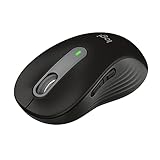
The Logitech G502 Hero at around $32 is the best gaming mouse for FPS in 2025 for players who want the best possible sensor at the lowest price. Players on the tightest budget should pick the Razer DeathAdder Essential at around $20 — proven ergonomics and accurate sensor for under $25. Wireless FPS players need look no further than the Logitech G305 at around $29.
Related Articles
Looking for more on this topic? Browse the hand-picked guides below — each one applies the same scoring rubric used in this review.
Frequently Asked Questions
What DPI should I use for CS2 or Valorant?
Most professional players use 400 or 800 DPI combined with low in-game sensitivity, giving an effective sensitivity that requires large arm movements for a 360 degree turn. Higher DPI does not improve accuracy; it just makes the cursor move further per millimetre. Consistency matters far more than the specific number you choose.
Does polling rate above 1000Hz matter?
8000Hz polling reduces click-to-photon latency by fractions of a millisecond, which is measurable but at the edge of human perception. It also increases CPU overhead, which can lower frame rates on weaker systems. 1000Hz remains the sensible default; treat 8000Hz as a marginal bonus rather than a requirement.
How light should an FPS mouse be?
The competitive standard has settled around 50-70 grams. Lighter mice reduce fatigue during long sessions and make rapid direction changes easier, which helps flick aiming. Below about 45 grams, some players find the mouse feels unstable and harder to control precisely for fine tracking, so lighter is not automatically better.
Are optical switches better than mechanical ones?
Optical switches use a light beam instead of metal contacts, which eliminates debounce delay and removes the double-click failure that plagues mechanical switches after a year or two of heavy use. The trade-off is a slightly different tactile feel that some players find less crisp. For durability, optical clearly wins.
Does mousepad choice affect aim?
Significantly. A control pad with more friction helps you stop precisely on target, which suits low-sensitivity flick shooting. A speed pad with a slicker surface suits large sweeping movements and tracking. A large pad of at least 45 by 40 centimetres is essential at low sensitivity, since you need the room.