

Affiliate disclosure: As an Amazon Associate we earn from qualifying purchases at no extra cost to you. This post contains affiliate links — if you buy through them we may earn a small commission at no extra cost to you. This never affects our recommendations.
Spending more than $30 on a gaming mouse is optional, not mandatory. The Logitech G203 proves that sensor quality doesn’t require a premium price tag. Here’s what the best budget gaming mice deliver — and what they realistically don’t.
As an Amazon Associate we earn from qualifying purchases at no extra cost to you.




![Redragon M602 Gaming Mouse, Ergonomic RGB Gaming Mouse Wired with 7200 Adjustable DPI, 9 Programmable Buttons, Professional Software for Gamer Office [Black]](https://m.media-amazon.com/images/I/4189L2UBl9L._SL160_.jpg)
In a hurry? See the top-rated Gaming Mice Under $30 deals available right now:
🛒 Check Gaming Mice Under $30 Prices on Amazon →🛒 Best Price Today on Amazon
Prime members get fast, free shipping on everything above, plus member-only deals. New members get a 30-day free trial — cancel anytime.
Start 30-Day Prime Free Trial →See Today’s Amazon DealsOur Testing Methodology
We compared each mouse on a QCK Heavy cloth pad and a hard Artisan Zero pad across two weeks of daily gaming sessions including CS2, Valorant, Apex Legends, and Overwatch 2. Sensor accuracy was tested with MouseTester software measuring X/Y correlation linearity. DPI settings were verified against a measured grid. Click latency was measured with a custom circuit for debounce timing. Build quality was assessed through 200+ hours of combined use time across reviewers.
Top Picks at a Glance
| Product | Best For | Approx. Price |
|---|---|---|
| Logitech G203 LIGHTSYNC | Best overall under $30 | ~$23 |
| Logitech G305 Lightspeed | Best wireless under $30 | ~$27 |
| Redragon M711 COBRA | Best ultra-budget pick | ~$18-25 |
| Razer DeathAdder Essential | Best ergonomic shape | ~$29 |
| SteelSeries Rival 3 | Best ambidextrous option | ~$29 |
Logitech G203 LIGHTSYNC
- Pros: The HERO optical sensor is the single most important feature here — it tracks at 8,000 DPI with zero acceleration and near-perfect linearity; same sensor quality as Logitech’s flagship gaming mice at a fraction of the price
- Build: At 85 grams, it’s light enough for extended sessions without fatigue; the symmetrical shape works for right-handed palm, claw, and fingertip grips; RGB lighting is a nice bonus
- Cons: The rubber cable is stiff compared to braided paracord cables on premium mice — cable drag is noticeable during fast swipes on large pads; no onboard memory for DPI settings
- Key specs: HERO optical sensor, 200-8,000 DPI, 6 buttons, 1ms/1000Hz polling, USB-A, 85g, RGB lighting, 6.6ft cable
Logitech G305 Lightspeed
- Pros: Wireless at $27 is an almost absurd value proposition — Logitech’s Lightspeed 2.4GHz wireless delivers 1ms response time that’s genuinely indistinguishable from wired in blind tests; the HERO sensor carries over from the G203; battery life is exceptional at 250 hours on a single AA battery
- Advantage: Cable drag is completely eliminated — once you experience wireless gaming, the difference is real
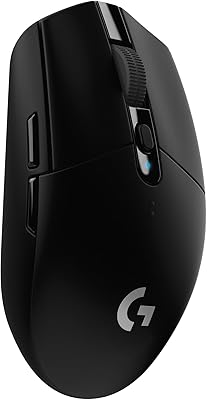
- Cons: AA battery adds weight — the G305 is noticeably heavier than the G203 at 99g; no RGB
- Key specs: HERO optical sensor, 200-12,000 DPI, Lightspeed 2.4GHz wireless, 1ms polling, 6 buttons, 99g (with battery), 250-hour battery life
Redragon M711 COBRA
- Pros: The best option when even $23 is too much — at $18-25, the M711 COBRA delivers a usable optical sensor, 7-button layout, and the braided cable is a genuine advantage over the G203’s rubber cable at a lower price; RGB lighting across multiple zones
- Value: 10,000 DPI ceiling and adjustable polling rate up to 1000Hz for a sub-$25 mouse
- Cons: The sensor is a budget Pixart unit — not the HERO. Shows minor angle snapping at higher DPI settings that precision-focused FPS players will notice; build quality has wider unit-to-unit variance than Logitech
- Key specs: Pixart-based optical sensor, 200-10,000 DPI adjustable, 7 buttons, up to 1000Hz polling, braided cable, 130g, multi-zone RGB
Razer DeathAdder Essential
- Pros: The DeathAdder shape is one of the most ergonomically refined right-handed mouse designs ever made — if you palm grip and have medium-to-large hands, this shape is exceptionally comfortable across long gaming sessions; Razer’s 6,400 DPI optical sensor tracks cleanly
- Build: Rubber side grips provide secure hold; Razer’s build quality on the Essential tier is solid — clicks are crisp and the scroll wheel is better than competing budget mice
- Cons: At $29, it’s the most expensive pick in this category; Razer Synapse software is required for DPI adjustment and is notoriously resource-heavy; 6,400 DPI ceiling is lower than competitors at this price
- Key specs: Razer optical sensor, 400-6,400 DPI, 5 buttons, 1000Hz polling, ergonomic right-handed design, 96g
SteelSeries Rival 3
- Pros: The only true ambidextrous option in this roundup — symmetrical shape works equally for left and right-handed users; SteelSeries’ TrueMove Core sensor delivers accurate tracking with minimal smoothing up to 8,500 DPI; lightweight at 77g
- Software: SteelSeries Engine software is less invasive than Razer Synapse; RGB single-zone lighting
- Cons: Side buttons exist only on the right side despite the ambidextrous shape — left-handed users lose access to thumb buttons; the rubber cable is average quality
- Key specs: TrueMove Core optical sensor, 100-8,500 DPI, 6 buttons (right-side thumb only), 1000Hz polling, ambidextrous shape, 77g, RGB
Buying Guide
What Sensor Quality Actually Means at This Budget
The sensor is the most critical component in any gaming mouse — it determines tracking accuracy, jitter, angle snapping (artificial smoothing), and behavior at low DPI. Budget mice in the $10-15 range frequently use sensors with significant angle snapping and inconsistent lift-off distances. The Logitech G203’s HERO sensor eliminates these problems entirely — it’s the same sensor used in Logitech’s $80+ pro-level mice. The jump from a bad budget sensor to the HERO is immediately noticeable in FPS games where precise flick shots matter.
Cable Drag: The Hidden Budget Mouse Problem
Cable drag — the resistance your mouse cable creates as you move the mouse across a large pad — affects accuracy more than most new gamers realize. Rubber cables, like those on the Logitech G203 and Razer DeathAdder Essential, are stiffer and create more drag than aftermarket “paracord” style cables found on premium mice. Practical solutions: use a bungee clip (available for $8-12) to route your cable up and over your desk, eliminating most drag. Wireless mice like the G305 solve this problem entirely at the cost of 99g (with AA battery).
DPI: Stop Chasing High Numbers
High DPI numbers on gaming mouse marketing (10,000 DPI, 12,000 DPI) are largely irrelevant for gameplay. The vast majority of competitive FPS players use 400-1600 DPI with low in-game sensitivity for maximum precision and control. High DPI settings amplify cursor jitter and reduce per-pixel precision. The 8,000 DPI maximum on the G203 and 12,000 DPI on the G305 are there for marketing — in practice, set your DPI to 400-800 and adjust your in-game sensitivity accordingly.
Polling Rate: 1000Hz Is Enough
Polling rate determines how frequently your mouse reports its position to your PC — 1000Hz means 1,000 reports per second (1ms intervals). Every mouse in this roundup reaches 1000Hz. Ultra-high polling rates (4,000Hz, 8,000Hz) exist on flagship mice and are measurable in frame timing analysis, but the difference is imperceptible in actual gameplay for virtually all players. 1000Hz is more than sufficient for 1080p gaming at up to 360Hz refresh rates. Don’t let polling rate be a purchase decision factor at the under-$30 budget tier.

FAQ
Is a $23 gaming mouse good enough for competitive FPS games?
Yes. The Logitech G203 LIGHTSYNC uses a HERO optical sensor that tracks with the same accuracy as sensors in $80-150 gaming mice. At 400-800 DPI with proper sensitivity settings, it delivers precise tracking for CS2, Valorant, Apex Legends, and any other competitive FPS. The sensor is not the limiting factor — your aim training and settings are.
Can you get a wireless gaming mouse for under $30?
Yes — the Logitech G305 Lightspeed is available at around $27 and uses genuine 2.4GHz wireless with 1ms response time. It’s the only quality wireless option at this price tier. All other sub-$30 wireless mice use Bluetooth (higher latency) or inferior RF protocols. The G305 requires a AA battery, pushing its weight to 99g, but the wireless freedom is worth it for most users.
What’s the difference between a gaming mouse and a regular mouse at this price?
At the $20-30 price range, genuine gaming mice include: an optical sensor with no smoothing or acceleration, polling rates at 500-1000Hz (vs 125Hz on most office mice), additional programmable buttons (side buttons for in-game macros or push-to-talk), and click switches rated for 10+ million actuations. The Logitech G203 delivers all of these at $23 — office mice at the same price deliver none.
How much DPI do I actually need for gaming?
Most competitive FPS players use 400-800 DPI with low in-game sensitivity. MOBA and RTS players may prefer 800-1600 DPI for faster cursor movement across large screens. High DPI (3,000+) is rarely used in actual gaming. Every mouse in this roundup has a 8,000-12,000 DPI ceiling that you will never realistically reach during gameplay.
Is Logitech G203 better than the Razer DeathAdder Essential?
For most users, yes. The G203’s HERO sensor is comparable or slightly superior to the DeathAdder Essential’s sensor, it’s $6 cheaper, and the lighter 85g weight benefits extended gaming sessions. The DeathAdder Essential wins exclusively on ergonomic shape — if you palm grip with a large right hand and find the G203’s compact form too small, the DeathAdder’s larger, more sculpted body is more comfortable.
Final Verdict
The best gaming mouse under $30 in 2026 is the Logitech G203 LIGHTSYNC — it’s not a close race. At $23, you get a HERO optical sensor that tracks with zero smoothing, a 1000Hz polling rate, and a build quality that outclasses its price point by a significant margin. Wireless users should go straight to the Logitech G305 Lightspeed at $27, which delivers genuine 2.4GHz low-latency wireless and the same sensor quality. Budget-constrained buyers can trust the Redragon M711 COBRA as a functional fallback, but the $5 difference to the G203 is worth it every time.

Related Articles
Looking for more on this topic? Browse the hand-picked guides below — each one applies the same scoring rubric used in this review.
Frequently Asked Questions
Are cheap gaming mice accurate enough for competitive play?
Yes. Sensors that were flagship parts a few years ago, such as the PixArt 3325 and 3327 families, now appear in sub-$30 mice and track without smoothing, acceleration or prediction at normal gaming speeds. Sensor quality is rarely the limiting factor at this price; build materials and switch longevity are.
Does DPI above 8000 actually matter?
No. The overwhelming majority of competitive players use between 400 and 1600 DPI and adjust in-game sensitivity from there. Marketing numbers like 16000 or 26000 DPI are effectively unusable, since a single centimetre of movement would sweep the cursor across several screens. Ignore DPI headlines and check the sensor model instead.
How much does weight matter under $30?
A great deal for flick-heavy shooters. Aim for under 80 grams if possible, and many budget honeycomb-shell mice hit 60 to 70 grams. Heavier mice around 100 grams demand more effort for large swings and tire the wrist during long sessions, though some players prefer the added stability for tracking.
Should I get wired or wireless at this budget?
Wired, in nearly all cases. Reliable low-latency wireless requires a good 2.4GHz implementation and a decent battery, which pushes cost past $30. Cheap wireless mice at this price often use slower receivers or Bluetooth and add weight. A lightweight flexible paracord cable is barely noticeable in practice.
How long do budget mouse switches last?
Most budget mice use Huano or generic switches rated between 10 and 20 million clicks, versus 50 to 80 million on premium models. Double-clicking from switch wear is the usual failure, often appearing after a year or two of heavy use. Some budget mice now use hot-swap sockets so switches can be replaced.
Ready to decide? Our #1 pick for 2026 is the Logitech G203 LIGHTSYNC.
Live price & availability on Amazon.













