

- Top Pick: Logitech G305 Lightspeed Wireless Gaming Mouse – Black
- Best Value: Redragon M656 Wireless Optical Gaming Mouse 4000 DPI Remapping Keys
- Premium Choice: Razer Orochi V2 Wireless Gaming Mouse — Ultra Lightweight & Portable, Bluetooth & 2.4Ghz Wireless Connectivity, 18K DPI, Up to 950hrs Battery Life, Compatible with PC & Mac — White
Affiliate disclosure: As an Amazon Associate we earn from qualifying purchases. This post contains affiliate links — if you buy through them we may earn a small commission at no extra cost to you. This never affects our recommendations.
Wireless gaming mice no longer require a $100+ budget. In 2025, genuine 2.4GHz low-latency wireless mice are available under $35, including the industry-standard Logitech G305 Lightspeed that competes directly with wired mice in latency benchmarks. Budget wireless mice from Logitech and third-party brands like TMKB cover the $10–$35 range, with significant performance differences between price tiers that are worth understanding before you buy.
This guide ranks five budget wireless gaming mice by actual gaming suitability — not just price. We evaluated connection stability, latency consistency, sensor accuracy, battery life, and build quality. All picks use 2.4GHz wireless rather than Bluetooth — the only acceptable wireless standard for gaming use.
In a hurry? See the top-rated Budget Wireless Gaming Mice Under $35 deals available right now:
🛒 Check Budget Wireless Gaming Mice Under $35 Prices on Amazon →🛒 Best Price Today on Amazon
Prime members get fast, free shipping on everything above, plus member-only deals. New members get a 30-day free trial — cancel anytime.
Start 30-Day Prime Free Trial →See Today’s Amazon DealsTop Picks at a Glance
| Product | Best For |
|---|---|
| Logitech G305 Black | Best overall budget wireless |
| Logitech G305 White | Lowest price Lightspeed |
| Wireless Gaming Mouse Rechargeable | Absolute lowest price wireless |
| TMKB Falcon M1SE | Budget ultralight wireless |
| VersionTECH Wireless | Entry-level wireless gaming |
As an Amazon Associate we earn from qualifying purchases at no extra cost to you.






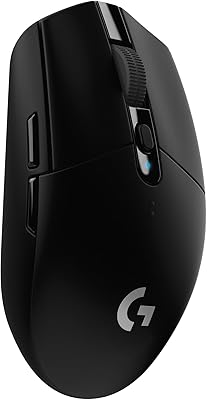
Logitech G305 Black — Best Budget Wireless Gaming Mouse
The G305 Lightspeed represents the gold standard for budget wireless gaming. Its proprietary Lightspeed 2.4GHz technology delivers sub-1ms wireless latency that is benchmarked as equivalent to wired performance. The HERO 12K sensor tracks accurately with zero jitter or acceleration at all DPI settings. A single AA battery provides 250 hours of gaming — roughly 60 days at 4 hours per day. At around $29, it is the single most recommended budget wireless gaming mouse in 2025.
- Pros: Lightspeed wireless, HERO 12K sensor, 250-hour battery, proven reliability
- Cons: 99g with battery, no RGB, requires AA battery replacement
Logitech G305 White — Lowest Price Lightspeed Wireless
At around $26, the white G305 is the least expensive Lightspeed wireless gaming mouse available — $3 cheaper than the black model with identical performance. If you do not have a preference on color, the white G305 is simply the better budget buy. The HERO 12K sensor, Lightspeed wireless system, and 250-hour battery life are all unchanged. G HUB software support and Logitech’s warranty are also identical.
- Pros: around $26 lowest Lightspeed price, all G305 performance at reduced cost
- Cons: White finish shows fingerprints and dirt more than black
Wireless Rechargeable Gaming Mouse — Absolute Lowest Price
At around $9, this rechargeable 2.4GHz wireless mouse represents the entry floor for wireless gaming mice. The sensor and wireless chip are basic — expect occasional connection stutters and less sensor accuracy than premium mice. The rechargeable battery eliminates the cost of AA batteries over time, and the included USB-C charging cable provides convenient top-up. Suitable for casual gaming and productivity use — not for competitive play where consistent tracking matters.
- Pros: around $9 price, rechargeable USB-C, 2.4GHz wireless, casual gaming capable
- Cons: Basic sensor with potential jitter, less stable wireless than Lightspeed
TMKB Falcon M1SE — Budget Ultralight Wireless
The TMKB Falcon M1SE is a 68g honeycomb ultralight mouse with 2.4GHz wireless connectivity at around $16. The perforated shell brings weight below most wireless mice in this price range, and the ambidextrous design suits both hands. Sensor performance is basic but functional for most gaming use cases. An interesting pick for players curious about ultralight wireless mice who cannot yet justify the $60+ price of premium ultralight wireless options.
- Pros: 68g ultralight honeycomb, ambidextrous, wireless at around $16
- Cons: Basic sensor, shorter battery life, wireless less stable than Lightspeed
VersionTECH Wireless — Entry-Level Wireless Gaming
The VersionTECH Wireless at around $13 is an entry-level 2.4GHz gaming mouse with adjustable DPI up to 2,400 and basic RGB lighting. Build quality is functional for casual gaming sessions. The 2.4GHz connection is more stable than Bluetooth but less refined than premium proprietary systems. For players who need wireless connectivity for a living room or couch gaming setup where precision is secondary to convenience, the VersionTECH delivers adequate performance.

- Pros: around $13 price, 2.4GHz wireless, RGB lighting, adjustable DPI
- Cons: Basic sensor, 2,400 DPI maximum, build quality is entry-level
Buying Guide
Why the G305 Dominates Budget Wireless
The gap between the Logitech G305 and the other budget wireless options on this list is significant. Lightspeed wireless technology uses frequency hopping and ultra-low power protocols to achieve sub-1ms latency — the same category as premium $150 wireless mice. The HERO 12K sensor is a genuine competition sensor. For around $29 (or around $26 for the white), the G305 delivers roughly 80% of the performance of a $120 wireless gaming mouse. There is no other product in this price range that comes close to that value ratio.
The Battery vs. Rechargeable Decision
AA-battery mice (G305) last 250 hours per battery — approximately $0 in battery cost per 250 hours of gaming. Rechargeable mice need charging every 40–80 hours. The convenience difference depends on usage patterns: players who game 4+ hours daily will find rechargeable more convenient (charge overnight weekly). Players who game less frequently may prefer the always-ready nature of a AA-battery mouse that sits unused for a week without losing charge. Both are valid — G305 uses AA, which is the trade-off for its 250-hour life.
Identifying Genuine Gaming vs. Office Wireless Mice
Not all wireless mice sold as “gaming” mice have sensors suitable for gaming. True gaming mice have optical sensors rated at 1,000Hz polling with specifications that explicitly state zero acceleration. Mice with maximum DPI under 3,200 and no polling rate specification are typically office mice in gaming packaging. The G305 explicitly publishes polling rate (125–1,000Hz) and sensor accuracy specifications — a transparency that cheaper alternatives rarely offer.
Connection Stability at Budget Price
The $10–$20 wireless mice on this list use generic 2.4GHz chipsets that are more susceptible to interference from other wireless devices, USB 3.0 ports, and Wi-Fi routers. If you experience cursor stuttering with a budget wireless mouse, move the USB receiver to a USB 2.0 port or use a short USB extension to position the receiver in direct line-of-sight to the mouse. The G305’s Lightspeed system is engineered to resist interference and virtually never stutters in standard desktop environments.
FAQ
Is the Logitech G305 the best budget wireless gaming mouse?
Yes, consistently and by a significant margin. No other wireless gaming mouse under $35 delivers Lightspeed-class 2.4GHz performance with a competition-grade optical sensor. The G305 has held this position for several years and continues to be the recommended budget wireless pick by the gaming hardware community in 2025.
Are $10 wireless gaming mice good for gaming?
For casual gaming — single-player games, couch gaming, productivity — a $10 wireless mouse is functional. For competitive online gaming (FPS, battle royale, MOBA), basic wireless mice introduce sensor inconsistencies and potential connection stability issues that can affect performance. Spending an extra $20 for the G305 eliminates those concerns entirely.
Do budget wireless gaming mice work on all surfaces?
Quality optical sensors (G305 HERO 12K) work reliably on cloth gaming mousepads, hard pads, and most desk surfaces. Budget sensors on sub-$15 mice may struggle on glossy or patterned surfaces. If you use a gaming mousepad, most wireless mice on this list will perform adequately. Avoid using any wireless gaming mouse on glass surfaces — even premium sensors struggle there.
How do I extend battery life on a wireless gaming mouse?
For rechargeable mice: reduce RGB lighting brightness or disable it entirely (RGB is the largest battery drain), use the lowest effective polling rate (500Hz instead of 1,000Hz saves approximately 20% battery), and enable sleep mode after a short idle period. For the G305 with AA battery: use the built-in power switch to fully turn off the mouse when not in use — this prevents standby drain and extends battery life significantly.

Verdict
The Logitech G305 at around $26–around $29 is the definitive budget wireless gaming mouse in 2025. It is not the cheapest option on this list, but it is the only budget wireless mouse that delivers genuine competition-grade performance. Players who cannot stretch to $27 should consider the TMKB Falcon M1SE at around $16 as the next-best wireless option — basic sensor but genuinely ultralight at 68g. Avoid sub-$15 wireless mice for any game where tracking consistency matters.
Related Articles
Looking for more on this topic? Browse the hand-picked guides below — each one applies the same scoring rubric used in this review.
Frequently Asked Questions
Is cheap wireless fast enough for competitive gaming?
Yes, if it uses a 2.4GHz USB dongle. That connection typically polls at 1000Hz with latency around one millisecond, which is indistinguishable from wired in practice. Avoid Bluetooth-only mice for gaming, since their latency is far higher and connection stability is worse under interference.
What sensor should I look for under 35 dollars?
Budget mice now commonly use PixArt PAW3311, PAW3325 or similar sensors, which track flawlessly up to well beyond the speeds any human generates. Ignore marketing DPI numbers of 26,000 and above, which are useless in practice. What matters is that the sensor has no smoothing, acceleration or angle snapping.
Do cheap wireless mice use AA batteries or rechargeable cells?
Both exist. AA-powered mice often run for six months to a year on a single cell and never need charging downtime, at the cost of extra weight. Built-in rechargeable batteries make lighter mice but need a USB-C top-up every few weeks. Neither is objectively better; it depends on whether weight or convenience matters more.
What do I give up compared with a premium wireless mouse?
Usually the switches, the coating quality and the software. Budget mice often use lower-cycle-rated mechanical switches that develop double-click issues sooner, simpler onboard memory, and less refined PTFE feet. Build tolerances are looser, so side-panel creak is more common. Core tracking performance, though, is now very close to flagship level.
How much should a good gaming mouse weigh?
Modern preference has shifted well below 80 grams, and many competitive players use mice in the 50-65 gram range for easier flick aiming. Budget wireless mice typically land between 65 and 90 grams depending on battery type. Weight preference is personal: palm grip users often prefer a bit more mass for stability.
Ready to decide? Our #1 pick for 2026 is the Logitech G305 Black.
Live price & availability on Amazon.













