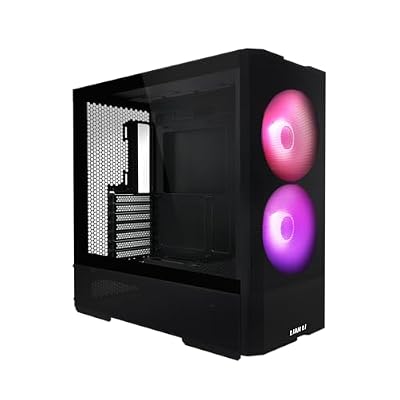
BTF Back to Front Gaming Case: How Back-Connect Layouts Work and When to Choose One
A BTF back to front gaming case is built for a back-connect motherboard, where the main power and many of the connectors sit on the rear side of the board instead of the front. The result is a front panel with no visible cables and a clean, almost cable-free interior. The idea is simple, but it only works when the board, the case and the power supply are chosen as a set. This guide explains how the layout works and whether it is worth the extra planning.
This is a buying guide framed around the product class. We have not assembled every chassis discussed here, and this article does not claim tested thermal or noise results. The hero listing below is the closest match we found for the query. Check the card for the exact model, compatible board list and price, and confirm that the case supports the board you plan to use before you buy.


How a Back-Connect Layout Works
In a conventional build, the motherboard’s power connectors and front-panel headers sit on the front-facing side of the board, and the cables run across the visible interior. In a back-connect layout, the board moves some of those connectors to the rear side, so the cables route through the motherboard tray instead of across the front. The case is designed with a cutout pattern that lets the connectors pass through, and the front of the build looks clean.
The motherboard tray is the key component. It has to fit the back-connect board, leave room for the cables and align the cutouts with the board’s connectors. A case that is not designed for this layout cannot simply take any board and make it work. This is why the compatibility list matters more than the case name.
Board, Case and PSU as One System
A back-connect build depends on three parts matching. The board must be a back-connect design, the case must have the cutouts and tray for it, and the power supply must use the right cable type. Some back-connect boards use proprietary or non-standard connector layouts, so check that the PSU and cable kit suit the board. Mixing parts from different systems can leave you with a build that will not fit or will not boot.
Cable Routing and Maintenance
One benefit of the layout is easier cable routing. With the main connectors on the back, the front is free of thick cable runs, and airflow in the main chamber can improve. The trade-off is that repairs are a little more involved, because some connectors are behind the tray. Plan for the first build to take longer and allow extra time for cable dressing.
BTF Case Comparison by Build Approach
The table below groups back-connect style cases by the approach they take to the layout. It avoids claims about specific models and uses price tiers rather than dollar figures, since compatibility lists and listings change often. Use it to choose the approach that fits your board and budget, then verify compatibility on the exact chassis.
| Build approach | Best for | Typical trade-off | Typical price range |
|---|---|---|---|
| Full back-connect tray with cutouts | Clean front and a cable-free look | Board and PSU must match the layout | Check current price |
| Mid-size BTF-capable chassis | Back-connect builds with room to spare | Fewer compact options | Check current price |
| Compact back-connect build | Small desk builds with a clean front | Tight cable routing and GPU limits | Check current price |
| Standard case with BTF-style routing | Users who want the look on a budget | Partial cable hiding and less tidy results | Check current price |
For a general look at case layouts and their trade-offs, our guide to the best gaming PC case covers the major categories, and the best gaming desktop case article compares chassis by size.
Choosing a Back-Connect Motherboard
Compatibility Before Purchase
Start with the motherboard. Check that the board is a back-connect design and that the case lists it as compatible, or that the manufacturer confirms the layout. Look at the board’s memory slot placement, M.2 slot positions and the location of the CPU power connector, because these affect how the tray and the cooler fit. Our overview of the best gaming motherboards helps compare boards by features, and the what is the best gaming motherboard article explains how to rank them.
Form Factor and Size
Back-connect boards come in several sizes, and the form factor you choose sets the case size. The ATX, Micro-ATX and Mini-ITX comparison explains the size differences, and the Mini-ITX gaming PC build guide covers the compact options.
Power Supply and Cooling in a Back-Connect Build
The power supply must match the cable kit your board needs. Check the power supply’s connector list and confirm that it includes the cables for the back-connect layout. A modular unit helps, because you can install only the cables you need and keep the tray clean. Our guide to the best PSU for gaming covers wattage and connector choices, and the 850W gaming PSU roundup lists units in a useful wattage range.
Cooling follows the same rule as any case: match the cooler to the height and radiator limits. The best CPU cooler for gaming guide compares options, and the Corsair 5000D Airflow review shows how a high-airflow chassis is assessed, which applies to planning intake and exhaust in any layout.
Who Should Choose a BTF Case
A back-to-front layout suits a builder who wants a clean front, who is comfortable with a more careful build and who has checked the board and case compatibility. It suits a showcase desk where cables would otherwise be visible. It is a weaker choice for someone who wants the easiest build, cannot source a compatible board, or plans to change the board later. For a simpler approach, a standard case with careful cable routing will often be enough.
For a complete build plan, the step-by-step gaming PC build guide covers the assembly order, and the gaming PC budget build article shows how to budget the parts around the case and board.
Frequently Asked Questions
Can I put any motherboard in a BTF case?
No. The board must be a back-connect design that the case supports. Check the compatibility list or confirm with the manufacturer before buying.
Is a back-connect build harder to assemble?
It takes more planning. Cables pass through the tray, so route them before you install the PSU and allow extra time for cable dressing.
Does a BTF layout improve cooling?
It can improve airflow in the main chamber by removing cables from the front, but the result depends on the fans and the intake design. Plan the airflow as you would for any case.
Can I repair a back-connect build later?
Yes, but some connectors sit behind the tray, so repairs can take longer. Keep the cable kit and documentation with the build.
Final Recommendation
The best BTF back to front gaming case for most buyers is one that lists your exact back-connect board as compatible, includes a tray with the right cutouts, and fits the PSU and cooler you plan to use. Start with the hero listing, verify its board compatibility and price, and compare it with the class guidance above. If you want the cleanest possible front and are willing to plan the build, a back-connect layout is worth it. If you want the simplest path, choose a standard case with careful cable management.