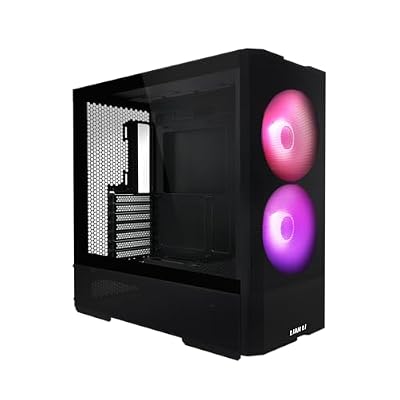
Dual Chamber Gaming Case 2026: Separating the Power Supply and Drives for a Cleaner Build
A dual chamber gaming case splits the interior into two zones: one for the motherboard and graphics card, and a second behind a partition for the power supply and storage. The layout hides cable clutter and can make a build look tidy from the front. It also changes how air moves, and it asks you to plan the wiring before the first part goes in. This guide explains how to judge a dual chamber case in 2026 and when the extra partition is worth it.
This is a buying guide framed around the product class. We have not assembled every chassis listed here, and this article does not claim tested thermal results. The hero listing below is the closest match we found for the query. Check the card for the exact model, chamber layout and price, and confirm that the partition, PSU length and GPU clearance match your parts before you buy.


How a Dual Chamber Layout Works
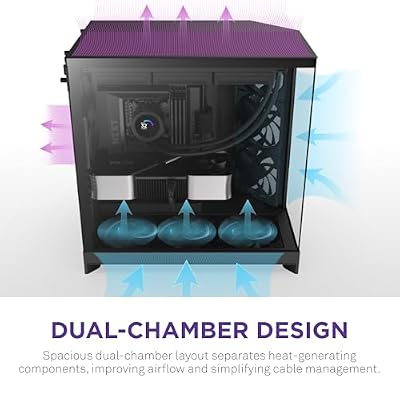
In a dual chamber design, a partition divides the case into a main compartment and a rear or bottom compartment. The motherboard, CPU cooler and graphics card sit in the main area. The power supply, drive cages and many of the cables sit behind the partition. The cables pass through cutouts, so the front looks clean and the cable runs are shorter and more hidden.
The partition has a practical effect on airflow. Air that would otherwise pass over cables can move more freely through the main chamber, which is helpful for the GPU and CPU. The trade-off is that the second chamber has its own airflow, and drives and the power supply may run warmer if the case does not vent them properly.
Cable Routing Through the Partition
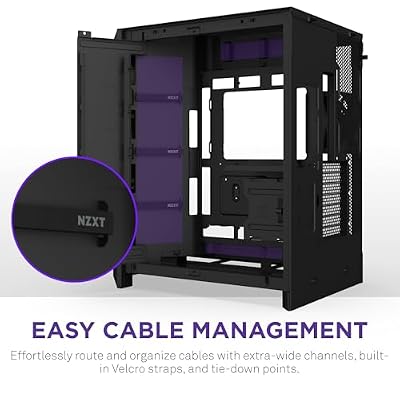
Cable routing is the main reason buyers choose this layout. Check how many cutouts the partition has, how large they are and where they sit relative to the motherboard. A well-placed cutout lets you route the 24-pin power and the CPU cable with minimal bending. Poorly placed cutouts make the job harder, even if the case looks neat in photos.
Power Supply and Drive Placement
Check the power supply length and the mounting position before you buy. Some dual chamber cases mount the PSU at the bottom of the rear chamber, while others use a shroud that covers the unit. Make sure the supported PSU format and maximum length suit the model you plan to buy. Drive cages behind the partition can also limit the number of SATA drives you can mount, so count your storage before choosing.
Dual Chamber Case Comparison by Priority
The table below groups dual chamber cases by what most buyers want from the layout. It avoids claims about specific models and uses price tiers rather than specific figures, since listings in this segment change often. Use it to choose the priority that fits your build, then verify the exact chassis.
| Priority | Best for | Typical trade-off | Typical price range |
|---|---|---|---|
| Cable hiding and a clean front | Showcase builds with visible hardware | Cutouts can be tight on some boards | Check current price |
| Airflow through the main chamber | High-load CPU and GPU builds | Rear chamber needs its own vents | Check current price |
| Large drive capacity | Builds with many SATA drives | Less room for a long PSU in some models | Check current price |
| Budget dual chamber | First tidy build on a budget | Fewer mounts and basic cable tie points | Check current price |
For a wider look at chassis types, our guide to the best gaming PC case compares layouts across categories, and the best gaming PC cases under 200 roundup lists budget choices with similar layouts.
NZXT H9 Flow - Dual-Chamber ATX PC Case - Black | Dual-chamber ATX flagship with 4 included fans, 420mm top and front radiator support, and wraparound tempered glass.




As an Amazon Associate we earn from qualifying purchases. Product prices and availability are accurate as of the date/time indicated.
Airflow Planning With a Partition
Front Intake and Rear Exhaust
A dual chamber case still needs a clear airflow path. Intake fans at the front or bottom should feed the main chamber, and exhaust at the top and rear should pull hot air out. The rear chamber needs its own intake or vent if the PSU and drives are to stay cool. Check whether the partition has a grille or an opening that connects the two chambers, because that opening changes how air moves.
The Corsair 5000D Airflow review is a useful example of how an airflow-focused chassis is judged, even though it is not a dual chamber design. The principles of intake and exhaust apply to any case layout.
Cooling Choices for the Main Chamber
The CPU cooler should suit the case height and the radiator support. A tower air cooler is often the simplest choice. Our overview of the best CPU cooler for gaming compares air and liquid options, and the budget AIO liquid cooler guide explains when a radiator is worth the mounting effort.
Building Inside a Dual Chamber Case
A dual chamber build rewards a plan. Mount the motherboard and the CPU cooler first, then install the GPU, and then route the power cables through the partition before you install the PSU. Dress the cables at the cutouts and leave enough slack for the PSU to sit without tension. Our guide to the step-by-step gaming PC build covers the basic assembly order, and the ultimate gaming PC build guide shows how to plan a larger system.
Choose the power supply with the layout in mind. Our guide to the best PSU for a gaming PC explains wattage and connector choices, and the 850W gaming PSU roundup lists units in a useful size and wattage range. Modular units help a dual chamber build because you can install only the cables you need.
Who Should Buy a Dual Chamber Case
A dual chamber case suits a builder who cares about a clean front, wants to hide the PSU and cables, and is willing to plan the wiring. It suits a system with many drives or a PSU that would clutter the main chamber. It is less suitable for someone who wants the simplest possible build, has a very large PSU that will not fit behind the partition, or plans to fill the rear chamber with high-heat parts without adding venting. If you are unsure, a standard mid tower with good cable management may serve you better.
For a complete build plan that fits a dual chamber layout, the best gaming motherboards guide helps find a board with a well-placed 24-pin connector and enough M.2 slots, and the best gaming SSDs article covers storage choices for a tidy build.
Frequently Asked Questions
Does a dual chamber case run hotter?
It does not have to. The layout can improve airflow in the main chamber, but the rear chamber needs its own venting for the PSU and drives. Check the vents and the partition openings on the spec sheet.
Will my power supply fit behind the partition?
Check the maximum PSU length and the mounting position in the rear chamber. Confirm that your unit, including its fan and modular connectors, fits within the stated limit.
Is a dual chamber case harder to build in?
It can be, because cables must pass through the partition before the PSU is installed. Plan the route first and use the cutouts to keep the runs short.
How many drives can I mount in the rear chamber?
It depends on the drive cage design. Count the SATA and M.2 options on your board, then check the number of mounts on the chassis specification.
Final Recommendation
The best dual chamber gaming case for most buyers is one whose partition has well-placed cable cutouts, whose rear chamber has its own venting, and whose maximum PSU length fits the unit you plan to buy. Start with the hero listing, confirm its chamber layout and price, and compare it with the class guidance above. If you want the cleanest possible front and are prepared to plan your cables, a dual chamber layout is worth the extra step. If you want the simplest build, a standard mid tower will serve you well.