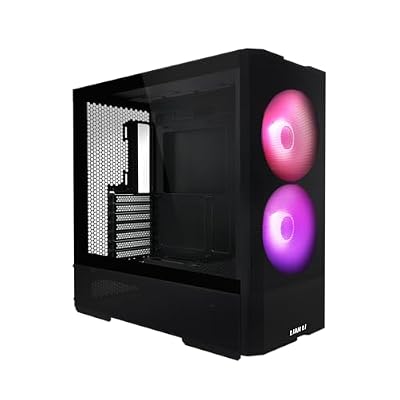
Fractal Design Pop Case Review 2026: Is the Value Mid-Tower Still Worth It?
Fractal Design’s Pop series has become one of the more sensible choices for builders who want a clean, well-finished mid-tower without paying premium prices. The line is built around practical details: sensible airflow, a tidy interior and a simple look that suits most desks and rooms. This guide reviews the Fractal Design Pop case as a buying decision rather than a spec sheet, and explains who it suits, where it is limited and what to check before ordering.
The listing above may be a close match rather than the exact variant you have in mind. The Pop family includes several versions with different front panels, colours and included fans, and small details such as fan count and panel type can change between them. Confirm the exact model, the supported graphics card length and the radiator positions on the product page before buying. The guidance here is written for the Pop family as a whole, so it applies whichever version you choose.
Who the Fractal Design Pop Suits
The Pop is a strong match for a first serious gaming build or a mid-range upgrade. It gives you enough room for a modern graphics card, a standard tower cooler and a common ATX motherboard, without the size and cost of a premium chassis. It also suits a builder who values quiet operation, because the family is generally designed to keep fan noise in check while still moving air. If you want a case that looks good without drawing attention, the Pop is in that territory.
It is less suitable for someone who plans a very large loop or a system with many drives. A value mid-tower has fewer mounting points and drive positions than a full-tower, and you may outgrow it if your build expands. Our overview of the best mid-tower gaming cases shows how the Pop compares with its nearest rivals.
Build Fit and Component Clearance
Check the graphics card first. Mid-tower cases of this type usually accommodate most mainstream and high-end cards, though a card choice guided by our 1440p GPU guide will tell you how much length you really need. The figure that matters is clearance with the front fans in place. Measure your card’s length and thickness, then compare them with the maximum length in the product specification. Front-panel fans and a front radiator both reduce usable space, so treat the spec as the upper limit rather than the target.
Next, check the CPU cooler. A tall tower cooler should fit, but make sure the side panel will close with the RAM and the cooler fan in place. If you prefer a liquid cooler, confirm the radiator mounting positions and whether a 240mm or 280mm radiator fits at the top or front. Our guide to budget AIO liquid coolers helps you match a radiator size to a case of this class.
Airflow, Noise and Thermal Trade-Offs
Airflow is the area where value mid-towers differ most. Panel style decides how much air reaches the fans, and the fan positions decide how well the case moves heat out of the chassis. A mesh front generally gives stronger intake than a solid panel, and a rear exhaust with a top fan completes a simple path. If the case includes a dust filter, check that it is easy to remove and clean, since a blocked filter cuts airflow quickly.
Noise is the other trade-off. A case that restricts airflow can keep noise down, but it may let components run warmer. A case with open airflow moves more air, and that can mean more fan noise under load. The best balance is usually a set of quality fans with a sensible curve, not a maximal fan count. For a larger case with strong airflow as a comparison, see our Corsair 5000D airflow review.
Comparison: Pop Against Common Alternatives
The table below compares the Pop family with the kinds of cases buyers typically weigh against it. Prices shift often and depend on the variant, so use the ranges as a starting point and check the current price on the card.
| Case class | Best for | Airflow | Noise balance | Typical price range |
|---|---|---|---|---|
| Fractal Design Pop (hero listing) | First serious builds, quiet desktop systems | Moderate to good | Generally quiet | Budget to mid-range, check current price |
| Mesh-front value mid-tower | Builds that run hot or use a flagship GPU | Strong | Fan-dependent | Budget to mid-range, check current price |
| Glass-front mid-tower | Showpiece builds | Moderate | Varies | Budget to mid-range, check current price |
| Compact micro-ATX case | Small desks and light gaming | Limited by size | Varies | Budget, check current price |
The Pop wins on balance rather than on any single feature. It is a sensible middle ground between the budget box and the premium chassis. If your priority is maximum cooling, a mesh-front value mid-tower may serve you better. If you want the cheapest entry point, a compact micro-ATX case will cost less but limit your options. For a wider set of recommendations at different budgets, our gaming PC cases under 200 dollars roundup is a useful next step.
Cable Management and Build Process
A mid-tower with a well-planned rear channel makes cable work straightforward. Route the main power cables first, then the front-panel connectors, the USB leads and the fan cables. Use the tie points to keep bundles off the fans, and leave enough slack that the side panel closes without tension. Clean routing also helps airflow, since loose cables can block the path that air takes through the case.
The build process is simple enough for a first-time builder, provided you work on a flat surface and read the motherboard manual before mounting the board. Install the standoffs that match your board, add the I/O shield and the CPU, then fit the cooler and the RAM. For the thermal interface, a reliable thermal paste with a simple application method is a better choice than an untested alternative.
Who Should Look Elsewhere
Look elsewhere if you plan a full-size loop, a large number of drives or a multi-GPU setup. A value mid-tower will not replace a full-tower in those cases. If your system is a compact mini-ITX build, the Pop is too large to be the right choice. Our guide to mini-ITX cases covers the compact end of the market in more detail, and the builds by budget guide shows how case choice fits into a complete system.
Top Picks Beside the Fractal Design Pop
The Pop is a value mid-tower, so these cases and fans suit similar budgets. Check clearances for your own parts before choosing.
Fractal Design Pop Air RGB Tempered Glass Case
The Pop Air with RGB fans and a clear glass side panel. It is a common starting point for first builds and a simple way to get an airflow-focused layout.
As an Amazon Associate we earn from qualifying purchases at no extra cost to you.

Fractal Design Pop 2 Air Black TG Case
A newer Pop 2 model with a tempered glass panel and an airflow focus. It suits buyers who want the same brand with a fresher design.

NZXT H5 Flow Compact ATX Mid-Tower Case
A compact mid-tower focused on airflow. It is a rival at a similar price and has a smaller footprint on the desk.

ARCTIC P12 Pro PST 120mm PWM Fans, 5 Pack
A five-pack of 120mm PWM fans. Extra fans make it easier to fill empty case mounts, and the PST connection lets them share one header.
Fractal Design Pop 2 Vision Black Panoramic Glass Case
A Pop 2 variant with a panoramic glass panel. It suits buyers who want a showcase look while staying in the same value range.

Check graphics card length, cooler height and radiator support against the case spec sheet before you buy.
Frequently Asked Questions
Is the Fractal Design Pop a good case for a first gaming PC?
It is a sensible choice for a first build, since the layout is straightforward and the room is adequate for mainstream and high-end cards. Check the card clearance and the cooler height before you buy, because those are the most common sources of trouble.
Does the Pop case run quietly?
The family is designed with noise in mind, but the result depends on your fans, your fan curves and your components. Quiet operation is achievable, but a case with strong airflow will always need fans that move air at a reasonable level.
Can I fit a 240mm or 280mm radiator?
Many mid-tower cases support radiators of that size, but the mounting position matters. Check the supported radiator positions in the specification and confirm that the radiator will not block the graphics card or the RAM.
Is the Pop family good for airflow?
It can be, provided you choose the right panel and fan layout. A mesh front and a clear exhaust path give the best results, and the filter should be easy to remove for regular cleaning.