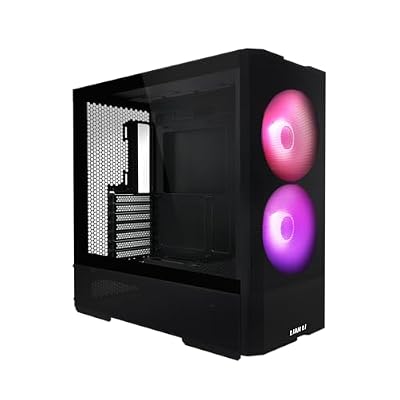
Hyte Y60 Gaming Case Review 2026: Clean Cable Builds in a Glass-Front Chassis
The Hyte Y60 is a glass-front case aimed at builders who care as much about the inside of the chassis as the outside. A display case is only as impressive as its cable work, and the Y60 family is the sort of design that rewards a careful build with a clean, uncluttered interior. This guide looks at the Y60 from the angle of build quality and cable concealment, rather than general airflow, and explains which builders will get the most from it.
The listing above may be the nearest match to the Hyte Y60 you intend to buy rather than the precise variant. Y-series cases vary in panel configuration, included fans, mounting options and clearance, and small differences can change how a build fits. Check the supported graphics card length, the radiator positions, the motherboard range and the cable routing features on the product page before ordering. The advice below is written for the Y60 family, so it stays valid across its versions.


Who the Y60 Is Built For
The Y60 suits a builder who wants a finished look and is prepared to spend time on the build. A glass front puts the motherboard, the graphics card and the lighting in clear view, so the difference between a neat build and a messy one is obvious. It is a good choice for a showpiece system, a streaming setup or a desk build where the PC is visible every day. Builders who enjoy the process of planning cable routes will find the chassis rewarding to work in.
It is a weaker choice for someone who wants the lowest-maintenance build. Glass panels show dust and fingerprints, and a display-focused layout asks more of the fans and the intake to keep components cool. If you prefer to close the case and forget about it, a solid mesh-front chassis may be more practical. For a broader survey of glass options and what they cost in practice, our tempered glass gaming case guide is a helpful companion.
Cable Concealment and Interior Layout
Cable concealment is where the Y60 earns its reputation. In a case with a rear channel and generous cutouts, the main power cables can run behind the motherboard tray, and the visible interior stays tidy. Check the tray cutouts and tie points in the specification, because they decide how much of the wiring you can hide. A case with a deep channel and sensible tie points makes the build far easier, while a shallow channel leaves cables exposed.
Plan the power supply cables before the build starts. Measure the lengths you need, and choose a modular unit so you use only the cables you need. Our guide to the 850W gaming power supplies covers options with clean modular designs. If you want a stronger unit for a high-end graphics card, the 1000W units for flagship builds guide explains what to look for.
Airflow and Temperatures in a Glass-Front Case
A glass-front layout limits intake, so the fans must do the work. Look for intake openings at the front and bottom, and make sure the filter can be removed without disturbing the cables. Place the intake fans to pull cool air across the graphics card, and use rear and top exhaust to move warm air out of the chassis. Avoid filling every mounting point if the fans simply recirculate warm air inside the case.
Temperatures also depend on the processor cooler and the fan curves. A capable tower cooler or a well-sized radiator keeps the CPU in check, while a sensible curve keeps the noise down. Run the system under a realistic workload and watch the results over several sessions, since dust and room temperature change the numbers. For a case built around airflow from the start, see our Cooler Master NR200P review for a compact comparison point.
Comparison: Y60 Against Other Glass-Front Cases
The table compares the Y60 family with the options buyers typically consider. Prices vary by retailer and variant, so use the ranges as a rough guide and check the current price on the card.
| Case class | Best for | Cable concealment | Airflow margin | Typical price range |
|---|---|---|---|---|
| Hyte Y60 (hero listing) | Clean showpiece builds | Strong, with a rear channel | Moderate, fan-dependent | Mid-range, check current price |
| Standard glass mid-tower | Budget showpiece builds | Basic | Moderate | Budget to mid-range, check current price |
| Mesh-front mid-tower | Hot-running components | Basic to good | Strong | Budget to mid-range, check current price |
| Premium glass chassis | High-end builds with premium finish | Strong | Varies | Premium, check current price |
The Y60 is a strong choice when cable work is the priority. A basic glass mid-tower costs less but offers fewer routing features, and a mesh-front case beats it on airflow. A premium glass chassis is the step up for finish and build features. If you want a case with a more restrained profile, our overview of the best gaming PC cases shows the full range.
Thermalright A70 Vision ATX Gaming case |Three Sides Without Stands,Panoramic Glass Panel |8 Fan Slots |Tower-Style Computer case |Equipped with Type-C Interface |Comes with a 9.16-inch LCD Display |


As an Amazon Associate we earn from qualifying purchases. Product prices and availability are accurate as of the date/time indicated.
Build Process and Maintenance
Build in a logical order. Install the motherboard standoffs and the I/O shield, fit the CPU and cooler, and then add the RAM and the graphics card. Route the power cables behind the tray before you close the chassis, and keep the front-panel leads away from the fans. Apply the thermal interface carefully, since visible and invisible parts of the build should both be clean. A thermal paste that suits your cooler and a steady application technique will serve you well.
Maintenance is part of the ownership cost. Clean the glass with a microfibre cloth, and clear the filter regularly, since a dusty filter reduces airflow and makes the case look neglected. A tidy build with clean filters keeps the chassis looking good for years.
Who Should Choose Something Else
Choose something else if you want a compact system, a quiet mesh-front case or the lowest maintenance. A mini-ITX build will fit a smaller case, and our notes on mini-ITX cases cover the options. If your system uses a flagship graphics card and runs at full load for long sessions, the RTX 5090 review shows the power and cooling demands that a card of that class brings, and a mesh-front airflow case may suit that load better.
Frequently Asked Questions
Is the Hyte Y60 good for cable management?
It is well suited to clean builds, especially if the rear channel and tie points match your board and power supply. Plan the cable route before installing the board, and check the specification for the channel depth.
Will the Y60 keep a high-end graphics card cool?
That depends on the fans, the intake area and the cooling layout. A glass front limits airflow, so choose fans carefully and test the system under load before judging the result.
Does the Y60 fit a large radiator?
Many variants support radiators, but the positions and sizes differ. Confirm the supported radiator sizes and whether the radiator blocks the graphics card or the RAM.
Is the Y60 a good choice for a first build?
It can be, provided you are comfortable with cable routing and enjoy a careful build. The glass shows every detail, so take your time and plan the layout first.