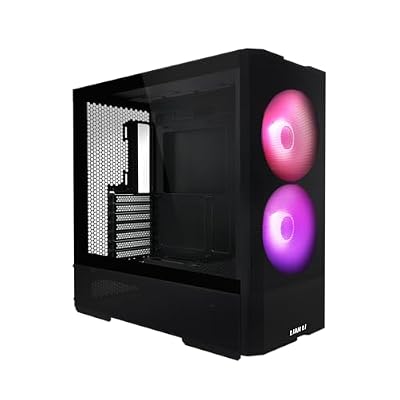
Hyte Y40 Gaming Case Review 2026: Display-First Chassis Buying Guide
The Hyte Y40 is built for a specific kind of buyer: someone who wants the graphics card and the interior on show. Its design puts a large panel of glass between the viewer and the components, so the case works as a display as well as a housing for hardware. That focus changes the decision. Instead of asking only about airflow or price, you have to weigh how much visual payoff you want against the thermal and fit trade-offs that come with a glass-forward layout.
The listing above may be a close match rather than the exact Hyte Y40 variant you have in mind. Hyte sells several Y-series models with different panel configurations, included fans and mounting options, and the specification details can differ between them. Confirm the supported graphics card length, the radiator positions and whether a vertical GPU mount is included before buying. The advice below applies to the Y40 family, so it stays useful whichever version you select.
Who the Hyte Y40 Suits
The Y40 suits a builder who spends time with the PC on display, whether that is a desk-side setup, a streaming station or a shelf in a living room. A large glass panel shows off the graphics card, the RAM and the lighting, and a clean build rewards careful cable work. It also suits someone who wants a tidy, modern look that stands out from a standard black box without going to the extremes of a fully lit showpiece.
It is less suitable for a buyer whose main concern is the lowest possible temperatures or the quietest operation. A glass-forward case restricts intake and can trap heat around the graphics card, so the fans and the layout must do more of the work. If the PC runs a flagship card at full load for hours each day, a mesh-front chassis will usually give you more margin. Our guide to the best tempered glass gaming cases covers the wider glass category and its trade-offs.
Glass Panel, Airflow and Thermal Reality
The central trade-off of a display case is airflow. Glass is a sealed panel, so the air has to enter through the other openings, usually the front or bottom intake. A case of this type can still run well, provided those openings are generous and the fans are chosen with care. Check the intake area, the filter design and the fan positions before you buy, since they decide how much air reaches the components.
Temperature control also depends on the cooler and the fan curves. A capable tower cooler or a well-sized radiator will keep the processor under control, while a sensible fan curve keeps noise down at idle. Test the system under a realistic load before you judge the result, and remember that room temperature and dust buildup will change the numbers over time. For a comparison with a case built around airflow first, see our Corsair 5000D airflow review.
Fit and Layout: Planning the Graphics Card
The graphics card is the reason most people buy a display case, so plan its position carefully. Some models in this family offer a vertical mounting option, which shows the card face-on through the glass. That presentation looks striking, but it adds hardware, requires a riser cable and can change the clearance for the power connector. Confirm whether your variant includes the mount, and whether the power connector and the side panel still work with the card in that position.
Measure the card length and thickness before you commit, and check the clearance against any front radiator or fans. Build fit is the most common source of trouble in a glass-forward case, because the panel leaves less room for error in the cable path. A compact tower cooler will fit more easily than a tall cooler with a large fan, so check the height limit in the specification. If your target is a 1440p build rather than a flagship, our guide to the best GPU for 1440p gaming helps you choose a card whose length suits a display case.
Comparison: Y40 Against Other Display Cases
The table compares the Y40 family with the options buyers usually consider alongside it. Prices change often and depend on the variant, so use the ranges as a guide and check the current price on the card.
| Case class | Best for | Visual focus | Thermal margin | Typical price range |
|---|---|---|---|---|
| Hyte Y40 (hero listing) | Desk-side display builds | High, large glass panel | Moderate, depends on fans | Mid-range, check current price |
| Glass mid-tower with lighting | Showpiece builds on a budget | High | Moderate | Budget to mid-range, check current price |
| Mesh-front airflow case | Hot-running graphics cards | Low | Strong | Budget to mid-range, check current price |
| Premium display chassis | Top-tier builds with premium finish | Very high | Varies | Premium, check current price |
The Y40 is a reasonable middle option. It delivers the display look without moving all the way to a premium chassis. A mesh-front case beats it on airflow, and a premium display case beats it on finish and build features. If you are not sure whether the glass matters to you, consider how often you will look at the case. Our guide to RGB gaming setups shows how lighting and display choices fit into a complete desk build, and the budget gaming PC build guide shows where a display case fits when money is tight.
Cable Management in a Display Case
Cable work matters more in a glass case because every cable is visible. Plan the route before you install the board, and hide the power leads behind the tray where the chassis allows it. Keep the front-panel and USB cables tidy, use the tie points and avoid crossing the graphics card’s fans. A clean interior is the main visual reward of a display case, so the effort pays off.
Pick a power supply with a clean modular design if you want a tidy look. Our guide to the best gaming PC power supply helps you choose a unit that suits the build. Thermal interface is another visible detail, so apply a reliable thermal paste carefully to keep the processor temperatures in line with the rest of the system.
Who Should Look at a Different Case
Look elsewhere if your priority is the coolest possible system, the quietest operation or the smallest footprint. A mesh-front mid-tower will usually run cooler, and a compact chassis will suit a small desk better. If you plan a multi-radiator loop, a larger airflow-focused case will give you more mounting positions. For memory choices that suit a visible build, see our 32GB DDR5 RAM guide. For a compact alternative, our notes on mini-ITX cases cover the small-form-factor market in more detail.
Top Picks for Display-Style PC Cases
The Y40 is built to show off components. These picks cover related cases and a riser for vertical mounting.
HYTE Y40 Panoramic Tempered Glass Mid-Tower
The Y40 itself, with a panoramic glass front for display builds. It is designed with vertical graphics card mounting in mind.
HYTE X50 ATX Mid-Tower Gaming Case
A mid-tower optimized for airflow from the same brand. It suits buyers who like the look but want more cooling headroom.
As an Amazon Associate we earn from qualifying purchases at no extra cost to you.

HYTE PCIe 5.0 Hyper Riser
A riser cable for vertical graphics card mounting. It is built to match the brand’s display cases and handles modern card speeds.

ASUS Prime AP304 ARGB ATX Case
An ATX case with four ARGB fans and tempered glass. It is a rival option for display builds at a modest price.

HYTE Y70 Panoramic Gaming PC Case
A larger HYTE case with panoramic glass and a focus on airflow. It suits builds with bigger graphics cards that need extra room.

A display case looks great, but the glass front can limit airflow, so plan fans and cooling with care. Think about where the cables will run, because a display case shows every wire that is left loose.
Frequently Asked Questions
Is the Hyte Y40 good for airflow?
Airflow is adequate but depends on the fans and the intake area. A display case with a sealed glass panel needs careful fan placement to keep components cool, so check the intake openings and test the system under load.
Does the Y40 support a vertical graphics card mount?
Some variants in the family offer a vertical mounting option. Confirm whether your model includes the mount and riser, and check the clearance for the power connector before buying.
Will a large graphics card fit?
Check the maximum card length in the specification, then subtract any space taken by front fans or a front radiator. Measure your card before ordering, because glass-forward layouts leave less room for error.
Is a display case worth the extra cost?
It is worth it if you spend time looking at the PC and value the visual payoff. If the case will mostly sit out of view, a mesh-front airflow chassis will usually deliver better thermals for the same spend.