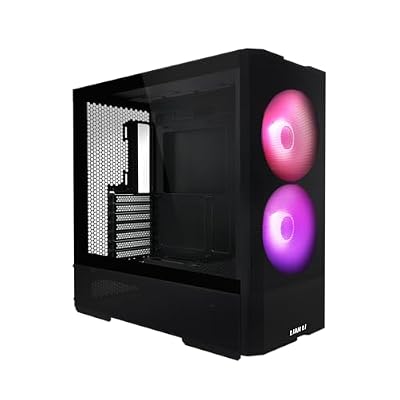
O11 Dynamic EVO XL Case Review: Is the Big Dual-Chamber Build Worth It?
The O11 Dynamic line from Lian Li is built around one idea: split the case into two chambers so the motherboard sits in front of a panel and the power supply, storage and cable clutter sit behind it. The EVO XL is the larger member of that family, aimed at builders who want room for a long graphics card, a large radiator and an E-ATX board without sacrificing a clean look. This guide explains who the O11 Dynamic EVO XL suits, what its layout does well, and where a smaller or cheaper chassis makes more sense.
Read the listing above before you decide. Case model names, dimensions and included fan counts change between regional variants and between revisions, so the card you see may be a close match to the exact model in your head. Confirm the internal dimensions, supported motherboard sizes and radiator limits on the product page before you order. The advice below is written for the O11 Dynamic EVO XL concept as a whole, so it remains useful whichever variant you end up choosing.

Who the O11 Dynamic EVO XL Is For
This case suits a builder who plans a high-end system and wants it to look intentional from every angle. The dual-chamber layout hides the power supply and most of the cabling, so the main window shows the motherboard, the graphics card and the lighting. It is a strong choice for a showpiece build, for a water-cooled system where a large radiator and pump reservoir need space, and for a builder who expects to upgrade the GPU or CPU over several years.
It is a weaker choice for someone who wants a compact desk-side machine. The EVO XL takes up real floor and desk space, and the second chamber adds depth that a standard mid-tower does not have. If you plan to move the PC often, or you have a small room, a mid-tower in the same airflow class will feel far easier to live with. Our overview of the best mid-tower gaming cases covers smaller chassis that still handle a flagship GPU.
Layout and Build Fit: Checking the Numbers That Matter
Fit is where most large-case purchases go wrong, so start with the three measurements that decide whether a build goes together. The first is graphics card length. Large cases of this type generally accommodate very long cards, but the figure that counts is the clearance with the front radiator or fan mounted, not the bare chamber width. The second is CPU cooler height, which matters if you run a tower air cooler and want the side panel to close. The third is radiator support, since the front and top mount positions determine whether a 360mm or 420mm radiator fits alongside a tall card. If you are weighing a liquid cooler against air, our look at budget AIO liquid coolers shows how radiator size changes the mounting plan.
Motherboard support is the next check. The EVO XL is positioned for large boards, including E-ATX, so builders with a standard ATX or micro-ATX board will have spare room that they may not need. That extra space is useful for cable routing, but it can also leave a small build looking sparse. Confirm that the standoff layout matches your board, and verify the front I/O placement if you rely on a specific header position. If you are still choosing a board, the motherboard form factor comparison explains how size affects case choice.
The dual-chamber design also changes how you route cables. With the power supply and drive cages behind the motherboard tray, the main cable bundles can be hidden well, provided the tray has enough cutouts and the cables are long enough to reach. Plan the route before you install the board. A rushed build that leaves the power supply cables short is harder to fix once the tray is already in place.
Airflow and Thermal Behaviour
Airflow in this class of case depends on the panel and the fan configuration more than on the chamber design. A solid or heavily tinted front panel restricts intake, so check whether the front is mesh or glass, and whether the top and rear positions can take the fans you intend to use. A case with plenty of mounting points is only as good as the fans you put in them, so budget for quality fans if you plan to run a large radiator. For a side-by-side look at how a mesh-front chassis handles the same job, read our Corsair 5000D airflow review.
For a balanced layout, most builders put intake fans at the front and bottom, and exhaust at the rear and top. Positive pressure, where intake exceeds exhaust, keeps dust down but can slightly reduce peak cooling for the GPU. Negative pressure does the opposite. Neither is correct for every build, and the best test is your own temperatures under a sustained load. Keep in mind that the cooling performance you get depends on the CPU cooler, the graphics card, the room temperature and the fan curves, not the case alone.
Build Experience and Practical Trade-Offs
The build experience in a large dual-chamber case is generally pleasant. There is room to work behind the tray, the GPU support is easy to install with a long card, and the large main chamber gives your hands space around the CPU socket. The downsides are weight and bulk. A fully loaded build with a large cooler and a heavy graphics card is awkward to lift, so plan to build on the table rather than on the floor, and handle the chassis with both hands.
Dust management deserves attention. Large cases collect dust in the lower intake, and the filters on the front and bottom need regular cleaning. Check how easily the filters slide out and whether they are magnetic, because a hard-to-reach filter tends to be ignored until temperatures climb. Cable management is straightforward once the route is planned, but the hidden chamber can also conceal a loose cable, so tidy the bundles before you close the panel.
How the O11 Dynamic EVO XL Compares to Alternatives
The table below compares the O11 Dynamic EVO XL against the kinds of cases most buyers consider in the same budget range. Prices change often and vary by retailer, so use the ranges as a rough guide and check the current price on the card.
| Case class | Best for | Build size | Airflow focus | Typical price range |
|---|---|---|---|---|
| O11 Dynamic EVO XL (hero listing) | Showpiece builds, large radiators, long GPUs | Large ATX to E-ATX | Depends on fan setup and panel | Premium, check current price |
| Standard dual-chamber mid-tower | Clean builds in a smaller footprint | ATX | Moderate to strong | Mid-range, check current price |
| Full-tower with mesh front | Maximum cooling and expansion | E-ATX | Strong | Mid to premium, check current price |
| Compact mid-tower | Small rooms, portable builds | Micro-ATX to ATX | Good with careful fan choice | Budget to mid-range, check current price |
The comparison shows the trade-off clearly. The EVO XL gives you the most room and the cleanest hidden-cable look in its class, but it asks for more space and a higher spend. A standard dual-chamber mid-tower keeps most of the appearance at a smaller size. A mesh-front full-tower prioritises cooling and expansion over looks. If your priority is the lowest noise and temperatures for the money, a mesh-front case often beats a glass-heavy design. For a broader set of options, see our guide to the best gaming PC cases, or tempered glass cases if the window is the main reason you are buying.
Who Should Skip the O11 Dynamic EVO XL
Skip this case if you are building a small system, if you have limited desk or floor space, or if you want a case that is light enough to move regularly. Skip it too if you plan a compact mini-ITX board, because you will pay for space you will not use. Budget buyers who only need a standard GPU and an ordinary air cooler will find a cheaper mid-tower gives the same result. If the case is only for looks and you will rarely open it, a smaller chassis with good cable management may serve you better. Our notes on mini-ITX cases cover the other end of the size range.
Buying Checklist Before You Order
Before you buy, measure your graphics card and your cooler against the listed clearance figures, not the marketing description. Confirm the radiator positions you need, check the motherboard standoff layout, and make sure your power supply cables reach the hidden chamber. Decide on your fan layout in advance, and budget for the fans if the included set does not match your plan. Check that your power supply has the cable length to reach the hidden chamber, and use our power supply guide if you still need a unit. Finally, check the warranty and the return policy, because large cases are easy to damage in transit and harder to return once assembled.
Frequently Asked Questions
Does the O11 Dynamic EVO XL fit an E-ATX motherboard?
The EVO XL is positioned for large boards, including E-ATX, but you should confirm the exact motherboard support on the product specification for the variant you are buying. Check the standoff layout against your board before you commit.
Is the O11 Dynamic EVO XL good for airflow?
Airflow depends on the panel style and the fans you install. A mesh or open front with a good fan layout generally performs better than a heavily tinted panel. Plan your intake and exhaust, and use fan curves to balance noise and temperatures.
Can I fit a large radiator and a long graphics card at the same time?
Often yes, but the answer depends on the radiator thickness, fan placement and GPU length. Measure the clearance with the radiator and fans installed, because that is the figure that decides whether the build fits.
Is this case suitable for a first build?
It can be, since the chamber layout gives you room to work. The size and weight mean it is more demanding to handle than a mid-tower, so plan the build on a stable surface and take your time with the cable routing. Keep a tube of thermal paste and a cleaning kit ready before you start.