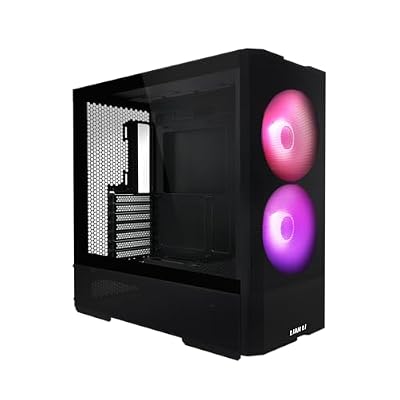
Lian Li V3000 Plus Case Review: Who Should Buy This Chassis
Lian Li builds some of the most recognisable PC cases on the market, and the V3000 Plus sits in the part of the range that targets builders who want a large, well-ventilated chassis without an extreme price. Large cases are often bought on looks alone, then regretted when the graphics card does not fit or the radiator has nowhere to go. This guide takes a different approach. It explains what a case like the V3000 Plus is designed to do, which builders gain the most from it, and where a different chassis is the smarter buy.
Our wider look at the best gaming PC cases places this chassis among its rivals. Check the listing above before going further. Model names, panel options and included fan counts can differ between regions and production runs, so the card may be a close match to the exact variant you have in mind. Confirm the internal dimensions, maximum graphics card length, supported motherboard sizes and radiator positions on the product specification before ordering. The guidance below applies to the V3000 Plus family as a whole, so it stays useful whichever configuration you choose.
Who the V3000 Plus Suits Best
This type of chassis is a good match for a builder who wants room to work and a clear airflow path. It suits a high-end gaming system with a large graphics card, a tower air cooler or a radiator, and a motherboard that is not compact. It also suits a builder who plans to upgrade over several years, because extra clearance makes future changes less stressful. If you are moving from a small case that runs hot, the extra volume alone can change how the system behaves under load.
It is less suitable for a buyer who needs a compact machine. Lian Li’s larger cases are not designed for a desk shelf or a tight apartment corner, and the footprint can be a real problem in a small room. If you plan to carry the PC to events or move it often, a smaller chassis will save your back. Our guide to the best mid-tower gaming cases covers options that trade some volume for portability.
Build Fit: The Measurements to Check First
Start with the graphics card. A large chassis can accommodate a long card, but the figure you need is the clearance with the front fans or radiator mounted. Many builders check card length alone and then discover that a front radiator pushes the card out of reach. Write down your card’s length, its thickness in slots and the height of its fans, then compare those values with the case specification.
Next, check the CPU cooler. A tall air cooler may fit the case but still prevent the side panel from closing, depending on the top clearance and the memory height. Our roundup of the best CPU cooler for gaming lists sizes that suit tall chassis and those that suit compact ones. If you intend to use a 360mm radiator, confirm which mounting positions it supports and whether the top radiator will clash with the RAM or the motherboard heatsinks. The mounting plan is more important than the raw size figure, because the best position is the one that does not force you to compromise on the card.
Then check motherboard support and drive bays. Confirm the standoff pattern, the expansion slot count and whether the front panel connectors reach the header locations on your board. If you run several drives, count the mounting options before you buy, since a large case with few drive cages will still limit storage expansion. Our overview of motherboard form factors helps you match the board size to the chassis.
Airflow and Cooling Behaviour
Airflow in a large case depends on three things: the front panel, the fan layout and the way you balance intake against exhaust. A mesh or open front panel usually gives a stronger intake path than a solid panel, and the top and rear positions decide how hot air leaves the chassis. Choose fans with a good static pressure rating if you plan to run dense radiators, and avoid filling every slot if the fans will simply recycle warm air.
Most builders get the best balance with front and bottom intake and rear and top exhaust. Slightly positive pressure keeps dust from entering through gaps, but it can reduce the cooling of components that rely on fresh air. Test the result with your own workload, because the temperature you see will depend on the CPU, the graphics card, the ambient temperature and the fan curves. For a comparison of how a different chassis handles the same job, see our Corsair 5000D airflow review.
Cable Management and Build Experience
A large case makes cable routing easier, but only if you plan the route. Start with the power supply and the 24-pin and CPU power leads, then run the front panel connectors, the USB headers and the fan cables. Use the cable tie points on the back of the tray, and leave enough slack for the side panel to close without straining the connectors. Tidy routing also makes dust cleaning less of a chore, which matters in a case where the filters collect a lot of debris over time. Measure the PSU cable lengths against the case before you buy, and if you still need a unit, the best gaming PC power supply guide covers modular options that suit a roomy build.
The build process is generally comfortable, with room to reach the motherboard and the GPU slot. Work on a flat surface, and remove the side panel and the top filters before you start. Install the CPU cooler and the RAM outside the case if your board allows it, then fit the board and the graphics card. If you use thermal compound, a good thermal paste with a clean application will serve you better than a rushed squeeze.
Comparison: V3000 Plus Against Other Large Cases
The table compares the V3000 Plus against the main alternatives in its price band. Ranges are intentionally broad, because retailer prices change often and depend on the panel style and included fans. Check the current price on the card before you decide.
| Case class | Best for | Build size | Cable routing | Typical price range |
|---|---|---|---|---|
| V3000 Plus (hero listing) | Large builds with long GPUs and radiators | Large ATX class | Open, needs planning | Mid-range, check current price |
| Compact Lian Li alternative | Smaller builds and tighter spaces | ATX to micro-ATX | Good for most builds | Budget to mid-range, check current price |
| Full-tower with mesh front | Maximum expansion and cooling | E-ATX class | Roomy | Mid to premium, check current price |
| Glass-front mid-tower | Showpiece builds on a budget | ATX | Moderate | Budget to mid-range, check current price |
The main trade-off is between volume and footprint. The V3000 Plus favours room and airflow over compactness, so it is the better choice when the build is demanding. A glass-front mid-tower is easier to place and usually cheaper, but it has less space for radiators and long cards. If you need a broader view of how case sizes compare, our guide to gaming PC cases under 200 dollars shows what the budget end of the market offers.
Who Should Look Elsewhere
Look elsewhere if you are building a small system, if your desk space is limited, or if you want a case that you can lift with one hand. A mini-ITX build gains nothing from a large chassis, and a budget system with a modest graphics card may not need the extra cooling capacity. If the case will mostly sit closed on a desk, a mid-tower with good airflow will deliver similar temperatures in a smaller package. Our notes on mini-ITX cases cover the compact alternative in more detail.
Top Picks Near the Lian Li V3000 Plus
Full towers offer room for radiators and storage, but they also need desk space. These choices cover rival chassis and a riser cable.
LIAN LI O11D EVO XL E-ATX Full Tower Case
A large full tower listed with room for 420mm radiators. It suits builders who want a showpiece with room for custom cooling.
As an Amazon Associate we earn from qualifying purchases at no extra cost to you.

Antec Flux Pro Full-Tower E-ATX Case
A full tower that ships with six PWM fans. It suits airflow-focused builds that need to cool a hot graphics card.

CORSAIR 7000D Airflow Full-Tower ATX Case
A high-airflow full tower with a ventilated front panel. It suits heavy builds with several radiators and drives.

GLOTRENDS 200mm PCIe 4.0 x16 GPU Riser Cable
A right-angle riser for mounting a graphics card vertically. Check that your case supports vertical mounting before you buy.

Thermaltake View 600 TG Full Tower Case
A full tower with tempered glass and room for large radiators. It is a value choice if you want size without a premium price.

Full towers are heavy and wide, so check desk space and the weight your floor or desk can hold. Also confirm that the case ships with the fans and drive trays you expect, since extras add cost.
Frequently Asked Questions
Will a long graphics card fit in the V3000 Plus?
The chassis is built to accommodate long cards, but the exact clearance depends on whether you use front fans or a front radiator. Check the maximum card length in the product specification and subtract the thickness of any front mounts before you buy.
Is the V3000 Plus good for airflow?
It can be, provided the front panel allows intake and you install a sensible fan layout. Airflow depends on the fans, the filters and the way you balance intake against exhaust, so test your build and adjust the fan curves.
Can I use a 360mm radiator in this case?
Many large cases support a 360mm radiator, but the position matters. Check which mounting points the case provides and whether the radiator will clash with the memory or the motherboard heatsinks.
Is this case a good first build choice?
It can be, because the extra space makes building easier. The downside is size and weight, so choose it only if you have room for it and are comfortable handling a large chassis.