
Best Mini ITX Gaming Case 2026: Fitting a Full Gaming PC Into a Small Chassis
A Mini ITX gaming case lets you run a capable graphics card and a modern processor in a chassis that fits under a desk or beside a monitor. The challenge is that Mini ITX boards are only 170 x 170mm, which leaves little room for error. This guide explains how to choose the best Mini ITX gaming case for 2026, with attention to GPU length, cooler height, power supply format and the airflow that keeps a small system stable.
This is a buying guide built around the product class. We have not reviewed every chassis discussed here, and this article does not claim measured thermal or noise results. The hero listing below is the closest match we found for the query. Read the card for the exact model, dimensions and price, and check its clearance figures against the parts you plan to install before you buy.
Why Mini ITX Is a Different Build
A Mini ITX board has one PCIe slot for the graphics card and usually two memory slots and a few M.2 slots. There is no room to hide mistakes. A card that fits on paper may touch a drive cage, a cooler may clash with the top panel, and a power supply that is one size too large will not install. Every component choice is a fit question, so the spec sheet matters more here than in any other size class.
The payoff is a small, quiet footprint and a clean look. A well-planned Mini ITX build can run a current mid-range or high-end card with excellent frame rates at 1440p, and it can sit on a shelf without dominating the room. The price of that efficiency is patience: you need to plan the parts in the right order and accept fewer upgrade paths later.
Board Choice and Its Limits
Choose the board first and then the case, because the board sets the physical starting point. Check the board’s M.2 slot positions, memory slot layout and power connector placement, because some Mini ITX boards put the 24-pin or the CPU power connector where a cooler or radiator needs to go. Our guide to the best ITX and mini gaming cases covers chassis options by size, and the Mini-ITX gaming PC build guide shows a complete parts plan.
Mini ITX Case Comparison by Build Goal
The table below groups Mini ITX chassis by what they are built to do. It avoids specific model claims and uses price tiers rather than dollar figures. Pick the goal that fits your build, then check the exact specifications before you order.
| Build goal | Best for | Typical trade-off | Typical price range |
|---|---|---|---|
| Maximum GPU length | High-power cards in a small chassis | Larger overall volume than the smallest cases | Check current price |
| Smallest footprint | Desk-side or travel builds | Tight cooler and GPU limits | Check current price |
| Airflow-focused mesh | Warm components and sustained loads | More dust and more fan noise | Check current price |
| Budget Mini ITX | First small build on a tighter budget | Fewer fan positions and basic cable routing | Check current price |
If you are comparing form factors before committing, the ATX, Micro-ATX and Mini-ITX comparison lays out the size and slot trade-offs. For a compact prebuilt alternative, the best mini gaming PC guide compares finished systems with custom builds.
Graphics Card Fit and Power Delivery
GPU Length, Thickness and Power Connectors
Measure the card’s length, thickness and the position of its power connector. Many compact cases have a maximum GPU length, and some also limit card thickness when a fan or radiator sits in front of the card. Check whether the power connector needs space to bend, because a tight angle can make cable routing difficult. If you are choosing a card class, our guide to the best GPU for gaming explains how to match a card to your resolution and frame-rate goal.
Power Supply Format
Most Mini ITX cases need an SFX or SFX-L power supply. Pick a unit with enough wattage for your CPU and GPU and a comfortable margin above their combined rated load. Our guide to the best PSU for gaming covers wattage and connector choices, and the Cooler Master V850 SFX review shows how a compact unit is assessed.
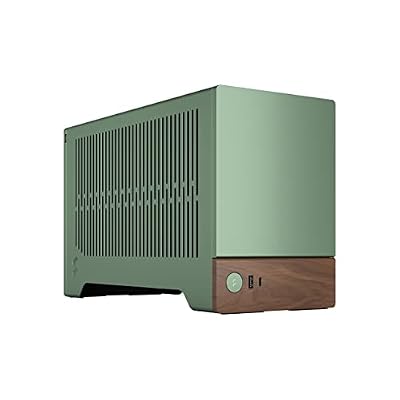
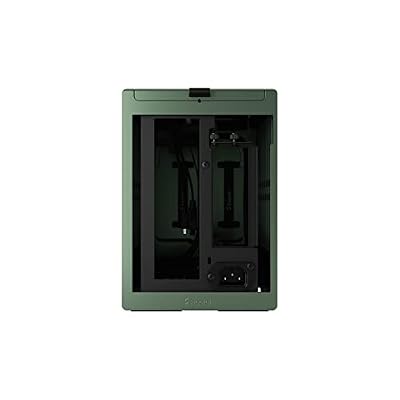
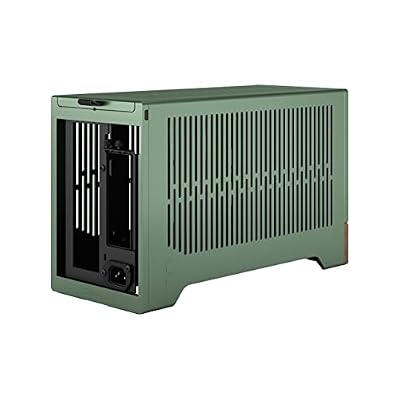
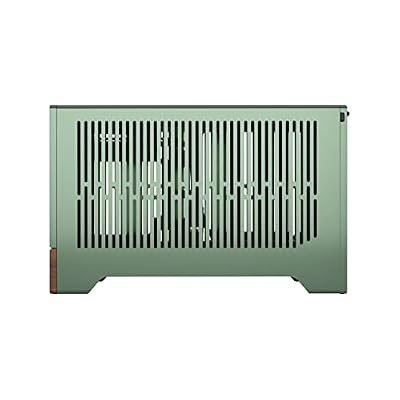
Fractal Design Terra Jade - Wood Walnut Front Panel - Small Form Factor - Mini ITX Gaming case – PCIe 4.0 Riser Cable – USB Type-C - Anodized Aluminum Panels






As an Amazon Associate we earn from qualifying purchases. Product prices and availability are accurate as of the date/time indicated.
Cooling a Mini ITX Gaming PC
Cooling is the hardest part of a Mini ITX build. The chassis has less air and less space for radiators, so the cooler and fans need to be chosen together. A low-profile tower cooler is common, but check its height against the case’s clearance limit. A small radiator can work too, though the mounting position and tube routing need planning. The air CPU cooler guide covers low-profile options, and the best gaming cooler article helps compare the main types.
If your GPU runs hot, undervolting can lower temperatures without changing the case. Our notes on undervolting a current NVIDIA card for cooler temperatures describe the method, and it is worth trying before you buy a larger case.
Who Should Build Mini ITX
A Mini ITX case is a good choice for someone who wants a small, tidy PC, has planned their parts carefully and accepts fewer upgrade paths. It suits desk setups, living-room systems and LAN bags. It is a poor choice for someone who expects to swap in a much larger GPU later, wants the easiest possible build, or plans to run a very high-power processor under sustained load without thought for cooling. For a broader view of small builds, the micro gaming PC with a high-end GPU article shows what a compact build can look like at the top end.
Frequently Asked Questions
Can a Mini ITX case run a high-end graphics card?
Often yes, but only if the case lists enough GPU clearance for the card you choose. Check the maximum length and thickness on the spec sheet and compare them with the card’s dimensions.
Do I need an SFX power supply for every Mini ITX case?
Most do, but confirm the format on the spec sheet. Some compact chassis accept other formats, while many expect SFX or SFX-L. Check the supported length as well.
Is Mini ITX harder to build than ATX?
Yes, because the space is tight and cable routing takes more planning. Build in a clean space, assemble the board outside the case if you can, and install the cooler and GPU before the final cable runs.
Will a Mini ITX build run quieter?
It can, because smaller fans and lower-power parts often run quietly. Noise depends on the fans, the cooler and the power draw under load, so set fan curves and test the system with your usual games.
Final Recommendation
The best Mini ITX gaming case for most buyers is the one whose spec sheet confirms your GPU length, cooler height and power supply format with room to spare, and whose airflow suits your components. Start with the hero listing, verify its clearance figures against your parts, and check its exact model and price before buying. If the numbers leave no margin, choose a slightly larger chassis rather than forcing a tight fit, because a small case that runs cool and builds cleanly is worth more than one that only just accepts your parts.


