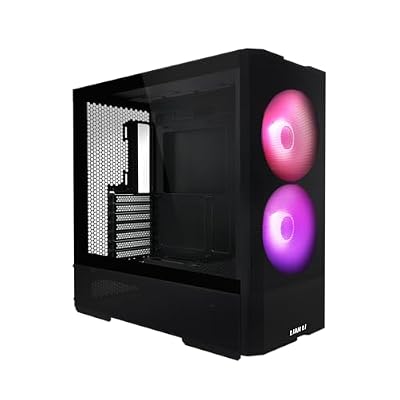
Aquarium Style Gaming Case 2026: Showing Off the Build Without Starving It of Air
An aquarium style gaming case gives you a large glass or open view of the interior, with the GPU, motherboard and cooling on display. It is the most visual of the case styles, and it asks more of the builder than most chassis. Light and visibility come first, but the same openness that shows off the parts also brings in dust and changes how the fans must be arranged. This guide explains how to choose an aquarium style case in 2026 and how to plan the build so it looks good and runs well.
This is a buying guide built around the product class. We have not reviewed every chassis discussed here and this article does not claim measured temperatures, noise levels or dust-control performance. The hero listing below is the closest match we found for the query. Check the card for the exact model, panel layout and price, and confirm the GPU and cooler clearances against your parts before ordering.


What Makes a Case Aquarium Style
The aquarium style is defined by a very open view of the interior. Large glass panels, often on both sides and sometimes on the front, make the whole build visible. Some designs go further and use a mostly open frame with little solid panelling. The look is striking, and it turns the case into a display. In practice, that means cable routing, component color and lighting all become part of the visual design.
The style also brings practical consequences. Dust enters through open sections, so you will need filters or a regular cleaning routine. Noise can change because the fans are more exposed and less enclosed. Airflow may be excellent if the design is open, but the chassis has less control over where the air goes, so planning matters more than it would in a sealed case.
Panel Coverage and Its Effect
Check how much of the case is open. A case with a glass side and a mesh front often gives a good balance. A case with a glass front and sides can look very striking but may restrict the intake. An open-frame design gives the most view and the least control, so it suits experienced builders who know how to tune their airflow.
Lighting and Visibility
Because the build is visible from all sides, the lighting becomes part of the design. Plan a single lighting scheme rather than many colors, and make sure cables and bright parts are tidy. An aquarium build with clean cable routing and consistent lighting looks deliberate, while a cluttered one looks unfinished.
Aquarium Case Comparison by Openness
The table below groups aquarium style cases by how open they are, since openness drives the look, dust and airflow. It avoids claims about specific models and uses price tiers rather than specific figures. Use it to pick the level of openness you want, then check the exact chassis.
| Openness level | Best for | Typical trade-off | Typical price range |
|---|---|---|---|
| Glass side, mesh front | Balanced look and airflow | Front mesh collects dust | Check current price |
| Glass on front and sides | Maximum visual impact | Restricted intake and more cleaning | Check current price |
| Open frame with minimal panels | Experienced builders and showcase rigs | Dust, noise and less airflow control | Check current price |
| Budget aquarium-style chassis | Visual build on a tighter budget | Fewer fan mounts and basic filtration | Check current price |
For a broader look at glass and showcase cases, the best tempered glass gaming cases roundup lists chassis with more closed designs, and the best gaming PC case guide covers the broader field.
Cooling an Open Showcase Build
Intake Placement and Filters
Intake matters most in an open build. Place intake fans where they can pull cool air across the GPU and the CPU cooler, and use a filter on any intake that faces the room. A filter adds some resistance, so check that your fans can still move enough air with it installed. Clean the filters on a fixed schedule, because an open case collects dust faster than a sealed one.
Cooler and GPU Choice
An open build shows the cooler, so choose a model that looks good as well as performs well. Our guide to the best gaming cooler compares the main types, and the air CPU cooler roundup covers tower designs. For the GPU, a card with a clean shroud and good heatsink design suits a visible build. Our best GPU for gaming guide helps match the card to your target performance.
Memory, Storage and the Visible Parts
In a showcase build, the memory and storage are on display, so choose parts that look consistent. Our guide to the best RAM for a gaming PC covers capacity and speed, and the best gaming SSDs article helps choose drives. If you plan a full desk setup around the case, the RGB gaming setup guide shows how lighting fits with the rest of the room, and the 1440p monitor for gaming guide helps match the display to the build.
Who Should Buy an Aquarium Style Case
An aquarium style case suits a builder who wants the build to be the centerpiece, who enjoys cable management and who is willing to clean dust regularly. It suits a showcase desk where visibility is the priority. It is a weaker fit for a system that runs in a dusty room, for a buyer who wants a quiet and low-maintenance machine, or for someone who wants strong airflow with no tuning. In those cases a glass side panel on a mesh front is usually a better choice.
For a complete budget plan around a showcase build, the gaming PC budget build guide shows how the parts add up, and the how to build a gaming PC in 2026 article walks through assembly.
Frequently Asked Questions
Does an aquarium style case run hotter?
It can, especially if the front is closed or the filters are dirty. An open design with well-placed intake fans can run very well. Plan the airflow before you buy.
How often should I clean an aquarium case?
Check the filters every few weeks and clean the fans and the interior as needed. Dust builds up faster in open designs, so a regular schedule helps protect airflow.
Is an open-frame case noisy?
It can be, because the fans and the components are less enclosed. Set your fan curves, choose quieter fans, and test the build under real load.
Can I keep an aquarium build tidy?
Yes, with careful cable routing and a single lighting scheme. Route cables behind the motherboard tray where possible and use consistent colors for the visible parts.
Final Recommendation
The best aquarium style gaming case for most builders is one with a glass side panel and a filtered mesh front, which gives a strong view while keeping airflow and dust under control. Start with the hero listing, confirm its panel layout, filter design and price, and compare it with the class guidance above. If you want a fully open showcase, be ready for more cleaning and more careful fan planning, and choose the design that matches how much maintenance you are prepared to do.