Best Mid Tower Gaming Case 2026: The Practical Default for Most ATX Builds
The mid tower is still the default chassis for most gaming PCs, and for good reason. It fits a standard ATX motherboard, takes a full-length graphics card and leaves room for a large air cooler or a 240mm to 360mm radiator, all without the footprint of a full tower. Searching for the best mid tower gaming case usually means balancing airflow, build comfort and price, so this guide focuses on those trade-offs for 2026.
This is a buying guide framed around the product class, not a detailed research. We have not reviewed every chassis mentioned here, and this article does not claim measured thermal results. The hero listing below is the closest match we found for the search. Check the card for the exact model, dimensions and price, and confirm the GPU and cooler clearances against the parts you plan to use.


Why the Mid Tower Wins for Most Builders
A mid tower is built around the ATX board, which is 305 x 244mm and has seven expansion slots in its standard form. That covers the needs of most gaming systems: one large graphics card, one or two storage drives, and a sound or capture card if you want one. The chassis is large enough to keep components apart, which helps airflow, yet small enough to sit on a desk or beside one. Cable routing is also easier than in a compact case, because there is room behind the motherboard tray.
The downside is that not every mid tower is equally good. Some prioritize looks and forget the intake path. Others have generous fan mounts but a cramped drive cage that gets in the way of a long GPU. The category label tells you the board size, but it does not tell you how the case breathes, so the spec sheet matters more than the name.
Board Compatibility and Slot Count
Check the case’s maximum motherboard size before anything else. Most mid towers support ATX and Micro-ATX, and some also take E-ATX with limits. If you plan to buy a Mini-ITX board, a mid tower will work but it can feel empty, and a smaller case may be a better match. Our guide to ATX vs micro-ATX vs Mini-ITX motherboards explains how these sizes differ.
GPU Clearance and Front Radiator Conflicts
The biggest practical issue in a mid tower is the space between the front panel and the graphics card. A front radiator or a thick fan stack can reduce the room for a long card, so measure both. If you plan to run a long triple-fan card, check the maximum GPU length with the front fans installed, not just the empty chassis figure.
Mid Tower Comparison by Priority
The table below organizes mid tower cases by what most buyers prioritize. It avoids claims about individual models because specifications and availability change often in this category. Use it to choose the style that fits your build, then compare the exact chassis on its spec sheet and on the card above.
| Priority | Best for | Typical trade-off | Typical price range |
|---|---|---|---|
| Airflow first | High-load builds and warm GPUs | Open mesh can be dusty and louder | Check current price |
| Looks and glass | Showcase builds with visible parts | Solid panels can limit airflow | Check current price |
| Quiet operation | Shared rooms and low-noise systems | Less intake area and tighter thermals | Check current price |
| Budget value | First full-size build on a budget | Basic fan mounts and cable management | Check current price |
For a wider view of cases across sizes, our roundup of the best gaming PC cases places mid towers alongside other chassis types. If you want a case that also covers airflow and fan planning in detail, the Corsair 5000D Airflow review is a useful reference for how a mid-size airflow case is assessed.
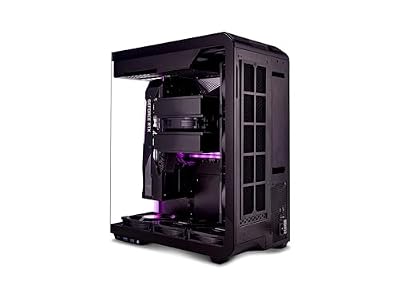
SSUPD Xhuttle Black ATX Mid Tower Gaming Case, with a Dual - Chamber Design, Panoramic Tempered Glass,Vertical GPU Airflow, Includes 3 x 120mm ARGB Reverse Fan, RGB Strip




As an Amazon Associate we earn from qualifying purchases. Product prices and availability are accurate as of the date/time indicated.
Airflow Planning in an ATX Mid Tower
Intake, Exhaust and Pressure
A mid tower works best when intake fans push slightly more air than the exhaust pulls out. This slight positive pressure reduces dust that enters through gaps. Place intake at the front and bottom, put exhaust at the rear and top, and match fan count to the heat you expect. Two or three intake fans and one rear exhaust are a common starting point for a single-GPU system.
Cooling the CPU
Tower air coolers suit most mid tower builds, and they are simpler to maintain than liquid systems. Check the cooler height against the case’s limit, especially if you use a top-mounted fan. Our notes on the best CPU cooler for gaming explain the performance trade-offs, and the budget AIO liquid cooler guide shows when a radiator makes sense in a mid tower.
Pairing a Mid Tower With the Rest of the Build
A mid tower is a flexible base for most gaming PCs. Pair it with a current mid-range or high-end graphics card, a 32GB DDR5 memory kit and a fast NVMe drive, and you have a system that handles modern games well at 1440p. Our guide to the best RAM for a gaming PC explains capacity and speed choices, and the best GPU for gaming guide helps match a card to your target frame rate.
Your monitor should match the build too. A strong mid tower with a high-end card is wasted on a low-refresh panel, so look at our 1440p monitor for gaming guide before you finalize the spend. For a complete budget plan, the gaming PC budget build article shows how the parts add up.
Mid Tower Buying Checklist
Before you buy, confirm five items on the spec sheet: maximum motherboard size, maximum GPU length with front fans installed, maximum cooler height, radiator support, and the power supply format. Then check the drive mounts against the storage you plan to add. A mid tower that passes all five checks will fit most builds without surprises. The mid-tower gaming cases roundup is a good companion list if you want more options to compare.
Frequently Asked Questions
Is a mid tower big enough for a high-end GPU?
In most cases, yes. A mid tower takes many long graphics cards, but the stated maximum length can drop when a front radiator or thick fans are installed. Measure the card and check the clearance with your planned front fans.
Can I use an ATX power supply in a mid tower?
Yes, most mid towers take a standard ATX power supply. Check the case’s maximum PSU length, especially for modular units with long cables, and confirm the bottom mount can take the unit’s fan.
Do I need a lot of fans in a mid tower?
Not always. Three intake fans and one or two exhaust fans cover most single-GPU builds. Add fans if your components run hot or your case has space for them, and keep the noise level in mind.
Is glass or mesh better for a mid tower?
Mesh generally offers better airflow and simpler dust management. Glass gives a cleaner look. A vented glass panel can be a good compromise, but check the vent area before you decide.
Final Recommendation
For most ATX gaming builds, the best mid tower gaming case is the one with a clear airflow path, generous GPU clearance and a cooler limit that fits your CPU choice. Start with the hero listing, confirm its exact model and dimensions, and compare it against the class guidance above. If your build is standard in size and you want a practical default, a well-planned mid tower will serve you for years, and it is easier to build in and cheaper to run than a larger chassis.