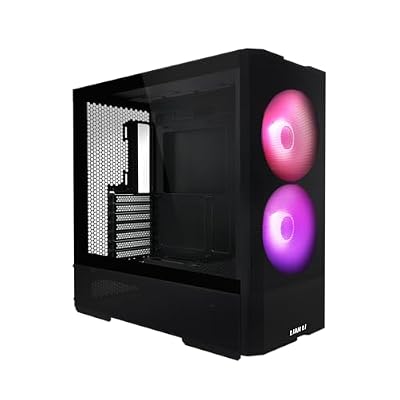
Phanteks Enthoo Pro 2 Case Review: A Full-Tower for Storage-Heavy Builds
The Enthoo Pro 2 is a full-tower chassis from Phanteks, a brand known for practical case layouts and roomy interiors. Where many buyers want a compact, showy box, the Enthoo Pro 2 is built for a different job: a large system with several drives, a serious cooling loop and enough space to keep the cabling tidy. This guide explains who this kind of full-tower suits, what its size gives you in daily use, and when a smaller chassis is the better decision.
Use the listing above as a starting point rather than a final answer. Full-tower cases come in several panel and fan configurations, and the card may be a close match to the exact variant you want. Confirm the supported motherboard sizes, the drive cage count, the radiator positions and the maximum graphics card length on the product page before buying. The advice below is written for the Enthoo Pro 2 family, so it remains valid for whichever version you pick.
Who a Full-Tower Like the Enthoo Pro 2 Is For
A full-tower makes most sense for builders who plan to fill the case. That includes people running multiple storage drives, a workstation-class motherboard, a large custom loop or several graphics cards for compute work. It also suits builders who value a clean, low-stress build process, because extra room makes every connector easier to reach. If your build is a single gaming GPU with a modest set of drives, the extra volume is unlikely to change your daily experience.
The downside is footprint and weight. A full-tower needs floor space and a sturdy desk or stand, and moving it is a two-person job once it is loaded. Many gamers who want a clean desktop setup will prefer a mid-tower. Our roundup of the best mid-tower gaming cases covers that category in detail, and the best gaming PC cases guide places full-towers alongside the rest of the market.
Storage and Expansion: Where the Size Pays Off
The clearest advantage of a full-tower is storage. Check the number of drive cages and whether they support both 2.5-inch and 3.5-inch drives. If you plan to use a large array of hard drives, confirm that the bays are accessible without removing the graphics card, and that the cages allow airflow across the drives. Drives run warmer when packed tightly, so placement matters as much as count.
Expansion slots matter too. A large motherboard with several PCIe slots needs a case with enough rear openings and a clear path for any add-in cards. Count your slots before you buy, especially if you plan to add a capture card, a sound card or a high-speed network adapter later. A full-tower gives you that headroom, which is its main reason to exist.
Cable Management in a Large Chassis
Good cable management is the reason many builders buy a Phanteks case. A large interior and a generous rear channel make routing easier, provided the cable tie points and grommets line up with your board and power supply. Route the main power cables first, then the front panel and USB leads, and finally the fan and drive cables. Leave slack at the connection points, because tight cables pull on connectors over time and make later maintenance harder.
For a modular power supply, plan the length of each cable before the build. A long, heavily sleeved cable is easier to hide than a short cable pulled taut. If you are still choosing a unit, our guide to 850W gaming power supplies shows options that suit a mid-range build, and the 1000W units for high-end GPUs cover heavier systems.
Cooling Potential and Airflow
A full-tower usually offers more mounting positions than a mid-tower, which helps with radiators and high-airflow fan layouts. The key questions are the front panel design, the number of intake positions and how easily you can position a large radiator without blocking the graphics card. A mesh front is the usual choice for strong intake, while a solid front can limit airflow even with good fans.
A large interior also helps thermals in a practical way. There is more space between the components, so the warm air from the graphics card has room to leave the case rather than heating the motherboard area. That does not guarantee lower temperatures, since the CPU cooler, the fan speeds and the room temperature still set the results. For an option built around a high-end processor, see our notes on CPU coolers for large GPU builds.
Comparison: Full-Towers and Their Alternatives
The table compares the Enthoo Pro 2 against the alternatives most buyers consider. Price ranges are rough and change often, so use them to narrow your list, then check the current price on the card.
| Case class | Best for | Storage capacity | Footprint | Typical price range |
|---|---|---|---|---|
| Enthoo Pro 2 (hero listing) | Storage-heavy and workstation-style builds | High, multiple drive cages | Large | Mid-range, check current price |
| Alternative full-tower with mesh front | Maximum airflow and radiator space | High | Large | Mid to premium, check current price |
| Standard mid-tower | Gaming-focused builds in less space | Moderate | Medium | Budget to mid-range, check current price |
| Compact cube case | Small desks and portable systems | Low | Small | Mid-range, check current price |
The trade-off is clear. The Enthoo Pro 2 class gives you storage and cable room that a mid-tower cannot match, but it costs more space and time to assemble. A standard mid-tower is the sensible choice for most gaming PCs, while a compact cube suits a desk-first build. If your system is built around a flagship card, check the RTX 5090 review for the clearance and power demands a flagship brings. Before committing to a full-tower, also compare the builds by budget to see whether the extra case cost fits the rest of your system.
Who Should Skip a Full-Tower
Skip this class of case if you are building a compact system, if you have limited space, or if you rarely add drives or cards. A small-form-factor build gains nothing from extra room, and a budget system with one GPU and one SSD can use a much smaller chassis. The extra volume also means more dust to manage, so a case you will rarely open is a poor fit. For a compact alternative, our guide to mini-ITX gaming builds shows what a small chassis can deliver.
Top Picks for Storage-Heavy Full-Tower Builds
Big cases suit many drives. These picks pair full-tower cases with large hard drives and an SSD, so you can build one machine that holds a very large library.
Antec C8 Full-Tower E-ATX Dual-Chamber Case
A dual-chamber full tower with tempered glass. It leaves room for both storage and cooling, and the layout hides cables.
As an Amazon Associate we earn from qualifying purchases at no extra cost to you.

DARKROCK Classico Max Storage Master E-ATX Case
A case marketed for storage builds, with four 120mm fans. It targets people who plan to fill many drive bays.

Western Digital 8TB WD Blue PC Hard Drive
An 8TB desktop hard drive. It suits bulk storage for media, backups and a large game library that does not need top speed.

Samsung SSD 870 EVO 2TB SATA
A 2TB SATA SSD with reads up to 560MB/s. It speeds up game installs and the operating system alongside slower hard drives.

darkFlash AIR NOVA Full Tower E-ATX Case
A full tower with a six-sided ventilated design. It suits a build that needs airflow alongside plenty of drive space.

Count the drives you plan to install now and later, and buy the case with a few spare bays. Large hard drives also add heat and noise, so plan front intake fans that reach the drive cage.
Frequently Asked Questions
Is the Enthoo Pro 2 a full-tower case?
The name and class point to a full-tower chassis with a large interior and multiple drive cages. Confirm the exact dimensions and motherboard support on the product specification for the variant you are considering.
Does a full-tower improve cooling compared with a mid-tower?
It can, mainly because of extra space and more mounting positions. The actual temperatures still depend on the fans, the CPU cooler, the graphics card and the room, so a good mid-tower with strong airflow can perform just as well.
How many drives can I fit?
That depends on the drive cage layout in the specific model. Count the 3.5-inch and 2.5-inch mounting positions in the specification, and check whether the cages can be removed or reconfigured to suit your build.
Is a full-tower a good choice for a first PC build?
It can be, since the space makes routing easier. However, the size and weight make it less convenient for a first-time builder who has limited room, so weigh that against the benefit before you buy.