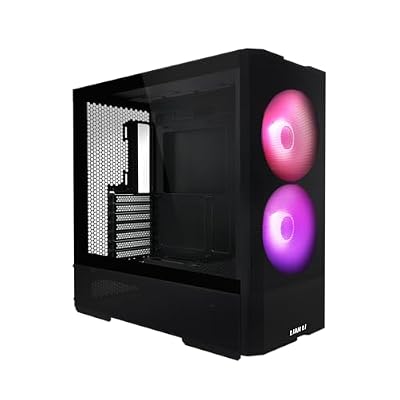
NCASE M2 SFF Case Guide 2026: Choosing a Compact Chassis for High-Wattage Parts
The NCASE M2 SFF case name appears in many search results, and buyers who use it want to know one thing: can a compact chassis run a powerful graphics card and a high-end processor without overheating? This buying guide answers that question for the whole category of compact cases built around the M2 style layout, including the vertical GPU mounting and dual-slot thinking that often comes with it.
We are not in a position to confirm that a product sold under this exact name is a released model with verified dimensions or thermal results, and this article does not claim detailed research. The hero listing below is the closest match we found. Read the card for the exact model and price, then compare the chassis specifications with your parts. The guidance here stays accurate whichever small case you end up choosing.
Why Layout Matters More Than Size in an SFF Chassis
Two compact cases with the same volume can behave very differently. What decides the result is the layout: where the intake fans sit, whether the graphics card blows air through the chassis or out of it, and how far the power supply is from the components it feeds. A well-planned layout gives cool air a clear path to the hottest parts. A poor one traps heat around the GPU and forces every fan to spin harder.
Many compact chassis in this family place the graphics card vertically or along a riser, which can free up space for a large cooler but also changes how air moves. Vertical mounting can keep dust off the card and make the build look clean, yet it asks more of the case fans and needs a riser cable that is well made. Before you commit, check whether the case supports the GPU orientation you want and whether the manufacturer lists the riser or bracket in the box.
Thermal Budget for a Compact Build
Think of the case as a thermal budget. Your CPU and GPU together set how much heat the chassis must move out. Add up the rated power of your parts and leave headroom, because a small case has less room to recover from a hot summer or a dusty filter. If the combined load is high, prioritize a case with a larger fan area and a clear exhaust path. If the load is modest, a more compact design can be a good fit.
Airflow Paths and Filter Access
Look at where the air enters and leaves. Intake should sit low at the front or bottom, where cool air is available, and exhaust should sit high or at the rear. Check that dust filters can be removed without taking the whole case apart, because you will clean them more often in a small chassis. Mesh panels offer better airflow, and solid panels can be quieter but may run warmer under load.
Compact Case Comparison by Layout
The table below compares the main layout families you will meet in compact chassis. It is organized by how the case is built rather than by individual model, because specifications in this segment change quickly and individual listings can be hard to verify. Use the table to pick a layout first, then check the chassis numbers.
| Layout family | Best for | Watch out for | Typical price range |
|---|---|---|---|
| Vertical GPU with riser | Clean look and a visible card | Riser quality and fan placement matter | Check current price |
| Horizontal GPU, compact body | Simpler cable routing and fewer parts | Card length limits in tight cases | Check current price |
| Mesh-front airflow design | High-load builds that need cooling first | More dust and more fan noise | Check current price |
| Sealed or solid-panel design | Quiet builds with moderate heat output | Less margin for hot components | Check current price |
For a broader look at compact chassis, our roundup of the best Mini-ITX gaming PC builds shows complete parts lists, and the best gaming desktop case guide covers chassis across sizes.
Power Supply and GPU Choices in a Small Chassis
Choosing a Power Supply That Fits
Most compact cases require an SFX or SFX-L power supply, which changes your options. SFX units are smaller than standard ATX units, but the choice of wattage and efficiency rating is narrower. Check the case’s supported power supply length as well, because a long modular unit can block the GPU. Our guide to the best PSU for a gaming PC explains wattage and connector choices, and the 850W gaming PSU roundup lists units in the size range many compact builds need.
A good SFX unit can run quietly, but it is worth reading its rated load and fan behavior rather than trusting the wattage number alone. The Cooler Master V850 SFX review is an example of how a compact power supply is assessed on its own terms.
Graphics Card Fit and Power Draw
Check the card’s length, thickness and power connectors against the case before you buy. A high-power card can need more headroom for its cooler and more airflow than a mid-range one. If you are choosing between GPU classes, our guide to the best GPU for gaming explains how to match a card to your resolution and frame-rate target, and the RTX 5070 review shows how a mid-high card behaves in a typical build.
Cooling the CPU Inside a Compact Chassis
The CPU cooler is the other half of the thermal picture. Compact chassis often limit cooler height, so a low-profile air cooler or a small liquid cooler is the usual choice. If you use an air cooler, confirm its height against the case’s clearance listing. If you use a radiator, confirm the supported size and where it mounts. Our overview of the best CPU cooler for gaming covers both types and their trade-offs, and the best gaming cooler guide helps when you need a second opinion.
Who This Layout Suits
A compact vertical or mesh-airflow chassis suits someone who wants a small desk footprint and enough cooling for a strong processor and graphics card. It suits a builder who will take time with cable routing and filter cleaning. It does not suit someone who wants to ignore thermals, install the largest cards on the market, or avoid reading specifications. If that sounds like you, a larger chassis will be easier to live with.
If you want to know whether a small build is right for your desk, our best gaming PC budget build guide shows how the parts add up. The minimal gaming setup article is useful for planning a clean desk around a compact tower.
Frequently Asked Questions
Is the NCASE M2 SFF case good for a high-end GPU?
It depends on the chassis you buy. Confirm the maximum card length, the GPU orientation and the power connector clearance on the spec sheet. A high-power card needs good airflow, so plan your fans before you finalize the build.
Does vertical GPU mounting run hotter?
It can, because the card may have less direct access to intake air depending on the layout. A well-designed case with good intake fans can manage it. Check the fan positions and the riser design before you decide.
Do I need a special power supply for a compact case?
Most compact chassis need an SFX or SFX-L unit. Check the supported format and maximum power supply length, then choose a unit with enough wattage and an efficiency rating that suits your components.
Is this type of case quiet?
Noise depends on fan speed, filter type and how hard the components work. A solid front panel can reduce noise, but it can also reduce airflow. Set your fan curves and test the build under your real workload.
Final Recommendation
Start with your thermal budget. If your CPU and GPU together draw a lot of power, choose a compact layout with generous intake and exhaust, a supported power supply format that gives you headroom, and a cooler that fits the stated clearance. Use the hero listing as your first candidate, verify its specifications against your exact parts, and if the numbers do not match, move to a larger chassis rather than squeezing a hot build into a tight space. A compact case is a good choice when the layout is right, and a poor one when it is not.