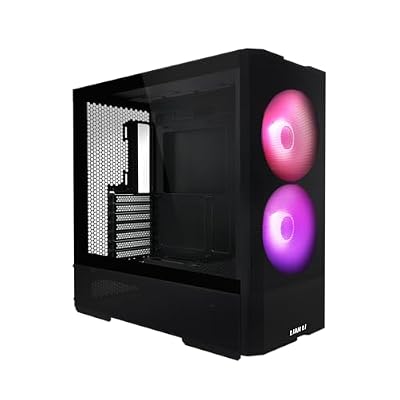
Hyte Y70 Gaming Case Review 2026: Is the Premium Showpiece Worth the Price?
The Hyte Y70 sits near the top of the Y-series range, and it asks a question that many premium case buyers face: does the extra money buy anything you will use, or does it mostly buy a better-looking box? This guide treats the Y70 as a purchase decision. It explains who the premium showpiece suits, which features are worth paying for, and when a lower-priced Y-series model or a different chassis delivers the same result for less.
The listing above may be the closest available match to the Hyte Y70 rather than the exact model you have in mind. Premium Y-series cases come in several variants with different panels, included accessories and mounting options, and the specification can differ between them. Confirm the supported graphics card length, the radiator positions, the motherboard range and any additional features before you buy. The guidance applies to the Y70 family, so it remains useful whichever version you select.


Who the Y70 Is For
The Y70 suits a builder with a flagship or near-flagship system who wants the chassis to match the hardware. It fits a showpiece build, a streaming or content desk where the PC is a visible centrepiece, and a builder who values a refined finish and a clean build experience. If the rest of the system is expensive, the case is a reasonable place to spend more, because it will sit in front of you every day for years.
It is a poor fit for a buyer who needs the most value per pound. A premium chassis costs more than a sensible mid-range case, and the extra spend does not improve the performance of the components inside it. If the goal is strong airflow or low noise, a well-designed mesh-front case at a lower price will often match or beat the premium option. For a clear view of the cheaper end of the market, our guide to gaming PC cases under 200 dollars is a good reference.
What the Premium Price Actually Buys
The honest answer is finish, build quality and convenience. A premium Y-series chassis typically offers a more refined panel, neater internal routing and better-finished mounting hardware than a budget case. Those features make the build quicker and the result tidier. They do not add cooling capacity by themselves, so check whether the airflow design meets your needs before paying for the finish.
Check the feature list closely. Some premium variants add extra panels, lighting or accessories, and those additions are only worth paying for if you will use them. A feature you never touch is simply cost. Compare the specification sheet against the cheaper Y-series models, and note the differences that affect your build, such as the radiator support, the drive cages and the clearance for the graphics card.
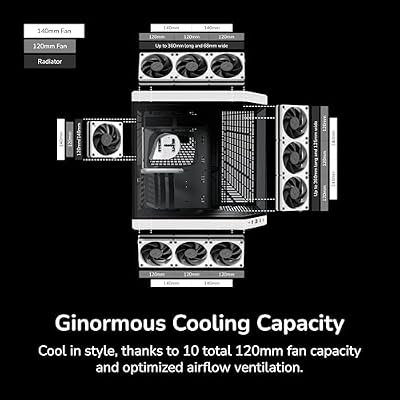
Hyte Y70 Modern Aesthetic Gaming PC Case - Panoramic Glass | High-Airflow Design | Cable Management | Dual Chamber ATX Mid-Tower Chassis | 10 Fan Capacity | Luxury PCIe 4.0 Riser Cable - Black/White




As an Amazon Associate we earn from qualifying purchases. Product prices and availability are accurate as of the date/time indicated.
Airflow, Cooling and Noise
A premium glass case still depends on airflow, and the cooling results depend more on the fans and the cooler than on the chassis name. Look at the intake area, the filter design and the number of fan positions before you buy. Place intake fans to pull cool air across the graphics card, and use exhaust fans at the rear and top to move warm air out. Avoid overfilling the case with fans if they only recirculate warm air inside it.
Noise is the other practical concern. A chassis with strong airflow can be quiet if the fans are well chosen and the curves are set sensibly. A large premium build with a flagship card will generate heat, so plan a balance between temperature and noise. For a case that prioritises airflow from the start, our Corsair 5000D airflow review offers a useful contrast.
Comparison: Premium Showpiece Cases Compared
The table compares the Y70 class with the options most premium buyers consider. Prices change often, so the ranges are a guide only. Check the current price on the card before you decide.
| Case class | Best for | Finish and build features | Airflow | Typical price range |
|---|---|---|---|---|
| Hyte Y70 (hero listing) | Premium showpiece builds | High, refined internals | Fan-dependent | Premium, check current price |
| Mid-range Y-series glass case | Showpiece builds with less spend | Good | Moderate | Mid-range, check current price |
| Mesh-front airflow case | Hot-running and quiet-focused builds | Basic to good | Strong | Budget to mid-range, check current price |
| Premium full-tower | Large, multi-radiator systems | High | Strong | Premium, check current price |
The Y70 is the most refined option in its family, but the comparison shows that the premium spend is about finish rather than raw cooling. A mid-range Y-series case delivers most of the look for less. A mesh-front airflow case is the better choice if temperatures and noise are the priority. A premium full-tower suits builds that need room for several radiators or drives. For a wider view of case categories, the best gaming PC case guide explains the trade-offs across sizes.
Build Experience and Maintenance
A premium chassis usually makes the build more pleasant. Internal routing is neater, mounting hardware is easier to use and the panels fit with less effort. Work on a flat surface, install the standoffs for your board, and route the power cables before closing the case. Apply the thermal interface with care, because the rest of the build is on show. A reliable thermal paste and a steady technique make a difference.
Maintenance matters in a showpiece build. Clean the glass, check the filter regularly and watch for dust on the fans. A premium case that is kept clean will look good for years, while a neglected one loses both its appearance and its airflow. Plan a routine that fits the room you use.
Who Should Save the Money
Save the money if the case is mostly out of sight, if your system is modest, or if you want the best cooling per pound. A mid-range Y-series case or a mesh-front airflow chassis will serve most builds well. If you are building a compact system, consider a smaller chassis, and our guide to mini-ITX cases shows the options. For a full system plan that matches budget to parts, the ultimate gaming PC build guide walks through the decisions in order, and the builds by budget roundup shows where a premium case fits. If the case is your main purchase, our mid-tower case roundup gives you cheaper options to compare first.
Frequently Asked Questions
Is the Hyte Y70 worth the premium price?
It is worth it if you value the finish, the build experience and the display, and if the rest of the system justifies a premium chassis. If you care more about cooling per pound, a mid-range case will usually be the better buy.
Does the Y70 cool better than a cheaper case?
Not automatically. Cooling depends on the fans, the intake design and the cooler. A premium chassis does not improve temperatures by itself, so compare the airflow design before you pay for the finish.
Will a flagship graphics card fit in the Y70?
Check the maximum card length in the specification and subtract the space taken by any front fans or radiator. Measure your card before ordering to avoid surprises.
Is the Y70 a good first case?
It can be, but the premium price and the glass-front design suit builders who enjoy a careful build. A first-time builder on a budget may prefer a simpler mid-range case with easier cable routing.