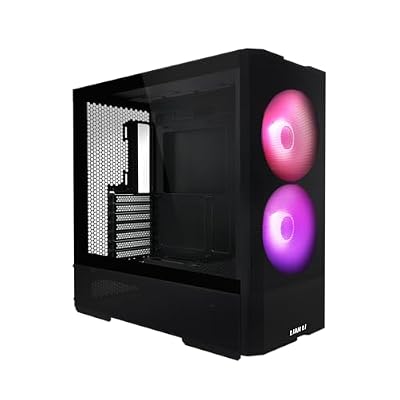
NZXT H7 Flow Case Review 2026: Airflow-First Mid-Tower Buying Guide
The NZXT H7 Flow is a mid-tower built around a perforated front panel, a choice that puts airflow ahead of a sealed, glass-heavy look. For many builders, that is the right priority: a gaming PC that runs cool and quiet under sustained load usually depends more on how air moves through the chassis than on any single cooling component. This guide reviews the H7 Flow as a buying decision. It explains who the design suits, what its airflow focus means in practice and where a different case is the better choice.
Treat the listing above as a close match rather than a guaranteed model. NZXT releases several H7 variants with different colours, panel options and fan configurations, and the card may not show the exact version you intend to buy. Confirm the supported motherboard sizes, graphics card length, radiator positions and included fans on the product page. The advice below is written for the H7 Flow family, so it remains accurate whichever variant you pick.

Who the H7 Flow Is Built For
The H7 Flow suits a gamer who wants a cool, quiet system with a tidy interior and a straightforward build process. Its perforated front lets fresh air reach the graphics card and the CPU cooler, which tends to help the most in demanding games where the GPU runs at full load for long periods. It also suits a builder who prefers an unobtrusive look, because the case is restrained rather than heavily lit.
It is less suitable for a builder who wants the case itself to be the centrepiece. The H7 Flow is a practical chassis, and if your priority is a glass wall and dramatic lighting, a tempered-glass alternative will match that goal more closely. Our roundup of tempered glass gaming cases covers that category. If you want a simpler comparison across the market, the best gaming PC cases guide lays out the main options.
Airflow Design and What It Means in Use
The defining feature of the H7 Flow is its front intake. A perforated panel allows air to enter across a wide area, and the intake fans can draw that air across the graphics card and toward the CPU cooler. Warm air leaves through the rear and top exhaust, which creates a simple front-to-back path. This arrangement works well for a card that runs hot, since it avoids trapping heat in the chassis.
The trade-off is dust and noise. An open front lets dust enter, so the filter needs regular cleaning. Strong airflow also means the fans will spin more under load, and the noise level depends on the fan model and its speed curve. A quality set of fans with a sensible curve keeps the system quiet at idle and capable under load. For a comparison of how another airflow-focused chassis handles the same trade-off, read our Corsair 5000D airflow review.
Build Fit: Clearance for Graphics Cards and Coolers
Start with the graphics card. A mid-tower of this type accommodates most modern cards, but the clearance figure in the specification is the number to respect. Front fans and a front radiator both reduce space, so measure your card’s length and thickness, then subtract any front-mounted hardware before you commit. A card that fits on paper can still clash with a radiator in a tight layout.
The CPU cooler is the next check. A tall air cooler will fit if the case provides enough top clearance, and you should confirm that the side panel closes over the memory and the cooler fan. If you prefer a liquid cooler, check the radiator positions, the supported thickness and whether the tubing can reach the pump without strain. Our guide to the best air CPU coolers for gaming helps you choose a cooler that matches the chassis height.
Comparison: H7 Flow Against Other Airflow Cases
The table compares the H7 Flow family with the alternatives most buyers evaluate. Prices change often and depend on the variant, so use the ranges to narrow the field and then check the current price on the card.
| Case class | Best for | Front intake | Glass or panel style | Typical price range |
|---|---|---|---|---|
| NZXT H7 Flow (hero listing) | Cool, quiet builds with a restrained look | Strong, perforated front | Practical, minimal | Mid-range, check current price |
| Sealed-front glass mid-tower | Showpiece builds with lighting | Limited | Tempered glass | Mid-range, check current price |
| Mesh-front value mid-tower | Budget airflow builds | Strong | Mesh | Budget to mid-range, check current price |
| Full-tower airflow case | Large builds with extra radiator space | Strong | Varies | Mid to premium, check current price |
The H7 Flow is a balanced choice. It does not chase the lowest price or the most dramatic look, but it gives airflow a clear priority. A glass mid-tower is the better pick if the window matters more than temperatures. A budget mesh-front case can achieve similar airflow at a lower cost, though it may offer fewer finishing touches. For buyers who want to balance performance and budget across the whole system, the builds by budget guide shows how a case fits into different spends.
Cable Management and Maintenance
Cable routing in a mid-tower is straightforward if you plan it. Run the power cables along the rear channel, secure the front-panel and USB leads, and route the fan cables so they do not sit in the airflow path. Tidy cables improve airflow and make dust cleaning easier, which matters for a front-intake case. Leave slack at the connectors so the side panel closes without pulling on the wires.
Maintenance is the other practical point. Remove and clean the front filter every few weeks in a dusty room, and check the fans and the radiator, if you have one, at the same time. A quick check keeps temperatures stable and prevents the gradual rise in noise that comes from dust buildup. If you need a power supply that suits a mid-range build, our guide to the 850W gaming power supplies covers well-regarded options.
Who Should Look Elsewhere
Skip the H7 Flow if you need a compact system, if you plan a multi-GPU build, or if you want a case that doubles as a display piece. A small-form-factor build will be better served by a compact case, and a custom loop with many radiators may need more room than a mid-tower provides. Our notes on mini-ITX cases cover the smaller end of the market, and the Cooler Master NR200P review shows another compact option for comparison.
Frequently Asked Questions
Is the NZXT H7 Flow good for airflow?
Its perforated front panel is designed for strong intake, which is the main reason to buy it. Good results still depend on the fans you install and the fan curves you set, so use quality fans and test the system under load.
Will a long graphics card fit in the H7 Flow?
Most modern cards fit in a mid-tower of this class, but the maximum length in the specification is the figure to check. Subtract the space taken by front fans or a front radiator before deciding.
Is the H7 Flow noisy?
Noise depends on the fans, the cooler and the workload. Strong airflow can mean more fan noise under heavy load, so choose quiet fans and a sensible speed curve if noise is a priority.
Is this case suitable for a first build?
It is a practical choice for a first build because the layout is straightforward and the interior is easy to work in. Check the card clearance and cooler height before you buy, since those are the usual sources of problems.