
Lancool 207 Case Review 2026: A Budget Airflow Case for Upgrade-Minded Builders
The Lancool 207 belongs to a group of budget-friendly cases that prioritise airflow over decoration. For builders on a tight budget, the question is rarely whether a case looks impressive. It is whether the chassis will keep a mid-range graphics card cool, leave room for a future upgrade and avoid adding cost that the rest of the build cannot afford. This guide reviews the Lancool 207 through that lens and explains when it is the right purchase and when to spend more.
The listing above is a substitute based on the closest match to the Lancool 207 name, so the card may not show the exact revision you intend to buy. Lancool cases appear in several versions with different panel options, included fans and clearance figures. Check the maximum graphics card length, the supported radiator sizes and the motherboard range on the product page before ordering. The guidance here is written for the Lancool 207 class of case and stays useful whichever version you select.


Who the Lancool 207 Is For
The Lancool 207 suits a builder assembling a first gaming PC or a budget upgrade on an existing system. It gives you a mesh-style front, a straightforward interior and enough space for mainstream components, which covers most of the gaming market. It is also a good match for a builder who plans to upgrade the graphics card later, because the case will not be the limiting factor if you move from a mid-range card to a stronger one within the same size class.
It is less suitable if you want a premium finish, a heavily lit showpiece or the largest possible interior. A budget chassis uses thinner panels, simpler fan mounts and fewer finishing details than a premium case, and those differences show up in the build process as well as the look. If you plan a custom loop or a dense multi-radiator layout, a larger chassis will serve you better. For a wider view of budget options, our guide to gaming PC cases under 200 dollars places the Lancool in context.
Airflow: What a Budget Mesh Front Delivers
The Lancool 207 design leans on a mesh-style front to move air through the case. An open front allows fresh air to reach the graphics card and the CPU cooler, and the rear and top exhaust complete a simple front-to-back path. For a mid-range card that runs warm under sustained load, this layout is usually more effective than a solid panel with a closed interior.
The practical catch is the filter and the fans. Budget cases often ship with basic fans, and replacing them with a quality set can change the results more than any other step. A good intake fan at the front and a reliable exhaust fan at the rear matter more than adding a third fan in a poor position. Check the filter layout too, because a dusty filter cuts airflow quickly and reduces the benefit of the mesh. For a comparison of how a premium airflow chassis handles the same job, read our Corsair 5000D airflow review.
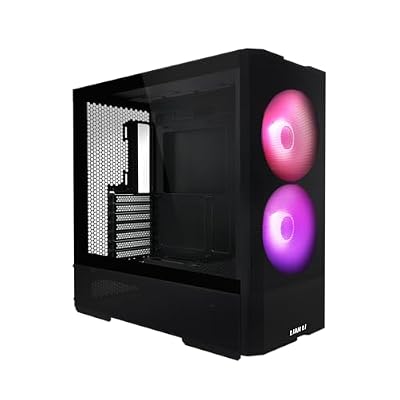
LIAN LI LANCOOL 207 Black Compact ATX Case, 4 Pre-Installed Fans | Compact ATX case with two 140mm ARGB front fans and two 120mm GPU fans, plus 410mm GPU and 360mm radiator support.


As an Amazon Associate we earn from qualifying purchases. Product prices and availability are accurate as of the date/time indicated.
Fit and Upgrade Headroom
When a case is cheap, it is tempting to assume it will fit anything. Check the figures. Confirm the maximum graphics card length, and remember that front fans or a front radiator reduce the usable space. Measure the CPU cooler height against the top clearance, and confirm that the side panel will close over the RAM. Budget cases sometimes have tighter clearances than their marketing suggests, so the specification is the figure to trust.
Upgrade headroom is the case’s main advantage for a budget build. If you start with a mid-range card and expect to upgrade in two or three years, choose a case with enough clearance for the larger card you may buy later. Spending slightly more on the chassis can save you from replacing it at the same time as the GPU. Our overview of the builds by budget guide shows how to balance the case, the GPU and the power supply across different spends.
Comparison: Budget Airflow Cases Side by Side
The table below compares the Lancool 207 class with the alternatives most budget buyers consider. Prices vary by retailer and change often, so use the ranges as a guide and check the current price on the card.
| Case class | Best for | Airflow | Build finish | Typical price range |
|---|---|---|---|---|
| Lancool 207 (hero listing) | Budget builds and upgrade paths | Strong, mesh-style front | Functional | Budget, check current price |
| Premium mesh-front mid-tower | Builds that need refinement and premium panels | Strong | Refined | Mid-range, check current price |
| Budget glass-front case | Showpiece builds on a small budget | Moderate | Showy | Budget, check current price |
| Compact micro-ATX case | Small desks and light gaming | Limited by size | Simple | Budget, check current price |
The Lancool 207 wins on price-to-airflow rather than on finish. A premium mesh case costs more and usually offers better panels, filters and fan mounts, which matters if you value refinement. A budget glass case will look better on a shelf, but it may trade airflow for appearance. For a broader look at mid-size chassis, see our guide to the best mid-tower gaming cases.
Build Process and Cable Management
Budget cases can make cable routing harder if the rear channel is shallow or the tie points are sparse. Plan the route before you install the board. Start with the main power cables, then the front-panel and USB connectors, and finish with the fan cables. Use the available tie points, keep the fan leads away from the blades and leave enough slack for the panel to close.
Work on a stable surface, install the standoffs that match your motherboard, and fit the cooler before you close the case. If you use a tower cooler, check the thermal paste application and confirm the mounting pressure. The thermal paste you choose matters less than applying it cleanly and evenly. For the cooler itself, our best CPU cooler for gaming guide covers options at several price points.
Who Should Spend More Instead
Spend more if you plan a high-end graphics card on day one, a large custom loop or a build that will run in a warm room. A premium chassis offers better filters, stronger panels and more mounting options, which matter when the system runs hot. If you intend a compact build, the Lancool’s size may be wasted, and a small-form-factor chassis will be a better fit. For those cases, our mini-ITX case guide is a useful next step, and the power supply guide helps you budget the rest of the system.
Frequently Asked Questions
Is the Lancool 207 a good budget case for gaming?
It is a sound choice for a budget gaming build, mainly because of its airflow-focused front and straightforward interior. Check the card clearance and cooler height before buying, and budget for better fans if the included set is basic.
Will it fit a large graphics card?
Many mid-range and high-end cards fit, but you must check the maximum length in the specification and subtract any front fans or radiator. Do not rely on the case name alone to decide.
Does the Lancool 207 run cool?
Its mesh-style front supports good airflow, but temperatures depend on the fans, the cooler and the components. Replacing basic fans with quality ones and keeping the filter clean usually makes the biggest difference.
Is it worth buying a budget case instead of a premium one?
For most budget builds, yes, provided the clearance fits your parts. Choose a premium case only if you need better finish, stronger panels or a larger interior for a demanding system.


