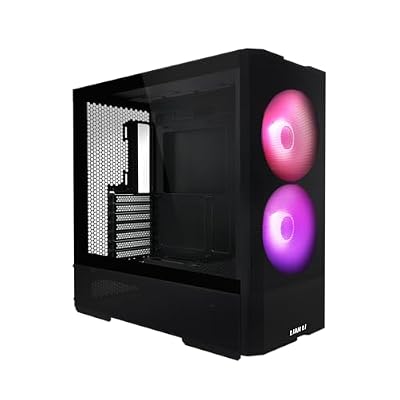
Tempered Glass Gaming Case 2026: Looks, Airflow and What the Panel Costs You
A tempered glass gaming case shows off the hardware you spent money on, and that visual payoff is the main reason buyers choose one. The trade-off is airflow and noise. A solid glass side panel changes how air moves through the chassis, and the front panel design decides whether the fans can breathe. This guide explains how to choose a tempered glass case in 2026 without giving up the cooling your components need.
This is a buying guide built around the product class, not a review of a specific chassis. We have not built in every case discussed here, and we do not claim measured temperatures or acoustic results. The hero listing below is the closest match we found for the query. Check the card for the exact model, panel layout and price, and confirm the clearances against your parts before ordering.

What Tempered Glass Changes in a Case
Tempered glass is a common panel material because it is clear, rigid and easy to clean. It can be used on the side, the front or both. In a case designed around glass, the designer usually adds ventilation along the edges or at the front, so the fans still have an intake path. A case that uses glass only as a side panel on an otherwise open chassis can look excellent and breathe well. A case with a fully sealed glass front can look great and run warmer.
The panel also changes noise. Glass reflects sound differently than mesh, and a solid panel can make fan noise more noticeable in a quiet room. This is not a reason to avoid glass, but it is a reason to plan your fan speeds and check the case’s noise-control features before you buy.
Side Panel Versus Front Panel
A side glass panel is the most common choice and usually the least costly in airflow, because the front intake remains open. A front glass panel is more restrictive. If the front intake is solid, air has to enter from the bottom or through small vents, and that can limit how much the GPU can breathe. Look at the front design first, then decide how much you care about the side view.
Dust and Cleaning
Glass is easier to wipe than mesh, but it does not stop dust from entering. A glass case with open intake vents still needs a filter, and that filter needs cleaning. Choose a case with a removable filter that you can reach without taking the whole panel off. Many builders find that a glass case with a good filter is more maintenance-friendly than an open mesh case without one.
Tempered Glass Case Comparison by Panel Layout
The table below organizes tempered glass cases by how the panels are arranged, since that arrangement drives both airflow and appearance. It avoids model-specific claims because listings in this category change often, and it uses price tiers rather than specific figures. Pick the layout that matches your priorities, then verify the exact chassis.
| Panel layout | Best for | Typical trade-off | Typical price range |
|---|---|---|---|
| Side glass, mesh front | Balanced airflow and a visible build | Side view only; front needs filtering | Check current price |
| Glass front and side, vented edges | Maximum showcase with some airflow | Less intake area than an open mesh front | Check current price |
| Full glass front, sealed | Showcase builds with light loads | Warmer interior and more fan noise | Check current price |
| Budget glass chassis | Visual builds on a tighter budget | Fewer fan mounts and basic filtration | Check current price |
For a broader comparison of glass and mesh chassis, our guide to the best gaming PC case covers the main choices, and the best gaming PC cases under 200 roundup lists budget options.
Keeping a Glass Build Cool
Fan Layout for a Glass Panel
With a glass side panel, the airflow path is usually intake at the front and bottom, exhaust at the rear and top. With a glass front, intake has to come from the sides or the bottom, which makes filter access and fan placement more important. Keep the intake fans positioned so they pull air across the GPU, and avoid placing exhaust fans so they fight the intake. The Corsair 5000D Airflow review is a useful reference for how an airflow-first case is assessed, even if you choose a glass design.
Thermal Headroom and Undervolting
If your build runs warm, you have two options: improve the airflow or reduce the heat. Undervolting a current graphics card can lower temperatures without changing the case. Our notes on undervolting an RTX 5070 for cooler temperatures describe the method, and it is worth trying before you assume the glass is the problem.
Matching Components to a Glass Showcase
A glass case puts the build on display, so cable management and component choice are more visible. Choose a motherboard with clean heatsinks, a memory kit that suits the look, and a GPU whose shroud matches the rest of the system. Our guide to the best RAM for a gaming PC covers memory options, and the best gaming SSD guide helps when you want a drive that looks as good as it performs.
Lighting is the other visual element. A well-planned RGB scheme can make a glass build look professional, but too many lights can look busy. Our RGB gaming setup guide shows how to keep lighting consistent across the desk and the case.
Who Should Buy a Tempered Glass Case
A tempered glass case suits a builder who wants a visible, polished system and is willing to plan airflow and filtering. It suits someone who cleans their PC regularly and who values the look of the components. It is a weaker choice for a system that runs at sustained high load in a warm room, or for a buyer who wants the quietest possible build with no extra effort. If you are unsure, pick a glass side panel on an open-front chassis, which gives most of the visual benefit with less airflow compromise.
For a complete build plan that keeps the case in mind, the how to build a gaming PC in 2026 guide walks through assembly order, and the 1440p monitor for gaming article helps match the display to the build.
Frequently Asked Questions
Does a tempered glass case run hotter than a mesh case?
It can, especially with a solid glass front. A glass side panel on an open-front chassis usually runs close to a mesh case. Check the intake design and plan your fans.
Is tempered glass easy to keep clean?
Yes, glass is easier to wipe than mesh. Dust still gets inside through the intake vents, so clean the filter and the fans regularly as well as the panel.
Is a glass front panel a problem for GPU cooling?
It can limit intake air if the front is sealed. Look for a case with side or bottom intake, and make sure the GPU has a clear path to fresh air.
Should I choose a side panel or full glass?
A side panel is the better balance for most builds. Full glass gives the best showcase but the least airflow flexibility, so choose it only if your loads are moderate.
Final Recommendation
For most buyers, the best tempered glass gaming case is one with a glass side panel and an open or filtered front intake. That combination keeps the build visible while preserving the airflow your CPU and GPU need. Start with the hero listing, check its exact panel layout and price, and compare it with the class guidance above. If the chassis is mostly glass with a sealed front, plan for more fans and more cleaning, or choose a more open design.