

Best ATX Motherboard Gaming 2026: Standard Size Buying Guide
The ATX motherboard is the standard size for most desktop gaming PCs. It fits the majority of mid-size and full-size cases, offers enough PCIe slots and M.2 connections for a typical build, and has a wide range of choices at every price tier. If you are not sure which board size to buy, ATX is the default that suits most people. This guide explains what to look for in an ATX gaming board, how to match the board to your processor, and where ATX sits between the larger and smaller sizes.
This is a buying guide, not a test report. We have not benchmarked every board in the cards below, and layouts differ across manufacturers and chipset tiers. Use the product cards as a starting point, then confirm the socket, memory support, M.2 layout and rear I/O on the product page. The hero listing is the closest match to the ATX gaming search, so treat it as a representative of the size class rather than a guarantee of one specific model.


What ATX Gives a Gaming Build
An ATX board measures about 305 by 244 millimetres. That size gives manufacturers room for four RAM slots, several M.2 slots, a full-length graphics slot and a reasonable number of SATA ports and USB headers. For a gaming PC with one graphics card and a few drives, ATX has enough space for everything you need. Most cases on the market support it, so you have the widest choice of chassis and cooling.
ATX also tends to offer good value. Because it is the most common size, manufacturers produce more models at more price points. You can find budget boards that run a mid-range processor and premium boards with stronger power delivery and better networking. The size stays the same, so the choice comes down to features and build quality.
Match the Board to Your Processor
The processor drives the choice of socket and chipset. An AM5 board supports AMD Ryzen 7000, 8000 and 9000 series processors. An LGA1851 board supports Intel Core Ultra 200S processors. Check the processor support list on the board page before you buy, because support can depend on the board revision and BIOS version. Buying a board for a processor you do not plan to use is an easy and costly mistake.
Power stage and cooling
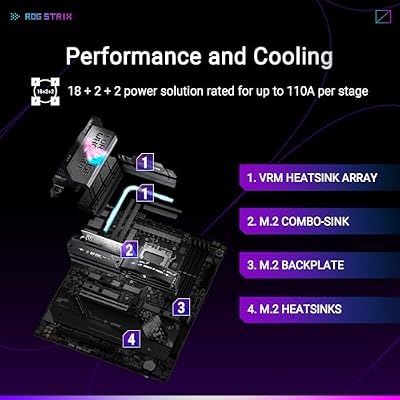
A higher-end processor draws more power under load, so the board’s power stage matters. Look for a clear description of the voltage regulators and a heatsink that covers them. For a mid-range processor, a simpler power stage is often enough. For a flagship chip, choose a board with a stronger design and test the thermal reviews before you commit.

ASUS ROG Strix X870E-E Gaming WiFi - AMD Ryzen AM5 X870E ATX Gaming Motherboards (DDR5, 18+2+2 DrMOS, 5 x M.2, PCIe 5.0, WiFi 7, USB4 Type-C C, USB 20Gbps Type-C up to 30W, HDMI, Aura Sync RGB)



As an Amazon Associate we earn from qualifying purchases. Product prices and availability are accurate as of the date/time indicated.
Memory, Storage and Expansion on ATX
Most ATX gaming boards provide four DIMM slots, which allows two or four memory sticks depending on the kit. Check the qualified memory list for the speed you plan to run. For storage, count the M.2 slots and confirm whether each one shares lanes with other ports. Two M.2 slots are common on mid-tier boards, and more are available on premium models.
Rear I/O and networking
Rear ports determine how many devices you can connect without a hub. Count the USB ports you use, and check whether the board includes USB-C, a video output for integrated graphics and multi-gigabit Ethernet. Wi-Fi is available on many ATX boards, but check the antennas and the wireless standard before you buy.
ATX Board Comparison Criteria
The table below lists the criteria to compare across ATX boards. It uses ranges and descriptions rather than fixed prices, because retail prices change frequently and vary by region.
| Criterion | What to check | Why it matters | Typical price range |
|---|---|---|---|
| Socket and chipset | Processor support list | Must match your CPU | Depends on platform tier |
| Power stage | Heatsink and phase description | Stability under sustained load | Varies by model |
| Memory | Slot count and qualified kits | Capacity and stable speed | Check current price |
| M.2 slots | Count and lane sharing | Storage expansion without losing ports | Varies by model |
| Networking | Multi-gig LAN and Wi-Fi option | Online gaming and file transfers | Often a premium feature |
| Case fit | ATX support in your case | The board must fit the chassis | Check your case first |
Who Should Buy an ATX Board
ATX is the right choice for most gamers. It suits a standard tower, a full set of storage and a graphics card of any size. It also gives you the most choice when you pick a case and a cooler. If you want room to upgrade later without moving to a larger board, ATX gives you enough slots for a typical build.
When ATX Is Not the Right Size
If you need a compact build, choose a smaller board. If you need many expansion cards or a workstation-style layout, look at E-ATX. ATX is not the best choice for a very small desk or a case that only supports Mini-ITX. Measure the space before you buy and match the board size to the case.
Related Guides
More reading for this build: gaming motherboards overview value gaming boards best AMD CPU for gaming Core Ultra 7 265K review budget gaming motherboard. Another motherboard roundup for gaming PCs.
Frequently Asked Questions
Is ATX better than micro-ATX for gaming?
For most gaming builds, ATX offers more slots and better room for cooling. Micro-ATX can be a good choice for a smaller case, but it has fewer expansion options. Choose ATX if your case supports it and you want the extra space.
Do all ATX boards fit all ATX cases?
Most do, but check the case’s mounting holes and the board’s standoff layout. Some cases also limit the height of the CPU cooler or the length of the graphics card.
How many RAM slots should an ATX gaming board have?
Four is common, which allows two or four sticks. Two-stick setups are often the most stable at high speeds, so check the manual’s memory population guide for your kit.
For a wider view of board sizes, read our comparison of ATX, micro-ATX and Mini-ITX and the best E-ATX motherboard for gaming. For AMD-specific advice, see the best AM5 motherboard for gaming.










