

Best E-ATX Motherboard Gaming 2026: Large Board Guide for Big Builds
An E-ATX motherboard is the largest common desktop board size. It offers more slots, more memory channels on some platforms, and more room for power delivery and cooling than a standard ATX board. For a gaming PC, E-ATX suits builders who want a large workstation-style system, multiple graphics cards for specific workloads, or a board with extra expansion. This guide explains when E-ATX is worth the size, how to check case support, and what to compare on the board.
This is a buying guide, not a benchmark roundup. We have not reviewed every model in the cards below, and layouts differ widely between manufacturers. Use the product cards as a starting point, then confirm the board dimensions, mounting holes, slot spacing and case compatibility on the product page. The hero listing is the closest match to the E-ATX gaming search, so treat it as a representative of the size class rather than a guarantee of one exact model.


What E-ATX Means for a Gaming Build
E-ATX boards are wider than standard ATX boards, typically around 305 by 330 millimetres. That extra width gives manufacturers room for more PCIe slots, larger heatsinks and additional rear ports. It also means the board needs a case that supports it. Many mid-size towers do not, so the case decision comes first. For a gaming PC with a single graphics card, the extra space is often unused. For a larger build, it can be a real advantage.
The main gaming benefit is headroom. Larger boards tend to have more robust power stages, more space for cooling and more connectors. If you plan to run a high-end processor for a long time, or to add several drives and expansion cards, E-ATX gives you room to do it without crowding parts together. The trade-off is size, weight and price.
Check Your Case Before You Buy
A full-size E-ATX board will not fit in most compact or mid-size cases. Check the case’s motherboard support list, and confirm the maximum board width and standoff positions. Look at the clearance behind the motherboard tray as well, because cable routing can become difficult in a tight case. A case that fits the board on paper may still leave little room for a large cooler or a thick graphics card.
Graphics card clearance
Large graphics cards can block the slots below them, and E-ATX boards often place the main graphics slot near the top. If you plan to use a second card or a card with a thick cooler, check the slot spacing on the board. The manual shows which slots are usable with which cards. A clear layout makes future upgrades easier.
Cooling and airflow
Large cases give you more choice of cooler. Check the cooler height limit, the radiator support and the fan mounting points before you buy. For air coolers, a tall tower may clash with the top memory slots on some boards. For liquid coolers, confirm the radiator mounting positions match the case.
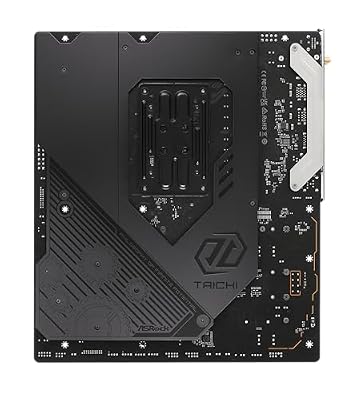
ASRock AMD X870E Taichi Ryzen Socket AM5 X870 Dual Channel DDR5 DIMMs 256 GB 8200 EATX Motherboard M.2 LED WiFi 7


As an Amazon Associate we earn from qualifying purchases. Product prices and availability are accurate as of the date/time indicated.
What to Compare on an E-ATX Board
Once the size fits, compare the power delivery, memory support, storage slots and rear I/O. A large board with weak power delivery is not a better gaming board. Look for a clear description of the power stage and a heatsink that covers it. Check the memory support list for the speed and capacity you want. Count the M.2 slots and confirm whether they share lanes with other ports.
Expansion slots and PCIe lanes
E-ATX boards often include more PCIe slots than ATX boards. Check whether the extra slots are electrically x16 or only mechanically x16, because a slot that runs at x4 can limit what you install. Read the manual’s lane diagram before you plan a multi-card setup.
Comparison Criteria for E-ATX Boards
The table below lists the checks to make before you buy. It uses ranges and general descriptions, not fixed prices, because retail prices vary by region and change often.
| Criterion | What to check | Why it matters | Typical price range |
|---|---|---|---|
| Board size | E-ATX dimensions and standoff layout | Must fit the case | Premium size class |
| Power stage | Heatsink size and phase description | Stable performance under load | Varies by model |
| PCIe slots | Electrical link width of each slot | Expansion and multi-card options | Check current price |
| Memory | Slot count and qualified kits | Capacity and stable speed | Check current price |
| Storage | M.2 count and lane sharing | Room for drives without losing ports | Varies by model |
| Case fit | Motherboard support list | Avoids a board that will not install | Check your case first |
Who Should Buy E-ATX
E-ATX suits a few builders well. The first is the enthusiast building a large case with a premium processor, a large cooler and several drives. The second is the workstation-minded gamer who uses the same machine for rendering, streaming or simulation and needs extra slots. The third is the buyer who wants long-term expansion room. For these users, the extra size can pay off.
Who Should Skip E-ATX
E-ATX is a poor choice for a compact build, a small desk or a case with limited space. It is also unnecessary for a standard gaming PC with one graphics card and a couple of drives. A standard ATX board is usually cheaper, easier to fit and more than enough. If space is your main constraint, our guide to the best ITX gaming PC build shows the opposite end of the size range.
Related Guides
More reading for this build: gaming motherboard guide gaming motherboards overview mini PC for gaming AMD CPUs for gaming Core Ultra 9 285K review.
Frequently Asked Questions
Is E-ATX better for gaming than ATX?
Not by itself. E-ATX gives more space for expansion and cooling, but a standard ATX board can deliver the same gaming performance for most builds. Choose E-ATX when you need the extra room.
Will an E-ATX board fit in a standard mid-tower case?
Often not. Many mid-tower cases support standard ATX only. Check the case’s motherboard support list before you buy the board.
Do I need E-ATX for multiple graphics cards?
Multi-GPU is rare for gaming today, and it is not a reason to choose E-ATX on its own. If you do need several expansion cards, a large board gives you more slot options. Confirm the lane layout in the manual first.
For other size choices, read the best ATX motherboard for gaming and our comparison of ATX, micro-ATX and Mini-ITX. For a compact alternative, see the best ITX mini gaming cases.







