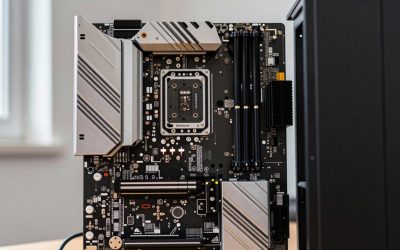
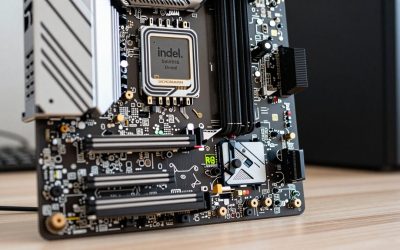
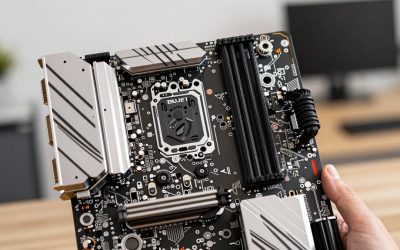
ASUS ROG Strix X870E-E Review 2026: Is a Premium X870E Board Worth the Money?
The ASUS ROG Strix X870E-E belongs to the premium end of the AM5 motherboard market, the class of board built around the X870E chipset for high-end Ryzen processors. If you are planning a build around a flagship Ryzen chip and a high-refresh graphics card, this is the kind of board you will end up comparing against everything else on the shelf. This guide is a buying framework for the ROG Strix X870E-E class. It covers what the chipset actually offers, which parts of a board like this justify the price, and where you are paying for features you may never use.
One note before the details. The listing above is the closest match to the board named in this guide. Product pages change, and revisions, bundles and packaging can differ between regions and retailers. Check the card for the exact model number, included accessories and current price. Everything written here is meant to hold true for the ROG Strix X870E-E family, so the reasoning still applies if the listing you end up buying is a neighbouring revision.


ASRock AMD X870E Taichi Ryzen Socket AM5 X870 Dual Channel DDR5 DIMMs 256 GB 8200 EATX Motherboard M.2 LED WiFi 7
What the X870E Chipset Means for an AM5 Build
AM5 boards divide roughly into the X870E, X870, B850 and B650 families. The X870E sits at the top. Its main selling point is additional chipset-level PCIe 5.0 capability on top of the lanes that come directly from the processor. For most gamers that difference is small in practice, because a single graphics card and one fast NVMe drive already run from CPU-attached lanes. The chipset upgrade matters more when you want several high-speed devices at once, such as a PCIe 5.0 SSD in a secondary slot, a fast capture card, or a multi-drive storage array.
That is why the X870E class is not automatically the right pick. If you run one graphics card, one primary SSD and a standard set of peripherals, a well-built X870 or B850 board will drive the same CPU and GPU with the same frame rates. The extra money in an X870E board goes into features that help most when you use them: more slots, better power delivery, and more expensive networking and I/O.
Memory Support and What to Check on the Spec Sheet
AM5 memory is DDR5, and the practical question is not whether a board supports DDR5 but how fast it will run with the kit you plan to buy. Board makers publish a memory support list, often called the QVL, that shows which kits have been tested. Before you buy, check that your target kit, usually a 6000MT/s or 6400MT/s two-by-16GB or two-by-24GB set, appears on the list for your board revision. A kit that is not on the list can still work, but it may need manual timing changes or run slower than advertised.
Our DDR5-6000 kit roundup lists kits that tend to work well on this platform. Four DIMM slots on a premium board give you room to expand later, but two sticks run faster and more reliably on most AM5 platforms. If you plan to upgrade memory down the line, pick a board where the first two slots are the ones the manual recommends for two-stick operation. The manual is the best source for that, not the box art.
Expansion Slots and Storage Layout
Count your storage before you count your slots. Most builds need one to three M.2 drives. Premium boards usually ship with several M.2 sockets, and some have heatsinks that cover all of them. Check which sockets are wired to the CPU and which go through the chipset. A drive in a chipset-fed slot can share bandwidth with other devices, so put your fastest drive in the CPU-attached slot and use the others for bulk storage.
Our guide to PCIe 5.0 NVMe drives explains which drives actually benefit from that bandwidth and which gain nothing measurable in games. For most gaming builds, a good PCIe 4.0 drive is enough, and the board’s storage layout matters more than the headline speed number.
Power Delivery, Cooling and Thermal Headroom
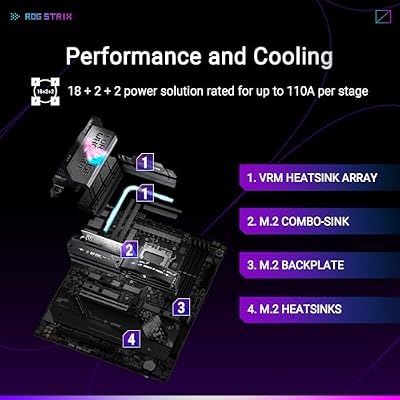
The voltage regulator module, or VRM, is where premium boards earn their reputation. High-core-count Ryzen processors draw a lot of current under sustained load, and a weak VRM will throttle the CPU before the cooler runs out of capacity. A board in the ROG Strix class uses a larger VRM design with more phases and bigger heatsinks than a mid-range board. That matters most if you run an X3D chip or a 16-core part for long rendering or compile jobs, where the processor stays under load for hours.
If you game on a mid-range CPU, the difference is much smaller. A capable B850 or X870 board can hold boost clocks well for typical gaming sessions. The VRM premium is a headroom feature, not a frame rate feature. Buy it when you expect sustained heavy load, and skip it when the CPU spends most of its time waiting on the graphics card.
Look at the M.2 heatsinks and the chipset cooler too. If you pair the board with a large air or liquid cooler, our 360mm AIO coolers for Ryzen 9 piece covers radiator sizing for high-core chips. A fast NVMe drive without a heatsink can throttle under long transfers, and a large chipset fan is often the loudest component on the board. Check the fan curve options in the BIOS before you judge noise. Many premium boards let you set the chipset fan to stop or run slowly under light load, which makes a quiet build much easier to achieve.
ASUS ROG Strix X870E-E Gaming WiFi - AMD Ryzen AM5 X870E ATX Gaming Motherboards (DDR5, 18+2+2 DrMOS, 5 x M.2, PCIe 5.0, WiFi 7, USB4 Type-C C, USB 20Gbps Type-C up to 30W, HDMI, Aura Sync RGB)



As an Amazon Associate we earn from qualifying purchases. Product prices and availability are accurate as of the date/time indicated.
Connectivity, Networking and Expansion
Premium boards in this class tend to include faster Ethernet, Wi-Fi 7 on many revisions, and a larger set of rear USB ports. Those features are useful if you have a fast home network, a mesh router that supports Wi-Fi 7, or a desk with several high-speed peripherals. They are less useful if your router is an older model or your peripherals are all USB 2.0 or USB 3.2 Gen 1. Wi-Fi standards and port speeds are advertised in the best case, so confirm them against your own router and devices before paying extra for them.
Audio is another area where the marketing can outrun the value. If you are still deciding on the rest of the parts, our general motherboard guide for gaming places this class alongside cheaper options. Most gamers use a headset or a pair of speakers, and onboard audio on a premium board is more than adequate for that. A separate sound card or DAC only matters if you have high-impedance headphones or a dedicated audio setup, which is outside the scope of most gaming builds.
For expansion, check the slot layout. If you plan to run a large graphics card, confirm the top PCIe slot is reinforced and the card does not block the M.2 sockets underneath. Some boards place a heatsink or a secondary M.2 directly beneath the main slot, and a thick triple-slot card can make that layout awkward to reach later.
Comparison Table: ROG Strix X870E-E Class Versus Other Premium Options
The table below compares the ROG Strix X870E-E class with other premium AM5 options. Prices are deliberately left as tiers, because they change quickly and vary by retailer. Use the cards in this guide to check the current price for each listing.
| Board class | Best for | Typical price tier | What to verify before buying |
|---|---|---|---|
| ROG Strix X870E-E class | Flagship Ryzen builds with heavy use and premium I/O | Premium (check current price) | Memory QVL, VRM design for your CPU, networking standard |
| X870E alternative with simpler I/O | High-end gaming without extra networking features | Upper mid-range to premium | M.2 layout, rear I/O count, BIOS update history |
| X870 mid-tier board | Gamers who do not need chipset-level PCIe 5.0 | Mid-range to upper mid-range | Slot layout, VRM size for your CPU |
| B850 value board | Mainstream AM5 gaming builds | Budget to mid-range | Memory speed support, power delivery for high-core CPUs |
For a broader view of how these tiers fit together, see our AM5 motherboard guide for gaming, which walks through the chipset tiers in more detail. If you are still choosing a processor, our 2026 gaming CPU guide shows which chips benefit from premium boards and which run fine on a cheaper one.
Who Should Buy a Board in the ROG Strix X870E-E Class
This class of board suits three kinds of builder. The first is someone pairing a flagship Ryzen processor with a top graphics card who wants a long-lived platform and room for future upgrades. The second is a creator or streamer who runs capture hardware, multiple drives and a fast network connection at the same time. The third is a builder who values a quiet, well-cooled system and will use the BIOS fan and thermal controls.
It is a poor fit for a budget build, a small form factor case with limited airflow, or a system where the CPU will mostly sit idle. In those cases, the money is better spent on the graphics card, the power supply or a better monitor. Our budget gaming motherboard guide covers the boards that make sense when cost matters more than headroom.
ASUS ROG Strix X870E-E Gaming WiFi AMD AM5 X870 ATX Motherboard 18+2+2 Power Stages, Dynamic OC Switcher, Core Flex, DDR5 AEMP, Wi-Fi 7, 5X M.2, PCIe® 5.0, Q-Release Slim, USB4®, AI OCing & Networking
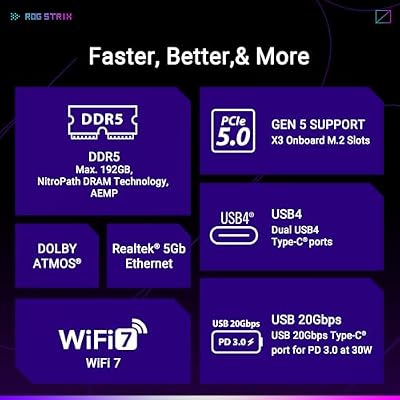


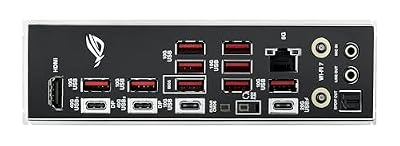

As an Amazon Associate we earn from qualifying purchases. Product prices and availability are accurate as of the date/time indicated.
Pre-Purchase Checklist for an X870E Board
Before you click buy, run through a short list. Confirm the socket and chipset match your processor. Check the memory QVL for your target kit. Read the rear I/O list and count the devices you need to plug in today. Look at the M.2 slot layout and choose the fastest drive for the CPU-attached slot. Check the BIOS update history for your processor generation, because a newer CPU may need a recent BIOS before it will boot. Finally, confirm the case fits the board, the cooler clears the VRM heatsink, and the graphics card will not block the M.2 sockets.
Many builders skip the BIOS check and then find that a new processor will not post on an older board revision. Board makers list supported CPUs for each BIOS version, and that list is the reliable source. If your processor is new, pick a board revision where the release notes mention it.
Frequently Asked Questions
Is an X870E board necessary for gaming?
No. A capable X870 or B850 board drives the same CPU and graphics card to the same frame rates in most games. The X870E chipset is useful when you need several high-speed devices at once or expect to run heavy sustained workloads. For a single-GPU gaming build, the extra cost is usually better spent elsewhere.
Does the ROG Strix X870E-E class support DDR5 at high speeds?
Premium AM5 boards generally support fast DDR5 kits, and our 32GB DDR5 kit guide shows which capacities suit gaming, but the exact speed depends on the processor, the memory kit and the board revision. Check the memory support list on the manufacturer site for your target kit. A kit on that list is the safest choice.
Do I need a VRM heatsink upgrade for a Ryzen 9 build?
For a high-core-count Ryzen chip under long, heavy load, a larger VRM design helps keep clocks steady. For most gaming sessions on a Ryzen 9 chip, a mid-range board is still enough. Choose the premium VRM if your workload keeps the CPU at full power for hours.
Is Wi-Fi 7 on a premium board worth paying for?
Only if your router and devices support Wi-Fi 7 too. A wired Ethernet connection is still the most reliable option for gaming, so the wireless feature matters most for laptops and rooms without a cable run.
Final Verdict on the ROG Strix X870E-E Class
The ROG Strix X870E-E class is a strong choice for builders who want a premium AM5 platform with headroom, good cooling and a broad set of connections. It is not the only good option, and it is not required for a fast gaming PC. Buy it when you will use the extra power delivery, storage layout and networking. If your build is mainly about the graphics card and the frame rate, a well-chosen X870 or B850 board will serve you just as well at a lower cost. Check the listing above for the current model and price, and confirm the memory list before you order.