

Best MATX Motherboard Gaming 2026: Micro-ATX Buying Guide
A micro-ATX motherboard, often written as mATX, is a compact board that keeps most of the features of a full-size ATX board in a smaller footprint. For gaming, it is a strong middle option. It fits smaller mid-tower cases, leaves room for a large graphics card and still provides enough memory slots, M.2 connections and rear ports for most builds. This guide explains when mATX makes sense, what it gives up compared with ATX, and what to check before you buy.
This is a buying guide, not a benchmark roundup. We have not reviewed each board in the cards below, and features differ between manufacturers and chipset tiers. Use the product cards as a starting point, then confirm the socket, slot layout, M.2 count and case compatibility on the product page. The hero listing is the closest match to the mATX gaming search, so read it as a representative of the size class rather than a guarantee of one exact model.


What Micro-ATX Means for Gaming
A micro-ATX board measures about 244 by 244 millimetres. That is smaller than a full ATX board, which allows a case to be more compact without losing much capability. Most mATX boards keep four memory slots, at least one graphics slot and multiple M.2 connections. What they usually lose is some expansion space, a few PCIe slots and, on some models, the most elaborate power stages and rear I/O designs.
For a typical gaming build with one graphics card, that trade-off is small. The graphics card, processor and cooling decide most of the performance. A mATX board gives you the same core gaming platform in a case that takes up less desk or floor space. If you do not need extra slots, you lose very little by choosing it.
Where mATX Fits Between ATX and ITX
Micro-ATX sits between full ATX and Mini-ITX. ATX gives the most room, mATX offers a good balance of size and features, and Mini-ITX is the smallest option with the fewest slots. Choosing mATX usually means a smaller case with a full set of gaming features. It is a practical choice when you want a compact tower but still need a board with several M.2 slots and room for a capable cooler.
Check the case first. Many compact mid-tower cases support mATX, but some support only ATX or ITX. Confirm the motherboard support list and the graphics card length limit before you commit to a board size. Our comparison of ATX, micro-ATX and Mini-ITX covers the trade-offs in more detail.
Choosing the Right mATX Board
Start with the processor. Make sure the board supports the socket and chipset you plan to use. Then check the power stage, because a smaller board can have less space for voltage regulators. A board with a clear heatsink design and good thermal reviews is worth the choice for a higher-end processor. For a mid-range chip, a simpler board is often enough.
M.2 and storage
Most mATX boards include two or three M.2 slots. Check whether a second slot shares lanes with a SATA port or a graphics slot. For a single fast drive and one game drive, two slots are enough. If you plan to add more storage later, look for a board with a clear lane map and a heatsink on each slot.
Rear I/O and networking
Count the USB ports and video outputs you need. Many mATX boards offer USB-C, multi-gigabit Ethernet and Wi-Fi as optional features. Check the antennas and the wireless standard if you need wireless. A smaller board does not have to mean fewer ports, but some models trim them to save cost.

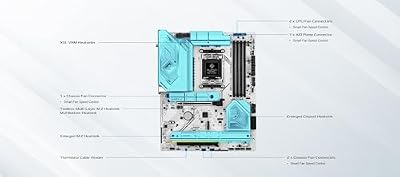
ASRock B850 Steel Legend WiFi AMD AM5 ATX Motherboard, Supports AMD Ryzen 9000/8000/7000 Series Processors, DDR5 8000+ (OC), PCIe 5.0, 2.5G LAN, WiFi 7, 14+2+1 Power Phase



As an Amazon Associate we earn from qualifying purchases. Product prices and availability are accurate as of the date/time indicated.
Comparison Criteria for mATX Boards
The table below lists the criteria to compare. It uses general descriptions and ranges rather than fixed prices, because retail prices change often and differ by region.
| Criterion | What to check | Why it matters | Typical price range |
|---|---|---|---|
| Board size | 244 by 244 mm class | Fits smaller compact cases | Mid range, check current price |
| Socket and chipset | Processor support list | Must match the CPU you plan to use | Depends on platform tier |
| Power stage | Heatsink and phase description | Stability with higher-end chips | Varies by model |
| M.2 slots | Count and lane sharing | Storage expansion | Varies by model |
| Graphics clearance | Slot spacing and case limit | Fit for large graphics cards | Check your case |
| Networking | LAN speed and Wi-Fi option | Online play and file transfers | Often optional |
Who Should Buy an mATX Board
Micro-ATX suits buyers who want a compact tower with a full gaming feature set. It is a good fit for a small office, a shared family PC or a build that needs to sit on a desk without taking over the room. It also suits builders who want to keep costs down without moving to a Mini-ITX board, which can limit cooling and expansion.
Who Should Choose Something Else
If you plan several expansion cards or a large custom loop, a full ATX board gives you more room. If you need the smallest possible case, Mini-ITX is the better size. Micro-ATX is a compromise, so it is best when you have a specific reason to choose it, such as a compact case that already fits your desk.
Related Guides
More reading for this build: ITX gaming PC build ITX mini cases gaming motherboard guide budget boards gaming motherboards overview.
Frequently Asked Questions
Is micro-ATX fast enough for gaming?
Yes. Board size does not limit gaming performance on its own. The graphics card, processor and memory decide most frame rates. A mATX board can run the same parts as a full ATX board for typical gaming builds.
Can I fit a large graphics card in an mATX case?
Often, but check the case’s graphics card length limit before you buy. Compact cases may restrict card length, and a thick cooler can also limit fit. Measure the card and check the case specification.
Does mATX have fewer M.2 slots than ATX?
Sometimes. Many mATX boards include two or three M.2 slots, which is enough for most builds. Check the layout on the product page, because the number of slots varies by model.
For a compact alternative, read the best ITX motherboard guide or the best ITX gaming PC build. For a full-size comparison, see the best ATX motherboard for gaming.










