

MSI MAG B850 Tomahawk WiFi Review: Is This Mainstream AM5 Board Enough for Gaming?
Most gamers who move to AM5 do not need an X870E board. They need a solid platform that runs a mainstream Ryzen processor well, supports fast DDR5 memory and leaves money for the graphics card. The MSI MAG B850 Tomahawk WiFi is built for that buyer. It uses the B850 chipset, which sits below the X870 family in the lineup, and it targets gamers who want a stable, well-cooled board without the premium price. This guide explains what the B850 class of board does well, where it reaches its limits and who should buy it.
The listing above is the closest match for the Tomahawk B850 WiFi name used in this guide. MAG boards get revised and bundled differently across regions, so confirm the exact model on the card and check the current price before you order. The reasoning below applies to the Tomahawk B850 family as a whole.


What the B850 Chipset Changes Compared With X870
The B850 chipset is the practical middle of the current AM5 range. Compared with the X870 and X870E families, it has fewer chipset-level high-speed lanes. For a single graphics card, one primary NVMe drive and a typical set of USB peripherals, that difference is rarely visible in game frame rates. The B850 chipset gives you what most gaming builds use: a CPU-attached PCIe slot for the graphics card, a fast M.2 slot for the system drive and enough USB and SATA connectivity for everyday use.
Where the gap shows up is in multi-device builds. If you want two or more high-speed NVMe drives running at full speed alongside a capture card, you will hit the limits sooner. For a gamer with a graphics card and one fast drive, B850 is a sensible default. Our X870 guide for high-end Ryzen chips covers the cases where the higher chipset is worth the premium.
Why the Tomahawk Layout Suits Gaming Builds
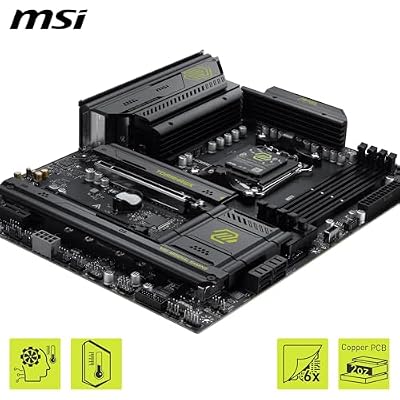
The Tomahawk layout keeps the important parts where you need them. The primary PCIe slot is positioned for the graphics card, the main M.2 slot is accessible under a heatsink, and the memory slots are spaced for a standard tower cooler. That matters more than flashy styling. A board that makes the graphics card or cooler awkward to install costs time and sometimes the cooler clearance you wanted.
Power Delivery and Thermal Behaviour
The VRM is the component that decides how a board handles sustained load. A B850 board does not need the largest power stage on the market for a mainstream Ryzen processor. A chip in the Ryzen 7 class, or a 6-core or 8-core part, runs well on a well-designed B850 VRM during long gaming sessions. For a 16-core processor under constant rendering or compile work, a premium X870E board gives more headroom, and that is the honest trade-off.
Check the CPU support list before buying. Board makers publish the processors each board revision supports, and some chips need a recent BIOS before they will start. The memory side of thermals is simpler: DDR5 at 6000MT/s on a mainstream board is a common, well-tested configuration, and the board’s memory settings in the BIOS are the place to tune it. Our DDR5-6000 kit guide explains which kits tend to run cleanly on this chipset.
MSI MAG B850 Tomahawk WiFi Motherboard, ATX - Supports AMD Ryzen 9000/8000 / 7000 Processors, AM5-80A SPS VRM, DDR5 Memory Boost 8200+ MT/s (OC), PCIe 5.0 x16, M.2 Gen5, Wi-Fi 7, 5G LAN




As an Amazon Associate we earn from qualifying purchases. Product prices and availability are accurate as of the date/time indicated.
Memory and Storage on the B850 Platform
Memory is where B850 builders most often gain or lose performance. Enable the EXPO profile in the BIOS for your kit, then confirm the speed in the system information screen. If the board will not run the full speed with four sticks, drop to two. Two sticks at a higher speed usually beat four sticks at a lower speed for gaming. Capacity matters too. For most gamers, 32GB is a comfortable target, and our 32GB DDR5 guide covers which kits fit that budget.
Storage on a B850 board is straightforward. Put your operating system and main game library on the fastest M.2 slot, and use a second slot for bulk storage. A PCIe 4.0 drive is the sensible choice for most gamers. Faster PCIe 5.0 drives cost more and deliver their biggest gains in large file transfers rather than typical game loading. Our PCIe 5.0 SSD guide explains where that extra speed is worth paying for.
Connectivity: What You Get and What You Can Skip
The rear panel on a Tomahawk-class board covers the basics. You get a set of USB ports, an Ethernet port and onboard Wi-Fi. The Wi-Fi is handy when cable runs are awkward, but a wired connection is still more stable for competitive online play. Check that the USB ports you need, such as front-panel USB for a case, are present on the motherboard header. Many builders forget this until the case is built.
Audio is good enough for headsets and standard speakers. Unless you have a dedicated DAC or an amplifier, the onboard codec does the job. The bigger practical question is whether you need a second M.2 slot or extra SATA ports, which depends on how many drives you plan to run.
Comparison Table: B850 Tomahawk Versus Other Mainstream Boards
The table below compares the Tomahawk B850 WiFi class with other boards in the mainstream AM5 range. Prices are shown as tiers because retailers change them often. Use the cards in this guide to check the current price of each listing.
| Board class | Best for | Typical price tier | What to verify before buying |
|---|---|---|---|
| Tomahawk B850 WiFi class | Mainstream gaming with a balanced feature set | Mid-range (check current price) | Memory QVL, CPU support list, M.2 heatsink coverage |
| Budget B850 boards | Value-focused gaming builds | Budget | VRM size, rear I/O count, Wi-Fi presence |
| X870 boards | Builds that need more chipset-level expansion | Mid-range to upper mid-range | Whether the extra lanes will be used |
| X870E boards | Heavy multi-device or high-core workloads | Premium | Whether the extra cost is justified by your use |
If you are weighing cheaper options, our budget gaming motherboard guide shows which boards cut features without hurting gaming performance. For a platform-wide view, the AM5 motherboard guide explains how the chipset tiers compare.
Who Should Buy the Tomahawk B850 WiFi Class
This board suits a gamer building a mainstream Ryzen system with one graphics card, a fast system drive and a reasonable amount of memory. It also suits a first-time builder who wants a stable platform with sensible defaults. It is a weaker choice if you plan to run a high-core workstation processor at full load for long periods, or if you want several PCIe 5.0 devices at once. In those cases, look at the X870 family instead.
Pairing matters too. If your processor is the main limit, check our CPU guide for gaming before buying the board. A capable B850 board cannot make a slow processor faster, so spend the money on the part that limits your frame rate.
Pre-Purchase Checklist
Confirm the socket and chipset match your processor. Check the CPU support list and the BIOS version that adds your chip. Verify the memory QVL for the kit you plan to buy and plan to enable the EXPO profile. Count the rear ports and front-panel headers your case needs. Plan the M.2 layout and check which slot goes straight to the CPU. Finally, measure the cooler and graphics card clearance against the case before you commit.
Related reading: our value gaming motherboard guide, our DDR5 kit guide for gaming.
Frequently Asked Questions
Is B850 good enough for a high-end graphics card?
Yes. The graphics card connects to a CPU-attached PCIe slot, and the chipset does not limit gaming performance for a single card. B850 handles RTX 5070 and RTX 5080 class cards without any gaming penalty.
Can I run four sticks of DDR5 on this board?
You can, but high speeds are harder with four sticks on AM5. Two sticks at the EXPO speed usually perform better for gaming. If you need four sticks for capacity, check the QVL and expect to lower the memory speed.
Do I need a PCIe 5.0 SSD on a B850 board?
Not for most gaming. A PCIe 4.0 drive is fast enough for game loading and everyday work. Consider PCIe 5.0 if you move very large files often or want the fastest possible drive for future use.
Is this board a good choice for a first AM5 build?
It is a sensible choice. The layout is straightforward, the chipset is mainstream and the feature set covers most gaming needs. Read the manual before you install the cooler, and check the CPU support list before you buy.
Final Verdict on the MSI MAG B850 Tomahawk WiFi Class
The MSI MAG B850 Tomahawk WiFi class is a practical, mainstream AM5 board for gamers who want a stable platform without paying for chipset extras they will not use. It handles a mid-range or high-end graphics card without any gaming penalty, and its layout suits a standard tower cooler. If you plan to run several high-speed devices or a 16-core processor under constant load, the X870 family is the better fit. For most gaming builds, though, the B850 Tomahawk class delivers what matters and leaves budget for the graphics card and the monitor. Check the listing above for the current model and price, and confirm the memory list before you order.










