

Best X870E Motherboard 2026: Ranked Picks for Flagship AM5 Builds
The X870E is the top chipset in the AM5 platform, and it attracts builders who plan to run a flagship Ryzen processor for years. Not every build needs it, but when you do need the chipset’s extra expansion and power headroom, the choice of board matters. This guide ranks the X870E motherboards in the list below for the buyer who wants a flagship AM5 platform. It explains how to read each board’s role, which tradeoffs matter most and which buyer each one suits.
The ranking is a buying framework, not a benchmark. We have not run these boards in our own test lab, and the listings shown are the closest matches for the board classes described here. Confirm the exact model, revision and price on each card before you order. Where a claim depends on the revision, the text below says so.

ASRock AMD X870E Taichi Ryzen Socket AM5 X870 Dual Channel DDR5 DIMMs 256 GB 8200 EATX Motherboard M.2 LED WiFi 7
How We Ranked the X870E Boards
The ranking weighs four things. The first is power delivery for high-core Ryzen processors under sustained load. The second is storage and expansion, meaning M.2 slot layout, heatsink coverage and the slots that share lanes. The third is rear I/O and networking, which matter only if you use them. The fourth is value for the buyer who does not need every extra. A board that ranks first for one buyer can rank lower for another, so the list below is ordered for a general flagship build, with a note on who each pick suits.
What the X870E Chipset Adds Over X870
The X870E chipset provides additional chipset-level PCIe 5.0 capability on top of the lanes that come directly from the processor. For a single graphics card and one primary drive, that extra capability is usually not used. It matters when you run several high-speed devices at once, such as multiple PCIe 5.0 drives, a capture card and a fast network adapter. Decide whether your build needs that before you pay the difference.
Ranked List of X870E Motherboards for 2026
The ranking below is ordered from the strongest all-round flagship pick to the most specialised option. Read each entry against your own use case.
1. The Flagship Premium Pick (Hero Listing)
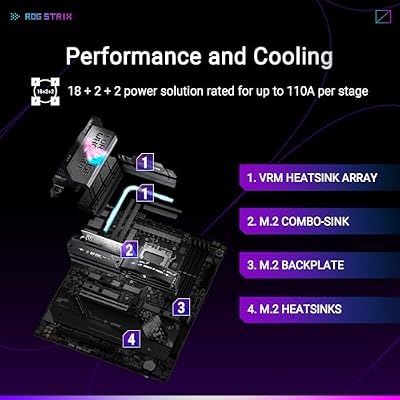
The top listing in this guide is a premium X870E board with a large power design, heavy heatsink coverage and a full connectivity set. It is the strongest choice when you want the most headroom for a flagship processor and expect to use the extra storage and I/O. It is also the most expensive option here, so it is best for builders who will use the features. For a single-GPU gaming build, it is more than you need. Our ASUS ROG Strix X870E-E review covers that class of board in more depth.

ASUS ROG Strix X870E-E Gaming WiFi - AMD Ryzen AM5 X870E ATX Gaming Motherboards (DDR5, 18+2+2 DrMOS, 5 x M.2, PCIe 5.0, WiFi 7, USB4 Type-C C, USB 20Gbps Type-C up to 30W, HDMI, Aura Sync RGB)



As an Amazon Associate we earn from qualifying purchases. Product prices and availability are accurate as of the date/time indicated.
2. The Balanced Feature Pick
The second listing sits in the balanced middle of the X870E range. It keeps the chipset’s expansion, uses a sensible power design and includes a practical set of rear ports. For most builders who want the X870E platform without the flagship price, this is the most sensible choice. Check the CPU support list and memory list before buying. Our Tomahawk X870E review explains how to judge boards in this balanced tier.
3. The Feature-Heavy Storage Pick
The third listing has the storage and connectivity focus typical of premium Taichi-class designs. It suits builders with several M.2 drives, a rich rear panel and a need for flexibility. Check how the M.2 slots share lanes with SATA ports, because the manual decides how many drives run at full speed. It is a strong pick for creators and a weaker one for pure gaming.
4. The Creator-Focused Flagship
The fourth listing follows the AORUS flagship approach, with strong power delivery and BIOS tools that help when a new processor needs a firmware update before it will post. It suits creators and power users who plan to keep the board for a long time. The premium over the balanced pick is justified only if you use the extra headroom.
5. The Specialist Option
The fifth listing is the most specialised entry. It fits a buyer with a specific layout requirement or a preference for a particular brand’s tools. Read its card carefully and compare its rear I/O and slot layout against your case before choosing it.
Comparison Table: X870E Picks at a Glance
The table below summarises the ranked list. Price tiers are shown rather than exact figures, because retailers change prices often. Use the cards above to check the current price of each listing.
| Rank | Role | Best for | Typical price tier | What to verify before buying |
|---|---|---|---|---|
| 1 | Flagship premium | Heavy workloads with full use of I/O | Premium (check current price) | CPU support list, memory QVL, rear I/O needs |
| 2 | Balanced feature set | Most X870E builders | Upper mid-range to premium | M.2 heatsink coverage, VRM size for your CPU |
| 3 | Storage-focused | Multi-drive builds and creators | Premium | Lane sharing between M.2 and SATA |
| 4 | Creator flagship | Long-life platform with BIOS tools | Premium | BIOS version for your processor |
| 5 | Specialist | Specific layout or brand preference | Varies | Case clearance and port layout |
Which X870E Board to Buy for Your Build
If you are building around a flagship Ryzen processor and want the most headroom, choose pick one. If you want the X870E platform without the highest price, choose pick two. If your build depends on several drives or a capture card, choose pick three. If you plan to keep the board through several processor generations and value BIOS tools, pick four is worth a look. The fifth pick is for a specific need, not a general recommendation.
Choosing the right processor matters as much as the board. Our 2026 gaming CPU guide explains which chips benefit from an X870E board and which run just as well on a cheaper platform. For the cooler, our CPU cooler guide for gaming covers the sizes that suit flagship chips.
Memory and Storage for an X870E Build
Whichever board you choose, check the memory support list for the kit you plan to buy. A 6000MT/s kit is a common target on AM5, and our DDR5-6000 roundup lists kits that tend to run cleanly. For storage, put the fastest drive on the processor-connected slot. Our PCIe 5.0 NVMe guide explains which drives justify the extra cost. Two sticks of memory at a high speed usually beat four sticks at a lower speed for gaming.
Related reading: our 32GB DDR5 guide, our motherboard guide for gaming.
Frequently Asked Questions
Is an X870E board needed for gaming?
No. A single-GPU gaming build runs the same frame rates on X870 or B850. X870E is worth it when you need chipset-level PCIe 5.0 expansion or flagship power headroom.
Which X870E board is best for most people?
Pick two, the balanced feature set, is the best choice for most buyers who want the X870E platform. It balances power, expansion and price better than the premium picks.
Do I need the BIOS updated for a new processor?
Often, yes. Check the CPU support list for the board revision and confirm the BIOS version before you install a new chip.
Should I wait for a newer X870E revision?
If the board you want already supports your processor and memory, buying now is reasonable. Revisions can add features, but they can also change the bundle. Read the release notes before deciding.
Final Verdict: Best X870E Motherboard for 2026
For most flagship AM5 builders, the balanced pick is the best value, and the flagship premium pick is the best choice when the extra headroom will be used. The storage-focused and creator-focused picks are strong for specific workloads, and the specialist pick fits only a narrow need. Whichever you choose, confirm the CPU support list, the memory list and the current price on the card before ordering. A board that matches your processor and workload will serve you longer than one chosen for its headline features.










