

MSI Tomahawk X870E WiFi Review 2026: Mid-Premium AM5 Value Explained
The MSI Tomahawk X870E WiFi is aimed at a specific buyer. It is not the cheapest route onto the X870E chipset, and it is not the most lavishly equipped board in the family. It sits in the middle, where you get the chipset’s extra PCIe 5.0 capability and a sensible power delivery design without paying for the top-shelf extras. This guide is a buying framework for the Tomahawk X870E WiFi class of board. It explains what matters for a Ryzen build, what you can safely ignore, and how to decide whether the price is justified for your system.
Treat the listing above as the closest match for the Tomahawk X870E WiFi name used in this guide. Board revisions, bundled parts and regional packaging can change, so confirm the exact model number on the card and check the current price before ordering. The advice below is written to stay accurate for the Tomahawk family whichever revision you end up with.

Why the Tomahawk Name Matters on AM5
MSI’s Tomahawk line has long been the balanced option in its range. The X870E version keeps that approach. The board targets gamers and small-studio builders who want a reliable platform without the extra cost of premium networking, large heatsink arrays or a display-heavy rear panel. For a single-GPU gaming build, that balance is the main reason to consider it.
The X870E chipset is the reason to look at this board at all, rather than a B850 or X870 model. The chipset adds PCIe 5.0 lanes on top of what the processor provides. Those lanes matter when you want more than one fast device connected at once. For a typical gaming PC, one graphics card and one primary SSD already run from CPU-attached lanes, so the chipset upgrade is an option you may not use. Decide whether your build needs it before you pay the difference.
Who Gets the Most From the Chipset
Builders with a high-end CPU, a PCIe 5.0 NVMe drive in a secondary slot, or a capture card alongside a graphics card are the people who benefit most. A streamer who records gameplay while running a fast storage pool is a good example. If your system is a single graphics card, one drive and a set of USB peripherals, a well-chosen B850 board gives you the same gaming performance for less money.
Power Delivery and Thermals for Ryzen Chips
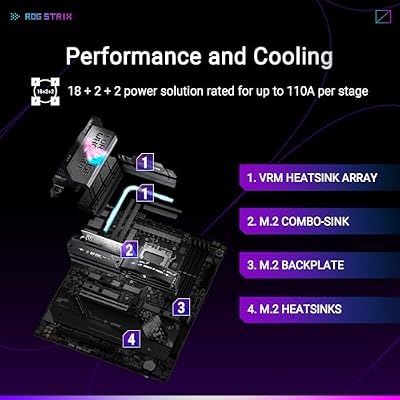
The VRM is the first thing to check on any AM5 board that you plan to run with a high-core-count Ryzen processor. The Tomahawk class uses a capable power stage with heatsinks sized for sustained gaming and productivity loads. That is enough for most users running Ryzen 7 and Ryzen 9 chips at stock settings. It is worth checking the official CPU support list and the VRM notes for your exact model before you pair it with the most power-hungry processors, because a board can be perfectly fine for an 8-core chip and still run warm with a 16-core part under long renders.
Cooling is where this class of board tends to be practical rather than flashy. Look for the M.2 heatsink over the primary slot and check whether the other slots have one as well. A fast PCIe 5.0 drive can throttle under long file transfers without a heatsink, so a good cover is more useful than a large RGB shroud. Our PCIe 5.0 NVMe guide explains which drives run hot enough to need that cooling.
If you plan a large air cooler, measure your case and the cooler height against the board’s memory clearance. The Tomahawk layout is generally straightforward, but a tall tower cooler can still clash with the top DIMM slot on some cases. If you are weighing a large air cooler against a liquid unit, our air cooler guide compares the two for AM5 builds. A 360mm liquid cooler needs a front or top radiator mount, which is simpler to plan with the board in hand.
Memory, Storage and Expansion Layout
AM5 memory is DDR5, and this board’s speed will depend on the kit you choose. Check the manufacturer’s memory support list for the kit you want. A 6000MT/s kit is a common sweet spot for Ryzen gaming, and our DDR5-6000 roundup covers kits that usually run cleanly on AM5. If you need more capacity for streaming or editing, our 32GB DDR5 guide helps you decide between two sticks of 16GB and two of 24GB.
For storage, plan the layout before you install anything. Put the fastest drive in the slot connected to the processor, and use the chipset-connected slots for bulk storage or a second drive for games. Some boards share lanes between M.2 slots and SATA ports, so check the manual if you plan to use every port at the same time.
Connectivity and What You Actually Need
The rear I/O on a board like the Tomahawk usually includes a healthy set of USB ports, a wired Ethernet port and onboard Wi-Fi. Wi-Fi is convenient for a desk without a cable run, but a wired connection is still the more stable choice for online games. If you plan to use the onboard wireless, check that your router supports the same Wi-Fi standard. A premium router will not help if the board’s wireless is the bottleneck.
Audio is adequate for headsets and speakers. If you have a dedicated DAC or amplifier, use it, but do not pay extra for a premium audio codec on a board you plan to use with a USB headset. Front-panel USB, both 10Gbps and 20Gbps where present, matters more for external drives and capture devices than any extra audio hardware.
Comparison Table: Tomahawk X870E Versus Other AM5 Options
The table below compares the Tomahawk X870E WiFi class with other boards you are likely to shortlist. Prices are shown as tiers because retailers change them often. Use the cards above to check the current price for each listing.
| Board class | Best for | Typical price tier | What to verify before buying |
|---|---|---|---|
| Tomahawk X870E WiFi class | Balanced X870E build with practical cooling | Mid-premium (check current price) | Memory QVL, CPU support list, M.2 heatsink coverage |
| Top-tier X870E boards | Maximum I/O and networking extras | Premium | Whether the extra I/O is used in your build |
| X870 boards | Strong gaming builds without chipset PCIe 5.0 | Mid-range | Storage layout and VRM size for your CPU |
| B850 boards | Mainstream AM5 gaming | Budget to mid-range | Memory speed support and BIOS version |
If you are still choosing between these tiers, our X870 guide for high-end Ryzen chips shows which boards suit the largest processors. For budget-focused comparisons, the affordable motherboard guide lists boards that deliver similar gaming results for less.

ASUS ROG Strix X870E-E Gaming WiFi - AMD Ryzen AM5 X870E ATX Gaming Motherboards (DDR5, 18+2+2 DrMOS, 5 x M.2, PCIe 5.0, WiFi 7, USB4 Type-C C, USB 20Gbps Type-C up to 30W, HDMI, Aura Sync RGB)



As an Amazon Associate we earn from qualifying purchases. Product prices and availability are accurate as of the date/time indicated.
Who Should Buy the Tomahawk X870E WiFi Class
This class of board suits a gamer who wants the X870E chipset without the top-tier price, or a small-studio builder who wants a reliable AM5 board for daily work. It is a good fit for a build with a mid-to-high graphics card, a Ryzen 7 or Ryzen 9 processor and a practical storage setup. It is less suited to a system that needs the most extensive rear I/O or networking, or to a budget build where the CPU and GPU would benefit more from the money.
If your build is mostly about the processor, see our 1440p CPU guide before you commit to a platform. For the wider board field, our motherboard guide for gaming PCs places this class alongside its rivals. The best board in the world does not change the frame rate if the processor is the limit.
Pre-Purchase Checklist for This Board
Confirm the socket, the chipset and the CPU support list. Check the memory QVL against the kit you want. Count the devices you need on the rear panel and confirm the port layout covers them. Plan the M.2 layout so the fastest drive sits in the CPU-attached slot. Measure your case and cooler clearances, paying attention to the top memory slots and the graphics card length. Finally, look up the BIOS release notes for your processor generation, because a newer chip can need a recent BIOS before it will boot.
Frequently Asked Questions
Is the Tomahawk X870E WiFi good for gaming?
Yes, for most gaming builds. Gaming frame rates depend mainly on the processor and graphics card, and this board class supports both well. Its value lies in balanced power delivery, practical cooling and the X870E chipset, rather than in any gaming-specific feature.
Do I need the X870E chipset or is X870 enough?
For a single graphics card and one or two fast drives, X870 is usually enough. The X870E chipset makes sense when you plan to run several high-speed devices at once, or you want extra PCIe 5.0 capability for future expansion.
Will this board support fast DDR5 memory?
AM5 boards in this class generally support fast DDR5, but the real limit depends on your processor and the kit. Check the memory support list for your exact board revision and the kit you plan to buy.
Is onboard Wi-Fi a reason to buy this board?
It is convenient if you cannot run an Ethernet cable to your PC. For competitive online gaming, a wired connection is still the more stable choice. If you can use Ethernet, the wireless feature is a convenience rather than a necessity.
Final Verdict on the MSI Tomahawk X870E WiFi Class
The MSI Tomahawk X870E WiFi class is a sensible middle choice for AM5 builders who want the X870E chipset with practical cooling and a balanced feature set. It rewards buyers who will use the chipset’s extra lanes and who want a board that does not chase premium extras. If your build is a single-GPU gaming system with modest storage needs, a B850 or X870 board will give you the same frame rates for less. Check the listing above for the current model, confirm the memory list and CPU support, and buy the board that matches the way you will use the system.







