

Best X870 Motherboard 2026: Ranked Picks for Gaming Without the X870E Premium
The X870 chipset sits one step below X870E in the AM5 range, and it is the sensible choice for many gamers who want a strong Ryzen platform without the flagship price. It supports the same processor families and the same memory technology, and it handles a high-end graphics card without a frame rate penalty. This guide ranks the X870 motherboards in the list below for a buyer who wants a capable gaming board that does not carry chipset extras they will never use.
The ranking is a buying framework, not a lab test. We have not benchmarked these boards side by side, and the listings shown are the closest matches for the board classes described here. Check the exact model, revision and price on each card before you buy. Where a point depends on the board revision, the text says so.



What X870 Gives You Compared With X870E
The main difference between X870 and X870E is chipset-level PCIe 5.0 capability. X870E provides more of it, which helps when several high-speed devices run at once. X870 covers the needs of most gaming builds: one graphics card connected to a CPU-attached PCIe slot, one fast primary NVMe drive and a standard set of USB peripherals. For that setup, the two chipsets deliver the same gaming performance.
The practical question is whether your build will use the extra chipset capability. If you plan one graphics card and one or two drives, X870 is the efficient choice. If you run a capture card, several PCIe 5.0 drives and a fast network adapter at the same time, the premium for X870E starts to make sense. Our X870E motherboard guide covers that higher tier in detail.
How X870 Compares With B850
B850 sits below X870 and suits mainstream gaming with a tight budget. X870 boards typically add a stronger power design, more M.2 slots and a richer rear panel. For a gamer on a mainstream Ryzen chip, B850 is often enough. For a high-end chip or a build that will grow over time, X870 gives more room. Our B850 guide covers the mainstream tier, so you can compare the two directly.
How We Ranked the X870 Boards
The ranking weighs four factors. The first is power delivery for the processor you are likely to pair with the board. The second is storage layout, including M.2 slot count, heatsink coverage and any lane sharing with SATA ports. The third is rear I/O and networking, which matter only if you use them. The fourth is value for a gaming-first build. The list is ordered for a general gaming buyer. A different buyer, such as a creator, may rank the same boards differently.
Ranked List of X870 Motherboards for 2026
1. The Best All-Round X870 Pick (Hero Listing)
The top listing in this guide is the most complete X870 board in the group. It has a capable power design, practical heatsink coverage and a rear panel that covers most builds. It is the best choice for a gamer who wants one board that handles a high-end Ryzen processor and a fast drive setup without needing the X870E tier. Check the CPU support list and the memory list before buying.
2. The Storage-Friendly Pick
The second listing is the better choice when you plan several M.2 drives. It has a layout that lets you run a large game library alongside a fast system drive. Check the manual to see which slots share lanes with the SATA ports, because the lane sharing decides how many drives run at full speed in your configuration. Our PCIe 5.0 NVMe guide explains which drives benefit from the extra bandwidth.
3. The Value Power Pick
The third listing focuses on a sensible power design at a lower price. It is a strong option for a gaming build with a mid-range or high-core Ryzen processor that does not run flat out for long periods. If your processor is one of the largest, verify the VRM notes for your exact chip. Our X870 guide for 9950X3D-class chips explains what to look for at the top end.
4. The Wireless-Focused Pick
The fourth listing includes onboard wireless and a richer rear port set. It suits a desk without a cable run, or a builder who uses a modern router that supports the same wireless standard. Wired Ethernet remains the more stable choice for competitive games, so use the wireless as a convenience rather than the only connection.
5. The Compact or Budget Pick
The fifth listing fits a smaller case or a tighter budget. It keeps the core X870 platform features and trims the extras. Check that the board fits your case and that the cooler clears the memory slots and the graphics card.
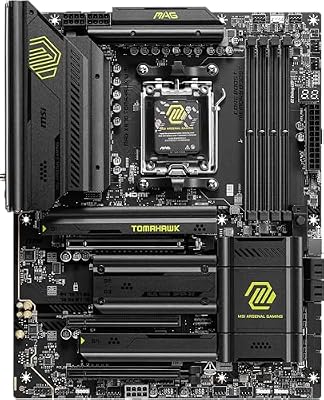
MSI MAG X870 Tomahawk WiFi Gaming Motherboard (AMD Ryzen 9000/8000/7000 Series Processors, AM5, DDR5, PCIe 5.0, M.2 Gen5, SATA 6Gb/s, USB 40Gbps, HDMI/DP, Wi-Fi 7, Bluetooth 5.4, 5Gbps LAN, ATX)


As an Amazon Associate we earn from qualifying purchases. Product prices and availability are accurate as of the date/time indicated.
Comparison Table: X870 Picks at a Glance
The table below summarises the ranked list. Price tiers replace exact figures because retailers change prices often. Use the cards above to check the current price for each listing.
| Rank | Role | Best for | Typical price tier | What to verify before buying |
|---|---|---|---|---|
| 1 | All-round gaming | High-end Ryzen gaming with a clean build | Mid-range to upper mid-range (check current price) | CPU support list, memory QVL, VRM notes |
| 2 | Storage-friendly | Multi-drive game libraries | Mid-range | M.2 and SATA lane sharing |
| 3 | Value power | Mid-range Ryzen gaming builds | Mid-range | VRM size for your exact processor |
| 4 | Wireless-focused | Desks without a cable run | Mid-range | Router Wi-Fi standard, Ethernet alternative |
| 5 | Compact or budget | Smaller cases and tighter budgets | Budget to mid-range | Case fit and cooler clearance |
Which X870 Board to Choose
For most gamers, pick one is the strongest all-round choice. If you run several drives, pick two is the better fit. If your processor is at the top of the range and you want to keep power headroom, pick three is worth a closer look. Pick four suits a wireless-only desk, and pick five suits a smaller or tighter build. Whatever you choose, make sure the board supports your processor before you buy. Our 2026 gaming CPU guide helps you pick the processor first, and that choice narrows the board options.
For the memory side, two sticks at a high speed usually beat four sticks at a lower speed for gaming. Our DDR5-6000 roundup lists kits that tend to run well on AM5. If you are weighing capacity, our 32GB DDR5 guide shows where 32GB fits and where 64GB is worth the extra cost.
Cooling and Build Checks
Check the cooler height against the memory slots and the case. Check the graphics card length against the M.2 sockets, because a long card can block the slot underneath. For cooler picks, our air cooler guide for gaming covers coolers that fit typical AM5 builds without wasting budget.
Frequently Asked Questions
Is X870 good enough for a high-end gaming PC?
Yes. A high-end graphics card and a flagship Ryzen processor run at full speed on X870. The chipset difference matters only when you need several high-speed devices at once.
How is X870 different from X870E for gaming?
For gaming, the difference is small. X870E adds chipset-level PCIe 5.0 capability, which is useful for multi-device builds. For one graphics card and one or two drives, X870 is the efficient choice.
Should I buy X870 or B850?
Buy X870 if you want more headroom, more M.2 slots or a richer rear panel. Buy B850 if you want the lowest sensible platform cost for a mainstream processor.
Do I need a BIOS update for a new CPU?
Often. Check the CPU support list on the manufacturer site and confirm the BIOS release that adds your chip before you install it.
Final Verdict: Best X870 Motherboard for 2026
For most gamers who want a strong AM5 platform, the all-round X870 pick is the best choice. It handles high-end Ryzen processors, supports a clean storage layout and keeps the price below the X870E tier. The storage-friendly and value power picks fit specific builds, and the wireless and compact picks cover narrower needs. Confirm the CPU support list, the memory list and the current price on each card before ordering, and pick the board that matches your processor and your storage plan.







