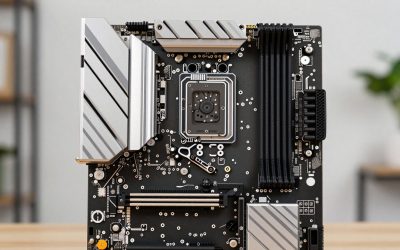
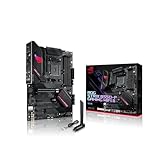
The best Z890 motherboard for most Core Ultra builders in this group is the GIGABYTE Z890 AORUS Elite WIFI7: it pairs a PCIe 5.0 graphics slot and four M.2 sockets with Thunderbolt 4, 2.5GbE and Wi-Fi 7 on a standard ATX board. Creators who need extra ports should look at the ASUS ProArt Z890-Creator WiFi, while anyone building around a tighter budget can start with the MSI PRO Z890-P WiFi. Z890 is Intel’s top desktop chipset for Core Ultra (Series 2) processors on the LGA 1851 socket, and it is the one that unlocks CPU and memory overclocking.
Quick List
- ASUS ProArt Z890-Creator WiFi – best for content creators who need fast networking, many M.2 slots and Thunderbolt
- ASUS TUF Gaming Z890-Plus WiFi – best for durable, no-nonsense gaming builds with Wi-Fi 7
- GIGABYTE Z890 AORUS Elite WIFI7 – best all-round pick for a balanced Core Ultra gaming PC
- Z890 Gaming Plus WIFI6E – best for a simple Z890 build that does not need Wi-Fi 7
- ASUS ROG Strix Z890-A Gaming WiFi – best for enthusiasts who want the most storage and I/O among the gaming boards
- MSI PRO Z890-P WiFi – best for straightforward builds that want fast wired networking at the lowest tier
Which One Is Right for You?
| If you… | Choose |
|---|---|
| edit video, run a NAS-style workflow or need 10GbE | ASUS ProArt Z890-Creator WiFi |
| want a balanced board with four M.2 slots and Thunderbolt 4 | GIGABYTE Z890 AORUS Elite WIFI7 |
| plan to fill many M.2 slots and want two Thunderbolt 4 ports | ASUS ROG Strix Z890-A Gaming WiFi |
| care about long-term durability and a plain, tidy design | ASUS TUF Gaming Z890-Plus WiFi |
| want 5Gbps wired networking without paying for a premium line | MSI PRO Z890-P WiFi |
| are happy with Wi-Fi 6E and want the simplest spec sheet | Z890 Gaming Plus WIFI6E |
All six boards use the same LGA 1851 socket, DDR5 memory and ATX size, so the decision is really about connectivity, storage slots and the VRM. If you are unsure, the AORUS Elite covers the widest set of everyday needs. Move up to the ProArt or Strix only if you will actually use the extra ports, and drop to the MSI or the Gaming Plus when the CPU and GPU deserve most of the budget.
All 6 Picks in Detail
1. ASUS ProArt Z890-Creator WiFi – Best for Content Creators
As an Amazon Associate we earn from qualifying purchases at no extra cost to you.

The ProArt is the workstation-flavored option in this list. Where the gaming boards lean on lighting and heatsink styling, this one is built around connectivity: ASUS documents both a 10Gb and a 2.5Gb Ethernet port, Thunderbolt support, and five M.2 sockets. That mix suits someone moving large video files to a network drive, working from several NVMe drives at once, or connecting fast external storage.
Think of it as the board for a person whose PC is a tool first and a toy second. A photographer offloading card dumps to a network server, a video editor with separate drives for cache, project files and exports, or a developer running containers and fast external storage will use the extra connectivity every day. A pure gaming build, on the other hand, rarely benefits from 10GbE, so budget-minded gamers can safely skip it.
- Z890 chipset, LGA 1851, ATX, DDR5 memory
- 16+2+1+2 power stages per the listing name
- PCIe 5.0 graphics support; five M.2 slots with one PCIe 5.0 x4 socket, per ASUS
- Marvell 10Gb Ethernet plus Intel 2.5Gb Ethernet, per ASUS specifications
- Wi-Fi 7 and Thunderbolt ports (Thunderbolt 5 and Thunderbolt 4 are documented by ASUS; confirm port counts on the listing)
Pros
- Fastest wired networking of the group
- Most M.2 capacity alongside the Strix
- Strong VRM for high-power Core Ultra chips
Cons
- Priced and designed for creators, so gamers pay for features they may not use
- Using the fifth M.2 slot disables the extra PCIe slot that shares its lanes, per ASUS documentation
Compared with the ROG Strix Z890-A, it trades gaming styling and a second Thunderbolt 4 port for 10GbE and a workstation focus.
2. ASUS TUF Gaming Z890-Plus WiFi – Best for Dependable Gaming Builds

TUF is ASUS’s durability-minded line, and this board keeps the formula uncomplicated: a 16+1+2+1 stage power design, DDR5, PCIe 5.0 and Wi-Fi 7 without the premium extras. ASUS lists four M.2 slots and four SATA ports, which is plenty for a main NVMe drive, a second game drive and some bulk storage.
The appeal is predictability. TUF boards are typically chosen by builders who want a sturdy, conventional layout, a well-supported BIOS and a spec sheet without surprises. A single Thunderbolt 4 port covers a fast external drive or a dock, and four M.2 slots are enough for most people for years. If you never plan to run more than two or three drives, you give up almost nothing against the pricier ROG and ProArt models.
- Z890 chipset, LGA 1851, ATX
- 16+1+2+1 power stages per the listing name
- Four M.2 slots (one PCIe 5.0 x4, the rest PCIe 4.0 x4) and four SATA ports, per ASUS
- Intel 2.5Gb Ethernet and Wi-Fi 7 with Bluetooth 5.4, per ASUS
- One Thunderbolt 4 Type-C port on the rear panel, per ASUS
Pros
- Thunderbolt 4 and Wi-Fi 7 included at this tier
- Clean feature set that avoids paying for creator-only extras
- Same four-slot M.2 layout as the AORUS Elite
Cons
- Only one Thunderbolt port and 2.5GbE networking
- Full Wi-Fi 7 features need a recent Windows 11 release, per ASUS
Next to the GIGABYTE AORUS Elite it offers a nearly identical feature set, so choose by firmware preference, styling and layout.
3. GIGABYTE Z890 AORUS Elite WIFI7 – Best All-Round Core Ultra Board

The AORUS Elite is the easiest recommendation because its listing covers everything a modern gaming or general-purpose build needs: four M.2 slots, PCIe 5.0, Thunderbolt 4, 2.5GbE and Wi-Fi 7. GIGABYTE also lists tool-free EZ-Latch features, which make graphics card and M.2 changes less fiddly. For a builder choosing a Core Ultra 7 or Core Ultra 9 and a single high-end graphics card, nothing here is missing.
It also suits upgraders who have been out of the loop for a few years. Moving from an older Intel platform means switching to DDR5, PCIe 5.0 and a new socket, and the Elite handles that transition without forcing you to decide between features. Pair it with a Core Ultra 7 and a mid-to-high-end graphics card and the board will not be what limits your performance.
- Z890 chipset, LGA 1851, ATX, DDR5
- Four M.2 slots; the primary CPU-connected slot is PCIe 5.0, per GIGABYTE
- Thunderbolt 4 Type-C port and 2.5GbE LAN
- Wi-Fi 7 (the model name states WIFI7)
- EZ-Latch tool-free design elements named in the listing
Pros
- Complete modern feature set with no obvious gaps
- Tool-free hardware conveniences
- Wi-Fi 7 and Thunderbolt 4 at a mainstream tier
Cons
- Only one Thunderbolt port, where some boards offer two
- No 5Gbps or 10Gbps wired networking
Against the TUF Z890-Plus it is a close match, and the choice often comes down to which brand’s BIOS you prefer.
4. Z890 Gaming Plus WIFI6E – Best for a Simple Z890 Build

This is the least detailed listing in the group. The name states an ATX Z890 board with LGA 1851, DDR5 memory boost up to 9200+ MT/s overclocked, and Wi-Fi 6E rather than Wi-Fi 7. The brand does not appear in the name we have, so confirm the manufacturer, BIOS support and warranty terms on the product page before committing. It makes sense for someone who wants Z890 overclocking features and DDR5 but has no need for the newest wireless standard.
The practical advice is to read the full specification table on the product page before ordering. Check how many M.2 slots there are, which of them is PCIe 5.0, what speed the wired LAN runs at, and whether the rear panel has the USB-C ports you need. If those answers line up with your plan, it can be a sensible way to get onto the Z890 platform; if any are missing, one of the better-documented boards above is a safer bet.
- Z890 chipset, LGA 1851, ATX
- Supports Intel Core Ultra processors (Series 2)
- DDR5 with a memory boost rating up to 9200+ MT/s (overclocked)
- Wi-Fi 6E wireless (confirm Bluetooth version on the listing)
- M.2 slot count, Thunderbolt and LAN speed: confirm on listing
Pros
- Gives access to Z890 and DDR5 overclocking headroom
- Wi-Fi 6E is still fine for most home networks
Cons
- Thin listing detail, so storage and port counts need checking
- Wi-Fi 6E is a generation behind Wi-Fi 7 boards
Compared with the MSI PRO Z890-P, it is the one to pick only if the final specifications on the product page match your port needs.
5. ASUS ROG Strix Z890-A Gaming WiFi – Best for Enthusiast Storage and I/O

The Strix Z890-A is the gaming-oriented counterpart to the ProArt. It shares the 16+2+1+2 power stage count and adds five M.2 slots, two Thunderbolt 4 ports, 2.5GbE and Wi-Fi 7, according to ASUS. If your build includes a large PCIe 5.0 SSD plus several additional drives and you want multiple fast USB-C devices, this is the most capable gaming board here.
It is the board to consider when your build is going to grow. A user who starts with one fast drive today and wants room for a game library, a capture drive and an archive drive tomorrow benefits from the slot count, and the two Thunderbolt 4 ports mean a dock and a fast external SSD can both stay connected. Gamers who want the matching ROG look across other components will also appreciate the styling.
- Z890 chipset, LGA 1851, ATX, DDR5
- 16+2+1+2 power stages per the listing name
- Five M.2 slots (one PCIe 5.0 x4) and four SATA ports, per ASUS
- Two Thunderbolt 4 ports and Intel 2.5Gb Ethernet, per ASUS
- Wi-Fi 7 with Bluetooth 5.4, per ASUS
Pros
- Most storage slots among the gaming boards
- Two Thunderbolt 4 ports for docks and fast external drives
- Robust power delivery
Cons
- Premium positioning within this list
- No faster-than-2.5GbE wired option
Compared with the AORUS Elite, you are paying for one more M.2 slot, a second Thunderbolt 4 port and heavier power delivery.
6. MSI PRO Z890-P WiFi – Best for Straightforward, Value-Minded Builds

The PRO Z890-P is MSI’s no-frills ProSeries board. Its listing highlights DDR5, PCIe 5.0, M.2, SATA and 5Gbps LAN, and MSI documents Wi-Fi 7 and Bluetooth 5.4. The 5Gbps port is unusual at this level and is useful if your network has multi-gig hardware. It is aimed at productivity and mainstream gaming PCs, not at extreme overclocking.
This board makes sense for a quiet workstation, a family PC or a gaming build where the money is better spent on the graphics card. It also pairs well with a mid-range Core Ultra 5 or Core Ultra 7 that does not need heavy overclocking. If you need Thunderbolt for a dock or external drives, verify its presence on the product page, or consider the ASUS and GIGABYTE boards that state it clearly.
- Z890 chipset, LGA 1851, ATX, DDR5
- PCIe 5.0 graphics slot and M.2 storage, per the listing name
- 5Gbps LAN (a Realtek 5G controller, per MSI)
- Wi-Fi 7 and Bluetooth 5.4, per MSI
- Four M.2 sockets reported by MSI; some retailer fields disagree, so confirm on listing
Pros
- 5Gbps wired networking is a standout at this tier
- Wi-Fi 7 included
- Simple layout for a clean build
Cons
- Thunderbolt and USB details vary in the listing, so confirm before buying
- Less robust power delivery information than the ASUS boards
Against the Gaming Plus WIFI6E, it offers clearer documentation and a newer wireless standard.
Specs Compared
| Board | Socket / size | Memory | M.2 slots | Wired LAN | Wireless | Thunderbolt |
|---|---|---|---|---|---|---|
| ASUS ProArt Z890-Creator WiFi | LGA 1851 / ATX | DDR5 | 5 (per ASUS) | 10GbE + 2.5GbE (per ASUS) | Wi-Fi 7 | Yes; confirm port counts on listing |
| ASUS TUF Gaming Z890-Plus WiFi | LGA 1851 / ATX | DDR5 | 4 (per ASUS) | 2.5GbE (per ASUS) | Wi-Fi 7 | 1 x Thunderbolt 4 |
| GIGABYTE Z890 AORUS Elite WIFI7 | LGA 1851 / ATX | DDR5 | 4 | 2.5GbE | Wi-Fi 7 | Thunderbolt 4 |
| Z890 Gaming Plus WIFI6E | LGA 1851 / ATX | DDR5, up to 9200+ MT/s OC | Confirm on listing | Confirm on listing | Wi-Fi 6E | Confirm on listing |
| ASUS ROG Strix Z890-A Gaming WiFi | LGA 1851 / ATX | DDR5 | 5 (per ASUS) | 2.5GbE (per ASUS) | Wi-Fi 7 | 2 x Thunderbolt 4 (per ASUS) |
| MSI PRO Z890-P WiFi | LGA 1851 / ATX | DDR5 | Confirm on listing | 5Gbps | Wi-Fi 7 (per MSI) | Confirm on listing |
How We Chose These
This guide is built from research, from published specifications and listing data. We started with the products in the current catalog set and read the listing names and manufacturer specification pages for each one, focusing on what separates Z890 boards in practice: M.2 slot count and speed, wired and wireless networking, Thunderbolt and USB-C support, power stage counts for high-wattage Core Ultra processors, and how clearly the listing states its specifications. Where a retailer field disagreed with the maker’s page, we followed the manufacturer and flagged the gap. Where nothing reliable was available, we wrote “confirm on listing” rather than guessing. We did not run performance numbers of our own.
What to Look For
Socket, chipset and processor match
Every board here uses the LGA 1851 socket, which is the platform for Intel Core Ultra (Series 2), the 200S desktop family. Z890 is the enthusiast chipset in that family, and it is the one that allows multiplier overclocking on unlocked K-series chips along with higher memory tuning. Cheaper chipsets in the same generation limit those options. If you do not plan to overclock, a lower chipset can save money, but Z890 boards also tend to bring more M.2 slots, Thunderbolt and better power delivery, so many buyers choose them for the feature set rather than the overclocking. The socket is not compatible with older LGA 1700 processors, even though many LGA 1700 coolers fit because the mounting hole spacing is shared. Confirm your cooler’s compatibility on the maker’s page.
Power delivery and cooling
The stage counts in the listing names, such as 16+2+1+2, describe the number of voltage regulator phases for the CPU cores and other rails. A K-series Core Ultra 9 can draw roughly 250 watts in sustained peaks under heavy multi-core loads, so a well-cooled VRM helps hold clocks steady. For a Core Ultra 5 or Core Ultra 7 gaming PC, any of these boards has more power delivery than needed. Pair a high-end CPU with a 360mm liquid cooler or a large dual-tower air cooler and make sure the case has airflow over the VRM heatsinks.
Memory: DDR5 only, and fewer sticks go faster
Z890 is DDR5-only, so you cannot reuse older DDR4 kits. Intel’s rated memory speed for Core Ultra 200S is lower than the overclocked figures advertised on board boxes, such as 9200+ MT/s, which are achievable only with specific kits and a good memory controller. As a rule of thumb, two DIMMs run faster and with less tuning than four, so buy a 32GB or 64GB two-stick kit rather than four sticks. A 2x16GB kit is the practical sweet spot for gaming, while video work or virtual machines benefit from 2x32GB.
Storage, ports and a worked example
Count what you need before comparing boards. Imagine a build with a PCIe 5.0 boot drive, two PCIe 4.0 game or scratch drives, one external Thunderbolt SSD, and a 2.5GbE home network. That list needs three M.2 slots, one Thunderbolt port and a 2.5GbE port, so the TUF, AORUS or Strix handle it with room to spare. Add a NAS with 10GbE and a fourth NVMe project drive, and the ProArt becomes the logical choice. Also read the manual notes on lane sharing: some M.2 slots disable a SATA port or a PCIe slot when used.
Wireless, BIOS and everyday details
Wi-Fi 7 needs a recent version of Windows 11 for its full feature set, and a router that supports it. Without those, the board falls back to Wi-Fi 6E behavior, which is why the Wi-Fi 6E board is not as limited as it sounds if your router is older. Check that the BIOS is recent out of the box or that the board has a USB BIOS Flashback feature, because early firmware may lack the latest stability updates for Core Ultra processors.
A quick buying checklist
Before you order, write down five things: the CPU you plan to buy, the number of NVMe drives you will install in the next two years, the fastest network port you can actually use, whether you need Thunderbolt for a dock or external drive, and the case you will mount the board in. Every board here is a full-size ATX model, so it needs a case with ATX standoffs and enough room for the rear connectors. Matching that short list to the specifications table above takes five minutes and prevents the most common regret, which is discovering after the build that a slot or port you wanted is missing.
Questions
Do I need Z890 for a Core Ultra processor?
No. Core Ultra (Series 2) processors also work on other 800-series chipsets for LGA 1851. Z890 is the right pick if you want to overclock an unlocked chip, tune memory aggressively, or get the largest set of M.2 slots and ports.
Can I use DDR4 memory on these boards?
No. All six boards use DDR5 memory, and DDR4 modules are physically and electrically incompatible with those slots. Plan your memory purchase around a DDR5 kit with a speed your chosen processor supports.
Is Wi-Fi 7 worth paying for?
It helps if you own a Wi-Fi 7 router and use the 6GHz band close to it. Otherwise, a wired connection or Wi-Fi 6E is usually enough, and you can put the savings toward the CPU or GPU.
How many M.2 slots do I need?
Most gaming builds are well served by two or three. Four or five slots matter for video editors, developers with large project drives and people who want to keep an old drive during an upgrade.
Will my LGA 1700 cooler fit?
Often yes, since the mounting hole spacing is the same, but the cooler maker’s compatibility list is the final word. Check height clearances and backplate requirements too.
Which board is best for an overclocked Core Ultra 9?
The ProArt and ROG Strix list the strongest power stage counts in this group. Whichever you choose, pair it with a capable cooler and a case with good airflow.
Update History
- October 20, 2026 – Initial publication; product set drawn from current catalog listings.
- Check the product page for current specifications and availability before buying.
Sources
- Manufacturer product and specification pages for ASUS, GIGABYTE and MSI
- Retailer listing titles and specification fields
- Published motherboard reviews and spec summaries for ASUS boards