

Sapphire RX 9070 XT Review 2026: Is This Sapphire-Style Radeon Worth Buying?
The Radeon RX 9070 XT is AMD’s current upper-mid gaming card, built on the RDNA 4 architecture and sold with 16GB of GDDR6 memory. Board partners such as Sapphire sell their own versions of the same GPU with different coolers, factory clocks, power limits and warranty terms. This Sapphire RX 9070 XT review explains what that means in practice, who should buy this class of card, and what to check on the listing before you pay.
This is a buying guide, not a lab report. We have not run our own benchmark suite on a specific retail unit for this article. Instead, it focuses on the product class: the specs AMD published at launch, the trade-offs versus the competing NVIDIA card in the same price band, and the checks that matter when you choose a board partner model. The listing below was selected for the query “Sapphire RX 9070 XT”. Check the card for the exact model, cooler design and current price before ordering.


What the RX 9070 XT Is Built For
The RX 9070 XT targets 1440p gaming at high settings and capable 4K performance with upscaling enabled. Its 16GB memory pool is the main reason many buyers consider it over 12GB cards in the same general tier. Newer games with large texture packs and high-resolution assets use more VRAM than older titles did, and extra memory gives you room to keep texture quality high without watching the memory meter during long sessions.
For the wider picture of where this card sits in AMD’s range, read our RX 9070 review and the graphics card hierarchy, which ranks current GPUs by performance tier. Our RX 9070 XT review covers the same card from a different angle and is worth reading alongside this buying guide.
AMD positions the card as a strong rasterization option, meaning traditional rendering without relying on ray tracing. Ray tracing performance has improved in RDNA 4 compared with earlier Radeon generations, but it still depends on the game and the settings you choose. If your favourite titles lean heavily on path tracing or heavy ray-traced lighting, compare the RX 9070 XT against the NVIDIA alternatives in the same article series before deciding.
Sapphire-Style Board Partner Models: What to Check
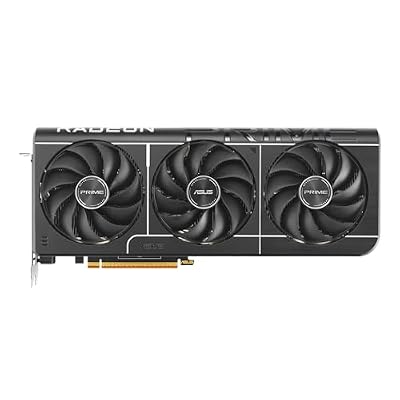
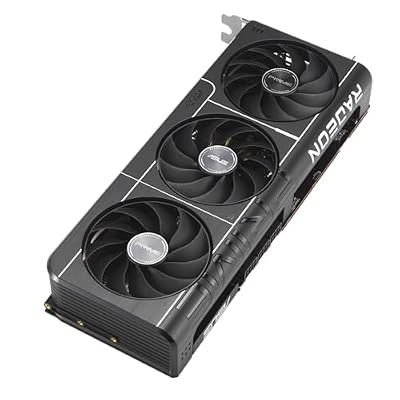
Two cards with the same GPU can behave differently. The cooler, the number of fans, the factory boost clock and the power limit all change temperatures and noise. A larger triple-fan cooler usually keeps the core cooler under sustained load, but it also needs more case clearance. Before you buy, check three things on the listing:
- Card length and slot width against your case’s GPU clearance
- The number of 8-pin or 12V-2×6 power connectors required
- Warranty length and whether the seller ships from a major retailer
Cooler Design and Noise
Board partner coolers vary widely. Models with larger heatsinks and more fans tend to run quieter at the same temperature target, while compact designs can work well in small builds but spin up sooner. If you value silence, read reviews that measure noise at a fixed fan curve rather than only peak temperature.
Power Supply Requirements
Plan for a quality 750W power supply from a reputable brand as a baseline for a system built around this card. A lower-quality unit with the same wattage can struggle under transient spikes. Our guide to gaming power supplies covers wattage sizing and connector types in more detail.
RX 9070 XT Versus the Alternatives
Most buyers in this range compare the Radeon card with NVIDIA’s GeForce RTX 5070 Ti and the RTX 5070. The table below summarises how the main options differ at a high level. Prices shift often, so treat the ranges as orientation only and check the current listing before you order.
| Card | Memory | Best for | Typical price range |
|---|---|---|---|
| Radeon RX 9070 XT (board partner model) | 16GB GDDR6 | 1440p high settings, strong rasterization value | Check current price |
| GeForce RTX 5070 Ti | 16GB GDDR7 | 1440p high settings with stronger ray tracing and DLSS support | Check current price |
| GeForce RTX 5070 | 12GB GDDR7 | 1440p at medium-high settings on a tighter budget | Check current price |
If your main games use upscaling and ray tracing heavily, the NVIDIA option often has an edge. If you mainly play traditional rasterized titles and want more performance per dollar, the RX 9070 XT is a strong contender. Our RX 9070 vs RTX 5070 comparison walks through the same decision with more detail on memory and driver support. For the Ti tier specifically, see our RTX 5070 Ti review and the head-to-head RTX 5070 vs RX 9070 breakdown.

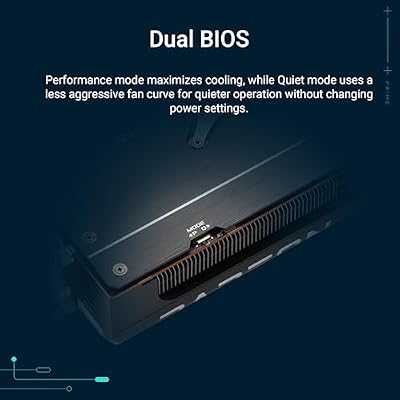
ASUS Prime Radeon RX 9070 XT 16GB GDDR6 OC Edition Gaming Graphics Card | PCIe 5.0, HDMI/DP 2.1, 2.5-Slot, Axial-tech Fans, Dual-Ball Fan Bearings, Dual BIOS, GPU Guard








As an Amazon Associate we earn from qualifying purchases. Product prices and availability are accurate as of the date/time indicated.
Who Should Buy This Card
The RX 9070 XT suits a player who wants a 16GB card for 1440p, plays a mix of competitive and single-player games, and does not need the top tier. It also fits builders who already run an AMD Ryzen processor and want a platform that is consistent end to end. If you are still deciding on the whole build, our CPU guide for 1440p gaming helps you pair the right processor so the GPU is not held back.
If your display is 1440p, our best GPU for 1440p gaming roundup compares the wider field. Skip this class of card if your monitor is 1080p and you cap frame rates. A lower tier will cost less and still saturate the display. Skip it also if you need 4K at maximum ray-traced settings without any upscaling. That workload pushes you toward the top of the market, where the price-to-performance argument changes.
Upgrade Path and Longevity
A 16GB card gives you more room for future game releases than a 12GB card, but no GPU stays at the top forever. Plan for the card to handle high settings at 1440p for several years, then step down the settings as newer games arrive. Buying a card with enough memory is usually a better long-term decision than buying the fastest card you can barely afford. If you are weighing cost against performance, our best gaming GPU guide and the best GPU for a gaming budget list show where this card falls on the value curve.
Installation and Driver Tips
Install the latest stable AMD driver package from the official site after your operating system is updated. Use a clean installation option if you are coming from another GPU brand, and remove old display driver residue first. Check that the card is seated fully in the top PCIe x16 slot and that all power cables are firmly connected. Monitor temperatures during your first long gaming session and confirm that fan curves are behaving as expected.
Undervolting and Thermal Care
Many modern GPUs can run cooler and quieter with a modest undervolt. The process is card-specific and carries some risk, so follow a tested guide and step changes carefully. Our guide on undervolting a current-generation card for cooler temperatures explains the general method and the stability checks to run afterward.
Frequently Asked Questions
Is the RX 9070 XT good for 1440p gaming?
Yes. The card is positioned as a 1440p high-settings option with 16GB of memory. Frame rates depend on the game, the settings and your CPU, so check benchmark results for your specific titles before buying.
Does the Sapphire model perform differently from other board partner cards?
The GPU is the same, but cooler size, factory clocks, power limits and warranty can differ. Compare those specifications on the listing and in independent reviews of the exact model.
Should I buy the RX 9070 XT or an RTX 5070 Ti?
Choose the RX 9070 XT if you want strong rasterization value and mostly play traditional titles. Choose the RTX 5070 Ti if ray tracing and NVIDIA’s upscaling features matter more to your library. Both have 16GB of memory, so the decision usually comes down to the games you play most.
How much PSU do I need for this card?
A quality 750W power supply is a sensible baseline for a typical gaming system with this GPU. Check the manufacturer’s recommendation for the exact model, because board partner cards can have different power requirements.
Final Verdict
The Sapphire-style RX 9070 XT is a practical 1440p card with 16GB of memory and a clear value argument for players who prioritise traditional rendering. Choose the board partner model based on cooler size, case fit, warranty and price, not on brand name alone. Compare it against the NVIDIA alternatives, confirm the exact model on the listing, and buy from a retailer with a clear return policy. Used or open-box stock can save money, but verify the warranty status first.







