Best Graphics Card Under $1000 2026: Picking the Right High-Value GPU
A graphics card under $1000 is where most serious gamers start to get real 1440p performance and a credible path toward 4K with upscaling. At this budget you are choosing between several strong current-generation cards, and the right pick depends on resolution, memory, ray tracing needs and whether you care more about raw rasterization or NVIDIA’s feature set. This guide explains how to narrow the field and where the value really sits.
This is a buying guide written around the product class. We have not benchmarked each model in our own lab for this article. The hero listing below was selected for the query “best graphics card under 1000”, and the alternatives come from the same search. Treat the listings as starting points, confirm the exact model, memory size and price on each card, and compare reviews for the games you play.


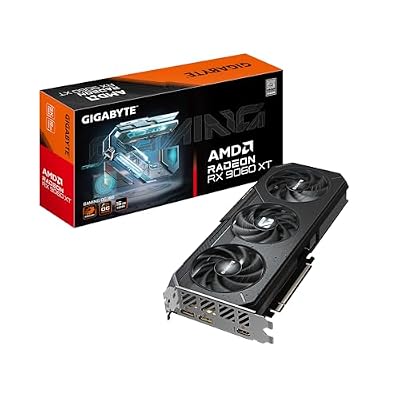
GIGABYTE Radeon RX 9070 XT Gaming OC 16G Graphics Card, PCIe 5.0, 16GB GDDR6, GV-R9070XTGAMING OC-16GD Video Card


What $1000 Buys in a Graphics Card
At this price you move up from the mainstream tier into the high-end of the current generation. Cards here are designed for smooth 1440p gaming at high or ultra settings and for 4K gaming with upscaling enabled. They also handle ray tracing more comfortably than budget options, although the heaviest path-traced titles still benefit from upscaling and tuned settings. The jump in cost from $500 is large, so it is worth being precise about what you need before you spend.
Memory is again a key factor. Cards in this band typically offer 16GB or more of VRAM, which gives you comfortable headroom for high-resolution textures and future releases. If you plan to keep the card for several years, the extra memory is part of what you pay for, not a luxury.
Key Criteria for a $1000 Card
Target Resolution and Refresh Rate
Decide your target before you compare cards. For 1440p at high refresh rates, a high-tier card gives you room to run most games at high settings without constant compromise. For 4K, you will rely on upscaling for demanding titles, and the card’s upscaler and memory bandwidth matter more. Matching the card to your monitor keeps the spend sensible.
Ray Tracing and Upscaling Support
Ray tracing performance and upscaler quality are major differentiators in this price band. Check whether the games on your list support the upscaling technology of each vendor and whether independent reviews test ray tracing at your target resolution. Frame generation can raise displayed frame rates, but it adds input and latency considerations that matter in competitive play.
Power, Cooling and Case Fit
High-end cards draw more power and take up more space. Check the card length, the slot width and the number of power connectors required against your case and power supply. A well-cooled card with a quieter fan curve often matters more day to day than a small difference in peak performance.
High-Value GPU Comparison
The table below groups the main choices you will see under $1000. Because prices change frequently and differ by region, the ranges are intentionally broad. Use the live listing for the exact figure.
| Card class | Memory | Best for | Typical price range |
|---|---|---|---|
| NVIDIA 70-Ti class (current generation) | 16GB GDDR7 | 1440p high refresh, strong ray tracing and DLSS | Check current price |
| NVIDIA 80-class (current generation) | 16GB GDDR7 | 1440p at very high settings, entry 4K with upscaling | Check current price |
| AMD 9070 XT class (current generation) | 16GB GDDR6 | 1440p high settings, strong rasterization value | Check current price |
| Previous-generation high-end card (new or open-box) | 16GB to 24GB | Large memory for 4K-ready builds on a fixed budget | Check current price |
If you are still choosing between tiers, our graphics card hierarchy places current GPUs in performance order, which makes the trade-offs easier to see. For a deeper look at the 70-Ti class, our RTX 5070 Ti review covers memory, power and ray tracing in detail.
Comparing the Top Contenders
NVIDIA Versus AMD at $1000
NVIDIA’s strength in this band is its feature set, including upscaling, frame generation and a mature ray tracing stack. AMD’s current high-end cards focus on strong raster performance and competitive memory capacity. If most of your library is traditional rendering, the AMD option can offer excellent value. If you play many ray-traced titles, the NVIDIA card is often the safer pick. Read our RX 9070 XT review and the RTX 5070 vs RX 9070 comparison to see how the two families line up.
Stepping Up From the 70-Ti Tier
The step from a 70-Ti card to an 80-class card is significant in price, and it is only worth making if your display and games can use the extra performance. At 1440p, the difference may be smaller than the price gap suggests, especially if you are CPU-limited. Our RTX 5080 review shows where the higher tier pulls ahead, and the RTX 5070 vs 5070 Ti comparison helps you judge the middle step.
Why Some Builders Skip to 4K Hardware
Some players look at $1000 cards as a stepping stone to 4K. That approach works best when the rest of the system is balanced. A 4K display gains the most from a strong GPU, but it also benefits from a capable CPU, fast memory and a high-quality power supply. Our guide to the best GPU for 4K gaming explains which parts of the build deserve the budget first.
GIGABYTE Radeon RX 9070 XT Gaming OC 16G Graphics Card, PCIe 5.0, 16GB GDDR6, GV-R9070XTGAMING OC-16GD Video Card


As an Amazon Associate we earn from qualifying purchases. Product prices and availability are accurate as of the date/time indicated.
Build Context: Balancing the Rest of the System
A $1000 card is only part of the picture. A GPU this strong can be held back by an older processor, slow memory or a cramped case with poor airflow. Budget some of your spend for a current six-core or larger CPU, at least 32GB of DDR5, a fast NVMe drive and a reliable 850W power supply for a system built around a high-end card. Our CPU guide for 1440p gaming shows the pairings that avoid bottlenecks, and the 850W gaming PSU guide covers the power supply side.
If you are planning the entire machine, our $1500 gaming PC build guide shows how a high-end GPU fits into a complete system with sensible allocation across the other parts.
Frequently Asked Questions
Is a graphics card under $1000 enough for 4K gaming?
It can be for many titles when you use upscaling and tuned settings. Very demanding games with heavy ray tracing will still need compromises. Check reviews for your specific games at 4K before buying.
Should I buy the 16GB or the 24GB option at this price?
Choose based on your resolution and how long you plan to keep the card. 16GB covers most 1440p and many 4K titles. More memory helps with very large textures and future releases, but it only matters if your games actually use it.
Is an older high-end card a good value at $1000?
It can be, if you buy new or open-box with a warranty and verify the card’s condition. Compare its performance and features with current-generation options before deciding.
Do I need a new CPU to make the most of a $1000 GPU?
Not always, but a CPU that is several generations old can limit performance in high-refresh and CPU-heavy titles. Check benchmarks that test CPU-limited scenarios for the games you play.
Final Verdict
The best graphics card under $1000 is the one that matches your resolution, your ray tracing needs and your monitor, with memory that will last through your planned upgrade cycle. Compare the hero listing and the alternatives on specification and reviews, confirm the exact model and price, and buy from a seller with a clear return policy. Balance the rest of the build so the GPU can work at full potential, and you will get the most from the money you spend.