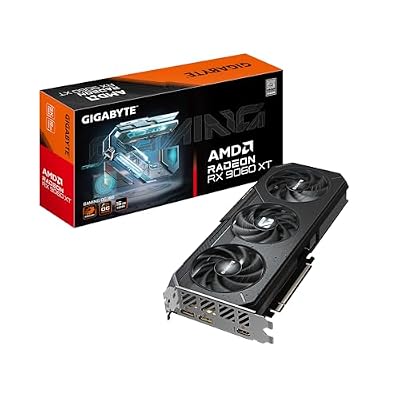
RX 9060 Graphics Card Review 2026: Value, Target Resolution and Buying Checks
The RX 9060 is AMD’s mainstream RDNA 4 graphics card for buyers who want solid 1080p gaming and a reasonable path to 1440p with adjusted settings. It targets the value segment, where most budget and mid-range builds are decided. The right question is not whether the card is fast in absolute terms, but whether it delivers the frame rate you need at the resolution and settings you use.
This review explains what to check before buying an RX 9060, how it compares with the surrounding market, and how to read the comparison table. The four alternatives come from the same search, and each one should be confirmed as a specific model, memory variant, or board design before you compare prices.
Where the RX 9060 Sits in AMD’s Lineup
AMD’s RDNA 4 architecture brought a new generation of mid-range cards, and the RX 9060 family sits in the value tier. The card is best suited to 1080p high refresh gaming and to 1440p play where you accept some setting reductions. It is not a card for maximum 4K performance, and buyers who want that should look at higher tiers.
For context, the RX 9070 class is the step up for higher resolutions, and our RX 9070 review explains that jump. If you are looking at the lower tier instead, the budget GPU guide covers the cheaper options.
Memory variants and what to check
Some RX 9060 family cards come with different memory sizes. More video memory helps with high-resolution textures and some newer games, but it does not change the GPU’s core speed. Check the memory amount on the listing, and make sure the variant matches the resolution you plan to play. A card with more memory at the same core performance may be the better buy for 1440p, but only if the price difference is small.
Performance Expectations by Resolution
At 1080p, the RX 9060 can deliver high frame rates in most titles at high settings, especially if paired with a capable processor. At 1440p, you will likely need to reduce a few demanding settings, such as shadows, volumetric effects, or ray tracing, to hold a steady frame rate in newer games. At 4K, expect to rely on upscaling and to lower settings significantly.
Pair the card with a monitor that matches its strengths. A 1080p high refresh monitor makes the most of the card, while a 1440p monitor rewards you with sharper images at the cost of more demanding settings. Our 1440p 240Hz monitor guide covers monitor choices for that step up.
Upscaling and ray tracing
AMD’s upscaling technology can raise frame rates with a modest quality trade-off, and it works across a range of games. Ray tracing is supported, but it has a bigger performance cost on mid-range cards. If you want ray tracing in most of your games, check reviews of the RX 9060 family in those specific titles. If you rarely use it, rasterized performance matters more for your purchase.
Buying Checks for an RX 9060 Build
Check card length and slot width against your case. Many mid-range cards are compact, but partner designs vary. Check the power supply too. A quality power supply with enough capacity and the right connectors matters for stable operation. Avoid unbranded units, because a failing power supply causes crashes that are often blamed on the GPU.
Look at the processor pairing. A budget processor can hold back a fast card at 1080p, especially in CPU-heavy games. The budget CPU guide lists processors that pair sensibly with this class of card.
Cooling and noise
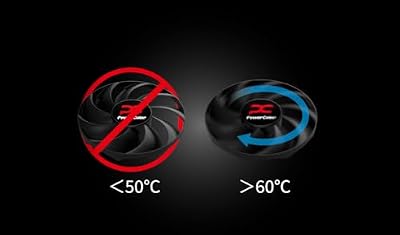
Mid-range cards usually run quietly, but cheap cooler designs can be loud under load. Look for reviews that report fan noise and temperatures for the specific partner model. A well-ventilated case helps any card, and it is worth checking airflow before spending more on the GPU.
Comparison Table
The table below shows the hero listing and four alternatives from the same search. Check the memory size, board design, card length, and warranty on each one. Prices and ratings are not hardcoded here; they are loaded from live product data when the page renders.
| Slot | ASIN | Best fit | Check before buying |
|---|---|---|---|
| Hero pick | B0F91K2KBX | RX 9060 for 1080p high refresh and value 1440p | Memory size, card length, power connector |
| Alternative 1 | B0F9QS3L7B | Alternative board design in the same tier | Cooling design and noise reviews |
| Alternative 2 | B0F8PPT3G1 | Option for a compact build | Dimensions versus your case |
| Alternative 3 | B0FC2XXSG5 | Option with a different memory variant | Memory amount and resolution target |
| Alternative 4 | B0G2GMZTCN | Alternative for buyers who want a quieter design | Fan configuration and warranty length |
Who Should Buy the RX 9060
The RX 9060 suits buyers building a 1080p or entry 1440p gaming PC on a budget, and buyers upgrading an older card without moving to the high end. It also suits players who prioritize value over maximum settings. If you want to play 4K at high settings, the card is the wrong tier.
If you are deciding between AMD and NVIDIA in this price range, the RTX 5060 versus RTX 4060 comparison shows how NVIDIA’s lower tier compares. For a wider view of brand choice, the AMD versus NVIDIA buyers guide sets out the trade-offs.
Frequently Asked Questions
Is the RX 9060 good for 1440p gaming?
It can run 1440p with adjusted settings in many games. For a steady high frame rate at 1440p with demanding titles, a higher tier card gives more headroom. Choose based on the games you play and the frame rate you accept.
Does the memory size of the RX 9060 matter?
More memory helps with high-resolution textures and some newer games. It does not change core speed. Pick the memory variant that matches your resolution and budget rather than the largest option by default.
Will an RX 9060 bottleneck a fast processor?
At 1080p, the card may limit frame rates in some games with a very fast processor, which is normal for a value card. At 1440p and 4K, the graphics card is usually the limit. Match your processor to your resolution target.
Should I buy the RX 9060 or wait for a higher tier?
If your current card is weak and you need a value upgrade now, the RX 9060 is a practical choice. If you want high settings at 1440p or above, a higher tier is the better buy. Decide based on your target resolution.
For more context, see our RX 9060 XT review, the graphics card roundup, and the budget gaming PC build guide. For the step up, the RX 9070 versus RTX 5070 comparison is a useful next read.


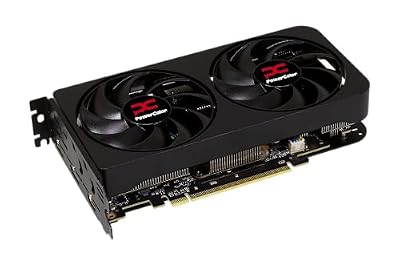
PowerColor Reaper AMD Radeon RX 9060 XT 8GB GDDR6






As an Amazon Associate we earn from qualifying purchases. Product prices and availability are accurate as of the date/time indicated.