Best 1440p Gaming Graphics Card 2026: How to Pick the Right Card for QHD
1440p has become the most popular resolution for serious PC gamers because it offers a clear step up from 1080p without the heavy cost of 4K. Picking the best 1440p gaming graphics card means balancing frame rate, memory, upscaling and ray tracing against your monitor’s refresh rate and your budget. This guide explains what a 1440p card needs in 2026, how the main options compare, and where the value sits.
This is a buying guide built around the product class. We have not benchmarked each model for this article. The hero listing below was selected for the query “1440p gaming graphics card”, and the alternatives were pulled from the same search. The listing may be a close match rather than the exact model you want, so confirm the card, memory size and price before ordering.

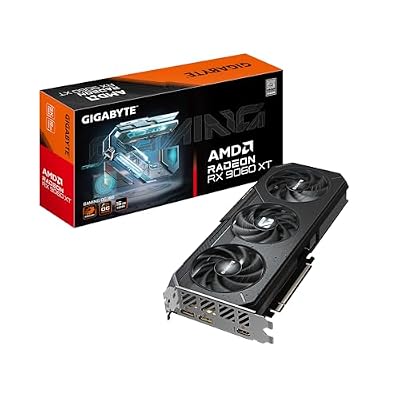
GIGABYTE Radeon RX 9070 XT Gaming OC 16G Graphics Card, PCIe 5.0, 16GB GDDR6, GV-R9070XTGAMING OC-16GD Video Card
What a 1440p Card Needs to Deliver
At 2560 x 1440 the GPU renders about 1.8 times the pixels of 1080p. That is a meaningful increase, but it is far more manageable than 4K. A well-chosen 1440p card can run most current games at high settings with healthy frame rates, provided you pick the right tier and pair it with a suitable CPU. The sweet spot for most players is a card with 16GB of memory, strong upscaling support and enough raw speed to keep a 144Hz or 165Hz monitor busy in mainstream titles.
Memory matters here. Newer games use larger textures, and a 12GB card can start to show limits in some titles at high settings. A 16GB card gives you more breathing room for several years of releases. When the choice is close on speed, the card with more memory is usually the better long-term buy.
Key Buying Factors for 1440p
Refresh Rate Targets
If your monitor runs at 144Hz or higher, match the card to that target. A card that averages 90 frames per second is smooth on a 60Hz panel but leaves a high-refresh display underused. Think about the games you play most and whether you want high frame rates in competitive shooters or high visual quality in single-player titles. Those goals call for different balances.
Upscaling as a Frame Rate Tool
Upscaling is especially useful at 1440p. A quality upscaling mode can lift frame rates noticeably with little visible loss, which can let a mid-to-high card hit a high refresh target in demanding games. Check which upscalers each card supports and which of your games use them. Native rendering is still the reference point, but upscaling is part of the normal 1440p experience.
Ray Tracing Trade-Offs
Ray tracing at 1440p is more achievable than at 4K, but it still costs frame rate. If your favourite games use heavy ray tracing, prioritise a card with stronger ray tracing hardware. If they do not, you can put that budget toward raw rasterization and memory instead.
1440p Card Comparison
The table below groups the main options for QHD gaming. Ranges are intentionally broad. Check the live listing for the exact price and model before you buy.
| Card class | Memory | Best for | Typical price range |
|---|---|---|---|
| Upper-mid 70-Ti class (current generation) | 16GB GDDR7 | 1440p high refresh, strong ray tracing and upscaling | Check current price |
| Mainstream 70-class (current generation) | 12GB GDDR7 | 1440p at medium-high settings on a tighter budget | Check current price |
| AMD 9070 XT class (current generation) | 16GB GDDR6 | 1440p high settings, strong rasterization value | Check current price |
| High-end 80-class (current generation) | 16GB GDDR7 | 1440p at very high settings with headroom to spare | Check current price |
To see the full list of options across tiers, our best GPU for 1440p gaming roundup covers the wider field, and the best graphics card for 1440p gaming guide focuses on value picks.

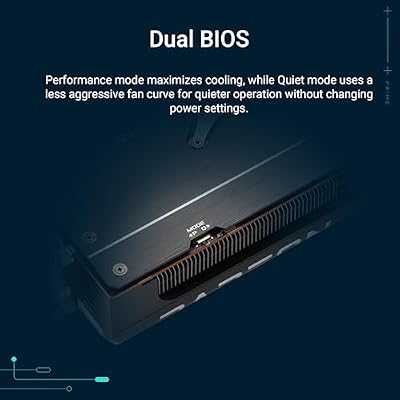
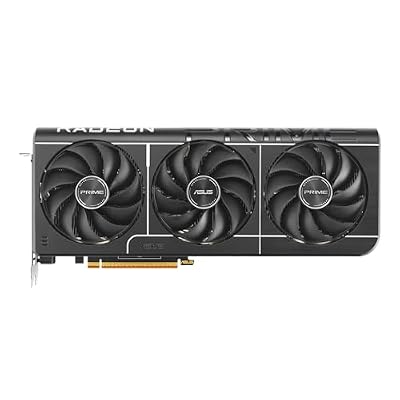
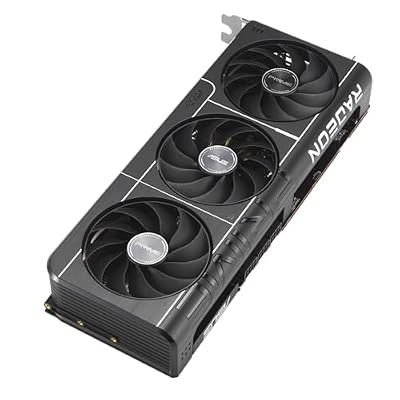
ASUS Prime Radeon RX 9070 XT 16GB GDDR6 OC Edition Gaming Graphics Card | PCIe 5.0, HDMI/DP 2.1, 2.5-Slot, Axial-tech Fans, Dual-Ball Fan Bearings, Dual BIOS, GPU Guard








As an Amazon Associate we earn from qualifying purchases. Product prices and availability are accurate as of the date/time indicated.
Matching the Card to Your Monitor
A 1440p card only shines if the monitor is right for it. Look for a panel with a refresh rate that suits your games and a response time that matches your play style. Our 1440p gaming monitor guide covers panel types, and the best 1440p monitors for gaming list compares popular models by use case.
CPU Pairing for High Refresh
At 1440p, CPU limits appear sooner in high-refresh esports titles. If you want 240Hz or more, the processor matters as much as the GPU. Our best CPU for 1440p gaming guide explains which chips avoid bottlenecks for the cards in this article.
Which Card Fits Which Player?
Players who mostly play competitive shooters and want high frame rates should look at the upper-mid tier and check reviews that test CPU-limited scenarios. Players who want the best visual results in single-player games should prefer the higher memory and ray tracing headroom of a 70-Ti or 80-class card. Budget-conscious builders can still get a good 1440p experience from a mainstream card, especially with upscaling enabled.
If you are comparing a specific current card to its rivals, our RTX 5070 Ti review and the RTX 5070 review cover the NVIDIA side of the market, while the RX 9070 review covers the AMD alternative at a similar level.

ASUS TUF Gaming GeForce RTX 5070 12GB GDDR7 OC EditionGaming Graphics Card | PCIe 5.0, HDMI/DP 2.1, 3.125-slot, Military-grade Components, Protective PCB Coating, Axial-tech Fans


As an Amazon Associate we earn from qualifying purchases. Product prices and availability are accurate as of the date/time indicated.
Build Planning Around a 1440p Card
A 1440p build does not need the most expensive parts. A balanced system with a current six-core or larger CPU, 32GB of DDR5, a fast NVMe drive and a reliable 750W power supply is a strong foundation for most mid-to-high 1440p cards. Our $1500 gaming PC build guide shows how to allocate the budget, and the best PSU for gaming guide explains wattage and connector choices.
Frequently Asked Questions
Is 12GB enough for 1440p gaming?
For many current games at medium to high settings, yes. For the newest titles with large textures and high settings, 16GB gives you more comfortable headroom and better long-term value.
Should I choose a 1440p card or a 4K card?
If your monitor is 1440p, a 1440p card is usually the better value. A 4K card makes sense only if you have a 4K display or plan to buy one soon, because the extra cost is wasted on a 1440p panel.
Does upscaling reduce image quality at 1440p?
Quality modes of modern upscalers often look very close to native rendering in motion, and they can give a meaningful frame rate boost. Test the modes in your own games and choose the one that fits your taste.
Is an AMD card good for 1440p gaming?
Yes. AMD’s current upper-mid cards are strong for 1440p, particularly for traditional rendering. Compare ray tracing performance and upscaler support for your games before choosing.
Final Recommendation
The best 1440p gaming graphics card for most players is a current upper-mid card with 16GB of memory, strong upscaling and enough speed to match a high-refresh monitor. Compare the hero listing and the alternatives on specs and reviews, confirm the exact model and price, and pick a monitor and CPU that match the card’s strengths. That balance gives you a sharp, smooth 1440p experience without paying for resolution you cannot use.