CPU Undervolting Thermal Management Complete Guide
CPU undervolting lowers the voltage a processor uses at a given clock speed, which can reduce heat and power draw without giving up much performance. It is one of the few tweaks that can make a gaming PC quieter and more stable at the same time, but it also carries a real risk if you push too far. This guide explains how undervolting works on current desktop processors, how to plan the thermal side around it, and which cooling choices make the result easier to hold. It is a buying and settings reference, so it is written to hold whichever processor and cooler you choose. We have not run our own stress tests for this article, so the advice focuses on method and safety margins rather than on fixed voltages.
How CPU Undervolting Works and Why It Helps
A processor’s voltage and clock speed are linked. Higher voltage allows a higher stable clock, but it also raises heat roughly in step with the power the chip draws. Undervolting lowers the voltage at a given frequency, so the chip uses less power for the same work. If the cooler and case can handle less heat, the processor holds its boost clock for longer, and fans can run more quietly.
The gain is usually modest, and it varies between chips. Some processors accept a meaningful reduction, while others need a smaller offset to stay stable. The aim is not the lowest possible voltage. The aim is the lowest voltage that stays stable under your heaviest real workload, with a margin for drift over time.
Offset Undervolting and Curve Optimization
There are two common approaches. A voltage offset applies a fixed negative value across the operating range. A curve optimizer, found on some AMD AM5 platforms, sets a separate negative offset for each core so the chip can use less voltage on cores that tolerate it. Offset methods are simpler to set but less precise. Curve tuning takes longer but can be more efficient. Start with the simpler method unless your platform makes the curve approach easy to access.
Why Stability Testing Comes Before Savings
An undervolt that looks stable in a short run can fail later under a long, heavy load. The failure may show as a crash, a game freeze or a machine check error in the system log. Test each change with a sustained load tool and a few hours of real games before you consider it final. A small loss in efficiency is far cheaper than a corrupted save or a system that will not boot.
Thermal Planning Before You Change the Voltage
Undervolting is easier to manage when the thermal side is already sound. A processor that runs hot at stock will not gain much from a small voltage change, and a poor cooler will hold the chip back regardless of settings. Plan the cooler, the paste and the case airflow first, then tune the voltage.
Choosing a Cooler That Suits the Chip
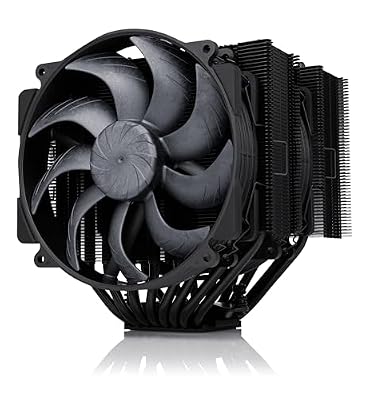
A capable air cooler or a well-sized liquid cooler handles most current gaming processors well. The right choice depends on your chip’s power draw, your case size and how much noise you accept. The hero listing in this guide is a representative cooler for this kind of build. Check the listing for compatibility with your socket, the height limit in your case and the radiator size if it is a liquid unit, because the listing may be a close match rather than the exact model named in a review.
Thermal Paste and Mounting Pressure
Paste and mounting matter more than most buyers expect. A poorly seated cooler or a thin, uneven layer of paste can add several degrees of heat at the die. Use the amount of paste the cooler maker recommends, tighten the mounting hardware evenly, and recheck after the first heat cycle. Our best thermal paste guide covers the choices by price band.
Step-by-Step Undervolting Process
Work in small steps and record every value. Undervolting is a process of trial and measurement, not a single setting you copy from a forum post.
Record a Stock Baseline
Before you change anything, run a sustained workload and record the temperature, clock speed and power draw. Note the ambient temperature and the fan curve, because a change of room temperature can shift your results. This baseline tells you what the undervolt actually improved.
Apply a Small Offset and Test
Set a small negative offset in the BIOS, or a modest curve value on a platform that supports it. Run a sustained load test for a fixed time, then a few real games. If the system is stable, step the offset down by a small amount and repeat. If it crashes, back off to the last stable value and keep it.
Check the System Log for Silent Errors
A setting can pass a short test and still produce errors that do not crash the system. Check the operating system’s event log for machine check or hardware error entries after each test. Any new error means the offset is too aggressive, even if the system appears to run normally.
Keep Microcode and BIOS Current
Some processor generations have had stability issues that the vendor addressed through microcode and BIOS updates. Keep your BIOS current before you tune the voltage, because an old microcode can make a stable offset unreliable. Read the vendor’s notes for your specific chip before you start.
Comparison: Cooling Options for an Undervolted Build
The table below groups common cooling approaches by goal. Price columns use tiers rather than numbers, because prices vary by region and change over time. Check current listings before you buy.
| Cooling approach | Best for | Main trade-off | Price tier |
|---|---|---|---|
| Quality air cooler | Quiet builds with good case airflow | Size and clearance limits | Budget to mid-range, check current price |
| 240mm or 280mm liquid cooler | Mid-range chips in compact cases | Pump noise and radiator placement | Mid-range |
| 360mm liquid cooler | High-core processors and heavy workloads | Case support and installation effort | Mid-range to premium |
| Stock or bundled cooler | Light workloads and budget builds | Limited headroom for undervolt gains | Included with the chip |
For most readers, a quality air cooler or a 240mm liquid unit covers the typical gaming processor. The 360mm tier is worth the extra cost when you run a high-core chip for long sessions.
Troubleshooting Undervolt Problems
Most undervolt failures come from an offset that is too aggressive for the chip, a thermal problem that masks the true stability, or a BIOS setting that conflicts with the offset. Work through them in order.
Crashes Under Load
If the system crashes under load, the offset is almost certainly too low for that chip at that clock. Raise it by a small amount and test again. If crashes continue at the stock setting, the problem is not the undervolt. Check the power supply, memory and the cooler mount.
Unexpected Heat After a Change
If the chip runs hotter after an undervolt, check the fan curve and the paste application. A change to the offset can alter the boost behavior, and the cooler may now be working harder in a different pattern. Compare the new readings with the baseline you recorded.
Results That Change Over Time
An undervolt that was stable for weeks can fail after a BIOS update, a memory change or a new game with a different load pattern. Retest after any significant change to the system, and keep the last known stable value on hand.
Who Should Undervolt and Who Should Not
Undervolting suits builders who are comfortable with testing, want a quieter or cooler system, and have a cooler that already keeps the chip in a healthy range. It is less suitable for anyone who needs a guaranteed stock configuration for work or support reasons, because an undervolt is a deliberate change from the vendor’s defaults. If you are choosing a processor with thermal headroom in mind, the low-temperature gaming CPU guide lists options that run cooler at stock.
For the processor itself, the best Intel CPU for gaming guide and the Core Ultra 7 265K review cover current Intel options. For an AMD comparison, the Intel 14900K versus 9800X3D comparison shows how two very different chips handle heat and power. Each chip responds to undervolting in its own way.
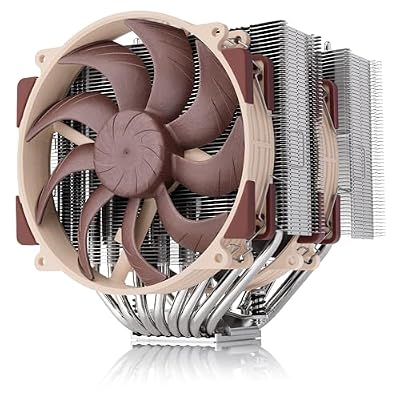
Noctua NH-D15 G2 LBC, Quiet High-Performance Dual Tower CPU Cooler | 168mm Height, Ultimate Low-Noise Cooling, 8 Heatpipes, AMD AM5/AM4 Specific Low Base Convexity, Dual 140mm Fans


As an Amazon Associate we earn from qualifying purchases. Product prices and availability are accurate as of the date/time indicated.
For cooler choices, our best air CPU coolers guide covers quiet, high-performance options, and the air versus AIO cooling comparison explains when a liquid cooler earns its extra cost. For Ryzen 9 builds, the 360mm AIO guide for Ryzen 9 lists the units suited to high-core chips. If you want a quick recap of the cooler basics, the best CPU cooler for gaming page is a good starting point.
To verify the results, use our temperature checking guide to read the core values during a session. Memory tuning can also affect stability, so if you run an overclock on memory at the same time, read the DDR5 overclocking safety guide before you change both settings together.
Frequently Asked Questions
Does CPU undervolting reduce performance?
It can reduce peak performance slightly if the offset is too aggressive, because the chip may throttle or become unstable. A well-chosen offset usually keeps the same boost behavior while lowering heat and power draw. Test in your own games and compare frame times, not only peak clocks.
Is undervolting safe for my processor?
A small, tested offset is generally low risk, but a value that is too aggressive can cause crashes or silent errors. Keep the BIOS current, test each change for a long period, and check the system log for hardware errors. Revert to stock if the results look unreliable.
Do I need a liquid cooler to undervolt?
No. Undervolting helps any cooler, and a capable air cooler is often enough for a mainstream gaming processor. A liquid cooler helps most on high-core chips under long, heavy loads, where the extra thermal capacity matters more.
How much can I expect to save on power?
The savings depend on the chip, the offset and the workload. Measure the power draw and temperature before and after, under the same test, rather than relying on a general figure. Your own readings are the only reliable guide.