Network Optimization for Gaming Guide 2026
Network optimisation for gaming is about making the path between your console or PC and the game server as stable and predictable as possible. Raw download speed matters less than most people think. A connection that delivers a large download quickly can still produce rubber-banding, sudden spikes in ping or dropped packets during a match. Those symptoms come from jitter, packet loss and congestion, and they are fixable with careful choices about the router, the cabling and the household traffic that shares your link.
This is a planning and setup guide. It walks through the parts of a home network that affect online play, the order in which to troubleshoot them and the hardware categories that suit different situations. It does not promise a specific ping reduction, because the result depends on your internet provider, the distance to the game server and the number of people using the connection.
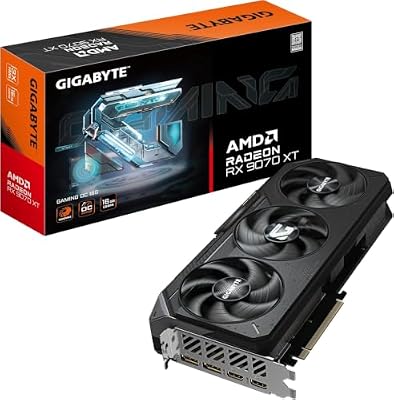
The listing below is the primary pick for this search. It falls in the gaming router and networking category that many players consider when they want a more reliable connection. The listing above may not match the exact model you intend to buy, so check the card for the precise model, supported standard and price before you order.

How a Home Network Affects Online Games
Online games send small packets many times per second. Each packet needs to arrive on time and in order, and any delay or loss shows up as lag, a desync or a teleporting character. Three measures matter most. Ping is the round-trip time to the server. Jitter is the variation in that time from one packet to the next. Packet loss is the share of packets that never arrive. A connection with a modest ping and very little jitter often feels better than one with a lower average ping that swings wildly.
Why Wi-Fi often causes trouble
Wi-Fi shares the air with other devices and neighbouring networks. Interference, distance from the router and walls can all make the signal less consistent. When many devices stream video or sync files at the same time, the wireless channel becomes busy and packets wait longer. A wired connection avoids most of these problems, which is why Ethernet remains the standard recommendation for competitive online play.
Upload matters as much as download
Online games send your inputs to the server, which means upload quality shapes how responsive you appear to others. Cloud backups, video calls and game updates running in the background all compete for upload capacity. Pausing those tasks during a session is one of the simplest and most effective changes you can make.
Router Features Worth Checking
A router that suits gaming is not necessarily the most expensive one. Look for stable performance under load, a reliable wired port set, support for modern Wi-Fi standards if you plan to use wireless, and quality-of-service controls that let you prioritise gaming traffic. Traffic prioritisation helps when the household is busy, but it does not fix a poor line from the provider. Set it up as a tool for managing contention rather than as a speed booster.
Quality of service and traffic priority
Many routers offer quality-of-service settings that assign priority to certain devices or applications. Setting the gaming console or PC to a higher priority can help during heavy household use. Keep the configuration simple, test before and after, and avoid overlapping rules that conflict with each other. Complicated rule sets often make troubleshooting harder.
The best router settings for gaming guide walks through the common options in plain terms. If you are choosing hardware, the best gaming router roundup explains which features separate budget models from more capable ones.

ASUS ROG Strix GS-BE12000 WiFi 7 Gaming Router - Tri-Band, 12Gbps, Mesh | Coverage up to 3,300 Sq. Ft., 2.5G Port x8. Game Boost for Low Latency Gaming & Streaming. VPN support


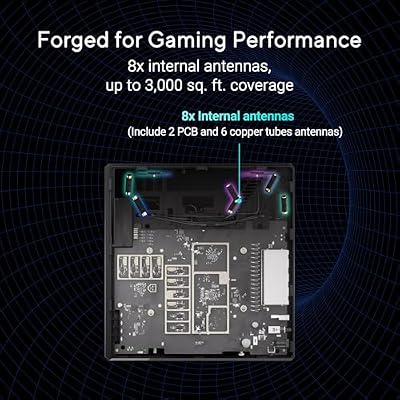


As an Amazon Associate we earn from qualifying purchases. Product prices and availability are accurate as of the date/time indicated.
Cabling and Switching
Good cabling is one of the cheapest upgrades a gamer can make. Most home runs need only a standard Gigabit-capable Ethernet cable, and the category you choose should match the speed you actually pay for. Keep runs reasonably short, avoid crushing or sharply bending cables, and route them away from power lines where possible. Damaged or poorly terminated cables can cause intermittent drops that are hard to diagnose.
If you have more wired devices than router ports, a network switch expands the number of wired connections without adding another router. A switch is a passive expansion tool, not a speed upgrade, so choose one with enough ports and reliable reviews rather than the highest headline throughput. The best Ethernet switch for gaming guide covers the options for a home setup.
A Step-by-Step Troubleshooting Order
When online play feels unstable, work from the device outward. Changing several things at once makes it impossible to know what helped. Keep a short log of each test so you can compare results over several evenings, because congestion often varies by time of day.
- Connect the console or PC to the router with Ethernet and re-test.
- Pause large downloads, cloud backups and streaming on other devices.
- Restart the router and modem if they have not been restarted recently.
- Check the router’s firmware version and install a stable update.
- Test the connection at different times to see whether congestion appears in the evening.
- Contact the internet provider if packet loss persists on a wired connection.
Choosing a DNS resolver
Domain name lookups happen before a game connects, but they do not usually determine in-game latency once the session starts. Changing the resolver can speed up initial connections and may help with some service issues. Compare the options, and do not expect a DNS change to fix jitter or packet loss. The comparison of Cloudflare and Quad9 DNS is a useful starting point if you want to test a different resolver.

TP-Link Tri-Band BE11000 Wi-Fi 7 Gaming Router (Archer GE650) | 6-Stream, 11 Gbps, 320MHz, 2×5G + 3×2.5G Ports, USB 3.0, Game Acceleration, Gaming Port & Panel, RGB Lighting, HomeShield

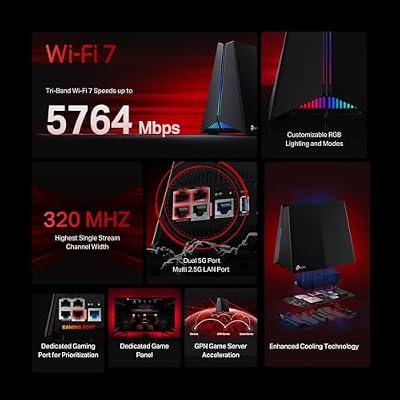


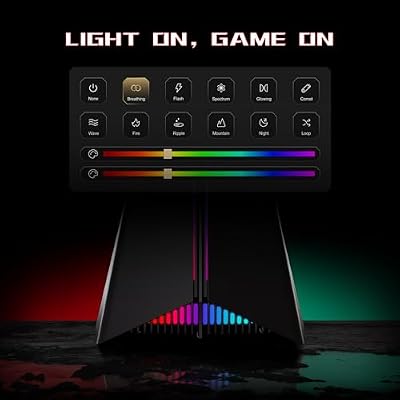
As an Amazon Associate we earn from qualifying purchases. Product prices and availability are accurate as of the date/time indicated.
Comparison Table: Network Hardware Options
The table compares the listings by the role they are likely to play in your setup. It avoids specific prices and throughput claims, which depend on your plan and your home layout.
| Option | Best for | Price tier | Trade-off to check |
|---|---|---|---|
| Primary pick (hero listing) | Gamers who want a dedicated router with strong wired ports | Mid tier | Confirm the Wi-Fi standard and the number of wired ports you need |
| Alternative 1 | Households with several competing devices | Premium tier | Higher cost for features you may not use |
| Alternative 2 | Players in a small apartment on a tight budget | Entry tier | Fewer advanced controls and smaller port count |
| Alternative 3 | Players who need more wired connections at the desk | Entry tier | Passive switch adds no speed and needs a clean cable run |
| Alternative 4 | Users who want an add-on for a dead spot | Check current price | Extenders can add latency when the link is weak |
When Hardware Will Not Fix the Problem
Not every network problem sits inside your home. If ping is high to every game server, the cause may be the provider, the route or the distance to the data centre. If packet loss appears only on certain servers, the route may be the issue. In those cases, check whether your provider offers a different plan or routing option, and describe the problem with specific times and server regions when you call support. Good notes make support calls far more productive.
Wireless range extenders deserve caution. They can fill a dead spot for streaming, but they often add latency for online games because each hop introduces delay. A wired backhaul or a mesh system with a dedicated link usually performs better than a single-band extender. For players who must stay on wireless, the guide to the best Wi-Fi for gaming explains the categories that hold up under load.
Further reading helps when you narrow the hardware choice. The best Ethernet setup for gaming guide covers adapters and cabling, the best modem router for gaming article explains combined units, and the best gaming router roundup compares current models. If you must extend coverage, the best Wi-Fi extender for gaming guide lists the trade-offs.
Frequently Asked Questions
Is a faster internet plan the best way to lower ping?
Not usually. A faster plan helps when your connection is saturated, but ping is driven mainly by distance, routing and the quality of the line. Upgrading speed without addressing jitter, Wi-Fi quality or congestion often produces little change in online responsiveness.
Should I turn on QoS for gaming?
It can help when several devices compete for bandwidth. Set a clear priority for the gaming device, test before and after, and keep the rules simple. If QoS makes the network harder to manage without measurable benefit, disable it.
Do I need a new router to play online?
Not always. If your current router handles wired connections well and the network is not heavily congested, a firmware update and better cabling may be enough. Consider a new router when the existing one drops connections under load, lacks the ports you need or cannot support the devices in your home.
Is Ethernet always faster than Wi-Fi?
Ethernet is not always faster in raw throughput, but it is usually more consistent. For online games, consistency is often more important than peak speed, which is why wired connections remain the first recommendation for competitive play.