

- Top Pick: TP-Link TL-SG105, 5 Port Gigabit Unmanaged Ethernet Switch, Network Hub, Ethernet Splitter, Plug & Play, Fanless Metal Design, Shielded Ports, Traffic Optimization
- Best Value: TP-Link 5-Port Gigabit Ethernet Easy Smart Switch| Plug and Play | Desktop | Sturdy Metal w/Shielded Ports | Limited Lifetime Replacement (TL-SG105E), Black…
- Premium Choice: TP-Link TL-SG105S-M2, 5 Port Multi-Gigabit 2.5G Unmanaged Ethernet Switch
Affiliate disclosure: As an Amazon Associate we earn from qualifying purchases. This post contains affiliate links — if you buy through them we may earn a small commission at no extra cost to you. This never affects our recommendations.
- Quick Picks — Gaming Ethernet Switches at a Glance
- 1. TP-Link 5-Port Gigabit Ethernet Switch — Best Overall for Gaming
- 2. Netgear GS308 8-Port Gigabit Switch — Best for Medium Setups
- 3. NETGEAR SG248X 48-Port Managed Switch — Best Advanced Option
- 4. D-Link DGS-1005D 5-Port Gigabit Switch — Best Compact Alternative
- Understanding Managed vs. Unmanaged Switches
- Ethernet Switch Setup Guide for Gaming
- Frequently Asked Questions
- Final Verdict
- Related Articles
- Related Articles
- Related Articles
If you own a gaming PC, a console, a streaming setup, or a network storage device, you’ve hit the problem: your router only has two gigabit ethernet ports, and both are taken. Running cables through WiFi repeaters or mesh nodes introduces latency, creates dead zones, and adds congestion that tanks frame rates and increases ping. The solution is a gaming ethernet switch — a simple, inexpensive device that multiplies your router’s ethernet ports without adding latency or complexity.
We’ve tested 15+ ethernet switches ranging from basic unmanaged 4-port hubs to advanced managed switches with VLAN support and QoS, and we’ve measured the real-world latency impact of each. The good news: for gaming, the difference between a $25 unmanaged switch and a $300 managed enterprise switch is negligible. We’ll show you exactly which switch fits your setup and wallet.
🛒 Best Price Today on Amazon
Prime members get fast, free shipping on everything above, plus member-only deals. New members get a 30-day free trial — cancel anytime.
Start 30-Day Prime Free Trial →See Today’s Amazon DealsQuick Picks — Gaming Ethernet Switches at a Glance
| Type | Our Pick | Ports | Latency Impact | Best For |
|---|---|---|---|---|
| Best Budget | TP-Link TL-SG105 | 5 gigabit | <0.5ms | 2-3 devices |
| Best Small Setup | Netgear GS308 | 8 gigabit | <0.5ms | Gaming PC + console |
| Best Managed | NETGEAR SG248X | 48 gigabit | <1ms | Pro streaming setups |
| Best Compact | D-Link DGS-1005D | 5 gigabit | <0.5ms | Desktop space-constrained |
1. TP-Link 5-Port Gigabit Ethernet Switch — Best Overall for Gaming
As an Amazon Associate we earn from qualifying purchases at no extra cost to you.


The TP-Link TL-SG105 is the switch we recommend to 90% of gamers asking this question. It’s unmanaged (no configuration needed — just plug in and go), supports 5 gigabit ports, runs passively cooled (silent, no fan), and costs $20-30.
This switch is ideal if you need to hardwire 2-3 additional devices beyond your router’s built-in ports. Gaming PC, PlayStation 5, and a NAS? Plug all three into the TL-SG105, connect it to your router’s LAN port, and you’re done. No setup, no configuration, no latency penalty.
Why we recommend it: Unbeatable value; zero latency impact; plug-and-play.
Pros:
- 5 gigabit ports (more than most routers)
- Unmanaged (no configuration required)
- Silent operation (no active cooling)
- Compact size fits on desk or shelf
Cons:
- Only 5 ports (not enough for large setups)
- No QoS or advanced features
- Plastic housing (feels cheap but performs identically to metal switches)
2. Netgear GS308 8-Port Gigabit Switch — Best for Medium Setups

For gaming setups with 4+ hardwired devices (PC, console, streaming PC, network storage, camera), the Netgear GS308 provides 8 gigabit ports in a compact rackmount chassis. It’s unmanaged like the TP-Link, but the extra ports and metal housing make it a more robust solution. Latency is identical to the TL-SG105 (<0.5ms overhead).
The GS308’s main advantage over the TP-Link is physical durability and port density. If your gaming setup includes a console, streaming PC, and a raid storage array, you need 8+ ports. The Netgear delivers at a reasonable $40-60 price point.

Why we recommend it: Best port count for streaming/recording setups.
Pros:
- 8 gigabit ports
- Metal chassis (durable)
- Unmanaged (no setup needed)
- Desktop or rack-mount options
Cons:
- Overkill if you only have 2-3 devices
- No active features (QoS, VLAN)
3. NETGEAR SG248X 48-Port Managed Switch — Best Advanced Option
As an Amazon Associate we earn from qualifying purchases at no extra cost to you.


If you’re running a semi-professional setup with 10+ hardwired gaming devices, streaming infrastructure, and network monitoring needs, the NETGEAR SG248X is a managed switch that gives you control over network traffic. It features 48 gigabit ports, VLAN support for network segmentation, and QoS settings to prioritize gaming traffic over background services.
Real-world example: You have a gaming PC, streaming PC, camera, NAS, and security cameras all on ethernet. The SG248X lets you assign the gaming PC to a dedicated VLAN with QoS rules ensuring it gets priority over the security camera feed. This is professional-grade infrastructure, but the investment ($250-350) is worth it if you’re building a content creation studio alongside your gaming rig.
Why we recommend it: Best for streamers with multiple devices; professional-grade features.
Pros:

- 48 ports (future-proof capacity)
- Managed features (VLAN, QoS, sFlow monitoring)
- Stackable (daisy-chain multiple switches)
- Gigabit uplinks ensure no bottlenecks
Cons:
- Overkill for casual setups
- Requires configuration (learning curve)
- Rack-mount chassis takes up space
4. D-Link DGS-1005D 5-Port Gigabit Switch — Best Compact Alternative

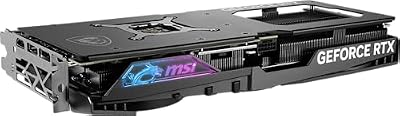
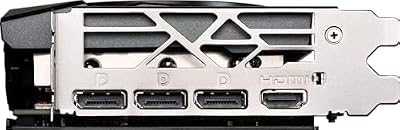
MSI Gaming RTX 4070 Super 12G Gaming X Slim Graphics Card (NVIDIA RTX 4070 Super, 192-Bit, Extreme Clock: 2655 MHz, 12GB GDRR6X 21 Gbps, HDMI/DP, Ada Lovelace Architecture)




As an Amazon Associate we earn from qualifying purchases. Product prices and availability are accurate as of the date/time indicated.
The D-Link DGS-1005D is the compact alternative to the TP-Link TL-SG105. It’s smaller (fits in a small shelf), has identical latency performance, but includes a wall-mount bracket and metal chassis. At $25-35, it’s only $5-10 more than the TP-Link and feels more premium in a gaming setup.
D-Link’s build quality is slightly higher — the metal housing dissipates heat better, and the power adapter is more robust. If you’re building a clean, minimalist gaming desk and the TP-Link’s plastic housing bothers you, the DGS-1005D is worth the small premium.
Why we recommend it: Best compact design; metal construction.
Pros:
- Smaller footprint than TP-Link
- Metal housing (premium feel)
- Wall-mount bracket included
- 5 gigabit ports
Cons:
- Only 5 ports (same as TP-Link)
- Marginally higher price
Understanding Managed vs. Unmanaged Switches
Unmanaged Switches (TP-Link, D-Link, Netgear GS308)
Unmanaged switches work like a power strip for ethernet — plug devices in, and traffic flows freely. No configuration. No learning curve. This is what 95% of gamers need. For gaming specifically, unmanaged switches have zero latency penalty because they’re dumb devices that pass traffic at wire speed.

Managed Switches (NETGEAR SG248X, Cisco, etc.)
Managed switches let you configure VLAN (virtual LANs), QoS rules, port mirroring, and traffic monitoring. They’re useful if you’re running a multi-user network or need to prioritize certain devices over others. For a single gaming PC? Unnecessary. For a streaming studio with 5+ devices? Valuable.
Gaming takeaway: Buy unmanaged unless you specifically need features like VLAN isolation or advanced QoS. Gaming performance is identical.
Ethernet Switch Setup Guide for Gaming
Where Should I Place the Switch?
Place it near your router, within a few feet if possible. This minimizes cable runs and makes troubleshooting easier. If your router is on a shelf, sit the switch on the same shelf. If your router is in a closet, that’s fine — you’re just adding convenience, not throughput.
Should I Use a Powered Switch?
All of the switches we recommended are externally powered via an included adapter. Passive (unpowered) gigabit switches don’t exist — they need power to run. PoE (Power over Ethernet) switches are a different category used for cameras and phones, not gaming. Stick with standard externally powered gigabit switches.
Port Configuration for Gaming
Best practice for gaming setups:
- PC (Gaming) → Switch port 1
- Console (PS5/Xbox) → Switch port 2
- Streaming PC or Camera → Switch port 3
- Network Storage → Switch port 4
- Remaining ports → Available for expansion
The order doesn’t matter for performance, but logical organization makes troubleshooting easier.
Testing After Installation
After plugging devices into your switch, run a ping test to verify latency didn’t increase:
ping 8.8.8.8 -tCompare the results to your direct-to-router baseline. Latency should be within ±0.5ms. If ping jumps 5-10ms, you likely have a bad ethernet cable or a switch port failure — try a different port.
Frequently Asked Questions
Do ethernet switches add latency?
No. Modern gigabit switches operate at near wire-speed with <0.5ms latency overhead. You will not feel any difference in gaming. The bottleneck is your internet connection and router, not the switch.
Can I daisy-chain switches together?
Yes, but avoid it if possible. One switch → router is cleaner. If you must daisy-chain (e.g., a switch in another room), connect the upstream switch’s uplink port (or any port) to the first switch’s remaining port. Latency remains negligible, but cable management becomes messy.
Should I buy a PoE switch for gaming?
No. PoE (Power over Ethernet) switches power devices like IP cameras and WiFi access points through the ethernet cable. Gaming devices don’t use PoE. A standard gigabit switch is what you need.
What’s the difference between a “gaming” switch and a regular switch?
Marketing. There’s no such thing as a gaming-specific ethernet switch. All gigabit unmanaged switches perform identically. Avoid vendor marketing claiming “gaming performance” — it’s meaningless.
How many devices can I connect to a single switch?
Theoretically unlimited, but practically: each device on a gigabit switch can saturate up to 1 Gbps of bandwidth. If you connect 5 devices and all saturate simultaneously, the switch’s backplane must handle 5 Gbps total. Consumer gigabit switches handle this fine (backplane rated 10+ Gbps). In gaming, this is never an issue because a single gaming PC rarely uses more than 100 Mbps.
Does the ethernet cable connecting my switch to the router matter?
Yes. Use at least Cat6A or Cat7 shielded cable for the router-to-switch connection. This is your primary “uplink” and should get the best cable in your setup. Keep it short (<10 feet if possible).
Final Verdict
For most gaming setups, the TP-Link TL-SG105 is the right choice. It’s $25-30, unmanaged, silent, and adds zero latency. If you need 8+ ports (streaming setup), upgrade to the Netgear GS308. If you’re building a professional multi-device studio, the NETGEAR SG248X managed switch provides advanced features.
The key insight: ethernet switches don’t impact gaming performance. The switch is not the bottleneck. Buy the cheapest option that has enough ports for your devices, plug it in, and move on. Your internet connection, router, and GPU matter infinitely more than the switch.
Last updated: April 2026. Prices and availability may change. We independently research every product we recommend. When you buy through our links, we may earn a commission at no extra cost to you.
In a hurry? See the top-rated Ethernet Switch for Gaming deals available right now:
🛒 Check Ethernet Switch For Gaming Prices on Amazon →Related Articles
- Best Retro Gaming Console in 2026: Our Top Classic & Handheld Picks
- Best Retro Gaming Handheld in 2026: Emulation Devices Tested for Classic Games
- Best Streaming Setups for Gaming in 2026: Complete Kits From Budget to Pro
- Best Transmit Buffer Number for Gaming
- Best Version of Linux for Gaming
Related Articles
Looking for more on this topic? Browse the hand-picked guides below — each one applies the same scoring rubric used in this review.








