

Affiliate disclosure: As an Amazon Associate we earn from qualifying purchases. This post contains affiliate links — if you buy through them we may earn a small commission at no extra cost to you. This never affects our recommendations.
- Quick Picks — Best PS4 Controllers at a Glance
- 1. PlayStation DualShock 4 (Official) — Best PS4 Controller Overall
- 2. DualShock 4 Glacier White — Best Aesthetic DualShock 4
- 3. Scuf Vantage 2 — Best PS4 Premium Controller
- 4. PowerA Wireless Pro — Best Budget PS4 Controller
- 5. Scuf Impact — Best Competitive PS4 Controller
- 6. 8BitDo Pro 2 — Best Universal PS4 Controller
- PS4 Controller Comparison Table
- How to Choose a PS4 Controller
- Stick Drift Prevention & Fixes
- Frequently Asked Questions
- Final Verdict
- Related Articles
- Related Articles
- Related Articles
The PlayStation 4’s DualShock 4 controller remains one of the most popular gamepads ever made, with 10+ years of reliability backing it up. While PlayStation 5’s DualSense is the official successor, millions of PS4 gamers still use DualShock 4s, and the older controller remains affordable and widely available.
The challenge: DualShock 4 stick drift is legendary (Sony faced lawsuits). This guide covers official DualShock 4 models, proven third-party alternatives, and how to extend your controller’s lifespan. We’ll also show you how DualShock 4 compares to modern alternatives like DualSense and how it performs as a PC gaming controller.
🛒 Best Price Today on Amazon
Prime members get fast, free shipping on everything above, plus member-only deals. New members get a 30-day free trial — cancel anytime.
Start 30-Day Prime Free Trial →See Today’s Amazon DealsQuick Picks — Best PS4 Controllers at a Glance
| Controller | Type | Wireless | Stick Tech | Drift Risk | Best For |
|---|---|---|---|---|---|
| DualShock 4 (Official) | Standard | Yes | Potentiometer | Moderate | PS4 native |
| DualShock 4 Glacier White | Standard | Yes | Potentiometer | Moderate | Aesthetic variant |
| Scuf Vantage 2 | Premium | Yes | Hall Effect | Very Low | Durability + customization |
| PowerA Wireless Pro | Third-party | Yes | Potentiometer | Low | Budget wireless |
| SCUF Impact | Premium | Yes | Hall Effect | Very Low | Competitive gaming |
| 8BitDo Pro 2 | Universal | Yes | Hall Effect | Very Low | Multi-device PS4 |
1. PlayStation DualShock 4 (Official) — Best PS4 Controller Overall
As an Amazon Associate we earn from qualifying purchases at no extra cost to you.


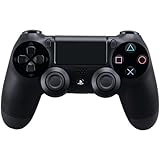
The official Sony DualShock 4 is the standard. Plug into any PS4, and the controller instantly pairs. The button layout feels natural after 100+ hours, and the haptic feedback (rumble) is responsive. The touch pad is gimmicky but genuinely useful in Destiny 2, Spider-Man, and other optimized games.
The downside: stick drift. After 1-2 years of heavy use, the analog sticks develop drift—the character moves without you touching the stick. Sony has partially addressed this through replacement programs, but the issue persists. Replacement sticks are cheap ($5-10) if you’re comfortable opening the controller.
Why we recommend it: Official PS4 standard. No compatibility issues, proven reliability for casual use, and replacement parts are widely available. If you play 3-5 hours weekly, stick drift may not manifest during the PS4’s remaining relevant life.
Pros:
- Official Sony product (native PS4 support)
- Affordable at $65
- Touch pad useful in optimized games
- Excellent button feedback
- Widely available (any retailer stocks it)
Cons:
- Stick drift after 1-2 years heavy use
- Potentiometer sticks degrade faster than Hall Effect
- No customization (unlike premium models)
- Smaller than Xbox controllers (some prefer larger grip)
2. DualShock 4 Glacier White — Best Aesthetic DualShock 4

GIGABYTE Radeon RX 9070 XT Gaming OC 16G Graphics Card, PCIe 5.0, 16GB GDDR6, GV-R9070XTGAMING OC-16GD Video Card


As an Amazon Associate we earn from qualifying purchases. Product prices and availability are accurate as of the date/time indicated.
The DualShock 4 Glacier White is identical to standard DualShock 4, but in striking white instead of black. If you have a white PS4 console or RGB setup, the Glacier White matches aesthetically. Everything else is identical: same stick drift risk, same button quality, same price ($65).
Best for: Aesthetic matching, white gaming setups, matching white consoles.
3. Scuf Vantage 2 — Best PS4 Premium Controller
As an Amazon Associate we earn from qualifying purchases at no extra cost to you.

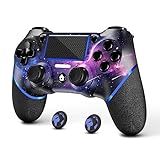

The Scuf Vantage 2 ($150) is the premium PS4 controller. It replaces potentiometer sticks with Hall Effect sensors (zero drift risk), adds 4 programmable back paddles, and allows stick sensitivity adjustment. Esports players use it for competitive 2K, FIFA, and fighting games where reaction speed and customization matter.
The build quality is exceptional, and the 4 back paddles let you rebind buttons for faster access. For casual PS4 players, the Vantage 2 is overkill. For competitive online gaming, it’s justified.
Pros:
- Hall Effect sensors (zero drift risk)
- 4 programmable back paddles
- Adjustable stick sensitivity
- Premium build quality
- 24-hour battery
Cons:
- $150 price (premium)
- Bulkier than standard DualShock 4
- Overkill for casual gaming
- Niche brand (less warranty support)
4. PowerA Wireless Pro — Best Budget PS4 Controller
As an Amazon Associate we earn from qualifying purchases at no extra cost to you.
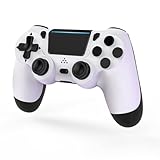
The PowerA Wireless Pro ($50) offers wireless at half the price of official DualShock 4. The build quality is solid, and stick drift is less common than official Sony controllers (likely because third-party designers learned from Sony’s mistakes). The button layout matches DualShock 4, so you won’t feel lost.
The trade-off: no touch pad (PowerA omits it), and the vibration is slightly lighter than DualShock 4. For casual gaming, these omissions don’t matter. For games that heavily utilize touch pad, stick to official DualShock 4.
Pros:
- $50 price (budget-friendly)
- Wireless 2.4GHz (no batteries)
- Lower stick drift risk than official
- Good button feedback
- Durable plastic construction
Cons:
- No touch pad (can’t use in optimized games)
- Lighter vibration feedback
- Less mature build quality than official
- No customization
5. Scuf Impact — Best Competitive PS4 Controller
As an Amazon Associate we earn from qualifying purchases at no extra cost to you.


The Scuf Impact ($160) is Scuf’s competitive-focused PS4 controller. Like the Vantage 2, it features Hall Effect sensors and 4 programmable paddles. The button response is tuned for fighting games and sports sims where frame-perfect inputs matter. Professional esports players use it.
The difference from Vantage 2: Impact is slightly lighter, slightly more ergonomic for competitive play, and marginally faster response time. For pure competitive gaming, Impact edges Vantage 2.
Pros:
- Hall Effect sensors (zero drift)
- Competitive-tuned button response
- 4 programmable paddles
- Lightweight (competitive advantage)
- Professional esports choice
Cons:
- $160 price
- Niche appeal (not for casual gamers)
- Less warranty support (boutique brand)
- Slightly fragile for rough use
6. 8BitDo Pro 2 — Best Universal PS4 Controller
As an Amazon Associate we earn from qualifying purchases at no extra cost to you.


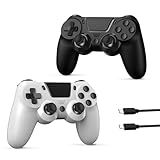

The 8BitDo Pro 2 ($50) isn’t officially a PS4 controller, but it works on PS4 via Bluetooth. It works on PC, Nintendo Switch, Android, Mac, and retro systems simultaneously, making it the most versatile option. Hall Effect sensors mean zero stick drift across all devices.
For gamers who play on multiple platforms (PS4 + PC + Switch), the Pro 2 is the logical choice. The Nintendo Switch button layout is unusual for PS4 players, but fully programmable button remapping via the 8BitDo app makes it feel native.
Pros:
- $50 price (excellent value)
- Works on PS4, PC, Switch, Android, Mac, retro systems
- Hall Effect sensors (zero drift risk)
- Fully programmable buttons
- Portable and lightweight
Cons:
- Nintendo Switch button layout (unusual for PS4)
- Manual PS4 pairing required (less native than official)
- No touch pad
- No vibration intensity control
PS4 Controller Comparison Table
| Model | Official | Wireless | Stick Tech | Drift Risk | Touch Pad | Customization |
|---|---|---|---|---|---|---|
| DualShock 4 | Yes | Yes | Potentiometer | Moderate | Yes | No |
| Glacier White | Yes | Yes | Potentiometer | Moderate | Yes | No |
| Scuf Vantage 2 | No | Yes | Hall Effect | Very Low | No | Yes (paddles) |
| PowerA Wireless | No | Yes | Potentiometer | Low | No | No |
| Scuf Impact | No | Yes | Hall Effect | Very Low | No | Yes (paddles) |
| 8BitDo Pro 2 | No | Yes | Hall Effect | Very Low | No | Yes (app) |
How to Choose a PS4 Controller
Stick Drift Tolerance
Casual player (1-3 hours/week): Official DualShock 4 fine. Drift unlikely within PS4’s remaining relevant life.

Regular player (5-10 hours/week): PowerA Wireless Pro (lower drift risk, $50).
Heavy player (10+ hours/week): Scuf Vantage 2 or Impact (Hall Effect sensors, zero drift risk).
Touch Pad Importance
Games that extensively use touch pad:
- Destiny 2 (swiping menus)
- Spider-Man (instant pause)
- God of War (interactive cutscenes)
Touch pad critical: Official DualShock 4 only.
Touch pad optional: Third-party controllers fine.
Customization Need
Casual/single-player games: Standard DualShock 4 (no customization needed).
Competitive online/esports: Scuf Vantage 2 or Impact (back paddles for faster inputs).
Multi-device gaming: 8BitDo Pro 2 (works on PS4, PC, Switch, Android).
Stick Drift Prevention & Fixes
Prevention (extend lifespan)
- Avoid aggressive stick mashing during gameplay
- Use thumb tip (not side of thumb) on sticks
- Rotate stick usage equally (left and right)
- Clean sticks occasionally (dust accelerates wear)
- Avoid dropping or rough handling
Fixes (if drift occurs)
- Replace sticks ($5-10): Open controller, swap potentiometer sticks with new ones. Takes 15 minutes. Video tutorials available.
- Use drift detection settings: PS4 has built-in stick sensitivity adjustment. Increase dead zone to compensate for minor drift.
- Contact Sony: Warranty replacement (1 year from purchase). They’ll send replacement if drift is within warranty.
Hall Effect controllers (Scuf Vantage 2, 8BitDo Pro 2) eliminate stick drift because they use non-contact sensors instead of physical potentiometers.
Frequently Asked Questions
Can I use a PS5 DualSense on PS4?
No. PS5 DualSense has different wireless protocol and PS4 doesn’t support it. Workaround: None. You must use PS4-compatible controllers.
Can I use a PS4 controller on PC?
Yes. Plug USB cable or pair via Bluetooth. Windows 10/11 recognize it without drivers. However, button mapping requires manual configuration per-game (less native than Xbox controllers on Windows).
Is the touch pad worth losing in third-party controllers?
For 95% of games, no. Only a handful of PS4 games heavily utilize touch pad (Spider-Man, Destiny 2, God of War). For those games, official DualShock 4 is required. For everything else, third-party controllers omit touch pad without issue.
Should I buy DualShock 4 or wait for DualSense?
If you play PS4 only: DualShock 4 ($65) is sufficient. The PS4 has 1-2 years of new releases remaining. DualSense only works on PS5.
If you’re transitioning to PS5: Buy DualSense instead (better build quality, haptic feedback, no stick drift risk).
How do I know if stick drift is happening?
In-game test: Hold joystick at rest. Character/camera shouldn’t move. If it does, stick drift is present.
Sensitivity test: Open PS4 accessibility settings → Controllers → Controller Button Assignment → Stick sensitivity. Adjust dead zone upward if drift is minor.
Final Verdict
For PS4 gaming only, the official DualShock 4 ($65) is the standard. It works perfectly, has native support, and touches pad functionality. Replace if drift occurs.
For budget wireless, the PowerA Wireless Pro ($50) is excellent. Lower drift risk than official, and full wireless freedom.
For zero drift risk + customization, the Scuf Vantage 2 ($150) uses Hall Effect sensors and back paddles (future-proof choice).
For multi-device gaming (PS4 + PC + Switch), the 8BitDo Pro 2 ($50) works universally with Hall Effect sensors.
For competitive esports, the Scuf Impact ($160) is the pro choice.
Learn more about console gaming setups, gaming monitor selection, and complete gaming chair guides for a complete PS4 gaming environment.
Last updated: April 2026. Prices and availability may change. We independently research every product we recommend. When you buy through our links, we may earn a commission at no extra cost to you.
In a hurry? See the top-rated PS4 Gaming Controller deals available right now:
🛒 Check Ps4 Gaming Controller Prices on Amazon →Related Articles
- Best Budget Gaming TV 2026: 4K 120Hz Gaming TVs Under 0
- Best Chromebook for Gaming in 2026: Cloud Gaming & Portable Picks
- Best Computer Speakers for Gaming in 2026: Audio Roundup from Budget to Premium
- Best Ethernet Cable for Gaming
- Best Gaming Beamer (Projector)
Related Articles
Looking for more on this topic? Browse the hand-picked guides below — each one applies the same scoring rubric used in this review.
Ready to decide? Our #1 pick for 2026 is the DualShock 4 (Official).
Live price & availability on Amazon.








