

- Top Pick: Thermalright Aqua Elite 240 V3 Water Cooling CPU Cooler, Double PWM ARGB Fans with S-FDB Bearings,Efficient PWM Controlled Pump,for AMD/AM4/AM5, Intel LGA1150/1151/1200/1700/1851, (AE240 V3)
- Best Value: CoolerMaster MasterLiquid ML240L RGB V2, Close-Loop AIO CPU Liquid Cooler, Gen3 Dual Chamber Pump, 240mm Radiator, SickleFlow 120 PWM ARGB, AMD Ryzen AM5/AM4, Intel LGA1700/1200 (MLW-D24M-A18PC-R2)
- Premium Choice: CORSAIR Nautilus 360 RS ARGB Liquid CPU Cooler – 360mm AIO – Low-Noise – Direct Motherboard Connection – Daisy-Chain – Intel LGA 1851/1700, AMD AM5/AM4 – 3X RS120 ARGB Fans Included – Black
Affiliate disclosure: As an Amazon Associate we earn from qualifying purchases. This post contains affiliate links — if you buy through them we may earn a small commission at no extra cost to you. This never affects our recommendations.
- Understanding Air Cooling vs AIO Liquid Cooling
- Thermal Performance: Head-to-Head Comparison
- Noise Levels: The Quiet Factor
- Maintenance and Longevity: What You Need to Know
- Aesthetics: RGB, Displays, and Case Integration
- Cost Analysis: Initial Investment vs Total Cost of Ownership
- Recommended Use Cases: Which Should You Choose?
- Small Form Factor (SFF) and Compact Builds
- Thermal Performance Under Extreme Loads (250W+)
- Installation Difficulty and Case Compatibility
- Recommended Coolers for Popular CPUs
- Frequently Asked Questions (FAQ)
- Final Verdict: Our Recommendation for 2026
- Related Reading
- Related Articles
- Related Articles
When building or upgrading your gaming PC, one of the most critical decisions is choosing the right CPU cooler. Should you go with a proven air cooler or invest in an all-in-one (AIO) liquid cooling system? In 2026, both cooling methods have reached maturity, with impressive thermal performance across the board. But the choice between air and AIO depends on your budget, case size, CPU power requirements, and aesthetic preferences. This guide breaks down everything you need to know to make the right decision for your specific gaming rig.
In a hurry? See the top-rated Air vs AIO Cooling deals available right now:
🛒 Check Air Vs Aio Cooling Prices on Amazon →🛒 Best Price Today on Amazon
Prime members get fast, free shipping on everything above, plus member-only deals. New members get a 30-day free trial — cancel anytime.
Start 30-Day Prime Free Trial →See Today’s Amazon DealsUnderstanding Air Cooling vs AIO Liquid Cooling
Air coolers work by using large aluminum or copper heatsinks with attached fans to dissipate heat away from the CPU directly into your case. Modern dual-tower air coolers like the Noctua NH-D15 G2 and Thermalright Peerless Assassin 120 SE are engineered with multiple heatpipes and optimized fin designs to maximize surface area for heat transfer.
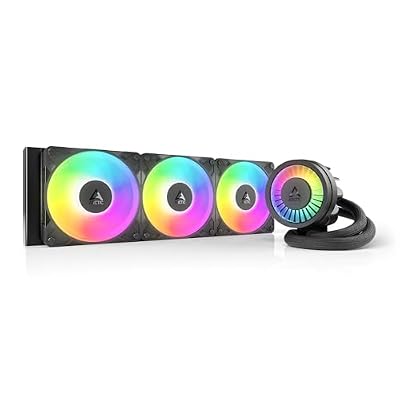
AIO liquid coolers, on the other hand, circulate coolant through a sealed loop connecting a water block (attached to your CPU) to a radiator with fans. This indirect cooling method allows heat to dissipate across a larger area, particularly effective with 360mm and 420mm radiators. Popular options in 2026 include the Arctic Liquid Freezer III 360, NZXT Kraken Elite 360, and Corsair iCUE H170i.
As an Amazon Associate we earn from qualifying purchases at no extra cost to you.





Thermal Performance: Head-to-Head Comparison
For gaming and content creation workloads under sustained loads (250W+), thermal performance varies significantly based on radiator size and cooler design:
| Cooling Solution | Max TDP Rating | Typical CPU Temp (Sustained Load) | Ryzen 9 9950X3D Suitability | Core Ultra 9 285K Suitability |
|---|---|---|---|---|
| Noctua NH-D15 G2 (Dual Tower) | 250W | 58–62°C | Excellent (Tight fit with HBC) | Excellent |
| Thermalright Peerless Assassin 120 SE | 280W | 56–60°C | Very Good | Very Good |
| be quiet! Dark Rock Pro 5 | 250W | 59–63°C | Good (Requires specific mounting) | Excellent |
| Arctic Liquid Freezer III 360 | 280W | 48–52°C | Excellent | Excellent |
| NZXT Kraken Elite 360 | 300W | 50–55°C | Excellent | Excellent |
| Corsair iCUE H170i | 350W | 48–54°C | Excellent | Excellent |
Key Finding: 360mm AIO coolers consistently run 8–15°C cooler than dual-tower air coolers under heavy sustained workloads (Cinebench R23, video encoding, rendering). However, dual-tower air coolers are competitive within 5–8°C when noise levels are normalized. For processors up to 250W, air coolers deliver exceptional performance; for 280W+ chips like the Ryzen 9 9950X3D or extreme overclocking scenarios, 360mm+ AIOs are the safer choice.
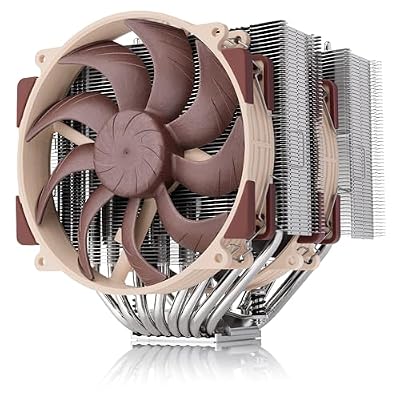
Noctua NH-D15 G2 LBC, Quiet High-Performance Dual Tower CPU Cooler | 168mm Height, Ultimate Low-Noise Cooling, 8 Heatpipes, AMD AM5/AM4 Specific Low Base Convexity, Dual 140mm Fans


As an Amazon Associate we earn from qualifying purchases. Product prices and availability are accurate as of the date/time indicated.
Noise Levels: The Quiet Factor
Modern gaming PCs demand both performance and silence. Here’s how they compare:
Air Coolers
Dual-tower coolers typically operate at 40–44 dBA under sustained load, with a steady, low-frequency fan tone that many users find less fatiguing. The Noctua NH-D15 G2 achieves quiet operation through its large 140mm fans running at lower RPMs (around 1500 max). Similarly, the be quiet! Dark Rock Pro 5 prioritizes acoustics, reaching just 39–42 dBA under most gaming loads.
AIO Liquid Coolers
360mm AIOs typically run at 35–40 dBA under sustained loads, as the larger radiator surface area allows fans to spin slower. However, pump noise becomes noticeable in silent environments—typically 25–30 dBA as a constant hum. The Arctic Liquid Freezer III 360 features a PWM-controlled pump that adjusts speed with temperature, reducing idle pump noise significantly.
Verdict: AIOs edge ahead in overall quietness during heavy loads, but air coolers eliminate pump noise entirely, making them better for silent, idle-focused setups.
Maintenance and Longevity: What You Need to Know
Air Cooler Lifespan
Air coolers are extremely durable, often lasting 10+ years with minimal maintenance. Bearings in quality fans (like Noctua’s NF-A15 PWM) are designed for 150,000+ hours of operation. The only regular maintenance needed is occasional dust removal every 6–12 months, and thermal paste replacement every 3–5 years when reapplying becomes necessary. This makes air coolers the most cost-effective long-term solution, especially when considering best CPU coolers for AMD platforms.
AIO Cooler Lifespan
Modern sealed AIO coolers are designed to last 3–6 years under normal conditions, with some premium models exceeding this with higher-quality pump bearings and better coolant formulations. The weak points are:
- Pump wear: Bearing degradation over time, typically manifesting as increased noise after 3+ years
- Coolant permeation: Gradual loss of coolant through radiator tubing, reducing cooling performance after 4–5 years
- Non-repairable: Once pump failure occurs, the entire cooler must be replaced—unlike air coolers where you can swap fans
AIO coolers are maintenance-free in the traditional sense (no paste replacement needed), but you cannot refill or repair them once they fail. The Arctic Liquid Freezer III 360 and NZXT Kraken Elite 360 use high-quality pumps rated for extended operation, but even they require replacement after 5–7 years if used daily.
Longevity Winner: Air coolers. A $100 dual-tower cooler can outlast 2–3 AIO coolers across a decade.
Aesthetics: RGB, Displays, and Case Integration
Air Coolers: Historically minimalist, but modern versions embrace aesthetics. The Noctua NH-D15 G2 chromax.Black offers a sleek all-black finish with no RGB, appealing to purists. However, the Thermalright Peerless Assassin 120 SE now includes ARGB lighting options, merging performance with aesthetics.
AIO Coolers: Here’s where liquid cooling shines. The NZXT Kraken Elite 360 features a 2.7-inch IPS LCD display capable of showing real-time CPU temps, custom GIFs, and system telemetry. The Corsair iCUE H170i integrates with Corsair’s ecosystem for synchronized RGB across all compatible hardware. These display-equipped coolers are ideal for showcase builds and streaming setups.
Verdict: If aesthetics matter and you want RGB integration, AIOs dominate. For clean minimalism, air coolers offer understated elegance at lower cost.




As an Amazon Associate we earn from qualifying purchases. Product prices and availability are accurate as of the date/time indicated.
Cost Analysis: Initial Investment vs Total Cost of Ownership
Air Cooler Costs
- Noctua NH-D15 G2: $140–160 (premium dual-tower)
- Thermalright Peerless Assassin 120 SE: $35–45 (exceptional value)
- be quiet! Dark Rock Pro 5: $85–100 (balanced price/performance)
- Long-term cost (10 years): $140–160 + potential $20 thermal paste replacement = ~$160–180
AIO Cooler Costs
- Arctic Liquid Freezer III 360: $100–130
- NZXT Kraken Elite 360: $150–180 (premium LCD display)
- Corsair iCUE H170i: $160–190 (ecosystem integration)
- Long-term cost (replacing every 5 years): $300–380 for two AIO replacements over 10 years
For budget-conscious builders, air coolers from Thermalright deliver exceptional performance per dollar. For premium gaming setups and future-proofing against high-wattage CPUs, investing in a quality AIO like the best AIO coolers for Ryzen 9 makes sense if you plan to keep your PC for 3–4 years before upgrading.
Recommended Use Cases: Which Should You Choose?
Choose Air Cooling If You
- Are building a budget gaming PC ($1,000–1,500) where cooling budget is constrained
- Want maximum reliability and longevity without pump replacement risk
- Have adequate case space (170mm+ CPU cooler clearance)
- Plan to keep your PC for 7+ years and dislike frequent hardware replacement
- Value silent operation without pump noise
- Are upgrading a system with a mid-range CPU (up to 200W) like the Ryzen 7 9700X or Core Ultra 7 285K
Choose AIO Cooling If You
- Are building a high-end gaming PC (Intel Core Ultra 9 285K, Ryzen 9 9950X3D) that demands top thermal performance
- Have a compact case (under 300L) where dual-tower coolers don’t fit
- Want RGB integration and aesthetic appeal for streaming or showcase builds
- Prioritize lower CPU temperatures for overclocking or 24/7 server workloads
- Plan to upgrade or replace your PC every 3–5 years
- Are building an optimal motherboard-cooler combo where space is premium and cooling matters

ARCTIC Liquid Freezer III Pro 360 - AIO CPU Cooler,3 x 120 mm Water Cooling


As an Amazon Associate we earn from qualifying purchases. Product prices and availability are accurate as of the date/time indicated.
Small Form Factor (SFF) and Compact Builds
One area where AIOs have a clear advantage is small form factor (SFF) gaming PCs. Cases like the Noctua D2L or ASUS ROG STRIX Z890-I have severe height restrictions (130–160mm), making most dual-tower coolers impossible to fit. Here, a 240mm or 280mm AIO liquid cooler becomes the optimal choice, offering superior cooling in a compact footprint.
For conventional mid-tower cases (ATX, M-ATX), dual-tower air coolers have no disadvantage and offer better value. Consider your power supply and case compatibility before finalizing your build.
Thermal Performance Under Extreme Loads (250W+)
Modern high-end processors like the Ryzen 9 9950X3D can exceed 250W under all-core loads, creating a scenario where cooler choice directly impacts stability and lifespan:
- Dual-tower air coolers (Noctua NH-D15 G2, Thermalright Peerless Assassin 140): Achieve 58–63°C sustained, acceptable but warming the case interior significantly
- 360mm AIO coolers (Arctic Liquid Freezer III, NZXT Kraken Elite): Achieve 48–54°C sustained, with radiators mounted externally exhausting hot air outside the case, keeping case ambient temperature lower for GPU and other components
For sustained rendering, video encoding, or long gaming sessions on flagship CPUs, the temperature difference translates to:
- Longer CPU lifespan (lower junction temperatures = slower degradation)
- Lower case ambient temperature (beneficial for GPU cooling and overall system health)
- Better sustained performance (no thermal throttling on multi-hour workloads)
As an Amazon Associate we earn from qualifying purchases. Product prices and availability are accurate as of the date/time indicated.
Installation Difficulty and Case Compatibility
Air Coolers
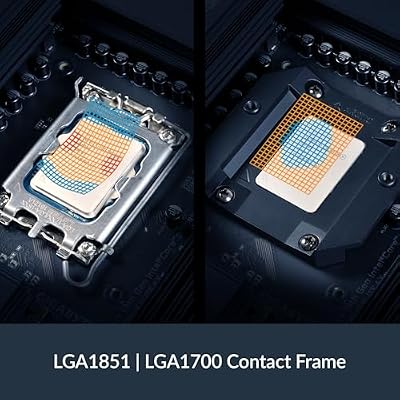
Installation varies by mount type. Intel LGA1700 mounts are generally simpler (vertical backplate), while AMD AM5 mounts sometimes require offset bars. The Noctua NH-D15 G2 HBC (High Base Convexity) is optimized for Intel LGA1700, simplifying installation and improving contact.
Challenges:
- RAM clearance issues with tall tower coolers and high-profile RAM heatsinks
- Socket-specific mounting variants (LBC vs HBC) requiring correct selection
- Heavy weight (500–1,200g) requiring careful support installation
AIO Coolers
AIOs require more steps: mounting the CPU block, installing the radiator, attaching fans, and connecting pump/fan power. However, once installed, they’re generally more forgiving regarding RAM clearance (side-mounted radiator doesn’t interfere).
Challenges:
- Radiator mounting orientation (top exhaust vs front intake affects case airflow)
- Tube routing to avoid kinks or sharp bends reducing pump efficiency
- More potential failure points (pump, fans, tubing connections)
Verdict: Air coolers are simpler to install; AIOs require more planning but are more forgiving once mounted.
Recommended Coolers for Popular CPUs
Budget Gaming (Ryzen 7 9700X, Core Ultra 7 285K)
Air cooling is ideal. The Thermalright Peerless Assassin 120 SE at $40 is unbeatable value, delivering 280W TDP capability with near-flagship performance. Pair it with a solid motherboard for gaming and you’re set.


As an Amazon Associate we earn from qualifying purchases. Product prices and availability are accurate as of the date/time indicated.
Mid-Range High-Performance (Ryzen 9 7950X3D, Core Ultra 9 285K)
The be quiet! Dark Rock Pro 5 ($95) or Noctua NH-D15 G2 ($150) handles these chips well. If your case supports it, the Arctic Liquid Freezer III 360 ($120) provides better sustained thermals and future-proofs your build.
Flagship Overclocking (Ryzen 9 9950X3D, Intel Core Ultra 9 285K KF)
AIOs are strongly recommended. The NZXT Kraken Elite 360 ($165) combines performance, aesthetics, and reliability. For pure performance obsessives, the Corsair iCUE H170i ($180) offers the highest TDP capability (350W) and ecosystem integration. Choose based on your case size and budget.
Frequently Asked Questions (FAQ)
Q1: Do AIO coolers leak and damage GPUs?
A: Modern sealed AIO coolers are extremely reliable, with failure rates below 1% according to manufacturer testing. Most failures occur within the first 48 hours (DOA) or after 5+ years of use. Catastrophic leaks are rare. If you’re concerned, use a stable power supply and ensure proper installation. Brands like Arctic and NZXT offer 5-year warranties covering leakage.
Q2: How often should I replace thermal paste on air coolers?
A: Quality thermal paste (Noctua NT-H2, Corsair TM30) typically lasts 3–5 years before degradation. You’ll notice rising CPU temperatures by 5–10°C as a signal for replacement. High-end liquid metal (conductonaut, Thermal Grizzly) lasts longer but risks damage if applied incorrectly. For most users, paste replacement every 3–4 years is standard maintenance.
Q3: Is a 360mm AIO always better than a dual-tower air cooler?
A: Not always. For CPUs under 200W, the temperature difference is negligible (2–3°C). Dual-tower coolers like the Thermalright Peerless Assassin 140 run nearly as cool with zero pump noise. A 360mm AIO wins for CPUs exceeding 250W sustained load, SFF builds, and aesthetic demands. Choose based on your specific use case, not a blanket assumption that liquid is always better.
Q4: What’s the actual lifespan difference between air and AIO?
A: A quality air cooler lasts 10–15 years with only dust removal and paste replacement. A sealed AIO lasts 3–6 years under normal use (8+ hours daily), declining to unacceptable temperatures after that. If you keep your PC for 5+ years, expect one AIO replacement; if you keep it for 10 years, expect two or three replacements. Air coolers are significantly more economical long-term.
Final Verdict: Our Recommendation for 2026
For most gaming builds, choose air cooling with a high-end dual-tower cooler. The Thermalright Peerless Assassin 120 SE offers the best value ($40, 280W capability), while the Noctua NH-D15 G2 ($150) sets the performance standard. These coolers handle any current-gen Intel or AMD processor, cost less than AIOs, last 10+ years, and eliminate pump noise and leak risks entirely.
Choose AIO cooling if:
- Your case is smaller than 300L (SFF gaming PC)
- You’re building a flagship showcase PC with RGB integration (NZXT Kraken Elite 360)
- Your CPU exceeds 250W sustained load and you want to prioritize lower temperatures
- You plan to upgrade or replace your PC every 3–4 years
The 2026 cooling market offers excellent options in both categories. Don’t overpay for cooling solutions based on marketing hype—match your choice to your CPU wattage, case constraints, aesthetic needs, and upgrade timeline. A well-matched cooler ensures years of reliable, efficient gaming performance.
Related Reading
- Best AIO Coolers for Ryzen 9 Gaming PCs
- Best CPU Coolers for AMD Ryzen Processors
- Best Motherboards for Gaming in 2026
- Best Budget CPUs for Gaming PCs
- Best Power Supplies for Gaming Rigs
- Best PC Cases for Gaming and Cooling
Related Articles
Looking for more on this topic? Browse the hand-picked guides below — each one applies the same scoring rubric used in this review.













