Console Killer Gaming PC Build 2026
A console killer gaming PC build is a desktop designed to match or beat a current game console in the living room, while offering the extras consoles rarely give you: higher frame rates, better mouse and keyboard support, a huge game library, and room to upgrade one part at a time. The goal is not to win on every spec. It is to deliver a smooth, reliable experience at 1440p or 4K on a TV or monitor, with a machine that also handles everything else you do on a computer. This guide explains how to plan that build, from the GPU and CPU balance to the power supply, case, and couch-friendly setup.
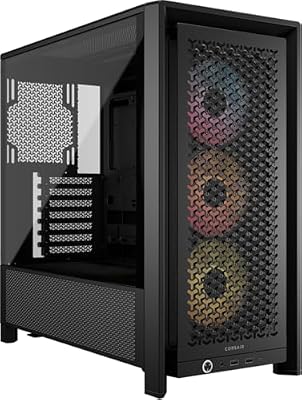
The hero listing above is the closest match for this query, not a guaranteed exact model. Check the card for the exact GPU, processor, and included parts before ordering. Bundles that look similar can differ in memory size and storage, so confirm those details on the listing.


Intel® Core™ Ultra 5 Desktop Processor 225 10 cores (6 P-cores + 4 E-cores) up to 4.9 GHz

What “Console Killer” Really Means
The phrase sounds like a fight, but the practical meaning is simpler. A console killer PC targets the same kind of play a console delivers: sit down, press start, and play at a steady frame rate on a large screen. A PC can do that well, and it can often do more. You can run higher frame rates, unlock settings the console does not expose, and play a far wider range of games. The trade-off is that you need to choose parts carefully, because a PC can be set up badly and feel worse than a console out of the box.
A useful way to think about it is to target a specific experience. For example, 1440p at a high and stable frame rate for most games, or 4K at a locked 60 frames per second in less demanding titles. Pick the target first, then size the GPU, CPU, memory, and cooling to deliver it.
Choosing the GPU and CPU Balance
The GPU does most of the work at 1440p and 4K, so it should be the first big purchase. A mid-range or upper-mid GPU with 12GB or more of memory is a comfortable target for 1440p. For 4K, a high-tier card gives you more headroom, but it also needs a larger power supply and better cooling. Compare reviews for the games you play most, and check the performance at your target resolution.
The CPU needs to keep up with the GPU, but it does not need to be the most expensive chip. A modern six-core or eight-core processor with good single-thread performance is enough for most console-style play. CPU-limited titles, such as large open-world games and competitive shooters, benefit from a stronger processor, so consider a faster chip if those are your main games.
Why Balance Matters More Than Peak Numbers
A very powerful GPU paired with a weak CPU creates bottlenecks, and so does a strong CPU with a modest GPU. The goal is a balanced pair where neither part sits idle while the other works hard. Balanced builds also tend to feel smoother in real play, which is what a console-style experience depends on.
For a broader GPU comparison, see the best GPU for 1440p gaming. For CPU options that suit a balanced build, read the best CPU for gaming.
Console Killer Build Comparison
The table below compares three console-killer approaches. Price ranges are shown as check-current-price notes because GPU and CPU pricing shifts often and varies by region and retailer.
| Build Target | Typical Parts | Best For | Typical Price Range |
|---|---|---|---|
| 1080p living room build | Entry to mid GPU, six-core CPU, 16GB DDR5 | Smaller TVs and budget couch play | Check current price |
| 1440p console-style build | Upper-mid GPU, eight-core CPU, 32GB DDR5 | Most players and high-refresh monitors | Check current price |
| 4K TV build | High-tier GPU, strong CPU, 32GB DDR5, large PSU | Big screens and demanding single-player games | Check current price |
AMD Ryzen™ 5 9600X 6-Core, 12-Thread Unlocked Desktop Processor


As an Amazon Associate we earn from qualifying purchases. Product prices and availability are accurate as of the date/time indicated.
Power Supply, Cooling and Case
A console killer build should run quietly in the room where you play. That means choosing a case with good airflow and a quiet cooler, and a power supply that stays cool at moderate load. An 850W unit from a reputable maker is a practical default for a mid-high GPU and gives room for later upgrades. Check the case’s power supply length limit and make sure the GPU fits, since many living room builds use compact cases.
For a case that suits a TV setup, our overview of gaming PC cases under 200 dollars lists options with good airflow, and the best 850W gaming power supplies covers the PSU side.
Keeping Noise Low in a Living Room
A console is famous for quiet operation, so a PC in the same room needs attention to noise. Use large, slow fans, set a moderate fan curve, and avoid cases with a closed front that force the fans to spin faster. Our guide to air versus AIO cooling explains which cooler type is more likely to stay quiet in your setup.
Connecting to a TV and Controller Setup
Connecting a PC to a TV is simple, but a few settings make the experience feel like a console. Use an HDMI 2.1 connection if your GPU and TV support it, enable the TV’s game mode to reduce input lag, and set the output resolution and refresh rate in the graphics control panel. Many players prefer a wireless controller for couch play, and PC support for common controllers is strong in 2026.
Choose a controller that suits your style. Our comparison of Xbox and DualSense controllers on PC covers the trade-offs, and the best PC gaming controllers lists options for different budgets.
Game Settings and Frame Rate Targets
Console-style play is about consistency. Pick a frame rate target, such as 60 or 120 frames per second, and tune the settings to hold it. Use upscaling features such as DLSS or FSR where available, because they can raise frame rates with a small loss in image quality. Lower a few heavy settings, such as shadows and volumetric effects, rather than the whole preset.
Enable a frame rate limiter in games that run above your monitor’s refresh rate. A stable frame rate feels better than a higher number that fluctuates. Monitor the GPU and CPU temperatures during a long session to confirm the cooling is adequate.
Step-by-Step Build Approach
Install the CPU and cooler on the motherboard outside the case, then add the RAM in the correct slots and install the first NVMe drive. Mount the board in the case and connect the front panel and fan headers. Install the power supply, route the cables cleanly, and fit the GPU last. Boot into BIOS, enable the memory profile, and set the fan curves before installing the operating system and drivers.
After the build, run a stress test and play a demanding game for an hour. Check the temperatures, frame rate stability, and noise level. If the frame rate dips, check whether the CPU or GPU is at full load. For a complete assembly guide, see our step-by-step gaming PC building guide.
Common Console Killer Mistakes
The first mistake is overbuying the GPU and underbuying the rest of the system. A top card paired with a small power supply and weak cooling can throttle and run loud. The second mistake is skipping the TV settings. Game mode, the right resolution, and the refresh rate all affect how the build feels in the room.
The third mistake is ignoring the cost of ongoing play. Consoles have a predictable cost, while a PC can be upgraded gradually. Plan a budget for the first build and for one upgrade in the next two to three years, so you do not overspend on day one.
The fourth mistake is choosing a case that is too small for the cooling you need. A compact case can work well, but only if you check the GPU length, the cooler height, and the airflow path before buying.
Upgrade Path and Long-Term Value
A console killer PC can grow over time. Start with a balanced build and upgrade the GPU first when frame rates drop. Keep the power supply with enough headroom for a larger card, and choose a motherboard with a platform that will accept a future CPU. Storage upgrades are simple, since NVMe drives are easy to add.
For a sense of how the build grows over budgets, our overview of gaming PC builds for every budget in 2026 shows what each tier can deliver, and what gaming PC can run in 2026 explains how to match settings to a target.
PC or Console: When a Build Makes Sense
A console killer PC makes the most sense if you already use a computer for work or study, if you want a large game library with frequent sales, or if you want higher frame rates and better mouse and keyboard options. A console can still be the better choice if you want a simple, low-maintenance system with a predictable cost and no tuning. Our comparison of gaming PC versus console in 2026 covers the decision in more detail.
Frequently Asked Questions
Can a PC really match a current console for gaming?
Yes, a balanced PC can deliver a similar or better experience in many games, especially at the same resolution. Exact results depend on the game, the settings, and the parts you choose.
What GPU do I need for a 4K TV build?
A high-tier GPU is the safest choice for 4K, and you should compare reviews for the games you play. Many players use upscaling to reach smooth frame rates at 4K with a mid-high card.
Is a PC harder to set up for couch gaming?
It takes a little setup, including TV game mode, the correct output resolution, and controller pairing. After that, the experience is similar to a console.
Should I buy a prebuilt or build my own?
A prebuilt is simpler and comes with a warranty. A custom build gives you more control over parts and noise. Compare the total cost and the parts list before deciding.
Final Thoughts on a Console Killer Gaming PC
A console killer gaming PC build is about balance, quiet operation, and a stable frame rate on the screen you actually use. Pick a target resolution, size the GPU and CPU to match it, and choose a case and power supply that keep the machine calm in the living room. The listings above are a good starting point. Confirm the exact GPU, CPU, and price on each card, and you will have a machine that delivers couch-friendly play with the flexibility of a PC.