

RGB Gaming PC Build Guide 2026
An RGB gaming PC build is one of the most popular ways to make a desktop look like a showpiece, but lighting is the last thing you should plan, not the first. A good RGB build starts with airflow, a case that shows the right parts, and components that stay quiet and cool under load. Once those basics are right, the lighting becomes an accent that makes the machine look intentional instead of noisy. This guide walks through the decisions that matter most for an RGB rig, from case choice to lighting control, and it explains where spending money on lights pays off and where it does not.
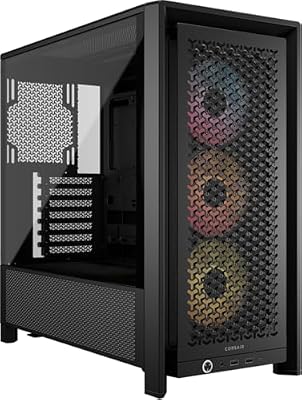
The product listing above is a starting point for the parts that show through the glass. Treat it as a closest match for the query, not a guarantee of an exact model. Check the card for the exact model, included fans, and price before you order, because two listings for the same query can differ in lighting type and cable count.


What RGB Actually Adds to a Gaming PC
RGB lighting on a PC does not make it faster. It changes how the machine looks through a side panel and how it feels in a room. That is a legitimate reason to spend money, but it is a different purchase from a better GPU or a larger cooler. Most people who regret an RGB build regret buying the wrong lighting ecosystem, not the lights themselves. They bought fans, a motherboard, and RAM from three brands that do not sync, and now every part glows a different shade of white.
Keep the lighting goal simple. Decide whether you want a single color, a slow wave, or a reactive effect that follows game events or temperature. A single calm color often looks better than a rainbow cycle, and it is easier to live with for long sessions. If you plan to use the PC in a bedroom or a shared space, dimmer and warmer tones are usually the better choice.
Addressable Versus Fixed-Color Lighting
Fixed-color lighting uses one LED color per strip or fan ring. It is cheap, reliable, and works with almost any controller. Addressable RGB lets each LED or segment show a different color, which allows animations and gradients. Addressable setups need a compatible controller and a proper data chain, and they are more sensitive to cable routing and power. For a first RGB build, a mix of fixed and addressable parts from one ecosystem is a reasonable middle ground.
Choosing a Sync Ecosystem Early
Motherboard software, fan controllers, and RAM lighting each use their own software layer. Pick one ecosystem and stay inside it for the fans, the board, and the RAM. Mixing brands can work with a universal controller, but it adds steps and more places where things can break after a Windows update. The simplest path is to choose a motherboard that already has the lighting headers and software you want, then buy fans and RAM that support the same protocol.
Start With the Case and Airflow
The case decides how much of the build you will see and how well the parts will breathe. A tempered glass front and side panel shows the GPU and the lit fans, but a mesh front panel usually moves more air. Look for a case with space for at least three intake fans at the bottom or front, and at least one exhaust fan at the rear or top. A case that is too tight will make even a beautiful RGB build run hot and loud, and the lights will not hide that.
Check the GPU length and CPU cooler height against the case specifications before you buy anything else. Many high-end graphics cards are long, and some tower coolers are tall enough to block the side panel. Measure the clearance from the front radiator or fan mount to the motherboard if you plan to use a liquid cooler. These checks take five minutes and prevent the most common return.
Glass Panels and Fan Count
A glass side panel shows your build, but glass also reduces ventilation if the front is solid. The best RGB cases use a mesh or perforated front and a glass side, so intake air reaches the GPU while the lights stay visible. Count your fans before you buy the case. A case with pre-installed lit fans saves money, but many stock fans are basic, so plan to replace them only if the noise or airflow is poor.
For a mid-range build with one mid-high GPU and a six to eight core CPU, three intake fans and two or three exhaust fans is a common layout. Positive pressure, with more intake than exhaust, helps keep dust out of the case, though you will need to clean the filters regularly.
Components That Show Through the Glass
The GPU is the largest visible part in most RGB builds, so its shroud, backplate, and lighting matter more than any other single component. The motherboard is the second most visible part. A board with a clean heatsink design and addressable headers gives you more control over the look. RAM with a lighting bar is an easy visual upgrade, but it is also the part most likely to clash with a different ecosystem, so check compatibility before you buy.
GPU and Motherboard Choices
Pick the GPU for performance first, then choose a model whose shroud looks right in your case. Many current cards have RGB or light accents that sync with the motherboard software. If you want the cleanest look, a model with a neutral shroud and a single LED accent is often easier to match with a white or black case.
On the motherboard, look for enough RGB headers for your fans, a clear chipset heatsink, and enough M.2 slots to hide cables behind the tray. A board with a rear connector layout and a clean back tray makes cable management far easier, which in turn makes the inside look tidy through the glass.
RAM and Storage
Thirty-two gigabytes of DDR5 is the comfortable target for a gaming build in 2026. If you use RGB RAM, install it in the correct slots as the motherboard manual describes, and enable the EXPO or XMP profile in BIOS so the memory runs at its rated speed. Storage is usually hidden, but a 2TB NVMe drive with a heatsink can still add a clean accent near the motherboard edge.

Lian Li V100-ATX Mid-Tower PC Case-Black-V100RX | Side I/O USB-C | Dust Filiter | Support 420mm GPUs & 360mm Radiator | Included GPU Bracket | LED & Display Platform (V100RX)


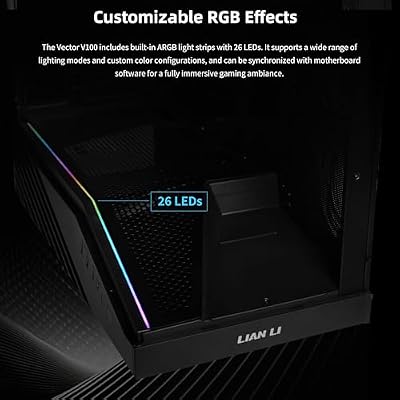


As an Amazon Associate we earn from qualifying purchases. Product prices and availability are accurate as of the date/time indicated.
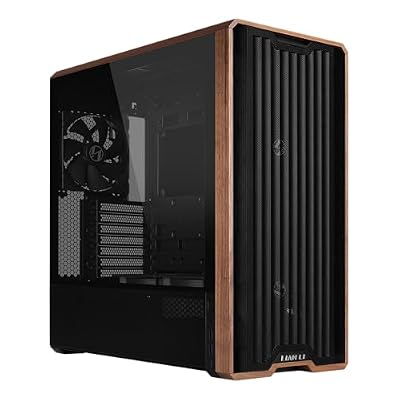
Lian Li LANCOOL 217 ATX Mid-Tower PC Case, 5 PWM Fans, Black Walnut Wood | Pre-installed 2×170mm, 2×120mm & 1×140mm Fans, Genuine Wood Panels, Back-Connect Ready, Flexible PSU Mounting (LAN217X)



As an Amazon Associate we earn from qualifying purchases. Product prices and availability are accurate as of the date/time indicated.
RGB Build Comparison Options
The table below compares three common ways to approach an RGB build. The price ranges are approximate and change with market conditions, so check the current price on each listing before you commit.
| Build Style | Lighting Setup | Best For | Typical Price Range |
|---|---|---|---|
| Single-color accent | Fixed-color fans, one controller | Clean look, low noise, first build | Check current price |
| Full addressable setup | Addressable fans, RAM and board sync | Players who want animated effects | Check current price |
| Custom showcase | Multi-zone strips, reactive effects | Builders who value visual control | Check current price |
If you want a deeper look at how cooling choices affect the look and sound of the same case, read our notes on air versus AIO cooling in 2026 before you pick a CPU cooler.
Power, Cooling and Lighting Control
Power and cooling are not glamorous, but they decide whether your lights can stay on for long sessions without a thermal throttle or a loud fan curve. A quality power supply with an 80 Plus efficiency rating and enough headroom keeps voltages stable. Many RGB builds add extra fans and a lit cooler, which draws more power than a basic build, so a reliable unit matters more here than in a plain system.
Choosing the Power Supply
For a mid-high GPU build, an 850W unit from a reputable manufacturer is a common safe default. It gives room for a future upgrade and keeps the PSU in a comfortable load range. Cheap unbranded units are the most common source of random shutdowns, and they are a poor place to save money in a build you plan to show off. If you are comparing options, our guide to the best 850W gaming power supplies covers the models worth considering.
Cooling for a Lit Build
An RGB showcase can use either a tower air cooler or an AIO liquid cooler. Air coolers are simpler and rarely leak, and many have lighting on the fan ring. AIO coolers can free up space around the CPU and look clean, but the radiator needs space and the pump needs to be mounted correctly. Pick the cooler that fits your case and your noise target, then choose the lighting to match.
Controlling the Lights
Set up one lighting profile in the motherboard software and test it after a restart. Many users find that a Windows update resets lighting or disables a background service. Keep a note of the profile name and the controller firmware version, so you can recover quickly. A simple, steady color is the easiest to maintain over years of updates.
A Practical Build Order for RGB Systems
Build in a clear order. Install the motherboard standoffs and I/O shield first, then mount the CPU and cooler on a bench or outside the case if the board is still loose. Add RAM, then the M.2 drive, then the GPU. Connect the lighting headers and fan hubs only after the main power and the front panel connectors are in place. Route the RGB cables behind the motherboard tray and secure them with ties, so they do not sit in front of the fans.
Test the system outside the case for a few minutes before final assembly. Confirm that the lights respond to the software, that the fans spin in the right direction, and that the PC posts. Fixing a wrong fan orientation outside the case takes seconds. Fixing it inside a closed case with a glass panel takes much longer.
For a wider look at build sequencing, our step-by-step gaming PC build guide for 2026 covers each stage in more detail, including BIOS setup and driver installation.
Common RGB Build Mistakes
The most common mistake is buying lights before checking the case. A case with poor airflow turns a bright build into a hot and loud one. The second mistake is mixing ecosystems without a plan. Mixed RGB can look good on the bench and then fail after a driver update. The third mistake is leaving the default rainbow profile on. It looks busy in a store video and tiring in a dark room.
Cable management is the fourth issue. Long, loose lighting cables can hang in front of the fans and reduce airflow. Use the case’s routing holes and the back tray, and keep runs short. A tidy inside makes the lights look better because nothing competes with them.
Finally, avoid buying the most expensive parts just for color. A mid-range GPU with a good cooler and clean lighting often looks better than a top model with a cheap case and mismatched fans. Spend on the case, the cooler, and the power supply first, then use the remaining budget for the visible lighting accents.
If your budget is still open, our overview of gaming PC builds for every budget in 2026 shows which parts to prioritize at each price point.
Related Guides for Your RGB Build
Case choice drives most of the look and airflow, so compare our picks for mid-tower gaming cases in 2026 and the best tempered glass gaming cases before you commit. If you want a smaller footprint with the same lighting, see ITX and mini gaming cases. For the board that controls your lighting headers, check the best gaming motherboards and the best 32GB DDR5 RAM options so the RAM matches your sync plan. For cooling, read the best air CPU coolers for gaming and our gaming cooler overview. Finally, the ultimate gaming PC build guide covers the full parts list from the GPU down to storage.
Frequently Asked Questions
Does RGB lighting affect gaming performance?
No. RGB LEDs draw a small amount of power and do not change frame rates. They can affect temperatures only if the lighting is fitted to fans that move less air. Choose fans for airflow first, then add lighting.
Should I buy a case with pre-installed RGB fans?
It depends on the fan quality. Pre-installed fans save time and can be a good value, but many stock fans are basic. If noise or airflow is poor in reviews, plan to replace them with better fans from the start.
Can I mix RGB brands in one build?
You can, usually with a universal controller, but it adds setup steps and more points of failure. For the most reliable result, keep the motherboard, fans, and RAM in one lighting ecosystem.
What is the best lighting setting for a long gaming session?
A steady, low-brightness single color is easiest on the eyes and the most stable over time. Save animated effects for short showcase sessions.
Final Thoughts on Building an RGB Gaming PC
An RGB gaming PC build works best when the lights follow the engineering, not the other way around. Start with a case that moves air, choose parts that keep temperatures and noise under control, and pick one lighting ecosystem that you can maintain. The result looks deliberate through the glass and runs reliably under load. Use the list and card above as a starting point, confirm the exact model and price on each listing, and build in a clear order so the finished machine is both tidy and easy to service later.








