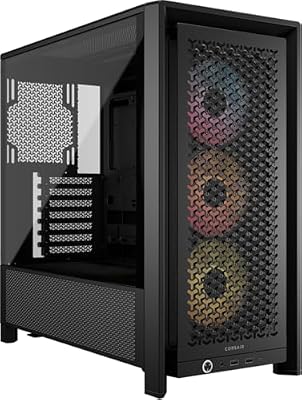
Water Cooled Showcase Gaming PC Build
A water cooled showcase gaming PC build puts coolant loops, clear tubing, and a well-lit interior at the center of the design. The look is striking, but the reason many builders choose water cooling is practical: a well-designed loop can move heat away from the CPU and GPU more effectively than air, and it can keep noise low at moderate fan speeds. The trade-off is complexity. A custom loop takes planning, leak testing, and maintenance that a simple air cooler does not. This guide explains where water cooling makes sense, how to choose between an AIO and a custom loop, and how to plan a showcase build that performs as well as it looks.
The hero listing above is the closest match for this query, not a guaranteed exact model. Check the card for the exact cooler type, radiator size, and included parts before ordering. Liquid cooling products differ in pump design, fan count, and tubing, so read the specifications rather than relying on the photos.


When Water Cooling Makes Sense
Water cooling is most useful when you have a high-power CPU or GPU that produces more heat than a compact air cooler can handle comfortably. It also helps when you want to free up space around the CPU, which can matter in a case with limited room. For a showcase build, the visual appeal is part of the decision. A radiator at the top or front, a clean loop, and colored coolant can make the interior the focus of the PC.
Water cooling is not automatically quieter or faster. A well-designed air cooler with large fans can perform very well, and a poorly planned loop can be louder because of the pump and radiator fans. Choose water cooling because it fits the build and the goals, not because it is the most expensive option.
AIO Versus Custom Loop
An AIO, or all-in-one liquid cooler, is a sealed unit with a pump, a radiator, and fans already connected. It is simple to install and rarely needs maintenance. A custom loop uses separate components, including a pump, reservoir, radiator, fittings, and tubing, and it can cool the CPU and GPU together. A custom loop offers more control and a more personal look, but it needs careful planning, leak testing, and ongoing checks of the coolant.
For most first showcase builds, an AIO is the practical choice. A custom loop is a better fit for experienced builders who want full control and are willing to maintain the system. Our guide to air versus AIO cooling in 2026 covers the basic trade-offs before you choose.
Choosing the Radiator and Case
The radiator size determines how much heat the loop can dissipate. A 240mm radiator suits moderate CPUs, while a 360mm radiator gives more headroom for high-power processors and GPUs. Check the case’s radiator mount positions, since a 360mm unit may fit at the top or front but not both. The case also needs room for the tubing and the pump, and the thickness of the radiator affects the space between the fans and the motherboard.
For a case with good radiator support and showcase glass, see the best tempered glass gaming cases. If you need a budget option, the best gaming PC cases under 200 dollars lists cases that still offer decent radiator support.

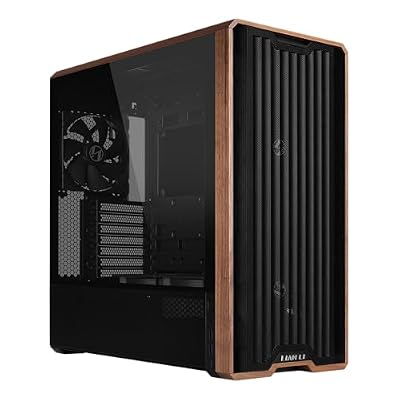
Lian Li O11 Vision Compact ATX PC Case, Back-Connect, Black (O11VPX) | Compact dual-chamber case with three-panel glass, back-connect support, hidden AIO tube routing and included 360mm top mesh.


As an Amazon Associate we earn from qualifying purchases. Product prices and availability are accurate as of the date/time indicated.
Water Cooled Build Comparison
The table below compares three ways to approach a water cooled showcase build. Price ranges are shown as check-current-price notes because liquid cooling components vary widely and prices change often.
| Cooling Approach | Typical Setup | Best For | Typical Price Range |
|---|---|---|---|
| 240mm AIO showcase | 240mm radiator, one pump, RGB fans | Mid-range CPUs and a clean first build | Check current price |
| 360mm AIO showcase | 360mm radiator at the top or front | High-power CPUs and strong cooling headroom | Check current price |
| Custom loop showcase | Pump, reservoir, separate radiators, hard tubing | Experienced builders who want full control | Check current price |

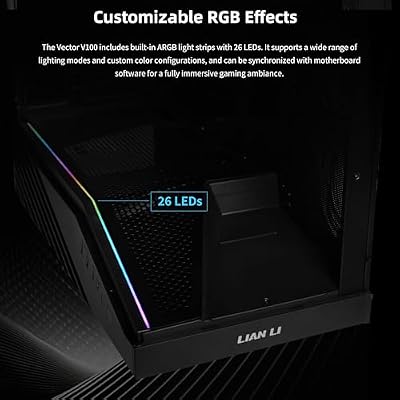
Lian Li V100-ATX Mid-Tower PC Case-Black-V100RX | Side I/O USB-C | Dust Filiter | Support 420mm GPUs & 360mm Radiator | Included GPU Bracket | LED & Display Platform (V100RX)




As an Amazon Associate we earn from qualifying purchases. Product prices and availability are accurate as of the date/time indicated.
Planning the Loop Layout
A good loop layout keeps the tubing short, avoids sharp bends, and routes the lines so they do not block the GPU or the fan exhaust. Start by mapping the components on paper: the CPU block, the radiator, the pump or reservoir, and the GPU block if you have one. Measure the tubing paths and add a margin for bends. Plan the fill port and the drain point so you can refill or drain the loop without moving the whole build.
Choose the tubing type before you buy. Soft tubing is easier to install but needs careful bending and clamps. Hard tubing looks cleaner in a showcase, but it requires exact measurements and fittings that match the tubing diameter. Whichever type you choose, buy the fittings and coolant from the same product line, to reduce the chance of a leak.
Coolant and Maintenance
Use a coolant designed for PC loops, and follow the manufacturer’s instructions for mixing and filling. Some coolants stain or corrode metal parts if mixed incorrectly, so check the compatibility of every component. Plan to inspect the loop every few months for leaks, discoloration, or pump noise. An AIO needs less attention, but its pump and fans still need occasional cleaning.
Cooling Performance and Noise
Water cooling can keep a CPU and GPU cooler at a given noise level, but the result depends on the radiator size, fan speed, and pump speed. A large radiator with slow fans is often quieter than a small radiator with fast fans. Set the pump to a moderate speed and use a fan curve that responds to temperature rather than running at full speed all the time.
For a broader view of cooler options, our guide to the best budget AIO liquid coolers in 2026 compares several models, and our gaming cooler overview covers air and liquid options side by side.
Showcase Lighting and Presentation
A showcase build benefits from a clean lighting plan. Choose one lighting ecosystem for the fans, the pump, and the motherboard, and keep the colors consistent. A single color or a slow effect often looks more refined than a busy rainbow pattern. Route the lighting cables behind the motherboard tray so they do not compete with the loop for attention.
Check how the loop looks through the glass. Tubing that is tight and evenly spaced reads as a clean build, while loose tubing or uneven bends can look unfinished. Plan the bends carefully and test the layout before final assembly.
Step-by-Step Build Notes
For an AIO build, install the CPU and motherboard as usual, then mount the radiator and fans in the case. Connect the pump to the correct header and check the pump’s cable routing. Install the GPU and the rest of the components, then fill the loop if it is a custom build. AIOs come sealed, so the step is simpler, but the mounting and fan orientation still matter.
For a custom loop, install the components in a sensible order. Mount the CPU block and the GPU block first, then the reservoir and pump, and then the radiator. Leak test the loop with the system powered off, using distilled water or the manufacturer’s recommended fluid, and keep paper towels nearby. Only power the system after the test has run for a long period without any drips. Our step-by-step gaming PC building guide covers the general assembly sequence.
Common Water Cooling Mistakes
The most common mistake is buying a radiator that does not fit the case. Measure the mount positions and the thickness before ordering. The second mistake is routing the tubing so tightly that it kinks or puts stress on the fittings. Leave slack in the tubing and use the correct bend radius.
The third mistake is skipping the leak test. Power the loop only after a long test with no drips. The fourth is mixing incompatible metals or coolants in a custom loop, which can corrode parts over time. The fifth is setting the pump too high, which can add noise without a real cooling benefit.
Maintenance and Long-Term Ownership
A water cooled build needs more upkeep than an air-cooled system. Check the loop for leaks every few months, clean the radiator fins, and watch for changes in pump noise, which can signal wear. For a custom loop, plan to flush and refill the coolant on the schedule recommended by the manufacturer.
Keep the packaging and the instructions for the cooler, along with the fittings and any spare parts. If a component fails, a spare fitting or a replacement tube can save a rebuild. Good records also help if you sell the build later.
For related reading, see CPU coolers for high-end GPU builds 360mm AIO coolers for Ryzen 9 the MasterLiquid 360 Atmos review.
Frequently Asked Questions
Is water cooling better than air cooling?
It can offer more headroom for high-power parts and a cleaner look, but a good air cooler performs very well in many builds. Choose based on the parts, the case, and your maintenance preferences.
Is an AIO safe for a first showcase build?
Yes, an AIO is simpler than a custom loop and rarely needs maintenance. It is a practical choice for a first water cooled build.
Do I need a 360mm radiator?
Not always. A 240mm radiator suits many mid-range CPUs. A 360mm radiator gives more headroom for high-power processors and GPUs, provided the case has room for it.
How often should I check a custom loop?
Check it every few months for leaks and discoloration, and follow the coolant manufacturer’s schedule for flushing and refilling.
Final Thoughts on a Water Cooled Showcase PC
A water cooled showcase gaming PC build combines performance cooling with a striking look, but it asks for careful planning. Choose an AIO for simplicity or a custom loop for full control, size the radiator to the case and the parts, and test the loop before powering the system. The listings above are a good place to begin. Confirm the cooler type, radiator size, and price on each card, and you will have a showcase build that stays cool and looks deliberate.